1. Entwodiksyon
This manual provides instructions for the Uniden DECT 6.0 Cordless Phone, model D1364. This phone features DECT 6.0 digital technology for enhanced clarity, security, and range. It includes Caller ID, Call Waiting, a phonebook, and an Eco-Mode for power management.
For optimal performance and to prevent damage, please read these instructions thoroughly before using your new phone.
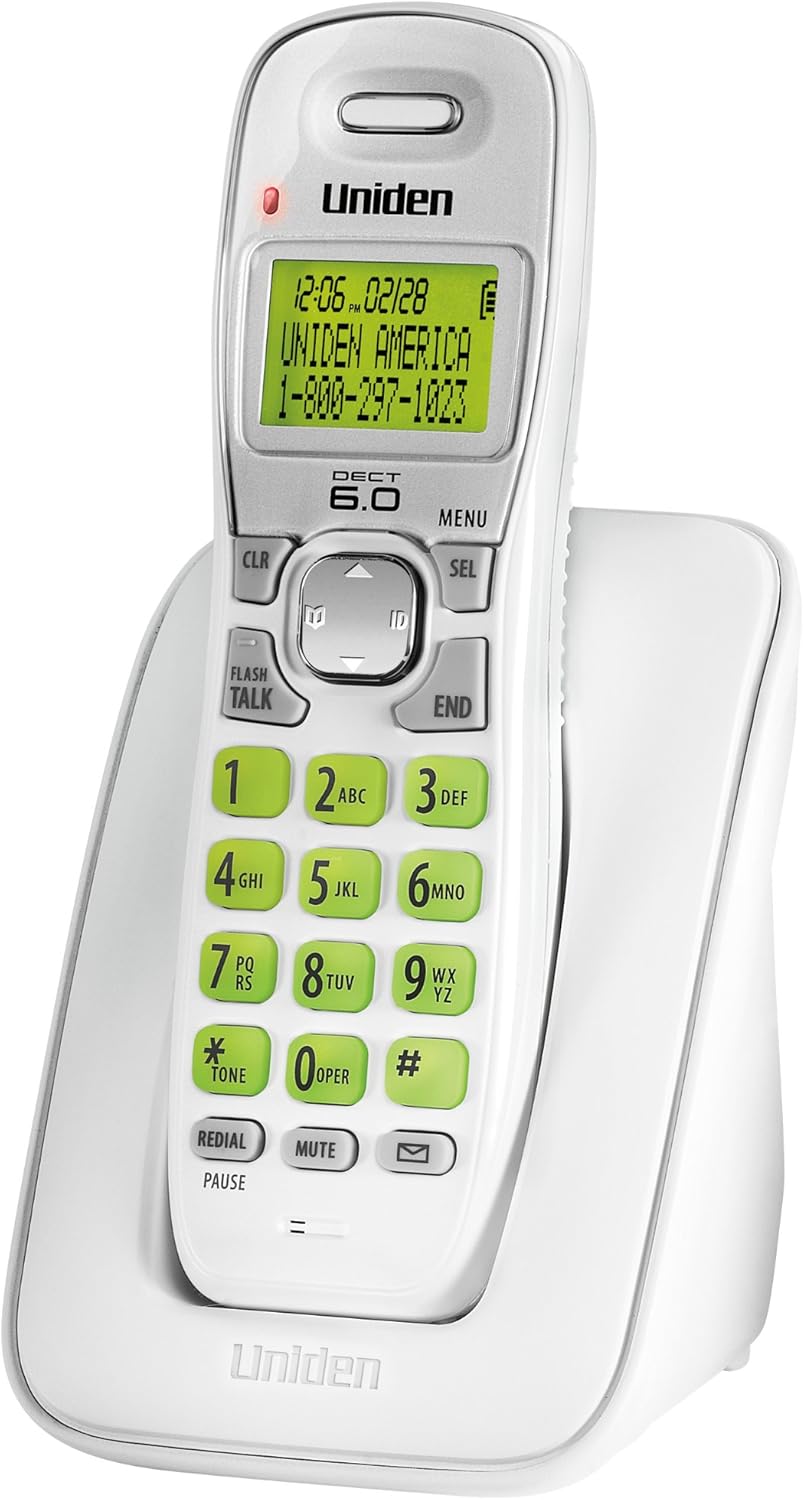
Figi 1: Uniden DECT 6.0 Cordless Phone D1364. This image shows the white cordless handset resting in its charging base. The handset features a green backlit LCD display showing time, date, and a sample caller ID entry. The keypad has large, green-backlit buttons for dialing and function keys like CLR, MENU, SEL, FLASH/TALK, END, REDIAL/PAUSE, MUTE, and a message indicator.
2. Pake kontni
Verifye ke pake ou a gen atik sa yo:
- One (1) Cordless Handset (D1364)
- One (1) Handset Charging Base
- One (1) AC Adapter for the charging base
- One (1) Telephone Line Cord
- One (1) Rechargeable Battery Pack (Product Specific, included)
- Manyèl itilizatè sa a
3. Enstalasyon
3.1 Enstalasyon batri
- Jwenn kouvèti konpatiman batri a sou dèyè aparèy la.
- Glise kouvèti a desann epi retire li.
- Konekte konektè pake batri a nan priz ki anndan konpatiman an, asire w ke polarite a kòrèk.
- Mete pake batri a nan konpatiman an.
- Remèt kouvèti konpatiman batri a, glise l anlè jiskaske li fè yon klik an plas.
3.2 Koneksyon Inite Baz la
- Plug the small end of the AC adapter into the DC IN jack on the back of the charging base.
- Branche gwo bout adaptè AC a nan yon priz elektrik estanda.
- Plug one end of the telephone line cord into the TEL LINE jack on the back of the charging base.
- Branche lòt bout fil telefòn nan nan yon priz telefòn nan miray la.
3.3 Premye Chaj Batri a
Place the handset on the charging base. The handset display will indicate charging. Allow the handset to charge for at least 15-20 èdtan before initial use to ensure full battery capacity.
3.4 Montaj sou miray (opsyonèl)
The charging base includes a built-in wall mount feature. Consult the diagrams in the full manual for detailed wall mounting instructions, typically involving two screws spaced appropriately on the wall.
4. Operasyon Enstriksyon
4.1 Fè ak Resevwa Apèl
- Pou fè yon apèl: Peze FLASH/PALE, then dial the number. Alternatively, dial the number first, then press FLASH/PALE.
- Pou fini yon apèl: Peze FINI or place the handset back on the charging base.
- Pou reponn yon apèl: Lè telefòn nan sonnen, peze FLASH/PALE.
4.2 Ajiste Volim
Pandan yon apèl, sèvi ak la UP / DESANN flèch kle on the navigation pad to adjust the earpiece volume.
4.3 Anyè telefòn
Anyè telefòn nan ka estoke jiska 30 non ak nimewo.
- Pou ajoute yon antre: Peze MENI, navigate to "Phonebook," select "Add Entry," and follow the on-screen prompts to enter the name and number.
- Pou konpoze yon nimewo apati anyè telefòn nan: Peze a UP / DESANN flèch kle to browse the phonebook, then press FLASH/PALE to dial the selected entry.
4.4 Idantifikasyon moun kap rele a ak Apèl an atant
This phone supports Caller ID and Call Waiting features (subscription required from your telephone service provider).
- The Caller ID list stores up to 30 incoming calls. Press the ID button (down arrow on navigation pad) to review the Caller ID list.
- During a call, if you hear a Call Waiting tone, press FLASH to switch to the incoming call.
4.5 Recomposition
The phone stores the last 5 numbers dialed.
- Peze REDIAL/POZ pou view lis rappel la.
- Sèvi ak la UP / DESANN flèch kle to select a number, then press FLASH/PALE pou rele.
4.6 Fonksyon bèbè
Pandan yon apèl, peze BÈN to temporarily disable your microphone. The other party will not hear you. Press BÈN ankò pou rekòmanse konvèsasyon an.
4.7 Handset Locator
If you misplace the handset, press the JWENN button on the base unit. The handset will beep, allowing you to locate it.
4.8 Eco-Mode
The phone features Eco-Mode, which automatically manages power consumption to extend battery life. This mode is active by default and does not require manual activation.
5. Antretyen
5.1 Netwayaj
Siye telefòn nan ak inite baz la ak yon twal mou.amp cloth. Do not use cleaning sprays or abrasive cleaners, as they may damage the finish or electrical components.
5.2 Swen Batri
- Toujou sèvi ak pil rechargeable espesifye a.
- If the phone will not be used for an extended period, remove the battery pack to prevent leakage.
- Dispose of old batteries according to local regulations. Do not dispose of them in fire.
5.3 Konsiderasyon Anviwònman
Avoid placing the phone in direct sunlight, near heat sources, or in areas with high humidity. Ensure proper ventilation around the base unit.
NAN. Depanaj
| Pwoblèm | Kòz posib | Solisyon |
|---|---|---|
| Pa gen ton | Fil telefòn nan dekonekte. | Ensure the telephone line cord is securely plugged into the base and the wall jack. |
| Telefòn nan pa chaje | AC adapter is disconnected or handset is not seated correctly. | Verify the AC adapter is plugged into the base and a working outlet. Re-seat the handset firmly on the charging base. |
| Move kalite son/estatik | Interference from other electronic devices or distance from base. | Move the handset closer to the base. Relocate the base away from other electronic devices (Wi-Fi routers, microwaves). |
| Caller ID not displaying | No subscription to Caller ID service. | Contact your telephone service provider to subscribe to Caller ID service. |
| Handset lost connection to base | Handset out of range or power interruption. | Move the handset closer to the base. Check power connections for the base. |
7. Espesifikasyon
| Karakteristik | Detay |
|---|---|
| Modèl | D1364 |
| Teknoloji | DECT 6.0 Digital |
| Koulè | Blan |
| Memwa ID moun kap rele | 30 names/numbers |
| Kapasite Anyè telefòn | 30 names/numbers |
| Memwa Rekonpozisyon | Last 5 numbers |
| Ekspozisyon | Green Backlit LCD |
| Klavye | Retroeklere vèt |
| Kalite batri | Rechargeable (Product Specific, included) |
| Talk Time (approx.) | Jiska 7 èdtan |
| Standby Time (approx.) | Jiska 6 jou |
| Sous pouvwa | AC Adapter (Base), Battery Powered (Handset) |
| Dimansyon (L x W x H) | 5.12 x 3.62 x 7.68 pous |
| Pwa atik | 3.76 liv |
| Enèji Efikasite | Eco-Mode, Energy Star compliant |
8. Garanti ak sipò
For warranty information and technical support, please refer to the warranty card included with your product or visit the official Uniden website. You may also contact Uniden customer service directly.
Uniden America Customer Service: 1-800-297-1023
Nòt: Espesifikasyon ak karakteristik pwodwi yo ka chanje san avètisman.


