1. Entwodiksyon
Mèsi pou acha aasing the GPX Portable Top-Loading CD Boombox, Model BC112B. This device offers versatile audio playback options including a top-loading CD player, AM/FM radio, and a 3.5mm auxiliary line-in for connecting external audio devices. Designed for portability and ease of use, this boombox can be powered by AC current or batteries, making it suitable for various environments. This manual provides comprehensive instructions to help you set up, operate, and maintain your new audio system.
2. Pake kontni
Tanpri asire w ke tout atik ki nan lis anba a yo enkli nan pakè w la:
- GPX Portable Top-Loading CD Boombox (Model BC112B)
- AC pouvwa kab
- Gid itilizatè a
- Kat Garanti
Note: 6 "C" batteries are required for portable operation and are sold separately.
3. Pwodwi souview
Familiarize yourself with the components and controls of your boombox.

Figi 3.1: Devan view of the GPX Portable CD Boombox, showing the top-loading CD compartment, control buttons, and dual speakers.

Figure 3.2: Labeled diagram of the GPX CD Boombox, highlighting the foldable handle, CD player, AM/FM radio, and program/shuffle/play controls.
Kontwòl ak Karakteristik:
- Lektè CD ki chaje anlè: Supports CD and CD-R/RW discs with 20-track programmable memory.
- Radyo AM/FM: Direct tune radio with telescopic FM antenna and built-in AM antenna.
- 3.5mm Audio Line Input: Connect external MP3 players or other audio devices.
- Oratè entegre: Oratè stereo entegre pou pwodiksyon odyo.
- 2-Digit Red LED Display: Shows track number or radio frequency.
- Manch pliable: Pou portabilite fasil.
- Opsyon pouvwa: Operates with included AC power cable or 6 "C" batteries (sold separately).
4. Enstalasyon
4.1 Koneksyon pouvwa
- Asire w ke aparèy la etenn.
- Insert the included AC power cable into the AC power input jack on the back of the unit.
- Plug the other end of the AC power cable into a standard wall outlet.
Note: Disconnect the AC power cable when using batteries.
4.2 Enstalasyon batri
For portable use, install 6 "C" size batteries (not included).
- Jwenn konpatiman batri a anba aparèy la.
- Louvri kouvèti lòj batri a.
- Insert 6 "C" size batteries, ensuring correct polarity (+/-) as indicated inside the compartment.
- Fèmen kouvèti lòj batri a byen.
Atansyon: Do not mix old and new batteries. Do not mix alkaline, standard (carbon-zinc), or rechargeable (nickel-cadmium) batteries. Remove batteries if the unit is not used for an extended period.
Video 4.1: This video demonstrates the battery installation process and highlights the portability of the GPX CD Boombox. It also shows the AC power connection and the AM/FM switch on the back of the unit.
5. Operasyon
5.1 Lekti CD
- Slide the function switch (located on the back) to the "CD/LINE IN" position.
- Open the top-loading CD compartment by gently lifting the lid.
- Place a CD or CD-R/RW disc onto the spindle with the label side facing up.
- Close the CD compartment lid securely. The display will show "00" or the number of tracks.
- Peze a Play/Pause (►⏸) button to begin playback. The track number will appear on the LED display.
- Sèvi ak la Skip Forward (►►) or Skip Back (◄◄) bouton pou navige ant tras yo.
- Peze a Rete (■) bouton pou sispann lèktur.
- Pou pwograme tras yo, peze bouton an Pwogram (P) button while the CD is stopped. Select tracks using the Skip buttons and press Program again to confirm each track. Press Play to start the programmed sequence.
Radyo 5.2 AM/FM
- Slide the function switch (located on the back) to the "FM" or "AM" position.
- Extend the telescopic FM antenna for optimal FM reception. For AM reception, the unit has a built-in antenna.
- Vire a Akor dial (located on the side) to select your desired radio station.
- Ajiste a Volim ranje selon nivo koute ou prefere a.
5.3 Line-In (Auxiliary Input)
Connect an external audio device (e.g., MP3 player, smartphone) to play audio through the boombox speakers.
- Slide the function switch (located on the back) to the "CD/LINE IN" position.
- Connect a 3.5mm audio cable (not included) from the headphone jack or line-out of your external device to the LINE AN jack on the back of the boombox.
- Kòmanse lèktur sou aparèy odyo ekstèn ou.
- Ajiste volim nan lè l sèvi avèk la Volim dial on the boombox and/or the volume controls on your external device.
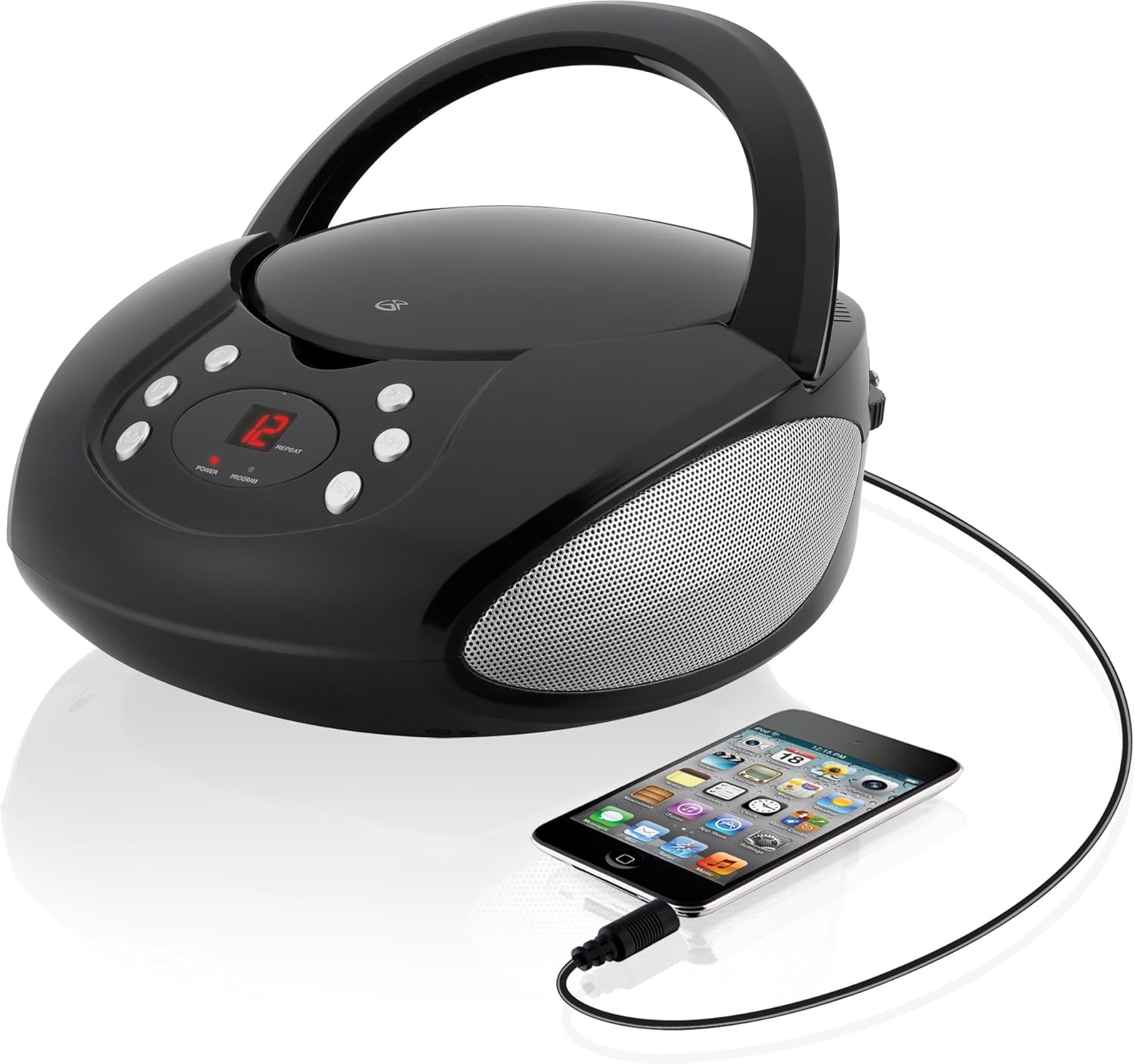
Figure 5.1: The GPX CD Boombox with a smartphone connected via the 3.5mm Line-In port, demonstrating auxiliary audio playback.
6. Antretyen
- Netwayaj: Sèvi ak yon twal mou epi sèk pou netwaye deyò aparèy la. Pa sèvi ak pwodui netwayaj abrazif oswa solvan.
- Swen jwè CD: Keep the CD compartment clean and free of dust. Avoid touching the lens inside the CD player.
- Depo: Lè w pa itilize aparèy la pou yon bon bout tan, sere l nan yon kote ki fre epi sèk. Retire pil yo si w ap sere l pou yon bon bout tan pou anpeche l koule.
- Swen antèn: Handle the telescopic FM antenna gently to prevent damage.
NAN. Depanaj
| Pwoblèm | Kòz posib | Solisyon |
|---|---|---|
| Pa gen pouvwa | AC cable not connected; Batteries depleted or incorrectly installed. | Ensure AC cable is securely plugged in. If using batteries, check battery polarity and replace if necessary. |
| CD not playing / "ER" displayed | CD inserted incorrectly; Disc is dirty or scratched; Function switch not in CD/LINE IN mode. | Re-insert CD with label side up. Clean the disc. Set function switch to CD/LINE IN. |
| Resepsyon radyo pòv | FM antenna not extended; Unit too close to interference sources. | Fully extend the FM telescopic antenna. Reposition the unit away from other electronic devices. |
| No sound from Line-In | Audio cable not connected; Volume too low on boombox or external device. | Ensure 3.5mm audio cable is securely connected. Increase volume on both the boombox and the external device. |
8. Espesifikasyon
- Modèl: BC112B
- Sous pouvwa: AC 120V ~ 60Hz or 6 x "C" Batteries (DC 9V)
- CD konpatibilite: CD, CD-R / RW
- Frekans radyo: AM, FM
- Antre: 3.5mm Audio Line In
- Dimansyon (L x W x H): 9.19 x 5.17 x 10.42 pous
- Pwa: 2.51 liv
- Manifakti: DPI
9. Garanti ak sipò
This product comes with a limited warranty. Please refer to the included warranty card for detailed terms and conditions, including warranty period and coverage. For technical support or service inquiries, please contact GPX customer service. Contact information can typically be found on the warranty card or the official GPX websit.
Pwopozisyon 65 Avètisman: Pwodui sa a ka gen ladan pwodwi chimik yo konnen nan Eta Kalifòni pou lakòz kansè ak domaj nesans oswa lòt domaj repwodiksyon.


