1. Entwodiksyon
This manual provides instructions for the OM SYSTEM OLYMPUS SZ-12 14MP Digital Camera. The SZ-12 is an ultra-compact long zoom camera designed for capturing high-quality photos and videos. It features a powerful 24x optical zoom, 3D Photo Mode, and various creative Magic Art Filters.
For optimal performance and to ensure safe operation, please read this manual thoroughly before using the camera and keep it for future reference.
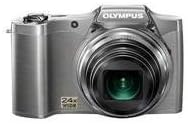
Figi 1: Devan view of the Olympus SZ-12 Digital Camera in silver.
2. Enstalasyon
2.1. Enstalasyon batri
The camera requires one Lithium Metal battery (included). To install the battery:
- Jwenn kouvèti konpatiman batri a anba kamera a.
- Glise latch la pou ouvri kouvèti a.
- Insert the battery according to the polarity indicators (+/-) inside the compartment.
- Fèmen kouvèti konpatiman batri a byen fèm jiskaske li fè yon klik an plas.
2.2. Memory Card Insertion (Sold Separately)
The camera uses SD/SDHC/SDXC memory cards. To insert a memory card:
- Louvri kouvèti konpatiman batri/kat memwa a.
- Insert the memory card into the slot with the label facing the correct direction (usually towards the front of the camera). Push gently until it clicks into place.
- Fèmen kouvèti lòj la.
2.3. Premye Chajman
Before first use, ensure the battery is fully charged. Connect the camera to a power source using the supplied USB cable and AC adapter. The charging indicator will show the charging status.
3. Itilizasyon Kamera a
3.1. Power On/Off
Peze a POUVWA bouton ki sitiye anlè kamera a pou limen oswa etenn li.
3.2. Fotografi debaz
Pou pran yon foto:
- Limen kamera a.
- Ankadre foto ou a avèk ekran LCD 3 pous la.
- Peze bouton deklanchè a mwatye pou fè fokus. Kad fokus la ap vin vèt lè ou fin fè fokus la.
- Peze bouton deklanchè a nèt pou pran foto a.
3.3. Fonksyon Zoom
The camera features a 24x wide-angle optical zoom. Use the zoom lever around the shutter button to adjust the focal length. Push the lever towards W for wide-angle shots and towards T for telephoto (zoom in) shots.
Video 1: Demonstration of Wide Angle Lens Technology and Magic Art Filters. This video highlights the camera's ability to capture broad scenes and apply creative effects directly in-camera.
3.4. Anrejistreman Videyo HD
The SZ-12 supports HD video recording. To start recording, press the dedicated movie record button. Press it again to stop recording. Playback on an HD television is possible via HDMI output (cable sold separately).
3.5. Magic Art Filters
Enhance your photos and videos with various in-camera Magic Art Filters. These filters are applied directly by the camera, eliminating the need for external software or additional editing time. Available filters include Pop Art, Pin Hole, Drawing, Fish Eye, Soft Focus, Punk, Watercolor, Sparkle, Miniature, and Reflection. Note that some filters may restrict the maximum image size.
3.6. Dual Image Stabilization
The camera features Dual Image Stabilization, which combines Sensor-Shift Image Stabilization with high ISO sensitivity and fast shutter speeds. This technology helps to reduce blur and produce crisp, clear images, even in challenging shooting conditions.
3.7. Intelligent Auto Mode
Intelligent Auto mode automatically identifies the scene you are shooting from up to 30 different scene modes (e.g., Portrait, Landscape, Night + Portrait, Macro, Sports). It then adjusts the camera settings for optimal results, simplifying the photography process.
4. Antretyen
4.1. Netwaye Kamera a
- Sèvi ak yon twal mou ki pa gen pousyè pou netwaye kò kamera a.
- For the lens, use a lens brush or a blower to remove dust, then gently wipe with a lens cleaning cloth. Avoid touching the lens surface with your fingers.
- Pa sèvi ak solvang òganik oswa ajan netwayaj fò.
4.2. Swen batri
- Sere batri a nan yon kote ki fre, sèk lè li pa itilize.
- Evite dechaje batri a nèt souvan pou pwolonje dire lavi li.
- Si ou pa pral itilize kamera a pou yon peryòd tan pwolonje, retire batri a.
4.3. Depo
Store the camera in a dry, well-ventilated area, away from direct sunlight, high temperatures, and humidity. Use a camera bag to protect it from dust and scratches.
NAN. Depanaj
| Pwoblèm | Kòz posib | Solisyon |
|---|---|---|
| Kamera a pa limen. | Batri a mouri oswa li pa byen mete. | Chaje batri a oubyen mete l tounen byen. |
| Imaj yo flou. | Camera shake; out of focus. | Hold the camera steady; ensure proper focus before shooting. Utilize Dual Image Stabilization. |
| Erè kat memwa. | Kat la plen, li pèvèti, oswa li pa konpatib. | Efase pa nesesè files, fòma kat la (sa ap efase tout done yo), oubyen eseye yon lòt kat konpatib. |
6. Espesifikasyon
- Modèl: SZ-12 Silver
- Megapiksèl: 14 MP
- Zoom optik: 24x Wide-Angle Zoom
- Ekran LCD: 3-pous
- Anrejistreman videyo: Videyo HD
- Estabilizasyon imaj: Doub Estabilizasyon Imaj (Deplasman Capteur)
- Dimansyon: 4.17 x 1.57 x 2.72 pous
- Pwa atik: 8 ons
- Batri: 1 batri ityòm metal (enkli)
- Sipòte File Fòma: JPEG
- Teknoloji Capteur foto: CMOS
- Rapò aspè: 16:9
- Montaj konpatib: Mikwo kat tyè
- Premye dat disponib: 18 janvye 2012
7. Garanti ak sipò
For warranty information and technical support, please refer to the official Olympus websit la oubyen kontakte sèvis kliyan yo. Kenbe prèv acha ou pou reklamasyon garanti.
Resous sou entènèt ak FAQ yo ka disponib tou sou Magazen Olympus sou Amazon.


