1. Entwodiksyon
The Garmin Montana 600 is a robust handheld GPS device designed for outdoor navigation, particularly hiking. It features a large, bright 4-inch 65K color TFT display with dual orientation capabilities, making it suitable for various viewing preferences. The unit includes a built-in basemap and a high-sensitivity GPS receiver for accurate positioning.
Key features of the Montana 600 include:
- Bright 4" sunlight readable touchscreen color display.
- High-sensitivity, WAAS-enabled GPS receiver for improved accuracy.
- 3-axis compass and barometric altimeter for comprehensive navigation data.
- Waterproof design for reliable performance in various weather conditions.
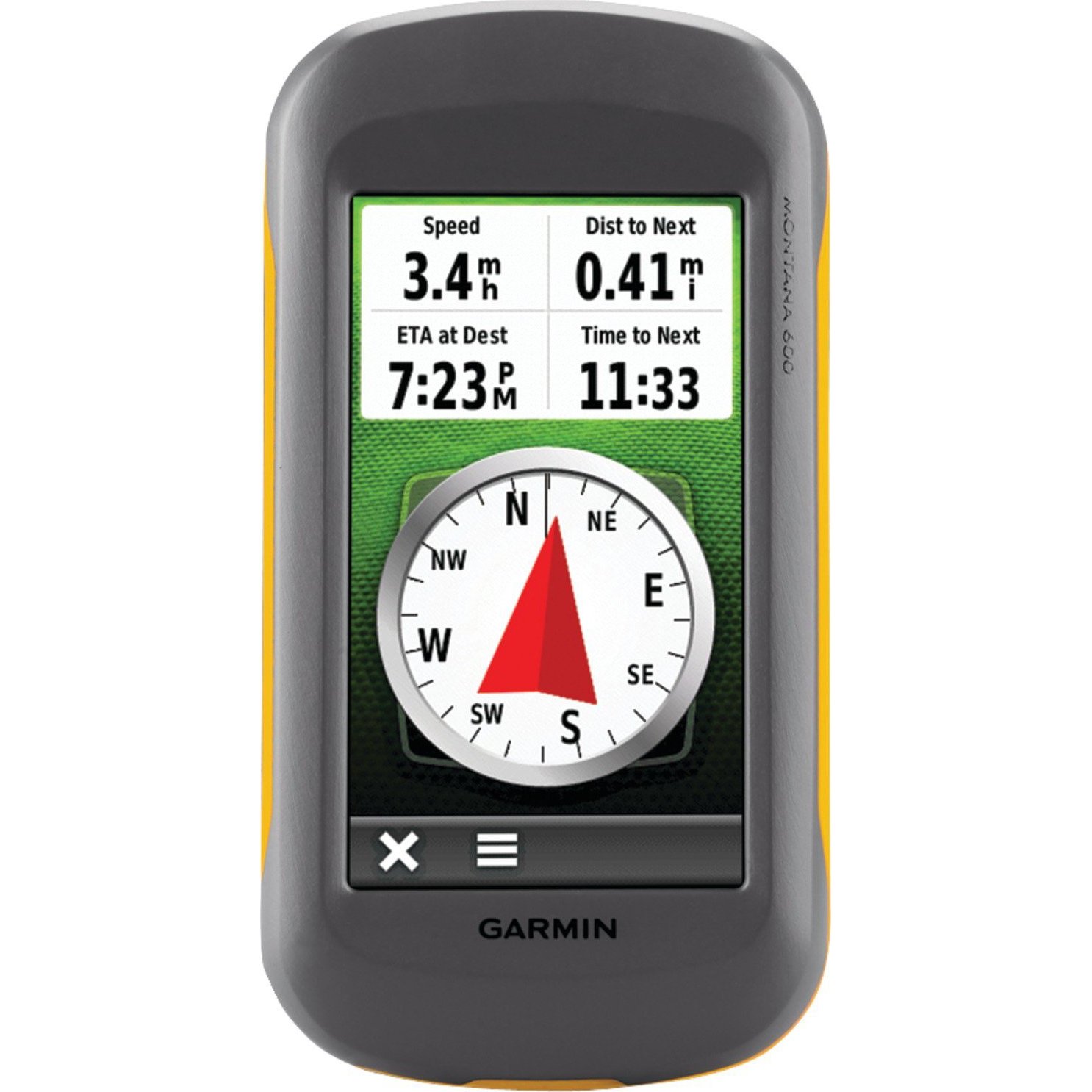
Figi 1: Devan view of the Garmin Montana 600 handheld GPS unit, showcasing its large color touchscreen display.
2. Enstalasyon
2.1. Enstalasyon batri
The Montana 600 operates on 3 AA batteries, which are included. It also supports an optional rechargeable lithium-ion battery pack. To install batteries:
- Jwenn kouvèti konpatiman batri a sou dèyè aparèy la.
- Open the cover by rotating the D-ring counter-clockwise or sliding the latch, depending on the model variant.
- Insert 3 AA batteries, ensuring correct polarity (+ and -). If using the rechargeable pack, insert it into the compartment.
- Close the battery compartment cover securely to maintain the device's waterproof rating.
2.2. Premye Limen
Press and hold the power button, typically located on the side or top of the device, until the screen illuminates. Follow any on-screen prompts for initial setup, such as language selection and time zone.
2.3. Mizajou lojisyèl
It is recommended to download and install the latest software updates for your Montana 600. Connect the device to a computer using the provided USB cable and visit the official Garmin website for update instructions and software. Software updates can improve performance and resolve potential issues, such as compass calibration.
2.4. Enstalasyon Kat MicroSD
The device supports MicroSD cards for additional map data or storage. Locate the MicroSD card slot, usually within the battery compartment or on the side under a protective cover. Insert the card gently until it clicks into place.
3. Opere Aparèy la
3.1. Touchscreen Display
The Montana 600 features a 4-inch touchscreen display. Navigate menus, select options, and scroll maps by touching the screen. The display supports dual orientation, allowing you to use the device in portrait or landscape mode.
3.2. Navigasyon GPS
The high-sensitivity, WAAS-enabled GPS receiver provides accurate location data. For optimal performance, ensure the device has a clear view of the sky. The device can display various map types, including street and topographical maps, depending on installed map data.
3.3. Compass and Altimeter
The integrated 3-axis electronic compass provides accurate heading information even when stationary. The barometric altimeter provides precise elevation data and can be calibrated for local atmospheric pressure. Refer to the on-screen menus for calibration procedures.
3.4. Jeokachèt
The Montana 600 is well-suited for geocaching. You can load geocache files (GPX) directly onto the device. The device offers dedicated geocaching profiles and features to assist in finding caches, including distance, direction, and cache details.
3.5. Koneksyon
The device supports Bluetooth for wireless connectivity and High-Speed USB for data transfer to and from a computer. Use the USB connection to manage maps, waypoints, tracks, and software updates with Garmin's BaseCamp lojisyèl.
4. Antretyen
4.1. Netwaye Aparèy la
To clean the device, use a soft, lint-free cloth. For stubborn dirt, dampen the cloth with water. Avoid using harsh chemicals or abrasive cleaners, as these can damage the screen or casing.
4.2. Jesyon batri
The Montana 600 provides approximately 16 hours of battery life with AA batteries. Battery life can vary based on usage, backlight settings, and temperature. To maximize battery life, reduce backlight brightness and disable unnecessary features when not in use. If using the rechargeable lithium-ion battery, charge it regularly using the provided USB cable or an optional AC adapter.
4.3. Enpèmeyabilite
The device is designed to be waterproof. Ensure all port covers and the battery compartment are securely closed to maintain its water resistance. Avoid submerging the device beyond its specified depth and duration ratings.
NAN. Depanaj
5.1. GPS Signal Acquisition Issues
If the device is having difficulty acquiring a GPS signal, ensure you are in an open area with a clear view of the sky. Avoid dense tree cover, tall buildings, or indoor environments. Allow several minutes for the device to locate satellites, especially after being off for an extended period or moved a significant distance.
5.2. Kalibrasyon konpa
If the 3-axis compass is not functioning correctly or providing inaccurate readings, it may require calibration. Refer to the device's system settings for the compass calibration procedure. It is often recommended to perform a software update before attempting calibration if issues persist.
5.3. Aparèy la pa reponn
If the device becomes unresponsive, try performing a soft reset by holding down the power button for approximately 10-15 seconds until the device powers off. Then, power it back on. If the issue persists, ensure batteries are properly installed and charged.
6. Espesifikasyon
| Karakteristik | Detay |
|---|---|
| Dimansyon pwodwi | 5.7 x 1.4 x 2.9 pous |
| Pwa atik | 1 liv |
| Nimewo Modèl | 010-00924-00 |
| Batri | 3 pil AA obligatwa (enkli) |
| Lavi batri | Jiska 16 èdtan |
| Gwosè ekran | 4 pous |
| Karakteristik espesyal | Barometric Altimeter, Geocaching, High-Speed USB, Picture Viewer, Touchscreen |
| Koneksyon Teknoloji | Bluetooth |
| Kalite kat jeyografik | Street; Topographical |
7. Garanti ak sipò
For detailed warranty information, technical support, and additional resources, please refer to the official Garmin website or the documentation included with your product. Garmin provides customer support and service for their products.
7.1. Konpozan ki enkli
The typical package contents may include:
- Garmin Montana 600 device
- Rechargeable lithium-ion battery pack (or 3 AA batteries)
- USB kab
- Quick start guide or manual
Note: Actual included components may vary. Please check your product packaging.


