1. Entwodiksyon
Thank you for choosing the Acctim Sonnet 12613 Analog Alarm Clock. This manual provides important information regarding the setup, operation, and maintenance of your new alarm clock. Please read it thoroughly before use and retain it for future reference.
The Acctim Sonnet alarm clock is designed for reliability and ease of use, featuring a silent sweep movement, a loud alarm, snooze function, backlight, and luminous hands for clear visibility in low light conditions.
2. Enfòmasyon sou Sekirite
- Kenbe revèy la lwen dlo ak imidite ki wo.
- Do not expose the clock to direct sunlight or extreme temperatures.
- Sèvi ak sèlman kalite pil espesifye a (1 x pil C).
- Pa melanje ansyen ak nouvo pil, oswa diferan kalite pil.
- Remove batteries if the clock will not be used for an extended period.
- Jete pil yo itilize yon fason responsab selon règleman lokal yo.
- Pa eseye demonte oswa repare revèy la tèt ou. Konsilte pèsonèl sèvis kalifye.
- Kenbe soti nan atenn timoun yo.
3. Pwodwi konpozan
Familiarize yourself with the main parts of your Acctim Sonnet alarm clock:
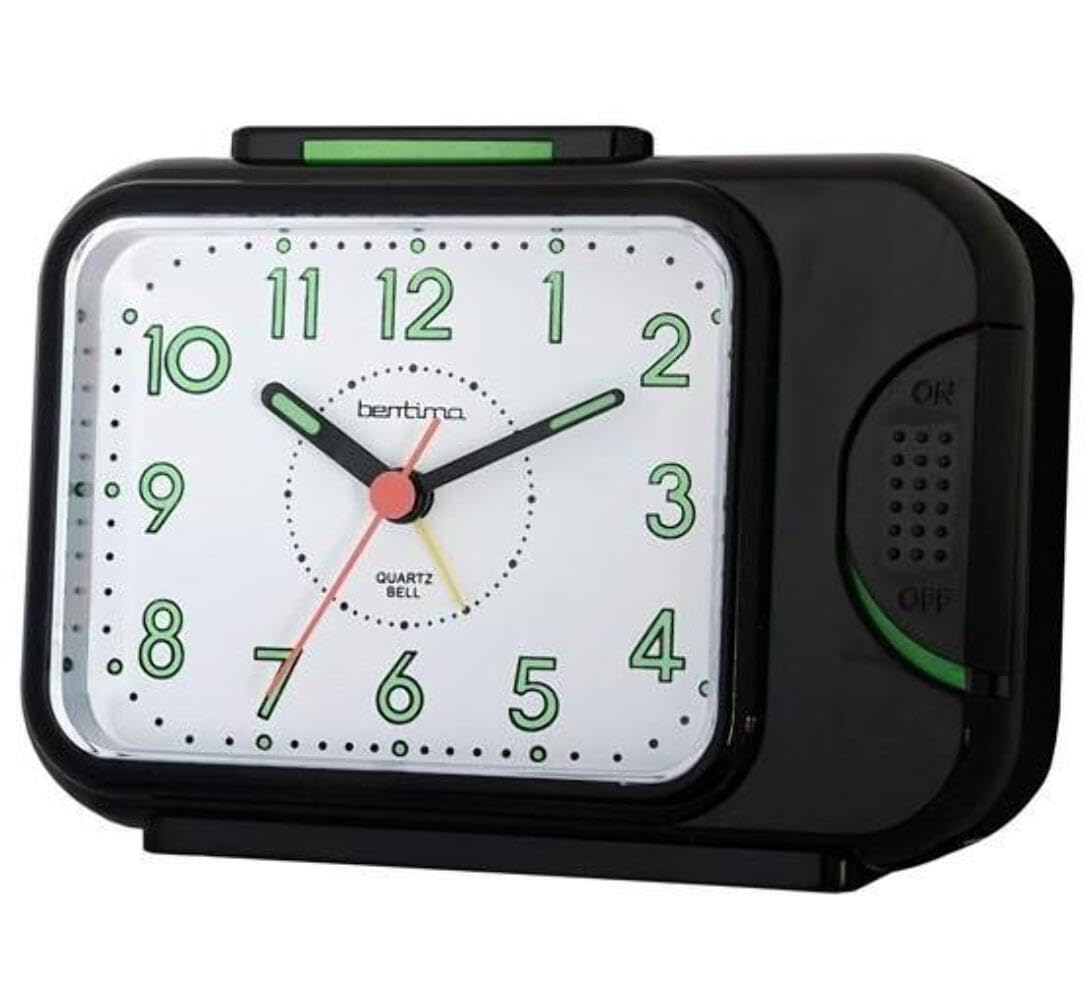
- Rele devan: Displays time with hour, minute, and second hands. Includes luminous hands for night visibility.
- Men alam: A smaller hand on the dial used to set the alarm time.
- Bouton Snooze/Limyè: Located on the top of the clock. Press to activate snooze or backlight.
- Lòj batri: Located on the back of the clock.
- Bouton pou ajiste tan: Sitiye sou do a, yo itilize li pou ajiste lè aktyèl la.
- Bouton pou ajiste alam: Located on the back, used to set the alarm time.
- Bouton ON/OFF alam: Sitiye sou do a, pou aktive oswa dezaktive alam lan.
4. Enstalasyon
4.1. Enstalasyon batri
- Louvri kouvèti lòj batri a ki sitiye sou do revèy la.
- Insert one (1) C battery, ensuring the polarity (+ and -) matches the diagram inside the compartment.
- Fèmen kouvèti lòj batri a byen.
Note: A C battery is not included with the product.
4.2. Mete Lè Aktyèl la
- Jwenn la Bouton Tan Anviwònman on the back of the clock.
- Rotate the knob in either direction until the hour and minute hands display the correct current time.
4.3. Setting the Alarm Time
- Jwenn la Bouton pou reglaj alam on the back of the clock.
- Rotate this knob to move the small alarm hand on the clock face to your desired alarm time.
- Asire w la Alam ON / OFF switch (also on the back) is in the "ON" position to activate the alarm.
5. Operasyon
5.1. Itilizasyon Alam lan
- Once the alarm time is set and the Alam ON / OFF switch is "ON", the alarm will sound at the set time.
- Pou etenn alam lan, glise bouton an Alam ON / OFF switch nan pozisyon "OFF" la.
5.2. Sèvi ak Fonksyon Snooze a
- Lè alam la son, peze la Snooze/Limyè bouton on the top of the clock.
- The alarm will temporarily stop and sound again after approximately 5 minutes.
- You can repeat the snooze function multiple times.
- To fully turn off the alarm, slide the Alam ON / OFF switch nan pozisyon "OFF" la.
5.3. Using the Backlight and Luminous Hands
- The clock features luminous hour and minute hands that glow in the dark after exposure to light, allowing for easy time reading at night without pressing any buttons.
- For additional illumination, press and hold the Snooze/Limyè bouton on the top of the clock to activate the backlight. The backlight will remain on as long as the button is pressed.
6. Antretyen
6.1. Netwayaj
- Siye revèy la ak yon twal mou epi sèk.
- Pa sèvi ak pwodui netwayaj abrazif, solvan, oswa espre chimik, paske sa yo ka domaje c la.asing oubyen rele.
6.2. Ranplasman batri
- When the clock starts to lose time or the alarm weakens, it is time to replace the battery.
- Follow the battery installation steps (Section 4.1) to replace the C battery.
NAN. Depanaj
| Pwoblèm | Kòz posib | Solisyon |
|---|---|---|
| Revèy la pa mache / Zegwi yo pa deplase. | Batri a mouri oswa li mal enstale. | Check battery polarity. Replace with a new C battery. |
| Alam lan pa sonnen. | Alarm ON/OFF switch is "OFF". Alarm time not set correctly. Battery low. | Ensure Alarm ON/OFF switch is "ON". Re-set alarm time. Replace battery. |
| Alarm is too quiet. | Low battery. Clock placed on a soft surface. | Replace battery. Place clock on a hard, flat surface for better sound projection. |
| Limyè dèyè a pa fonksyone. | Batri ki ba. | Ranplase batri. |
8. Espesifikasyon
| Mak | Acctim |
| Nimewo Modèl | 12613 |
| Koulè | Nwa |
| Dimansyon (L x W x H) | 10.31 x 14 x 5.79 cm (apeprè 4.06 x 5.51 x 2.28 pous) |
| Pwa | 199.58 gram (apeprè 0.44 liv) |
| Materyèl | Plastic (silent tick movement) |
| Kalite ekspozisyon | Analòg |
| Sous pouvwa | 1 x C Battery (not included) |
| Karakteristik espesyal | Alarm, Silent Clock Movement, Snooze, Backlight, Luminous Hands |
9. Garanti ak sipò
The Acctim Sonnet 12613 Analog Alarm Clock comes with a 1-ane garanti apati dat acha a, ki kouvri domaj fabrikasyon.
For technical support, warranty claims, or further assistance, please contact Acctim customer service. Refer to the official Acctim websit la oswa dokiman acha ou a pou enfòmasyon kontak.
Tanpri kenbe nimewo modèl ou a (12613) ak prèv acha a pare lè w ap kontakte sipò a.


