1. Entwodiksyon
This manual provides essential information for the installation, operation, and maintenance of the Johnson Controls TEC2203-3 Non-Programmable Thermostat. This device is designed for controlling heating and cooling systems with 2 Heat and 2 Cool stages, and features a 1SPDFAN (Single Pole Double Throw Fan) control. It serves as a reliable replacement thermostat for compatible HVAC systems.
2. Pwodwi souview
2.1 Karakteristik kle
- Non-Programmable operation for straightforward temperature control.
- Supports 2 Heat and 2 Cool stages for versatile HVAC system compatibility.
- Integrated 1SPDFAN control.
- Clear digital display for room temperature.
2.2 Konpozan ak Ekspozisyon
The TEC2203-3 thermostat features a user-friendly interface with a digital display and intuitive buttons for control. Refer to the image below for a visual guide to the thermostat's components.
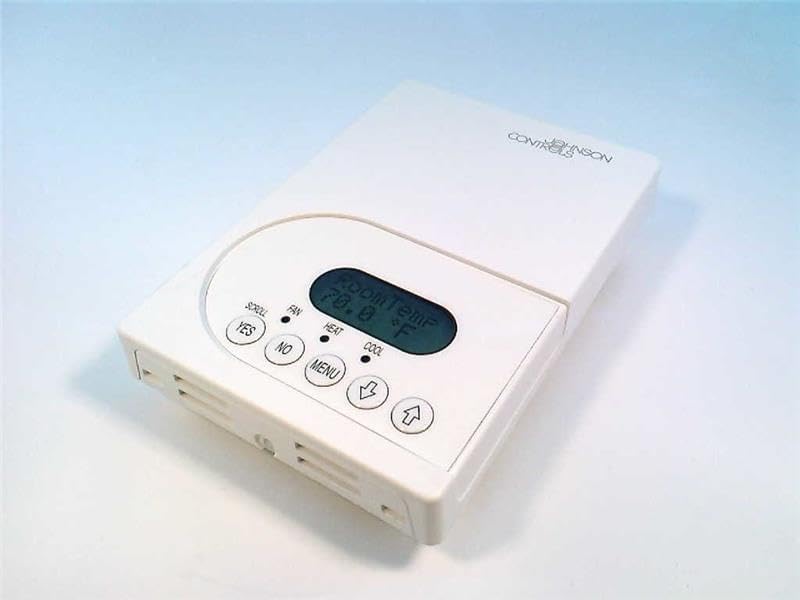
Figi 1: Devan view of the Johnson Controls TEC2203-3 Thermostat. The image shows the white rectangular thermostat unit with a central digital display indicating "Room Temp 70.0 °F". Below the display are control buttons: "YES", "NO", "MENU", a down arrow, and an up arrow. Indicators for "SCROLL", "FAN", "HEAT", and "COOL" are also visible.
The display shows the current room temperature. Indicators for HEAT and COOL illuminate when the respective modes are active. The FAN indicator shows fan operation. Buttons include:
- YES / NO: Used for confirming or canceling selections in menu options.
- MENI: Accesses system settings and operational modes.
- Up Arrow / Down Arrow: Adjusts temperature setpoints and navigates menu options.
3. Enstalasyon
Installation of the Johnson Controls TEC2203-3 Thermostat should be performed by a qualified HVAC technician. Incorrect installation can lead to system malfunction, property damage, or personal injury. Always ensure power to the HVAC system is turned off at the circuit breaker before beginning any installation work.
3.1 Prekosyon sekirite
- Disconnect all power to the heating and cooling system before installation.
- Swiv tout kòd ak òdonans elektrik lokal yo.
- Ensure wiring connections are secure and correct according to the wiring diagram provided with the product packaging (not included in this manual).
4. Operasyon Enstriksyon
The TEC2203-3 is a non-programmable thermostat, meaning it maintains a set temperature until manually changed.
4.1 Mete tanperati a
- Ekspozisyon an montre tanperati chanm aktyèl la.
- Peze a Flèch moute or Desann flèch button to adjust the desired temperature setpoint.
- The new setpoint will flash briefly and then be saved. The system will then work to reach and maintain this temperature.
4.2 Changing System Mode (Heat/Cool/Off)
- Peze a MENI bouton.
- Sèvi ak la Flèch moute or Desann flèch to navigate through the available system modes (e.g., HEAT, COOL, OFF).
- Peze WI pou chwazi mòd vle a.
- The corresponding indicator (HEAT or COOL) will illuminate when active.
4.3 Operasyon fanatik
The fan can typically be set to AUTO (runs only when heating or cooling) or ON (runs continuously).
- Peze a MENI bouton.
- Navigate to the fan settings using the Flèch moute or Desann flèch.
- Peze WI pou chwazi mòd fanatik vle a.
5. Antretyen
The Johnson Controls TEC2203-3 Thermostat requires minimal maintenance to ensure optimal performance.
- Netwayaj: Siye deyò tèmosta a detanzantan avèk yon twal mou.amp twal. Pa sèvi ak pwodui netwayaj abrazif oswa solvang.
- Airflow: Ensure that the thermostat's vents are not obstructed by dust or debris, as this can affect temperature sensing accuracy.
- Tcheke pwofesyonèl: It is recommended to have your entire HVAC system, including the thermostat, inspected by a professional technician annually.
NAN. Depanaj
If you experience issues with your TEC2203-3 thermostat, consider the following common troubleshooting steps:
- Pa gen ekspozisyon/pouvwa: Check the circuit breaker for your HVAC system. Ensure the thermostat is properly seated on its base.
- Lekti tanperati ki pa kòrèk: Ensure the thermostat's vents are clear of obstructions. Avoid placing the thermostat near heat sources (lamps, direct sunlight) or drafts.
- Sistèm nan pa reponn: Verify the system mode (HEAT/COOL/OFF) is correctly selected. Check if the temperature setpoint is above (for heat) or below (for cool) the current room temperature.
- Vantilatè a pa ap fonksyone: Check the fan mode setting (AUTO/ON). If set to AUTO, the fan will only run when heating or cooling is active.
If problems persist after attempting these steps, contact a qualified HVAC technician for assistance.
7. Espesifikasyon
| Karakteristik | Detay |
|---|---|
| Modèl | TEC2203-3 |
| Mak | Johnson Controls |
| Kalite kontwòl | Thermostat ki pa Peye-pwogramasyon |
| Stages | 2 Chalè / 2 fre |
| Kontwòl fanatik | 1SPDFAN |
| Pwa atik | 1 liv |
| ASIN | B004H2XCMU |
8. Garanti ak sipò
For specific warranty information and technical support regarding your Johnson Controls TEC2203-3 Thermostat, please refer to the documentation included with your purchase or contact Johnson Controls directly. Warranty terms and support options may vary based on region and purchase location.