Entwodiksyon
This manual provides comprehensive instructions for the setup, operation, and maintenance of your DIRECTV H24 HD Satellite Receiver. The H24 receiver is designed to deliver high-definition (MPEG-2, MPEG-4) and standard-definition (MPEG-2) programming, offering a wide range of features for an enhanced viewing experience. Please read this manual thoroughly before operating your device.
Ki sa ki nan bwat la
Upon unpacking your DIRECTV H24 HD Satellite Receiver, please ensure all the following components are present:
- DIRECTV H24 HD Satellite Receiver
- Pouvwa kab
- Kat Aksè
- 6-Foot HDMI Cable
- RC66RX IR / RF Compatible Remote Control
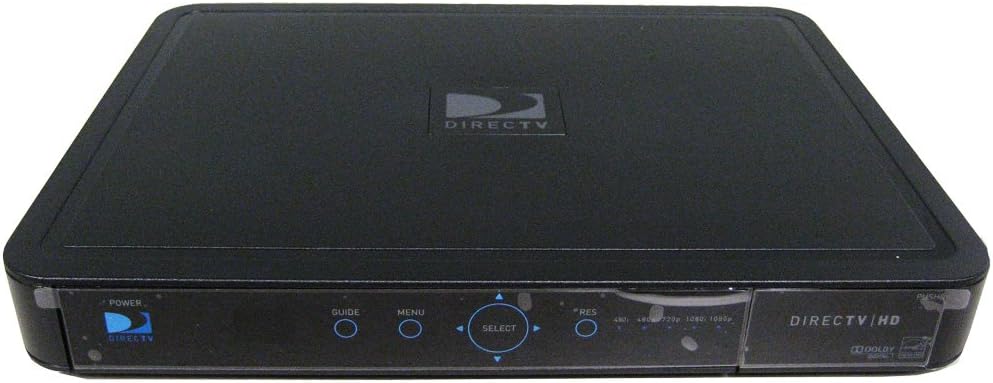
Imaj: Devan view of the DIRECTV H24 HD Satellite Receiver. The receiver is black with a glossy front panel. Visible controls include Power, Guide, Menu, and a circular Select button with directional arrows. Resolution indicators (480i, 480p, 720p, 1080i, 1080p) are also present on the right side of the front panel. The DIRECTV logo is prominently displayed on the top surface.
Enstalasyon
1. Konekte ak televizyon ou
The DIRECTV H24 receiver offers multiple connection options for your television. Choose the best available option for your TV.
- HDMI Connection (Recommended for HD): Connect one end of the provided HDMI cable to the HDMI output port on the back of the H24 receiver and the other end to an HDMI input port on your television.
- Koneksyon Videyo Konpozan (YPbPr): Connect the red, green, and blue component video cables from the H24 receiver's Component output to the corresponding input ports on your television. Also, connect the red and white RCA audio cables for sound.
- Koneksyon Videyo Konpoze (RCA): Connect the yellow composite video cable from the H24 receiver's Composite output to the yellow video input on your television. Also, connect the red and white RCA audio cables for sound.
- Koneksyon S-Videyo: Connect an S-Video cable from the H24 receiver's S-Video output to the S-Video input on your television. Also, connect the red and white RCA audio cables for sound.
2. Connecting to Audio System (Optional)
For enhanced audio, you can connect your receiver to an external audio system.
- Odyo optik: Connect an optical audio cable from the Digital Optical output on the H24 receiver to your audio receiver or soundbar.
- Coaxial Audio: Connect a digital coaxial audio cable from the Digital (coaxial) output on the H24 receiver to your audio receiver or soundbar.
- Stereo RCA Audio: Connect red and white RCA audio cables from the Stereo (L/R, RCA) outputs on the H24 receiver to your audio receiver or television.
3. Connecting to Satellite Dish
Connect the coaxial cable from your DIRECTV satellite dish to the Satellite In port on the back of the H24 receiver.
4. Koneksyon pouvwa
Once all other connections are made, connect the power cable to the H24 receiver and then plug it into a standard electrical outlet.
Enstriksyon Operasyon
Operasyon debaz
- Limen/Etenyen: Peze a POUVWA button on the remote control or the front panel of the receiver.
- Chèn Navigasyon: Sèvi ak la CHANNEL MONTE/DESAN buttons or enter the channel number directly using the remote's keypad.
- Gid: Peze a GID button to access the seven-day Advanced Program Guide. You can search for shows up to 7 days in advance.
- Meni: Peze a MENI button to access system settings, preferences, and other features.
- Chwazi: Use the directional arrows and the CHWAZI button to navigate and confirm selections within the guide and menus.
Karakteristik avanse
- Fòma ekran: Adjust the screen format to full screen, stretched, letterbox, pillar box, or crop mode via the menu settings.
- Sports Scores (Red Button): Press the red button on your remote to view scores of major games without changing the channel.
- ID moun kap rele: View and log Caller ID information provided by your local phone company (requires phone line connection to receiver, if available).
- Kontwòl paran yo: Set up parental controls and locks to restrict objectionable programming. Access this feature through the main menu.
Antretyen
Proper maintenance ensures the longevity and optimal performance of your DIRECTV H24 receiver.
- Netwayaj: Sèvi ak yon twal mou epi sèk pou netwaye deyò reseptè a. Pa sèvi ak pwodui netwayaj likid oswa materyèl abrazif.
- Vantilasyon: Ensure the receiver has adequate ventilation. Do not block the ventilation openings on the top, sides, or back of the unit. Avoid placing the receiver in enclosed spaces or on soft surfaces that may impede airflow.
- Sik pouvwa: If the receiver becomes unresponsive, try unplugging it from the power outlet for 15 seconds and then plugging it back in.
Depanaj
This section addresses common issues you might encounter with your DIRECTV H24 receiver.
| Pwoblèm | Kòz posib / Solisyon |
|---|---|
| Pa gen Foto / Pa gen Siyal |
|
| Pa gen odyo |
|
| Remote Control pa travay |
|
| Receiver Unresponsive |
|
| Pwoblèm Aktivasyon | As of January 1, 2019, DIRECTV no longer allows customers to self-activate receivers purchased online. You will need a DIRECTV authorized dealer to create an activation order for you. Contact DIRECTV customer support or an authorized dealer for assistance with activation. |
Espesifikasyon
| Karakteristik | Detay |
|---|---|
| Nimewo Modèl | H24-100 |
| Dimansyon (L x W x H) | 9.4 x 15 x 2.6 pous |
| Pwa atik | 6 liv |
| Sòti videyo | 480i, 480p, 720p, 1080i picture output |
| Koneksyon Teknoloji | Ethernet, HDMI |
| Audio Sòti Mode | Antoure |
| Pò Koneksyon | 1 Digital Optical, 1 Digital (coaxial), 2 Stereo (L/R, RCA), 1 HDMI, 1 Component (YPbPr), 1 S-Video, 2 Composite (RCA) |
| Enèji Efikasite | 2010 ENERGY STAR Excellence In Energy Efficient Product Design Award by the EPA |
Garanti ak sipò
For warranty information and technical support, please refer to the documentation provided by DIRECTV at the time of service activation or visit the official DIRECTV support website. Please note that DIRECTV policy changes may affect receiver activation and service. For activation of receivers purchased online, an authorized DIRECTV dealer is required to create an activation order.
Limit responsabilite nou legal: Since January 1, 2019, DIRECTV does not allow customers to self-activate receivers purchased online. You will need a DIRECTV authorized dealer to create an activation order for you.


