1. Entwodiksyon
Thank you for choosing the lightmaXX DJ Scan LED. This professional LED scanner is designed to provide dynamic lighting effects for various applications, including DJ sets, clubs, and events. Featuring a powerful LED light source and precise scanning capabilities, it offers vibrant colors and versatile patterns to enhance any performance space.
This manual provides essential information for the safe and efficient operation of your lightmaXX DJ Scan LED. Please read it thoroughly before installation and use, and keep it for future reference.

Figi 1: Plis paseview of the lightmaXX DJ Scan LED unit.
2. Enstriksyon Sekirite
Pou asire operasyon an san danje, tanpri obsève prekosyon sekirite sa yo:
- Toujou konekte aparèy la nan yon priz kouran ki gen koneksyon ak tè.
- Pa ekspoze aparèy la a lapli oswa imidite.
- Asire w ke gen ase vantilasyon toutotou aparèy la pou anpeche l chofe twòp.
- Evite ekspoze je dirèk nan sous limyè a.
- Dekonekte aparèy la nan kouran an anvan ou netwaye oswa fè antretyen.
- Se sèlman pèsonèl kalifye ki ta dwe fè reparasyon.
- Kenbe lwen materyèl ki ka pran dife.
3. Pake kontni
Verifye ke tout atik yo prezan nan pakè a:
- lightmaXX DJ Scan LED unit
- Kab pouvwa
- Manyèl Itilizatè (dokiman sa a)
- Mounting bracket (if included)
4. Karakteristik
The lightmaXX DJ Scan LED offers a range of features for dynamic lighting:
- Sous limyè: Powerful LED technology for bright and efficient illumination.
- Melanj koulè: RGBAW (Red, Green, Blue, Amber, White) color mixing for a wide spectrum of colors.
- Kalite eskanè: Designed as a scanner for precise beam movement and pattern projection.
- Kontwòl: DMX control for integration into professional lighting setups.
- Ekspozisyon: Digital display for easy navigation and setting adjustments.

Figi 2: Devan view showing the LED lens and light output.
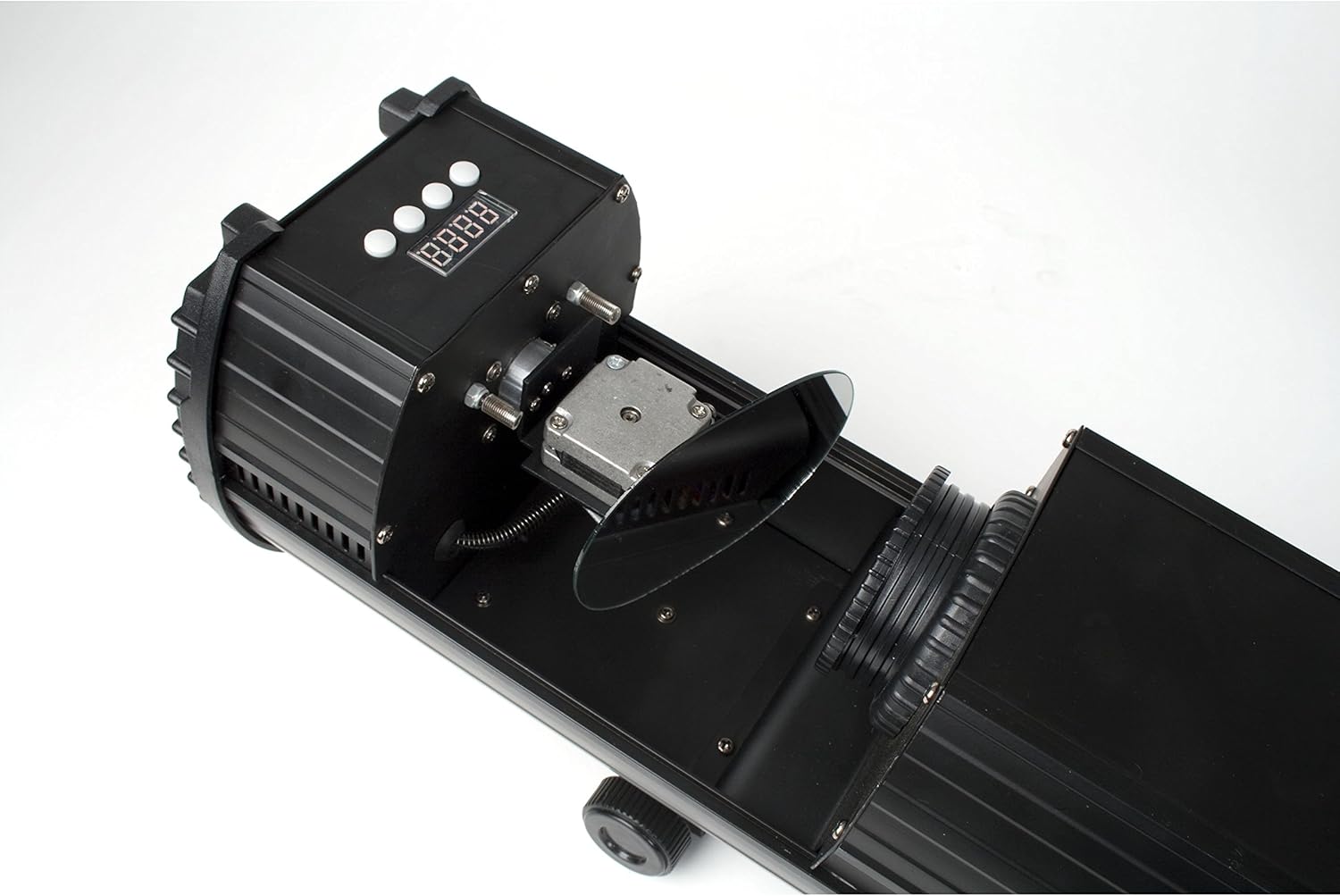
Figure 3: Internal mirror mechanism for dynamic scanning effects.
5. Enstalasyon
5.1 Montaj
The lightmaXX DJ Scan LED can be mounted on a truss, stand, or placed on a flat surface. Ensure the mounting surface or structure can support the weight of the unit securely. Use appropriate clamps and safety cables when mounting overhead.
5.2 Koneksyon pouvwa
Connect the supplied power cable to the power input on the rear of the unit and then to a suitable grounded power outlet (230V AC, 50Hz). Ensure the power switch is in the OFF position before connecting.

Figure 4: Rear panel with power input and cooling fan.
5.3 Koneksyon DMX (Si ou vle)
For DMX control, connect a standard 3-pin DMX cable from your DMX controller's output to the DMX IN port on the lightmaXX DJ Scan LED. If connecting multiple units, daisy-chain them by connecting the DMX OUT of the first unit to the DMX IN of the next.

Figure 5: Control panel and DMX input/output ports.
6. Opere
6.1 Kontwòl Panel
The control panel features a digital display and several buttons for navigating menus and adjusting settings. Refer to Figure 5 for the location of the control panel.
- MENI: Accesses the main menu or goes back to the previous menu.
- LEVE / DESANN: Navige nan opsyon meni yo oubyen ajiste valè yo.
- ANTRE: Confirms a selection or saves a setting.
6.2 Mòd Fonksyònman
The lightmaXX DJ Scan LED typically supports the following operating modes:
- DMX mòd: Allows full control over all functions via a DMX controller. Set the DMX address using the control panel.
- Son mòd aktif: The unit reacts to sound via a built-in microphone, creating dynamic light shows synchronized with music.
- Mòd oto: Runs pre-programmed light sequences automatically.
- Mòd Mèt/Esklav: Connect multiple units where one acts as the master, controlling the others (slaves) for synchronized operation without a DMX controller.

Figi 6: Egzample of a green light beam projection.

Figi 7: Egzample of a red light beam projection.
7. Antretyen
7.1 Netwayaj
Regular cleaning helps maintain optimal performance. Disconnect the unit from power before cleaning.
- Use a soft, lint-free cloth to wipe the exterior.
- For lenses and mirrors, use a specialized lens cleaning solution and cloth to avoid scratches.
- Periodically clean the cooling fan and vents to ensure proper airflow.
7.2 Depo
When not in use, store the unit in a dry, dust-free environment, preferably in its original packaging or a protective case.
NAN. Depanaj
Si ou rankontre pwoblèm, gade tablo ki anba a pou pwoblèm komen ak solisyon yo:
| Pwoblèm | Kòz posib | Solisyon |
|---|---|---|
| Aparèy pa limen. | No power connection; faulty cable; blown fuse. | Check power cable connection; try another outlet; replace fuse if necessary. |
| Pa gen pwodiksyon limyè. | Unit in standby; DMX signal issue; LED failure. | Check operating mode; verify DMX connection and address; contact support if LED is faulty. |
| Pa gen kontwòl DMX. | Incorrect DMX address; faulty DMX cable; DMX controller issue. | Set correct DMX address; test DMX cable; check DMX controller settings. |
| Beam movement is erratic. | Obstriksyon; pwoblèm mekanis entèn. | Ensure no physical obstructions; contact support if issue persists. |
9. Espesifikasyon
| Karakteristik | Detay |
|---|---|
| Nimewo Modèl | LCD-502 |
| Sous limyè | dirije |
| Kalite limyè | Scanner |
| Melanj koulè | RGBAW (Red, Green, Blue, Amber, White) |
| Pwovizyon pou pouvwa | 230V AC, 50Hz (typical) |
| Mòd kontwòl | DMX, Sound Active, Auto, Master/Slave |
| ASIN | B004CTLQXK |

Figure 8: Energy efficiency information for the LED light source.
10. Garanti ak sipò
lightmaXX products are designed for reliability and performance. For warranty information and technical support, please refer to the warranty card included with your product or visit the official lightmaXX websit la. Kenbe prèv acha ou a pou nenpòt reklamasyon garanti.
For further assistance, please contact lightmaXX customer service.


