1. Entwodiksyon
The Digitus DA-70544 is a versatile docking station designed for 2.5" and 3.5" SATA hard drives and SSDs. It provides a convenient way to access your data with high-speed USB connectivity, supporting data transfer rates up to 3000 Mbit/s. This manual will guide you through the setup, operation, and maintenance of your device.
2. Pwodwi souview
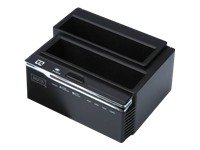
Figure 1: Digitus DA-70544 SATA Docking Station. This image shows the top-down view of the black docking station with two slots for SATA drives and front-facing indicator lights and buttons.
Key features of the Digitus DA-70544 include:
- High-speed data transfer up to 3000 Mbit/s.
- Supports SATA hard disk drives (HDDs) and solid-state drives (SSDs).
- USB interface for easy connection to computers.
- Compatible with Windows XP, Vista, 7, Mac, and Linux operating systems.
- Simple plug-and-play setup.
3. Enstalasyon
- Depake aparèy la: Carefully remove the docking station and all accessories from the packaging. Ensure all components are present: the docking station, power adapter, and USB cable.
- Konekte pouvwa: Connect the provided power adapter to the DC input port on the back of the docking station, then plug the adapter into a power outlet.
- Insert SATA Drive(s): Gently slide your 2.5" or 3.5" SATA hard drive(s) or SSD(s) into the appropriate slots on the top of the docking station until they are firmly seated. Ensure the SATA connector aligns correctly.
- Konekte ak òdinatè: Connect one end of the supplied USB cable to the USB port on the docking station and the other end to an available USB port on your computer.
- Pouvwa sou: Press the power button on the docking station (if available). The power indicator light should illuminate. Your operating system should automatically detect the new hardware.
4. Operasyon Enstriksyon
- Rekonesans Kondwi: Once connected and powered on, your operating system should recognize the inserted drive(s) as external storage devices. You may need to initialize and format new drives via Disk Management (Windows) or Disk Utility (Mac) before use.
- Transfè Done: Kounye a ou kapab trennen epi depoze files to and from the drive(s) in the docking station, just like any other external storage device. The high-speed USB interface ensures quick data transfers.
- Retire san danje: Before disconnecting the docking station or removing a drive, always safely eject the drive from your operating system (e.g., "Safely Remove Hardware" in Windows, "Eject" in Mac Finder) to prevent data corruption.
- Chanjman a cho: The DA-70544 supports hot-swapping of drives. After safely ejecting a drive, you can remove it and insert another without powering down the docking station, provided the operating system has fully released the previous drive.
5. Antretyen
- Netwayaj: Sèvi ak yon twal mou epi sèk pou netwaye deyò estasyon an. Pa sèvi ak pwodui netwayaj likid oswa ayewosòl.
- Depo: Lè w pa ap itilize estasyon an, sere l nan yon kote ki fre epi sèk, lwen limyè solèy dirèk ak tanperati ekstrèm.
- Handling Drives: Always handle hard drives and SSDs with care. Avoid dropping or subjecting them to physical shock, as this can cause data loss or damage.
- Vantilasyon: Ensure the docking station has adequate ventilation to prevent overheating, especially during prolonged use.
NAN. Depanaj
| Pwoblèm | Solisyon |
|---|---|
| Odinatè a pa detekte kondwi a. |
|
| Vitès transfè done ki ba. |
|
| Docking station not powering on. |
|
7. Espesifikasyon
| Karakteristik | Valè |
|---|---|
| Mak | CHIFF |
| Nimewo Modèl | DA-70544 |
| Supported HDD Interface | SATA |
| Entèfas | USB 2.0 |
| Max Done Transfè To | 3000 Mbit/s |
| Kantite USB 2.0 pò | 1 |
| Sistèm operasyon konpatib | Win XP, Vista, 7, Mac, Linux |
| Dimansyon pwodwi | 16.2 x 12.4 x 12.2 cm |
| Pwa pwodwi | 699 g (1.54 liv) |


