1. Entwodiksyon
The Behringer Europower PMP4000 is a powerful and versatile 16-channel powered mixer designed for various audio applications, from live sound reinforcement to studio recording. It integrates a high-efficiency Class-D amplifier, a comprehensive 24-bit Multi-FX processor, and a precise FBQ Feedback Detection System to deliver exceptional sound quality and performance.
This manual provides essential information for setting up, operating, maintaining, and troubleshooting your PMP4000 mixer. Please read it thoroughly before use to ensure safe and optimal performance.
2. Enstriksyon Sekirite Enpòtan
Always observe the following basic precautions when using this product:
- Li enstriksyon sa yo.
- Kenbe enstriksyon sa yo.
- Fè atansyon tout avètisman yo.
- Swiv tout enstriksyon yo.
- Pa sèvi ak aparèy sa a toupre dlo.
- Netwaye sèlman ak twal sèk.
- Pa bloke okenn ouvèti vantilasyon. Enstale an akò ak enstriksyon manifakti a.
- Pa enstale tou pre okenn sous chalè tankou radyatè, rejis chalè, recho, oswa lòt aparèy (tankou amplifiers) ki pwodui chalè.
- Pa defèt objektif sekirite nan ploge polarize oswa ki kalite tè. Yon ploge polarize gen de lam ak youn pi laj pase lòt la. Yon ploge kalite tè gen de lam ak yon twazyèm pwong tè. Yo bay lam lajè a oswa twazyèm pikèt la pou sekirite ou. Si priz yo bay la pa anfòm nan priz ou a, konsilte yon elektrisyen pou ranplase priz demode a.
- Pwoteje kòd elektrik la pou yo pa mache oswa kwense sitou nan priz, resipyan konvenyans, ak pwen kote yo sòti nan aparèy la.
- Itilize sèlman atachman/akseswa manifakti a espesifye.
- Itilize sèlman ak charyo a, kanpe, tripod, bracket, oswa tab ki espesifye pa manifakti a, oswa vann ak aparèy la. Lè yo itilize yon kabwa, pran prekosyon lè w ap deplase konbinezon kabwa a/aparèy la pou evite blese nan ranvèse.
- Deploge aparèy sa a pandan tanpèt zèklè oswa lè li pa itilize pou yon peryòd tan ki long.
- Refere tout sèvis yo bay pèsonèl sèvis kalifye. Reparasyon nesesè lè aparèy la domaje nenpòt fason, tankou kòd kouran oswa ploge domaje, likid koule oswa objè tonbe nan aparèy la, aparèy la te ekspoze a lapli oswa imidite, li pa fonksyone nòmalman. , oswa li te tonbe.
3. Pake kontni
Upon unpacking your Behringer Europower PMP4000, please ensure all components are present and in good condition:
- Behringer Europower PMP4000 Powered Mixer
- Pouvwa kab
- Manyèl Itilizatè (dokiman sa a)
- Multi-FX Processor and FBQ Feedback Detection System (integrated)
Si nenpòt atik ki manke oswa ki domaje, tanpri kontakte konsesyonè ou imedyatman.
4. Gid Enstalasyon
Follow these steps to set up your PMP4000 mixer:
4.1 Debalaj ak enspeksyon
Carefully remove the mixer from its packaging. Inspect the unit for any signs of physical damage that may have occurred during transit. Retain the original packaging for future transport or storage.
4.2 Koneksyon pouvwa
Connect the supplied power cable to the mixer's power inlet on the rear panel and then to a suitable AC power outlet. Ensure the mixer's power switch is in the OFF position before connecting to power.
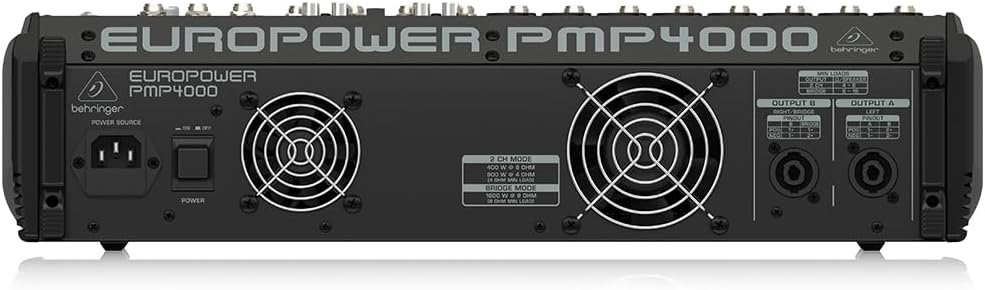
Figure 4.1: Rear panel of the PMP4000, highlighting the power input and speaker outputs.
4.3 Konekte Antre yo
The PMP4000 features 8 mono channels with XENYX mic preamps and 4 stereo channels. Connect your microphones, instruments, and line-level sources to the appropriate input jacks.
- Mikwofòn: Use XLR cables for condenser or dynamic microphones. Activate +48V phantom power for condenser microphones using the dedicated switch.
- Instruments/Line-Level: Use 1/4" TRS or TS cables for instruments (e.g., keyboards, guitars with DI boxes) or other line-level devices.
- Antre CD/Kasèt: Use the dedicated stereo RCA input for connecting external signal sources like CD players or media devices.

Figi 4.2: Top view of the PMP4000, showing input channels and main controls.
4.4 Konekte Sòti yo
The PMP4000 offers various output options for connecting to speakers and monitors.
- Rezilta prensipal: Connect your main PA speakers to the main L/R speaker outputs using speakON or 1/4" TS cables.
- Monitor Outputs: Konekte yotage monitors to the monitor outputs.
- Preamp Sòti: Use the multi-functional stereo Preamp outputs for connecting to external power amplifiers oswa aparèy anrejistreman.
4.5 Premye pouvwa-sou
Once all connections are secure, switch the power ON. The power LED will illuminate. Gradually raise the main fader and individual channel faders to a comfortable listening level.
5. Operating the PMP4000
This section details the primary controls and functions of your mixer.
5.1 Kontwòl Chanèl (Chanèl Mono 1-8)
- GAY: Ajiste sansiblite antre a pou chak kanal. Mete sa a pou reyalize yon nivo siyal ki an sante san saturation.
- Egalizè (WO, MWAYEN, BA): 3-band equalizer for shaping the tone of each channel.
- BA KOUPE: Aktive yon filtè pas-wo pou retire gwo bri ba frekans endezirab.
- FX VOYE: Controls the amount of signal sent to the internal effects processor.
- MON VOYE: Controls the amount of signal sent to the monitor mix.
- PAN: Positions the channel's signal within the stereo field (left to right).
- Bèbè: Fèmen kanal la sou silans.
- PFL (Pre-Fader Listen): Sends the channel's signal to the headphones for monitoring before the fader.
- CHANNEL FADER: Adjusts the output level of the individual channel to the main mix.
- CLIP ki ap dirije: Illuminates when the input signal is too high, indicating potential distortion. Reduce the GAIN if this LED lights up frequently.
5.2 Channel Controls (Stereo Channels 9/10 - 15/16)
These channels are designed for stereo line-level sources and feature simplified controls suitable for stereo instruments or playback devices.
5.3 Seksyon Mèt la
- FADER MIX PRENSIPAL: Kontwole nivo pwodiksyon jeneral melanj stereo prensipal la.
- MONITOR FADERS: Adjust the output level for the monitor mixes.
- FX RETOUNEN: Controls the overall level of the effects processor's output returning to the main mix.
- 7-BAND GRAPHIC EQ: Allows precise frequency correction for the monitor or main outputs. Use the EQ switch to select which output is affected.
- Sistèm Deteksyon Feedback FBQ: This system instantly reveals critical frequencies that are causing feedback, allowing you to cut them using the graphic EQ.
5.4 24-bit Multi-FX Processor
The PMP4000 includes a studio-grade 24-bit stereo FX processor with 100 awesome presets. These include various reverbs, delays, chorus, flanger, pitch shifter, and multi-effects. Use the PROGRAM knob to select the desired effect and the FX SEND controls on individual channels to apply the effect.
5.5 Amplifier Operation Modes
The PMP4000 offers selectable amplifier operation modes:
- STEREO (MAIN L/R): Delivers 2 x 800 Watts to separate left and right main speakers.
- DOUBLE MONO (MAIN/MONITOR): Provides 800 Watts to the main output and 800 Watts to the monitor output, allowing for separate mixes.
- BRIDGED MONO: Combines the power to deliver 1600 Watts into a single, powerful mono output.
5.6 Karakteristik espesyal
- Anile Vwa: Removes the singer's voice from recordings for karaoke applications.
- XPQ 3D Stereo Surround Effect: Enhances the stereo image and adds vitality to the sound.
6. Antretyen
Proper care and maintenance will extend the life of your PMP4000 mixer.
6.1 Netwayaj
Clean the unit regularly with a soft, dry cloth. Do not use liquid cleaners or solvents. Ensure no dust or debris accumulates in the ventilation openings.
6.2 Depo ak manyen
Store the mixer in a cool, dry place away from direct sunlight and extreme temperatures. When transporting the unit, use appropriate protective cases to prevent damage.
NAN. Depanaj
If you encounter issues with your PMP4000, refer to the following common problems and solutions:
| Pwoblèm | Kòz posib | Solisyon |
|---|---|---|
| Pa gen pwodiksyon son | Power off; cables disconnected; faders down; MUTE engaged; incorrect ampmòd lifier. | Check power, all cable connections, raise faders, disengage MUTE, verify ampmòd lifier. |
| Son defòme | Input GAIN too high; output level too high; faulty cable. | Reduce input GAIN and output levels. Check and replace cables if necessary. |
| Fidbak (son rèl) | Microphone too close to speakers; high frequencies boosted; room acoustics. | Use FBQ Feedback Detection to identify and cut problematic frequencies on the graphic EQ. Reposition microphones or speakers. |
| Pa gen pouvwa fantom (+48V) | Entèripsyon pouvwa fantom lan etenn. | Ensure the +48V phantom power switch is engaged. |
Si pwoblèm nan pèsiste apre ou fin eseye solisyon sa yo, tanpri kontakte pèsonèl sèvis ki kalifye.
8. Espesifikasyon teknik
- Modèl: PMP4000
- Chanèl: 16 (8 mono, 4 stereo)
- Amplifier pouvwa: 2 x 800 Watts stereo / 1600 Watts bridged mode
- Wattage: 1050 wat
- Voltage: 48 Volts
- Sous pouvwa: Fil elektrik
- Mikwo Preamps: 8 x XENYX with +48V phantom power
- Processeur Efè: 24-bit Multi-FX with 100 presets
- EQ: 3-band per channel, 7-band stereo graphic EQ with FBQ Feedback Detection
- Koneksyon Teknoloji: XLR, TRS, RCA
- Koulè: Nwa
- Pwa atik: 28.3 liv (12.84 kg)
- Dimansyon pwodwi: 18.74 x 18.11 x 4.8 pous (47.6 x 46 x 12.2 cm)
- Peyi orijin: Lachin
- Dat premye disponib: 30 avril 2010
9. Garanti ak sipò
Behringer products are built to high standards and come with a limited warranty. For detailed warranty terms and conditions, please refer to the warranty information provided with your purchase or visit the official Behringer websit.
For technical support, service, or spare parts, please contact your authorized Behringer dealer or visit the support section of the Behringer website. Ensure you have your product model number (PMP4000) and serial number ready when seeking support.


