1. Pwodwi souview
The Aluratek AUV200F USB 2.0 to VGA Adapter is designed to extend your desktop by adding an additional display via a USB port. This adapter enables dual monitor support, enhancing multitasking capabilities for various applications.
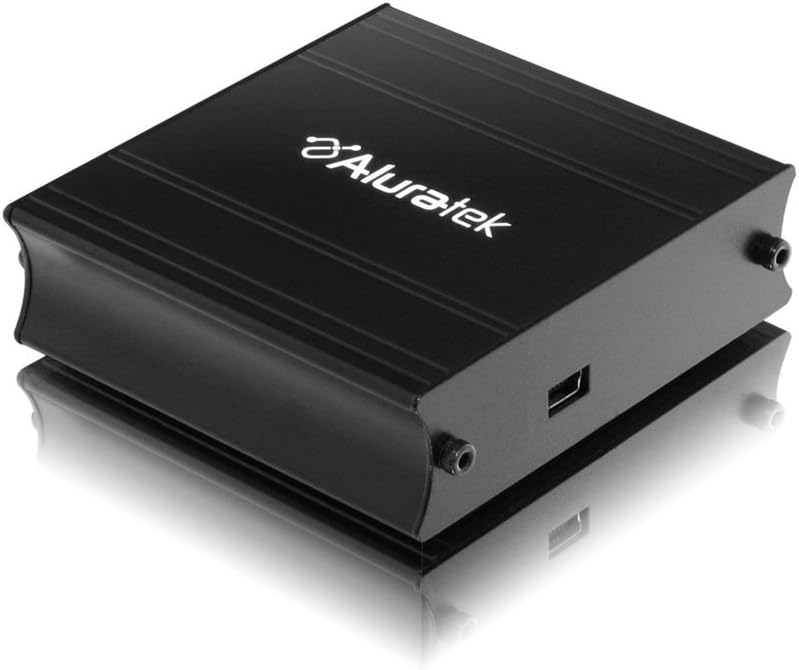
This image shows the Aluratek AUV200F USB to VGA Adapter. It is a compact, black rectangular device designed to connect a computer's USB port to a VGA monitor. The top surface displays the Aluratek logo, and one side features a USB input port, while the opposite side has screw holes for securing a VGA cable.
Karakteristik kle:
- Supports Primary, Extended, and Mirror display modes.
- Supports widescreen monitor resolutions up to 1680 x 1050.
- Supports standard monitor resolutions up to 1600 x 1200.
- Pèmèt viewing data across multiple screens or with display continuity.
- Facilitates more effective multitasking by reducing overlapping windows.
2. Pake kontni
Before proceeding with the installation, please verify that your package contains the following items:
- Aluratek AUV200F USB to VGA Adapter
- Driver Installation CD (or download instructions)
- Gid Quick Start
3. Kondisyon sistèm
To ensure proper functionality, your computer system must meet the following minimum requirements:
- Sistèm operasyon: Windows XP-SP2/3, Vista, Windows 7, or Mac OS 10.4.11 or later (Intel-based only).
- Pò ki disponib: One available USB port and one available VGA port on the monitor.
- Processeur: Recommended 1.2 GHz or higher.
- RAM: Recommended 512 MB or higher.
4. Enstalasyon ak Enstalasyon
4.1 Enstalasyon chofè
- Mete CD chofè a: Place the provided driver installation CD into your computer's optical drive. If your computer does not have an optical drive, download the latest drivers from the official Aluratek websit.
- Kouri Enstalatè a: Follow the on-screen instructions to install the necessary drivers. It is recommended to restart your computer after the driver installation is complete.
4.2 Koneksyon Materyèl
- Connect VGA Cable: Connect one end of a VGA cable (not included) to the VGA port on your external monitor and the other end to the VGA port on the Aluratek AUV200F adapter. Secure the screws on the VGA connector for a stable connection.
- Konekte kab USB: Plug the USB connector of the Aluratek AUV200F adapter into an available USB 2.0 port on your computer.
- Pouvwa sou: Ensure your external monitor is powered on.
5. Operasyon Enstriksyon
Once the adapter is connected and drivers are installed, your operating system should detect the new display. You can configure the display settings through your computer's display control panel.
5.1 Configuring Display Modes (Windows)
- Aksè nan Anviwònman Ekspozisyon: Right-click on an empty area of your desktop and select "Screen resolution" (Windows 7/Vista) or "Display settings" (Windows 10).
- Identify Displays: Click "Identify" to see which number corresponds to each monitor.
- Chwazi Mòd Ekspozisyon: In the "Multiple displays" dropdown menu, select one of the following options:
- Pwolonje ekspozisyon sa yo: This creates an extended desktop, allowing you to drag windows between monitors.
- Kopi ekspozisyon sa yo: This mirrors your primary display onto the second monitor.
- Show desktop only on 1/2: This disables one of the displays.
- Ajiste Rezolisyon an: Select the desired resolution for each monitor. The Aluratek AUV200F supports up to 1680x1050 for widescreen and 1600x1200 for standard monitors.
- Aplike Anviwònman yo: Click "Apply" and then "OK" to save your changes.
5.2 Configuring Display Modes (Mac OS)
- Aksè nan Preferans Ekspozisyon: Go to "System Preferences" > "Displays".
- Arrangement Tab: In the "Arrangement" tab, you can drag the monitor icons to arrange them as desired for an extended desktop. To mirror displays, check the "Mirror Displays" box.
- Resolution Tab: In the "Display" tab for each monitor, select the desired resolution.
NAN. Depanaj
If you encounter issues with your Aluratek AUV200F adapter, please refer to the following common solutions:
- No Display on Second Monitor:
- Ensure all cables (USB and VGA) are securely connected.
- Verify that the external monitor is powered on and set to the correct input source (VGA).
- Check your computer's display settings to ensure the second monitor is detected and configured for "Extend" or "Duplicate" mode.
- Reinstall the device drivers from the Aluratek websit.
- Poor Display Quality or Lag:
- Ensure your computer meets the recommended system requirements.
- Adjust the display resolution to a lower setting to see if performance improves.
- Note that USB-to-VGA adapters are generally not recommended for high-motion video playback or demanding graphic applications like gaming due to potential latency.
- Pwoblèm Enstalasyon Chofè:
- Download the latest drivers directly from the official Aluratek support websit.
- Temporarily disable antivirus software during installation if it interferes.
- Try installing the drivers in Safe Mode if standard installation fails.
- Adaptè pa rekonèt:
- Eseye konekte adaptè a nan yon lòt pò USB sou òdinatè w la.
- Ensure the USB port is functional by testing it with another USB device.
7. Espesifikasyon
| Modèl | AUV200F |
| Mak | Aluratek |
| Kalite Connector | USB 2.0 pou VGA |
| Supported Resolutions (Widescreen) | Jiska 1680 x 1050 |
| Supported Resolutions (Standard) | Jiska 1600 x 1200 |
| Sistèm operasyon konpatib | Windows XP-SP2/3, Vista, Windows 7, Mac OS 10.4.11 or later (Intel-based) |
| Aparèy konpatib | Odinatè pòtab, òdinatè biwo |
| Dimansyon pwodwi | 23.62 x 14.73 x 6.35 cm |
| Pwa atik | 181.44 g |
8. Antretyen
To ensure the longevity and optimal performance of your Aluratek AUV200F adapter, follow these maintenance guidelines:
- Netwayaj: Sèvi ak yon twal mou epi sèk pou netwaye adaptè a. Evite itilize pwodui netwayaj likid oswa solvan.
- Depo: Sere adaptè a nan yon kote ki fre epi sèk, lwen limyè solèy dirèk ak tanperati ekstrèm.
- Manyen: Handle the adapter with care. Avoid dropping it or subjecting it to strong impacts. Do not force connectors.
9. Garanti ak sipò
The Aluratek AUV200F USB to VGA Adapter comes with a 1-ane garanti limite soti nan dat acha a. Garanti sa a kouvri domaj nan materyèl ak atizan konn fè nan itilizasyon nòmal.
For technical support, warranty claims, or further assistance, please visit the official Aluratek websit la oubyen kontakte depatman sèvis kliyan yo. Kenbe prèv acha ou a pou validasyon garanti a.
Aluratek Official Websit: www.aluratek.com