1. Entwodiksyon
This manual provides essential information for the safe and effective use of your Leica D-Lux 4 Safari Special Edition Digital Camera. Please read it thoroughly before using your camera and keep it for future reference. The Leica D-Lux 4 Safari is a limited edition digital camera featuring a distinctive Safari Green color and a special case, designed for high-quality digital photography.
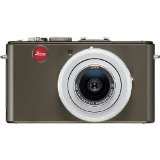
Figure 1: Leica D-Lux 4 Safari Special Edition Digital Camera. This image displays the compact digital camera with its distinctive green finish and lens.
2. Enstalasyon
2.1. Enstalasyon batri
- Asire w ke kamera a etenn.
- Jwenn kouvèti konpatiman batri a anba kamera a.
- Glise latch la pou ouvri kouvèti a.
- Insert the provided battery, ensuring the correct orientation as indicated inside the compartment.
- Fèmen kouvèti konpatiman batri a byen fèm jiskaske li fè yon klik an plas.
2.2. Mete kat memwa
The camera supports SD and SDXC memory cards for storing photos and videos.
- With the camera powered off, open the battery/memory card compartment cover.
- Insert the memory card into the designated slot with the label facing the correct direction (usually towards the front of the camera). Push until it clicks into place.
- Fèmen kouvèti lòj la.
2.3. Premye Limen
Peze bouton pouvwa a pou limen kamera a. Swiv nenpòt enstriksyon ki parèt sou ekran an pou mete dat la, lè a ak lang lan.
3. Operasyon Enstriksyon
3.1. Basic Photography (Point & Shoot)
- Pouvwa sou: Peze bouton pouvwa a.
- Chwazi mòd: Use the mode dial to select "Automatic" for general use.
- Konsantre: Point the camera at your subject. The camera will automatically focus using contrast detection.
- Kaptire: Peze bouton deklanchè a mwatye pou fè fokis, apresa peze l nèt pou pran yon foto.
3.2. Anrejistreman Videyo
- Chwazi mòd: Turn the mode dial to "Movie" mode.
- Kòmanse/Sispann anrejistreman: Press the dedicated video record button to start and stop recording. The camera records in 1080p at 30 frames per second.
- Estabilizasyon imaj dijital: The camera features digital image stabilization to reduce blur during video recording.
3.3. Zoom Functionality
The camera features 2.5x optical zoom. Use the zoom lever (typically around the shutter button) to zoom in or out. Digital zoom is also available up to 16x.
3.4. Mòd Avanse pou Pran Foto
Explore various modes via the mode dial:
- Mòd Peyizaj: Optimized for wide scenic shots.
- Kontwòl Manyèl Ekspozisyon: For experienced users to manually adjust aperture and shutter speed.
- Anviwònman Balans Blan: Customize white balance for accurate color reproduction under different lighting conditions.
3.5. Koneksyon
- Wi-Fi: Connect your camera to a Wi-Fi network for wireless transfer of images and remote control via a compatible smartphone app. Refer to the camera's on-screen menu for Wi-Fi setup.
4. Antretyen
4.1. Netwaye Kamera a
- Kò kamera: Sèvi ak yon twal mou epi sèk pou siye kò kamera a. Pou pousyè tè ki difisil pou retire, siye l yon ti kras.ampRense twal la avèk dlo. Evite pwodui chimik ki agresif.
- Lantiy: Sèvi ak yon bwòs pou lantiy pou retire pousyè a, apresa siye dousman ak yon twal mikwofib pou lantiy. Pou tach, sèvi ak yon solisyon espesyalize pou netwaye lantiy.
- Ekran: Wipe the LCD screen with a soft, dry microfiber cloth.
4.2. Swen batri
- Always use the original Leica charger and battery.
- Evite ekspoze batri a nan tanperati ekstrèm.
- Sere batri a nan yon kote ki fre, sèk lè li pa itilize.
NAN. Depanaj
5.1. Kamera a pa limen
- Asire w ke batri a byen chaje epi li byen mete l.
- Eseye itilize yon lòt batri ki byen chaje si ou genyen.
5.2. Imaj ki pa bon
- Check if the lens is clean and free from smudges or dust.
- Ensure adequate lighting for your shot.
- Adjust shooting modes or exposure settings if necessary.
5.3. Pwoblèm koneksyon Wi-Fi
- Verify that Wi-Fi is enabled on the camera and your smartphone.
- Ensure the camera is within range of the Wi-Fi network.
- Rekòmanse tou de kamera a ak smartphone ou.
6. Espesifikasyon
| Karakteristik | Detay |
|---|---|
| Mak | Leica |
| Non modèl | D Lux4 Safari |
| Rezolisyon total toujou | 12 MP |
| Teknoloji Capteur Foto | CMOS |
| Zoom optik | 2.5x |
| Zoom dijital | 16x |
| Ouverture maksimòm | 2.8 Milimèt |
| Estabilizasyon Imaj | Digital |
| Sipòte File Fòma | JPEG, RAW |
| Rezolisyon videyo | 1080p |
| To Frame | 30 FPS |
| Gwosè ekran | 3 pous |
| Teknoloji san fil | Wi-Fi |
| Materyèl patiraj | Metal |
| Koulè | Vèt |
| Batri enkli | Wi |
7. Garanti & Sipò
7.1. Enfòmasyon sou Garanti
The Leica D-Lux 4 Safari Special Edition Digital Camera comes with a Garanti manifakti 3 zanGaranti sa a kouvri domaj nan materyèl ak nan fabrikasyon anba itilizasyon nòmal. Tanpri konsève prèv acha ou pou reklamasyon garanti.
7.2. Sipò pou Kliyan
For technical assistance, troubleshooting, or service inquiries, please visit the official Leica website or contact their customer support. You can find detailed contact information on the Leica websit la oubyen nan dokimantasyon ki vini ak kamera ou a.