Entwodiksyon
Welcome to the user manual for your Olympus OM-4 35mm Film SLR Camera. This manual provides essential information for setting up, operating, and maintaining your camera to ensure optimal performance and longevity. The Olympus OM-4 is a classic 35mm SLR camera known for its advanced metering system and robust build quality, offering photographers precise control over their images.
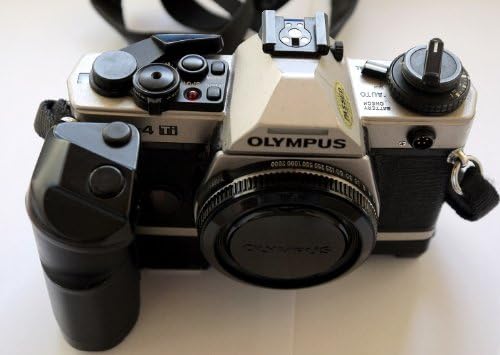
Figi 1: Devan view of the Olympus OM-4 35mm Film SLR Camera, showing the lens, body, and attached grip.
Enstalasyon
1. Enstalasyon batri
The Olympus OM-4 requires batteries for its metering and electronic functions. A battery is included with your camera. To install:
- Locate the battery compartment, typically on the bottom of the camera body.
- Louvri kouvèti lòj la.
- Insert the battery, ensuring correct polarity as indicated inside the compartment.
- Fèmen kouvèti lòj batri a byen.
2. Chaje fim nan
The OM-4 uses standard 35mm film. Follow these steps to load film:
- Louvri dèyè kamera a lè w rale bouton rebobinaj fim nan anlè.
- Place the film cassette into the film chamber on the left side.
- Rale gid fim nan sou bobin anlè a sou bò dwat la epi mete l nan youn nan fant yo.
- Avanse fim nan yon ti kras avèk levye avanse fim nan pou asire li pran nan bobin anlè a.
- Fèmen dèyè kamera a byen fèm.
- Advance the film two frames, pressing the shutter release button each time, until the frame counter shows '1'. This ensures the exposed leader is wound onto the take-up spool.
3. Strap and Lens Cap Attachment
A strap and lens cap are included for convenience and protection.
- Attach the camera strap to the strap lugs on the camera body for secure carrying.
- Place the lens cap on the front of the lens when the camera is not in use to protect the lens element from dust and scratches.
Enstriksyon Operasyon
1. Operasyon debaz
- Pouvwa sou: Rotate the main switch to the 'ON' position.
- Vitès vole: Adjust the shutter speed dial on the top of the camera to select your desired speed.
- Ouverture: Adjust the aperture ring on your lens to control the depth of field.
- Konsantre: Gade nan viewfinder and rotate the focusing ring on your lens until the image appears sharp. The OM-4 typically features a split-image or microprism focusing screen for precise focusing.
- Lage Panno: Gently press the shutter release button on the top of the camera to take a picture.
- Davans fim: After each shot, advance the film using the film advance lever until it stops, preparing the next frame.
2. Auto Exposure Feature
The Olympus OM-4 features an advanced auto exposure system. To utilize this:
- Set the shutter speed dial to 'AUTO' or 'APERTURE PRIORITY' mode, if available on your specific model.
- The camera will automatically select the appropriate shutter speed based on the light conditions and your chosen aperture.
- Monitor the exposure indicators in the viewfinder to ensure a correct exposure.
3. Rebobinaj fim
Once all frames on the film roll have been exposed:
- Press the film rewind release button on the bottom of the camera.
- Rotate the film rewind knob clockwise until you feel the tension release, indicating the film is fully rewound into its cassette.
- Open the camera back and remove the film cassette.
Antretyen
Proper maintenance ensures the longevity and performance of your Olympus OM-4 camera.
- Netwayaj: Use a soft, lint-free cloth to wipe the camera body. For the lens, use a dedicated lens cleaning solution and cloth. Avoid touching the lens surface directly.
- Depo: Store the camera in a cool, dry place away from direct sunlight and extreme temperatures. If storing for extended periods, remove the batteries to prevent leakage.
- Manyen: Always handle the camera with care. Avoid dropping or subjecting it to strong impacts.
Depanaj
| Pwoblèm | Kòz posib | Solisyon |
|---|---|---|
| Kamera a pa limen. | Pil ki mouri oswa ki mal enstale. | Tcheke enstalasyon batri a; ranplase pil si sa nesesè. |
| Fim nan pa avanse. | Film not properly loaded or end of roll reached. | Re-load film correctly; if at end of roll, rewind and replace. |
| Imaj yo flou. | Incorrect focus or camera shake. | Ensure proper focusing; use a tripod or faster shutter speed in low light. |
| Exposure issues (too dark/bright). | Incorrect exposure settings or metering error. | Check shutter speed, aperture, and ISO settings. Ensure metering mode is appropriate for the scene. |
Espesifikasyon
- Mak: Olympus
- Non modèl: OM-4
- Kalite fòma fim: 35mm
- Karakteristik espesyal: Ekspozisyon oto
- Kalite vole: Panno Focal Avyon
- Kalite Kontwòl Ekspozisyon: Otomatik
- Eleman ki enkli: Strap, Battery, Lens Cap
- Pwa atik: 2.2 liv
- Dimansyon pake: 3.9 x 3.9 x 3.9 pous
- Dat premye disponib: 3 septanm 2015
Enfòmasyon sou Garanti
This Olympus OM-4 camera comes with a GARANTI 100 JOU. Please retain your proof of purchase for any warranty claims. The warranty covers manufacturing defects and malfunctions under normal use. For specific terms and conditions, please refer to the warranty card included with your purchase or contact customer support.
Sipò
For further assistance, technical support, or inquiries regarding your Olympus OM-4 camera, please visit the official Olympus Store on Amazon:
You may also refer to the contact information provided with your product packaging for direct support channels.


