1. Entwodiksyon
The Olympus LS-10 Linear PCM Recorder is a portable device designed for high-fidelity audio recording. It captures sound with exceptional clarity, making it suitable for various applications, including live music, nature sounds, and interviews. This manual provides detailed instructions for the proper use and maintenance of your LS-10 recorder.
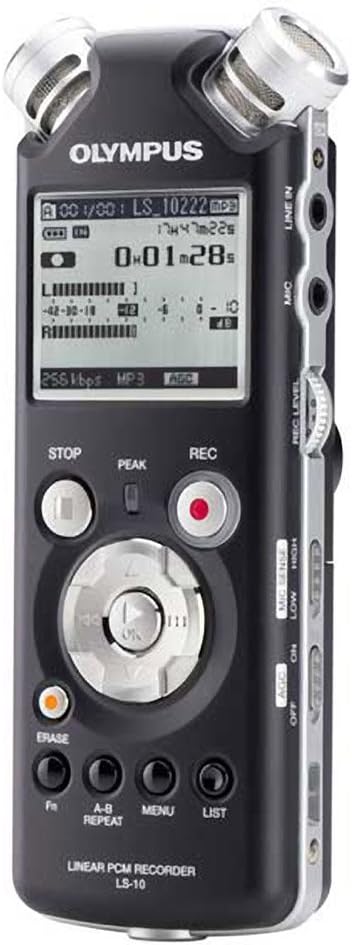
Figi 1: Devan view of the Olympus LS-10 Linear PCM Recorder, showing the display, control buttons, and built-in microphones.
2. Enstalasyon
2.1 Enstalasyon batri
The LS-10 operates on two AA batteries. For optimal performance, use alkaline, lithium, or NiMH rechargeable batteries.
- Jwenn kouvèti konpatiman batri a sou dèyè aparèy la.
- Glise kouvèti a nan direksyon flèch la endike a pou ouvri li.
- Mete de pil AA, asire w polarite ki kòrèk la (+/-) jan yo make anndan konpatiman an.
- Fèmen kouvèti lòj batri a byen.

Figi 2: Retounen view of the LS-10, illustrating the location of the battery compartment and built-in speakers.
2.2 Limen/Etenyen
Pou limen aparèy la, peze epi kenbe bouton an POUVWA bouton an jiskaske ekran an limen. Pou etenn li, peze epi kenbe bouton an POUVWA bouton an ankò jiskaske ekran an etenn.
2.3 Inserting an SD/SDHC Card
The LS-10 features an SD/SDHC card slot for expanded storage capacity.
- Locate the SD card slot on the side of the recorder.
- Insert an SD or SDHC card into the slot until it clicks into place. Ensure the card is inserted in the correct orientation.
- To remove the card, gently push it inward until it clicks, then release to eject.
3. Operasyon
3.1 Anrejistreman odyo
The LS-10 supports uncompressed 24-bit/96kHz Linear PCM recording, as well as WAV, MP3, and WMA formats.
- Chwazi mòd anrejistreman: Sèvi ak la MENI button to navigate to the recording settings and select your desired format (WAV, MP3, or WMA) and quality.
- Adjust Microphone Sensitivity: Sèvi ak la MIC SANS switch (LOW/HIGH) on the side of the device to match the recording environment. Use LOW for loud sounds and HIGH for quiet sounds.
- Set Recording Level: Sèvi ak la NIVO REC dial to adjust the input level. Monitor the level meter on the display to prevent clipping (distortion).
- Kòmanse anrejistreman: Peze a REC button (red circle) to begin recording. The REC indicator will illuminate.
- Sispann anrejistreman: Peze a SISPANN bouton pou fini anrejistreman an.

Figure 3: Front panel of the LS-10, highlighting the REC, STOP, and navigation buttons essential for recording and playback.

Figi 4: Top view of the LS-10, displaying the two high-quality built-in stereo microphones.
3.2 Lektur
Recordings can be played back through the built-in stereo speakers or via headphones.
- Chwazi File: Sèvi ak bouton navigasyon yo pou w ka wè anrejistreman w yo. files epi chwazi tras la vle.
- Kòmanse Lekti: Peze a PLAY/OK bouton pou kòmanse lecture.
- Ajiste Volim: Sèvi ak la VOLIM dial on the side of the unit to increase or decrease playback volume.
- One Stop lèktur: Peze a SISPANN bouton.
- AB repete: Sèvi ak la AB REPETE button to loop a specific section of a recording.

Figi 5: Side view of the LS-10, showing the LINE IN, MIC, and EAR (headphone) jacks, along with the REC LEVEL and VOLUME controls.
3.3 Navigasyon meni ak paramèt
The LS-10 features a menu system for configuring various settings.
- Peze a MENI bouton pou jwenn aksè nan meni prensipal la.
- Use the navigation buttons (up/down) to scroll through menu options.
- Peze PLAY/OK pou chwazi yon opsyon oubyen antre nan yon sou-meni.
- Common settings include:
- Rec Mode: Adjust recording quality and format.
- Info Sistèm: View enfòmasyon aparèy.
- Tan & Dat: Mete lè ak dat aktyèl la.
- Auto Power Off: Configure automatic power-off duration.
- Peze a LIS bouton pou sòti nan meni an.

Figure 6: The LS-10 display screen, illustrating the menu interface with various system settings.
3.4 File Jesyon
Anrejistrè a òganize files into folders and allows for easy transfer to a computer.
- Dosye: The LS-10 supports 5 folders, each capable of holding up to 200 messages, plus a dedicated MUSIC folder.
- Erasing Files: Chwazi la file ou vle efase epi peze bouton an EFASE bouton. Konfime sipresyon an lè yo mande w.
- Konekte ak yon òdinatè: Connect the LS-10 to your computer using a USB cable. The device will appear as a removable drive, allowing you to transfer files. Compatible with Windows 2000/XP/VISTA and Mac OS 10.2 or later.
4. Antretyen
4.1 Netwayaj
To maintain the recorder's performance and appearance:
- Siye aparèy la avèk yon twal mou epi sèk.
- Pou pousyè tè fè tèt di, alalejè dampRense twal la avèk dlo epi siye l sèk.
- Pa sèvi ak pwodui netwayaj abrazif, solvan, oswa alkòl, paske sa yo ka domaje sifas la.
4.2 Swen Batri
- Retire pil yo si ou pa pral itilize aparèy la pou yon peryòd tan pwolonje pou anpeche flit.
- Jete pil yo itilize dapre règleman lokal yo.
4.3 Depo
Store the LS-10 in a cool, dry place away from direct sunlight, extreme temperatures, and high humidity.
NAN. Depanaj
If you encounter issues with your LS-10, refer to the following common problems and solutions:
- Pa gen pouvwa:
- Tcheke si pil yo byen mete ak polarite ki kòrèk la.
- Ranplase ak pil fre.
- Asire w ke bouton pouvwa a byen peze epi kenbe l byen peze.
- Cannot Record:
- Check available memory on internal storage or SD card. Delete unnecessary filesi depo a plen.
- Ensure the device is not in playback mode.
- Verify microphone sensitivity and recording level settings.
- Kalite son pòv:
- Adjust microphone sensitivity (MIC SENSE) to match the environment.
- Ensure the recording level is not too high (causing distortion) or too low (causing noise).
- Record in a quiet environment if possible.
- Check if external microphones or line-in sources are properly connected.
- Computer Does Not Recognize Device:
- Asire w kab USB a byen konekte ak anrejistrè a ak òdinatè a.
- Eseye yon pò USB diferan sou òdinatè w lan.
- Restart your computer and the LS-10.
6. Espesifikasyon
| Karakteristik | Detay |
|---|---|
| Fòma anrejistreman | WAV (Linear PCM), MP3, WMA |
| Memwa Entèn | 2 GB |
| Ekstèn memwa | emplacement kat SD/SDHC |
| Lavi batri | Apeprè 14 èdtan (anrejistreman) |
| Batri | 2 x AA (Alkaline, Lithium, or NiMH) |
| Mikwo Jack | 3.5mm stereo mini-jack, impedance 2 kohms |
| Liy-In Jack | 3.5mm stereo mini-jack, impedance 2 kohms |
| Jack ekoutè | 3.5mm stereo mini-jack, impedance 8 ohms |
| Oratè entegre | 2 x 16mm round dynamic speakers, 8 ohms, 200 mW output |
| Aparèy konpatib | Odinatè pèsonèl |
| Entèfas Materyèl | USB |
| Dimansyon (W x H x P) | 3.4 x 6.3 x 6.5 pous (apeprè) |
| Pwa | 1 liv (apeprè) |
7. Enfòmasyon Sipò
For further assistance, technical support, or information regarding warranty, please refer to the official Olympus websit la oubyen kontakte depatman sèvis kliyan yo. Kenbe resi acha w la ak nimewo seri pwodwi a a pòte de men lè w ap chèche èd.


