1. Entwodiksyon
Thank you for choosing the Roadstar CD-853 USMP car stereo. This manual provides detailed instructions for the proper installation, operation, and maintenance of your new car audio system. Please read this manual thoroughly before using the product to ensure correct usage and to prevent damage.
The Roadstar CD-853 USMP is designed to provide high-quality audio entertainment in your vehicle, featuring CD, MP3, CD-R, and CD-RW playback capabilities, along with an FM/AM radio tuner.
2. Enfòmasyon sou Sekirite
- Enstalasyon pwofesyonèl rekòmande: Pou pi bon pèfòmans ak sekirite, li rekòmande pou yon pwofesyonèl kalifye enstale aparèy sa a.
- Pwovizyon pou pouvwa: This unit is designed for a 12V DC negative ground electrical system. Ensure correct wiring to prevent short circuits or damage.
- Evite dlo ak imidite: Do not expose the unit to water or excessive moisture. This can cause electric shock or fire.
- Tanperati: Avoid extreme temperatures. Ensure proper ventilation around the unit.
- Sekirite Kondwi: Pa sèvi ak aparèy la yon fason ki distrè w pandan w ap kondui. Toujou bay sekirite wout priyorite.
- Kontwòl Volim: Keep the volume at a level where you can still hear outside traffic sounds. Prolonged exposure to high volume levels can cause hearing damage.
3. Pwodwi souview
Layout panèl devan
The following image illustrates the main controls and features on the front panel of your Roadstar CD-853 USMP car stereo.
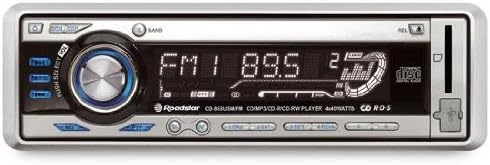
Figure 1: Front panel of the Roadstar CD-853 USMP car stereo. This image displays the front panel of the Roadstar CD-853 USMP car stereo, highlighting the main controls and display. Key features visible include the central volume/select knob, radio band selection, CD slot, and display showing radio frequency and playback information.
- Bouton pouvwa: Located on the top left, used to turn the unit on or off.
- EQ/DSP Button: Adjusts equalizer and digital sound processing settings.
- PUSH SELECT / VOL Knob: Central rotary knob for volume control. Pressing it typically accesses menu options or selection.
- BANN bouton: Selects between different radio bands (FM1, FM2, FM3, AM1, AM2).
- Ekspozisyon: Shows current status, radio frequency, track information, and menu options.
- CD plas: For inserting audio CDs, MP3 CDs, CD-R, and CD-RW discs.
- Bouton REL: Release button, typically for detaching the front panel.
- Bouton Ejecte: Located near the CD slot, used to eject discs.
- Antre USB/AUX: (If present, typically indicated by an icon) For connecting external audio devices or USB storage.
4. Enstalasyon
4.1 Enstalasyon
Due to the complexity of vehicle electrical systems, professional installation is strongly recommended. Incorrect installation can lead to damage to the unit, your vehicle, or personal injury. Refer to your vehicle's service manual for specific wiring diagrams and dashboard disassembly instructions.
4.2 Koneksyon fil elektrik
Ensure all wiring connections are secure and correctly matched. Common wiring colors include:
- Papye jòn: 12V konstan (batri)
- Wouj: Chanje 12V (Ignisyon/Akseswa)
- Nwa: Tè
- Ble: Antèn pouvwa / AmpLimyè a distans
- Oratè Fil: Typically pairs of solid and striped wires (e.g., White/White-Black for Left Front, Grey/Grey-Black for Right Front, Green/Green-Black for Left Rear, Purple/Purple-Black for Right Rear).
Always consult the wiring diagram provided with your unit and your vehicle's specific wiring information.
4.3 Premye pouvwa-sou
After installation, turn on your vehicle's ignition. Press the Power button on the unit. The display should illuminate, indicating successful power-up. If the unit does not power on, recheck all wiring connections and your vehicle's fuse box.
5. Operasyon Enstriksyon
5.1 Operasyon debaz
- Limen/Etenyen: Peze a Pouvwa button (top left) to turn the unit on. Press and hold the Power button for a few seconds to turn it off.
- Kontwòl Volim: Vire santral la PUSH SELECT / VOL knob clockwise to increase volume and counter-clockwise to decrease volume.
- Seleksyon sous: Peze a MÒD or SRC button (if present, typically below the volume knob) to cycle through available audio sources (e.g., Radio, CD, USB, AUX).
5.2 Operasyon radyo
- Chwazi Gwoup Mizik: Peze a BAND bouton an pou chanje ant bann FM1, FM2, FM3, AM1, ak AM2.
- Manyèl akor: Sèvi ak la TUNE buttons (typically left/right arrows) to manually adjust the frequency.
- Akor Otomatik Chèche: Peze epi kenbe la TUNE bouton yo pou chèche otomatikman pwochen estasyon ki gen bon son an.
- Estasyon Prereglaj: To store a station, tune to the desired frequency, then press and hold one of the numbered preset buttons (1-6) until you hear a beep. To recall a preset, simply press the corresponding numbered button.
5.3 Lekti CD/MP3
- Mete yon disk: Gently insert a CD (audio CD, MP3 CD, CD-R, or CD-RW) into the Plas CD with the label side facing up. The unit will automatically pull the disc in and begin playback.
- Ekspilsyon yon Disk: Peze a Ejecte button (located near the CD slot) to remove the disc.
- Jwe/Poz: Peze a JWE/POZ button (if present, often integrated with the volume knob press) to pause or resume playback.
- Track Skip: Sèvi ak la SOTE buttons (typically forward/backward arrows) to skip to the next or previous track.
- Vit Avant/Anvers: Peze epi kenbe la SOTE buttons to fast forward or reverse within a track.
- Folder Navigation (MP3): For MP3 CDs, use the DOSYE ANWO/ANBA buttons (if present) to navigate between folders.
5.4 Anviwònman son
- Egalizeur (EQ): Peze a EQ/DSP button to cycle through preset equalizer modes (e.g., Pop, Rock, Classic) or to access manual bass/treble adjustments.
- Bass/Treble: When in EQ adjustment mode, rotate the PUSH SELECT / VOL knob to adjust bass or treble levels. Press the knob to confirm selection or move to the next setting.
6. Antretyen
- Netwaye inite a: Sèvi ak yon twal mou epi sèk pou netwaye panèl devan an. Pou pousyè tè ki difisil pou retire,ampen the cloth lightly with water. Never use harsh chemicals, abrasive cleaners, or solvents.
- Disk manyen: Handle discs by their edges. Keep them clean and free from scratches. Store discs in their cases when not in use. Do not use cracked, warped, or irregularly shaped discs, as they can damage the player mechanism.
- Panèl Devan Detachable: If your unit has a detachable front panel, remove it when leaving your vehicle to deter theft. Store it in a protective case.
NAN. Depanaj
Si ou rankontre pwoblèm ak aparèy ou an, gade tablo ki anba a pou pwoblèm ak solisyon komen yo.
| Pwoblèm | Kòz posib | Solisyon |
|---|---|---|
| Pa gen pouvwa | Fil elektrik ki pa kòrèk; Fuzib boule; Kontwòl machin nan etenn. | Check power and ground connections. Replace fuse if necessary. Turn vehicle ignition to ACC or ON position. |
| Pa gen son | Volume too low; Mute function active; Incorrect speaker wiring. | Ogmante volim nan. Dezaktive silans lan. Tcheke koneksyon oratè yo. |
| Erè disk / Disk la pa ap jwe | Disc is dirty, scratched, or inserted incorrectly; Disc format not supported. | Clean the disc. Insert disc correctly. Use supported disc formats (CD, MP3, CD-R, CD-RW). |
| Resepsyon radyo pòv | Antenna not connected; Weak signal area; Antenna damaged. | Ensure antenna is securely connected. Try tuning to a stronger station. Check antenna for damage. |
| Bouton pa reponn | Inite a bloke; Panèl detachab la pa byen chita. | Reset the unit (refer to manual for reset button location, often a small pinhole). Re-attach the front panel securely. |
If the problem persists after trying these solutions, please contact customer support or a qualified service technician.
8. Espesifikasyon
- Modèl: Roadstar CD-853 USMP
- Sorti pouvwa: 160 Watts (4 x 40 Watts)
- Medya ki sipòte: CD, MP3, CD-R, CD-RW
- Tuner: Radyo FM/AM
- Pwovizyon pou pouvwa: 12V DC (tè negatif)
- ASIN: B000YSFRMY
9. Garanti & Sipò
Roadstar products are manufactured to high-quality standards. This product is covered by a limited warranty from the date of purchase. Please refer to the warranty card included with your product for specific terms and conditions.
For technical support, service inquiries, or further assistance, please visit the official Roadstar website or contact your authorized Roadstar dealer. Keep your proof of purchase for warranty claims.


