1. Entwodiksyon
This manual provides detailed instructions for the setup, operation, and maintenance of your Acctim Smartlite Grande Alarm Clock, Model 13422X. Please read this manual thoroughly before using the product to ensure correct operation and to maximize its lifespan.
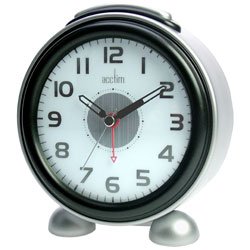
Figi 1: Devan view of the Acctim Smartlite Grande Alarm Clock, displaying its analog dial, time hands, and brand logo.
2. Enfòmasyon sou Sekirite
- Sekirite batri: Use only the specified battery type (not included). Do not mix old and new batteries, or different types of batteries. Insert batteries with correct polarity (+/-). Remove exhausted batteries promptly. Do not dispose of batteries in fire.
- Plasman: Place the clock on a stable, flat surface. Avoid placing it in direct sunlight, near heat sources, or in areas with high humidity or extreme temperatures.
- Netwayaj: Clean the clock with a soft, dry cloth. Do not use liquid cleaners or abrasive materials.
- Demonte: Pa eseye demonte oswa repare revèy la tèt ou. Konfye tout antretyen bay pèsonèl kalifye.
3. Pake kontni
Tanpri verifye ke tout atik yo prezan:
- Acctim Smartlite Grande Alarm Clock (1 unit)
- Manyèl Enstriksyon (dokiman sa a)
Remak: Pil yo pa enkli epi yo dwe achte separeman.
4. Pwodwi Features
- Smartlite Technology: An innovative feature that automatically illuminates the clock dial for easy viewing in low-light conditions. A built-in light sensor detects ambient light levels, turning the illumination off during daytime to conserve battery life.
- Fonksyon alam: Integrated alarm with an on/off switch.
- Non-Ticking Sweep Movement: The second hand moves in a continuous, smooth motion, designed to reduce audible ticking sounds.
- Ekspozisyon analòg: Clear and easy-to-read analog dial.
- Batri Powered: Operates on batteries for portability and convenience.
5. Enstalasyon
5.1. Enstalasyon batri
- Jwenn kouvèti konpatiman pil la sou dèyè revèy la.
- Retire kouvèti a lè w glise l oswa lè w leve l dapre mak yo.
- Insert the required batteries (check the compartment for battery type) ensuring correct polarity (+ and -) as indicated inside the compartment.
- Ranplase kouvèti lòj batri a byen.
5.2. Anviwònman Tan Inisyal
- Jwenn bouton pou mete lè a sou do revèy la.
- Rotate the knob in either direction to set the current time. Ensure the hour and minute hands are accurately positioned.
6. Operasyon Enstriksyon
6.1. Mete alam la
- Jwenn bouton reglaj alam lan sou dèyè revèy la.
- Vire bouton reglaj alam lan pou deplase zegwi alam lan nan lè alam ou vle a.
- Locate the alarm ON/OFF switch (usually a small slider or button) on the back or side of the clock.
- Glise switch la nan pozisyon "ON" pou aktive alam lan.
6.2. Silencing the Alarm
When the alarm sounds, you can silence it by:
- Pressing the snooze/light button (if available, typically on top). This will temporarily silence the alarm, and it will sound again after a few minutes.
- Sliding the alarm ON/OFF switch to the "OFF" position. This will deactivate the alarm until it is manually turned "ON" again.
6.3. Smartlite Function
The Smartlite feature operates automatically. The built-in light sensor will detect low ambient light conditions and illuminate the clock dial. During brighter conditions, the illumination will turn off to conserve battery power. No manual adjustment is required for this feature.
7. Antretyen
7.1. Netwayaj
Wipe the clock's exterior with a soft, dry, lint-free cloth. Do not use abrasive cleaners, solvents, or chemical sprays, as these can damage the finish and internal components.
7.2. Ranplasman batri
When the clock's display dims, the alarm weakens, or the clock stops functioning, it is time to replace the batteries. Follow the battery installation steps in Section 5.1.
NAN. Depanaj
- Clock not working / Display dim:
- Tcheke si pil yo byen mete ak bon polarite a.
- Ranplase ak pil fre.
- Alam pa sonnen:
- Asire w ke switch alam lan ON/OFF la nan pozisyon "ON".
- Verify the alarm time is set correctly.
- Ranplase pil yo si yo fèb.
- Smartlite not illuminating:
- Ensure the clock is in a sufficiently dark environment for the sensor to activate.
- Ranplase pil yo si yo fèb.
- Unusual noise from the clock:
- While the clock features a non-ticking sweep movement, some subtle mechanical sounds may be audible in very quiet environments. This is generally normal for analog movements.
- Ensure the clock is on a stable, flat surface to prevent vibrations.
9. Espesifikasyon
| Mak | Acctim |
| Nimewo Modèl | 13422X |
| Kalite ekspozisyon | Analòg |
| Style | Modèn |
| Karakteristik espesyal | Alarm, Smartlite (Automatic Dial Illumination) |
| Sous pouvwa | Batri Powered |
| Fòm | Round |
| Materyèl ankadreman | Acrylonitrile Butadiene styrene |
| Batri enkli | Non |
| Mòd operasyon | Elektrik |
| Manifakti | Acctim |
| ASIN | B000TLIGD8 |
| Dat Premye Disponib | 1 mas 2014 |
10. Garanti ak sipò
For warranty information and customer support, please refer to the documentation provided at the point of purchase or visit the official Acctim websit la. Kenbe prèv acha ou a pou nenpòt reklamasyon garanti.
For further assistance, please contact your retailer or the manufacturer's customer service department.


