1. Entwodiksyon
This manual provides instructions for the setup, operation, and maintenance of your Polycom SoundPoint IP 430 phone. The SoundPoint IP 430 is a two-line desktop IP phone designed for clear voice communication, featuring a full-duplex speakerphone with Polycom Acoustic Clarity Technology.
2. Enstalasyon
2.1 Debake
Retire tout konpozan yo nan anbalaj la avèk prekosyon. Asire w ke atik sa yo la:
- Polycom SoundPoint IP 430 Phone Unit
- Aparèy
- Aparèy kòd
- Ethernet kab
- Telefòn kanpe
- (Note: Power supply is not included with this specific product offering and must be acquired separately if Power over Ethernet (PoE) is not available.)
2.2 Konekte Telefòn nan
- Atache Sipò Telefòn nan: Align the stand with the slots on the back of the phone unit and snap it into place.
- Konekte telefòn nan: Plug one end of the coiled handset cord into the handset and the other end into the handset port on the phone unit (typically marked with a handset icon).
- Konekte sou rezo a: Plug one end of the Ethernet cable into the LAN port on the phone (marked with a network icon) and the other end into an active network port (e.g., a wall jack or network switch).
- Konekte kouran an (si w pa itilize PoE): If your network does not provide Power over Ethernet (PoE), connect an appropriate external power adapter (not included) to the power port on the phone unit and then to a power outlet.
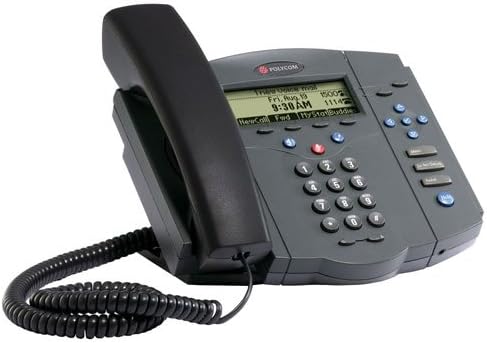
Figure 1: Polycom SoundPoint IP 430 Phone. This image displays the complete phone unit, including the main body, handset, and coiled handset cord. The phone features a monochrome LCD display, a numeric keypad, and various function buttons for call management.
Once connected, the phone will power on and begin its boot-up sequence. This may take a few moments as it connects to the network and registers with your VoIP system.
3. Operasyon Enstriksyon
3.1 Fonksyon Apèl Debaz yo
- Fè yon apèl:
- Pran telefòn nan, peze bouton Oratè a, oubyen peze yon bouton Liy.
- Fè nimewo ou vle a lè l sèvi avèk klavye a.
- Peze bouton "Rele" a oubyen tann apèl la konekte otomatikman.
- Reponn yon apèl:
- Pick up the handset, press the Speaker button, or press the flashing Line button.
- Fini yon apèl:
- Hang up the handset, press the Speaker button again, or press the "End Call" soft key.
3.2 Speakerphone and Mute
- Sèvi ak Speakerphone: Peze a Oratè button to toggle speakerphone mode on or off.
- Silenn mikwofòn la: Pandan yon apèl, peze la bèbè button to mute your microphone. The button will illuminate when active. Press again to unmute.
3.3 Kontwòl Volim
Sèvi ak la Volim buttons (located below the display) to adjust the volume of the handset, speakerphone, or ringer, depending on the phone's current state.
3.4 Hold and Transfer
- Placing a Call on Hold: Pandan yon apèl aktif, peze la Kenbe soft key. To resume the call, press the flashing Line button or the "Resume" soft key.
- Transfere yon apèl:
- Pandan yon apèl aktif, peze la Transfè soft key. The current call will be placed on hold.
- Dial the number of the party you wish to transfer the call to.
- Once the second party answers, you can announce the call (consulted transfer) or press the Transfè soft key again to complete the transfer (blind transfer).
3.5 Aksè a Mesaj Vokal
Peze a Mesaj button (envelope icon) to access your voicemail. Follow the audio prompts to retrieve your messages.
4. Antretyen
4.1 Netwaye Telefòn nan
- Sèvi ak yon mou, yon ti kras damp, lint-free cloth to clean the phone's exterior.
- Pa sèvi ak pwodui netwayaj abrazif, sir, oswa solvan.
- Evite flite likid dirèkteman sou telefòn nan.
- Ensure the phone is disconnected from power before cleaning.
4.2 Swen Jeneral
- Keep the phone away from excessive heat sources, direct sunlight, and moisture.
- Evite lage telefòn nan oswa sibi gwo enpak.
NAN. Depanaj
This section addresses common issues you might encounter with your Polycom SoundPoint IP 430 phone.
| Pwoblèm | Kòz posib | Solisyon |
|---|---|---|
| Telefòn nan pa limen. | Pa gen ekipman pou kouran oswa koneksyon an defektye. |
|
| Pa gen ton rele. | Network connectivity issue or phone not registered. |
|
| Cannot hear caller / Caller cannot hear me. | Volume settings, mute active, or faulty handset/speaker. |
|
6. Espesifikasyon
Key technical specifications for the Polycom SoundPoint IP 430 phone:
| Karakteristik | Detay |
|---|---|
| Dimansyon pwodwi | 14 x 12.5 x 6 pous |
| Pwa atik | 3.55 liv |
| Nimewo Modèl | IP 430 |
| Mak | Polycom |
| Koulè | Gri |
| Kalite Telefòn | Kòde |
| Sous pouvwa | Corded Electric (PoE compatible, external adapter not included) |
| Kalite diler | Single klavye |
| Kalite sistèm repons | Digital |
| Kapasite Apèl Konferans | 2-fason |
| Manifakti | Polycom Inc. |
7. Garanti ak sipò
7.1 Enfòmasyon sou Garanti
For specific warranty details regarding your Polycom SoundPoint IP 430 phone, please refer to the warranty documentation provided at the time of purchase or visit the official Polycom (now Poly) websit. Tèm garanti yo anjeneral kouvri domaj fabrikasyon pou yon peryòd espesifik.
7.2 Sipò teknik
If you require technical assistance beyond the scope of this manual, please contact your VoIP service provider or IT department. For direct manufacturer support, visit the Poly (formerly Polycom) support websit pou resous, FAQ, ak enfòmasyon pou kontakte yo.


