Entwodiksyon
This manual provides comprehensive instructions for the safe and efficient operation of your Coby TF-DVD7107 7-Inch Portable DVD Player. Please read this manual thoroughly before using the device to ensure proper setup, usage, and maintenance. Keep this manual for future reference.
Enfòmasyon sou Sekirite
Obsève prekosyon sekirite sa yo pou evite domaj nan aparèy la epi asire sekirite itilizatè a:
- Pa ekspoze aparèy la anba lapli, imidite, oswa tanperati ekstrèm.
- Evite mete aparèy la toupre sous chalè oswa nan limyè solèy la dirèk.
- Use only the specified power adapters and accessories provided by Coby.
- Pa eseye ouvri oswa repare aparèy la tèt ou. Konfye tout antretyen bay pèsonèl kalifye.
- Kenbe aparèy la lwen gwo chan mayetik.
- Asire bon vantilasyon pou anpeche surchof.
Kontni pake
Verifye ke tout atik yo prezan nan pakè a:
- Coby TF-DVD7107 Portable DVD Player
- Remote kontwòl
- AV kab
- 100-240V UL listed AC adaptor
- DC adaptè machin
- Ekoutè stereo
- Lityòm-ion rechargeable batri
Pwodwi souview
The Coby TF-DVD7107 is a compact portable DVD player designed for on-the-go entertainment. It features a 7-inch widescreen TFT color display and supports various media formats.
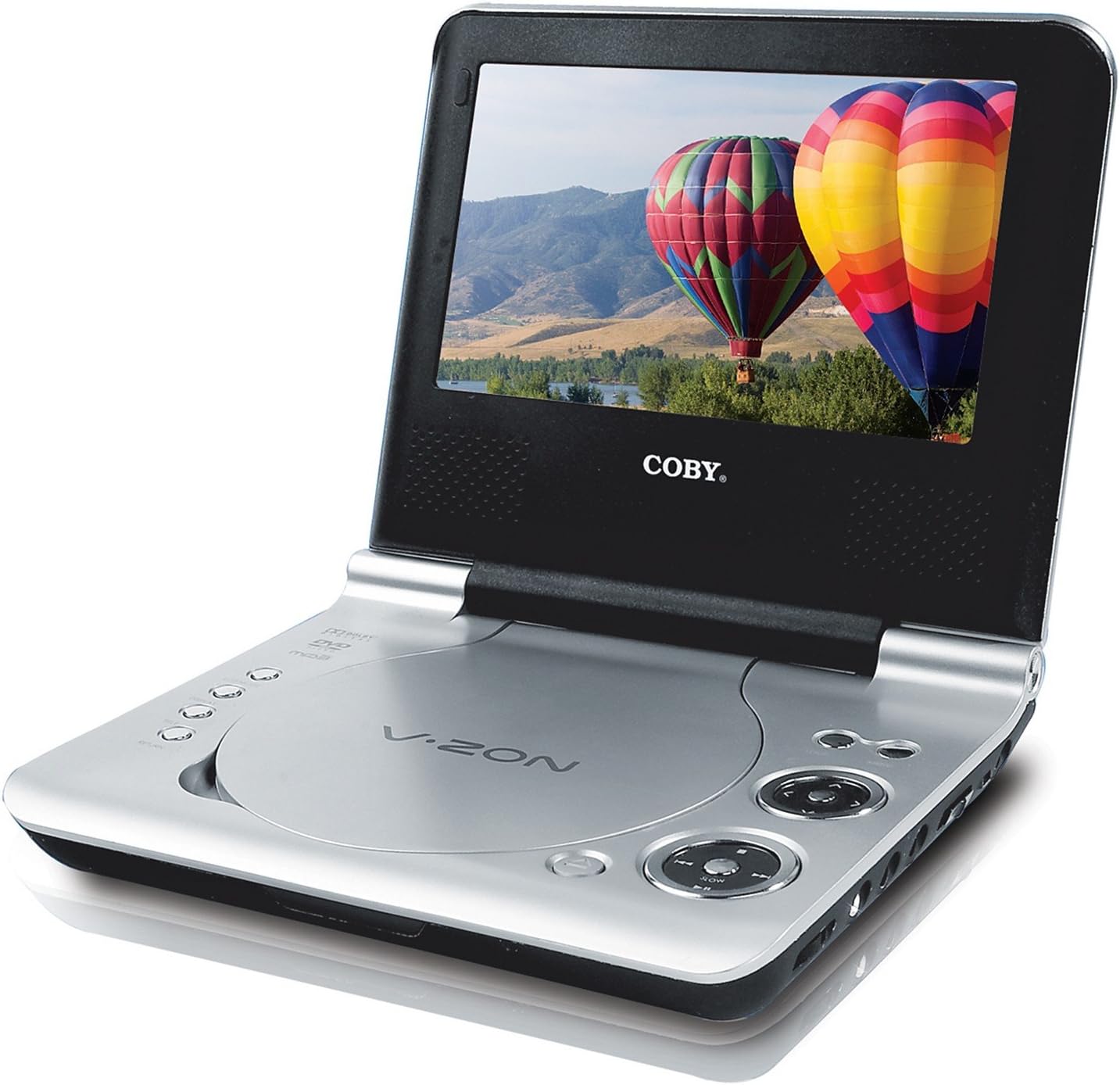
An image of the Coby TF-DVD7107 portable DVD player. The device is open, revealing a 7-inch widescreen display and the disc compartment. The screen shows a vibrant image of hot air balloons over a landscape. The player features a silver finish with black accents around the screen and control buttons.
Karakteristik kle:
- 7-inch Widescreen (16:9) TFT Color Display
- Compatibility with DVD, DVD±R/RW, CD, CD±R/RW, JPEG, and MP3 formats
- Built-in anti-skip circuitry for uninterrupted playback
- Multiple subtitle and viewopsyon ang yo
- Slow/Fast motion play and zoom operation
- Convenient on-screen display
- Jack kas pou tande prive
Enstalasyon
1. Chaje batri a:
Before first use, fully charge the included Lithium-ion rechargeable battery. Connect the AC adaptor to the DC IN 9V port on the player and then to a power outlet. The charging indicator light will illuminate. Once fully charged, the light may change color or turn off, depending on the model.
2. Enstale batri a:
Locate the battery compartment on the underside of the player. Insert the Lithium-ion battery, ensuring correct polarity, and secure the compartment cover.
3. Alimente Aparèy la:
- AC pouvwa: Connect the AC adaptor to the player and a wall outlet.
- Car Power: Use the DC car adapter to power the player from your vehicle's 12V accessory socket.
- Pouvwa batri: Ensure the internal battery is charged for portable use.
Enstriksyon Operasyon
Lektur debaz:
- Pouvwa sou: Peze bouton POWER pou limen jwè a.
- Mete disk: Gently open the disc cover and place a DVD or CD onto the spindle with the label side facing up. Close the cover securely.
- Lektur: The player will typically begin playback automatically. If not, navigate to the PLAY option using the control buttons or remote and press ENTER.
- Kontwòl: Use the PLAY/PAUSE, STOP, FAST FORWARD, REWIND, NEXT, and PREVIOUS buttons on the player or remote control to manage playback.
- Volim: Adjust the volume using the dedicated volume controls.
- kas ekoutè: For private listening, plug stereo headphones into the headphone jack(s).
Karakteristik avanse:
- Sou-titres: During DVD playback, press the SUBTITLE button on the remote to cycle through available subtitle tracks.
- Viewang yo: If a DVD supports multiple camera angles, press the ANGLE button on the remote to switch between them.
- Slow/Fast Motion: Use the appropriate buttons on the remote to adjust playback speed.
- Zoom: Press the ZOOM button to enlarge a portion of the screen. Use navigation buttons to move the zoomed area.
- Ekspozisyon sou ekran (OSD): The OSD provides information about playback status, track number, time, and other settings.
Region-Free Playback (Advanced User Information):
The Coby TF-DVD7107 is typically set to a specific DVD region. Some users have reported success in modifying the device to play DVDs from all regions. This procedure is not officially supported by the manufacturer and may void your warranty. Proceed at your own risk.
Reported Procedure:
- Ensure the unit is powered on and a DVD is inserted, but do not start playback. The player should be on the neutral blue screen.
- Sèvi ak kontwòl remote la, peze la SETUP button. A menu box should appear.
- Peze a Avanse vit (>>) bouton.
- Peze a Fast Rewind (<<) bouton.
- Peze a Next Chapter (>>|) bouton.
- Peze a Previous Chapter (|<<) bouton.
- A number representing the current region should appear. Use the right arrow button (next to "ENTER" on the remote) to change this number to 255.
- Peze a SETUP button again until the setup menu disappears.
Your device should now be set to region-free. Note down your original region setting if you wish to revert the change.
Antretyen
Netwaye aparèy la:
- Use a soft, dry cloth to clean the exterior of the player.
- For the screen, use a soft, lint-free cloth specifically designed for electronics displays. Do not use abrasive cleaners or solvents.
- Keep the disc compartment free of dust and debris.
Swen batri:
- Pou pwolonje lavi batri a, evite dechaje batri a nèt souvan.
- Si w ap sere aparèy la pou yon peryòd tan pwolonje, chaje batri a apeprè 50% epi sere l nan yon kote ki fre epi sèk.
- Pa ekspoze batri a nan tanperati ki wo.
Depanaj
If you encounter issues with your Coby TF-DVD7107, refer to the following common problems and solutions:
- Pa gen pouvwa:
- Ensure the AC adapter is securely connected to both the player and a working power outlet.
- If using battery power, ensure the battery is charged and correctly installed.
- Check the power switch is in the 'ON' position.
- Disk la pa ap jwe / Erè disk:
- Verify the disc is clean and free of scratches or smudges.
- Asire w ke disk la byen antre ak bò etikèt la anlè.
- Check if the disc format (DVD, CD, MP3, JPEG) is supported by the player.
- The built-in anti-skip circuitry helps, but severe vibrations can still cause interruptions.
- Pa gen son:
- Ajiste nivo volim.
- If using headphones, ensure they are fully plugged in and functional.
- Check if the audio output is muted.
- Kalite imaj ki pa bon:
- Netwaye ekran an avèk yon moso twal mou, ki pa pelen.
- Ensure the disc is clean and undamaged.
- Adjust display settings if available in the menu.
- Odè oswa Son ki pa nòmal:
If you detect any burning smell or unusual sounds, immediately disconnect the power adapter and turn off the device. Do not attempt to use or repair the unit. Contact qualified service personnel.
Espesifikasyon
| Karakteristik | Detay |
|---|---|
| Mak | Coby |
| Nimewo Modèl | TF-DVD7107 |
| Gwosè ekran | 7 pous |
| Kalite ekspozisyon | LCD |
| Kalite Medya Sipòte | DVD, DVD±R/RW, CD, CD±R/RW, JPEG, MP3 |
| Koulè | Ajan |
| Pwa atik | 3.55 liv |
| Dimansyon pwodwi | 8 x 6 x 2 pous |
| Batri | 1 Lithium-ion Rechargeable battery (included) |
| Antre pouvwa | 100-240V AC (with adaptor), 12V DC (with car adaptor) |
Garanti ak sipò
For warranty information and technical support, please refer to the documentation provided at the time of purchase or contact Coby customer service directly. The product's legal disclaimer states, "Item sold as is. No refunds." This may indicate specific terms regarding returns or exchanges from the point of sale. Any claims regarding defects or service should be directed to the manufacturer or the retailer from whom the product was purchased.


