1. Entwodiksyon
This manual provides comprehensive instructions for the setup, operation, maintenance, and troubleshooting of your COBY CR-A78 AM/FM Digital Alarm Clock with Time Projector. Please read this manual thoroughly before using the device to ensure proper function and to maximize your user experience. Keep this manual for future reference.
2. Pwodwi souview
The COBY CR-A78 is a versatile digital alarm clock featuring an AM/FM radio tuner and a unique time projection function. It is designed to provide reliable timekeeping, alarm functions, and radio entertainment, with the added convenience of projecting the current time onto a wall or ceiling.
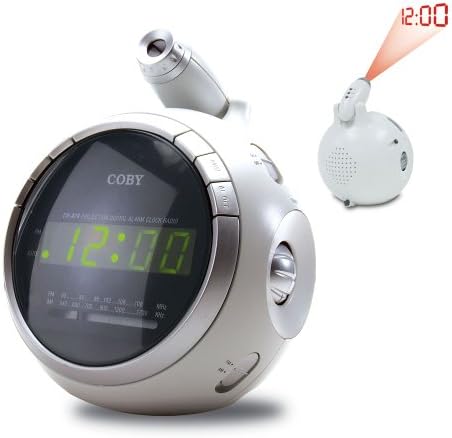
Imaj 2.1: Devan view of the COBY CR-A78 digital alarm clock, showing the green LED display and the adjustable time projector. An inset image illustrates the time '12:00' being projected onto a surface.
3. Karakteristik
- Sintonizatè dijital AM/FM: For listening to your favorite radio stations.
- Large Green LED Display: Provides clear visibility of the time.
- Integrated Time Projector: Projects the current time onto a wall or ceiling for easy viewing.
- Fonksyon alam doub: Set two independent alarms for different wake-up times.
- Fonksyon Snooze: Allows for a temporary pause of the alarm.
- Revèy dòmi: Fall asleep to music with an automatic shut-off feature.
- Batri Backup: Kenbe lè a ak paramèt alam yo pandan kouran an koupe.tages (requires 9V battery, not included).
4. Pake kontni
- COBY CR-A78 AM/FM Digital Alarm Clock
- AC pouvwa adaptè
- Manyèl Itilizatè (dokiman sa a)
5. Enstalasyon
5.1. Koneksyon pouvwa
- Insert the small end of the AC power adapter into the DC IN jack located on the back of the unit.
- Plug the other end of the AC power adapter into a standard wall outlet (AC 120V, 60Hz).
- The unit will power on, and the display will flash, indicating it is ready for time setting.
5.2. Enstalasyon sovgad batri
A 9-volt battery (not included) can be installed to provide backup power for the clock and alarm settings during a power interruption.
- Jwenn kouvèti konpatiman batri a anba aparèy la.
- Retire kouvèti a lè w glise l.
- Connect a 9-volt battery to the battery connector inside the compartment, observing polarity (+ and -).
- Place the battery into the compartment and replace the cover securely.
6. Operasyon Enstriksyon
6.1. Mete Tan an
- Peze epi kenbe la TAN SET bouton an jiskaske chif èdtan yo kòmanse flache.
- Peze a LÈ Peze bouton an plizyè fwa pou ajiste lè a. Obsève endikatè PM a pou w ka byen ajiste AM/PM nan.
- Peze a MINIT bouton an plizyè fwa pou ajiste minit la.
- Peze a TAN SET Peze bouton an ankò pou konfime epi sòti nan mòd reglaj tan an.
6.2. Mete alam la
The CR-A78 features two independent alarms, Alarm 1 and Alarm 2.
- Peze epi kenbe la ALARM 1 SET (oswa ALARM 2 SET) button until the alarm hour digits flash.
- Peze a LÈ bouton an pou mete lè alam ou vle a.
- Peze a MINIT bouton yo mete minit nan alam vle.
- Peze a ALARM 1 SET (oswa ALARM 2 SET) button again to confirm the alarm time.
- Pou aktive alam lan, glise bouton an ALAM 1 ON/OFF (oswa ALAM 2 ON/OFF) switch to the 'ON' position. Select 'BUZZER' for a beeping alarm or 'RADIO' to wake to the radio.
6.3. Sèvi ak Fonksyon Snooze a
Lè alam la son, peze la SNOOZE button. The alarm will temporarily stop and sound again after approximately 9 minutes. To turn off the alarm completely, press the ALARM ON / OFF chanje sou 'OFF'.
6.4. Operasyon Radyo (AM/FM)
- Peze a RADYO ON/OFF bouton pou limen radyo a.
- Glise a AM/FM switch to select the desired band.
- Vire a REGLAGE knob to find your desired station.
- Ajiste volim nan lè l sèvi avèk la VOLIM bouton.
- Pou fèmen radyo a, peze la RADYO ON/OFF bouton ankò.
6.5. Using the Time Projector
- Locate the projector lens on top of the unit.
- Peze a PWOJEKTÈ ON/OFF button to activate the time projection.
- Vire lantiy pwojektè a pou ajiste fokus tan pwojekte a.
- Adjust the angle of the projector arm to direct the time onto your desired surface (wall or ceiling).
- Peze a PWOJEKTÈ ON/OFF button again to turn off the projection.
7. Antretyen
- Netwayaj: Sèvi ak yon twal mou epi sèk pou netwaye deyò aparèy la. Pa sèvi ak pwodui netwayaj abrazif oswa solvan.
- Swen Lantiy: Gently wipe the projector lens with a soft, lint-free cloth if it becomes dusty.
- Plasman: Mete aparèy la sou yon sifas ki plat e ki estab, lwen limyè solèy dirèk, sous chalè ak imidite twòp.
- Ranplasman batri: Replace the 9-volt backup battery annually or if the unit experiences frequent power outages to ensure continuous backup functionality.
NAN. Depanaj
| Pwoblèm | Kòz posib | Solisyon |
|---|---|---|
| Aparèy pa limen. | Adaptè AC a pa byen konekte. | Asire w adaptè AC a byen branche nan aparèy la ak nan yon priz miray ki fonksyone. |
| Alam lan pa sonnen. | Alam lan pa aktive oswa li pa byen configuré. | Verify the alarm time is set correctly and the ALARM ON/OFF switch is in the 'ON' position (BUZZER or RADIO). |
| Resepsyon radyo pa bon. | Antenna not extended or unit too close to interference. | Extend the FM wire antenna fully. For AM, rotate the unit for best reception. Move away from other electronic devices. |
| Projected time is blurry. | Projector focus not adjusted. | Rotate the projector lens to adjust the focus until the time is clear. |
| Tan/paramèt pèdi apre kouran an koupetage. | Batri backup la mouri oswa li pa enstale. | Install a fresh 9-volt battery or replace the existing one. |
9. Espesifikasyon
| Karakteristik | Spesifikasyon |
|---|---|
| Mak | Coby |
| Modèl | CR-A78 |
| Kalite ekspozisyon | LED dijital (vèt) |
| Radio Tuner | AM/FM Analòg |
| Sous pouvwa | AC 120V, 60Hz |
| Sovgad batri | 1 x pil 9V (pa enkli) |
| Dimansyon pwodwi (L x W x H) | 12.7 x 10.16 x 15.24 cm (5 x 4 x 6 pous) |
| Pwa pwodwi | 567 g (1.25 lbs) |
| Koulè | Ajan |
10. Garanti ak sipò
For warranty information or technical support, please refer to the documentation provided at the time of purchase or contact Coby customer service. Keep your purchase receipt as proof of purchase for any warranty claims.


