Entwodiksyon
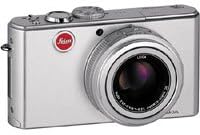
The Leica D-LUX 2 is an 8.4 megapixel digital camera designed for versatile photography. It features Leica DC VARIO-ELMARIT 6.3-25.2 mm f/2.8-4.9 ASPH. optics with 4x optical zoom, providing a focal length range equivalent to 28-112 mm on a 35 mm camera. The camera incorporates optical image stabilization and offers various scene programs to adapt to different shooting conditions. Its compact and stylish aluminum body is built for portability and ease of use.
Enstalasyon
1. Enstalasyon batri
The Leica D-LUX 2 uses a Lithium-Ion battery (3.7 V, 1150 mAH). Ensure the battery is fully charged before first use.
- Louvri kouvèti konpatiman batri a ki sitiye anba kamera a.
- Insert the charged battery into the compartment, ensuring correct orientation as indicated inside the compartment.
- Fèmen kouvèti konpatiman batri a byen fèm jiskaske li fè yon klik an plas.
Imaj: Anba view of the Leica D-LUX 2 camera, highlighting the battery and memory card compartment. This compartment is crucial for power and storage.
2. Enstalasyon Kat Memwa
The camera supports SD & MMC Cards. A 64 MB SD Card is supplied with the camera.
- Avèk konpatiman batri a louvri, lokalize fant kat memwa a.
- Insert the SD or MMC card into the slot with the label facing the correct direction (usually towards the front of the camera) until it clicks.
- Fèmen kouvèti lòj batri a.
3. Mete bouchon lantiy la
Always attach the lens cap when the camera is not in use to protect the lens from dust and scratches.

Imaj: Devan view of the Leica D-LUX 2 camera with its lens cap in place, demonstrating proper lens protection.
Opere kamera a
1. Powering On / Off
Press the power button to turn the camera on or off. The lens will extend upon powering on.
2. Mòd Debaz pou Pran Foto
The D-LUX 2 offers various exposure control modes:
- Full Automatic Mode: The camera automatically sets all parameters. Shutter speed range: 1/4 - 1/2000 sec.
- Mòd Pwogram (P): The camera sets aperture and shutter speed, but you can adjust other settings. Shutter speed range: 1 - 1/2000 sec.
- Priyorite Ouvèti (Av oswa A): Ou ajiste ouvèti a, epi kamera a chwazi vitès obturateur ki apwopriye a.
- Priyorite obturateur (Televizyon oswa S): You set the shutter speed, and the camera selects the appropriate aperture. Shutter speed range: 8 - 1/2000 sec.
- Mòd manyèl (M): You control both aperture and shutter speed. Shutter speed range: 60 - 1/2000 sec.
- Scene Programs: Select from various pre-set scene modes like Portrait, Sport, Night-time Landscape, Night-time Portrait, Fireworks, Party, Snow, Self-portrait, Food, Baby, Soft-focus for skin, Candlelight, and Starry Sky.

Imaj: Dèyè view of the Leica D-LUX 2, displaying the LCD screen and various control buttons for mode selection and navigation.
3. ISO sansiblite
Adjust the ISO sensitivity manually or set it to automatic. Available ISO settings are 80, 100, 200, and 400.
4. Optical Image Stabilizer
The camera features an Optical Image Stabilizer with two operating modes: one for exposure only and another for both exposure and monitor display. This helps reduce blur caused by camera shake.
5. File Fòma
Still images can be saved in RAW, TIFF, or JPEG (Fine / Standard) formats. RAW and TIFF formats offer maximum image data for post-processing, while JPEG provides smaller file gwosè.
6. Anrejistreman Videyo
The camera can record video in QuickTime Motion JPEG format. Video resolutions include up to 3840 x 2160, 16:9 VGA 848 x 480, and 4:3 VGA 640 x 480 at 10 or 30 frames per second.
7. Self-Timer
Utilize the self-timer function for delayed shots, with options for a 2-second or 10-second delay.
Antretyen
1. Netwaye Kamera a
- Sèvi ak yon twal mou ki pa gen pousyè pou netwaye kò kamera a.
- For the lens, use a specialized lens cleaning cloth and solution. Avoid touching the lens surface directly.
- Keep the lens cap on when not in use to prevent dust accumulation.
2. Swen batri
- Store the Lithium-Ion battery in a cool, dry place when not in use.
- Evite dechaje batri a nèt souvan pou pwolonje dire lavi li.
- Sèvi ak sèlman plato espesifye pou batri a.
3. Manyen Kat Memwa
- Toujou fòma nouvo kat memwa nan kamera a anvan premye itilizasyon an.
- Avoid removing the memory card while the camera is writing data to prevent corruption.
- Regularly back up your photos and videos to an external storage device.
Depanaj
| Pwoblèm | Kòz posib | Solisyon |
|---|---|---|
| Kamera a pa limen. | Batri a dechaje oswa li pa byen mete. | Chaje batri a nèt epi asire w ke li byen mete. |
| Imaj yo flou. | Camera shake or incorrect focus. | Ensure Optical Image Stabilizer is active. Use a faster shutter speed or tripod. Check focus settings. |
| Erè kat memwa. | Kat la plen, li pèvèti, oswa li pa konpatib. | Efase pa nesesè files, reformat the card (will erase all data), or try a different compatible SD/MMC card. |
| Flash la pa tire. | Flash mode is set to OFF or conditions are too bright. | Check flash mode settings (Auto, On, Off, Slow Synch). Ensure subject is within flash range. |
Espesifikasyon
| Karakteristik | Detay |
|---|---|
| Non modèl | Leica D-LUX 2 |
| Rezolisyon toujou efikas | 8.4 MP |
| Kalite Capteur Imaj | 1/1.6 inches CCD |
| Kalite lantiy | Leica DC VARIO-ELMARIT 6.3-25.2 mm f/2.8-4.9 ASPH. with 4x optical zoom |
| Focal Length (35mm equivalent) | 28 a 112 mm |
| Zoom optik | 4x |
| Zoom dijital | 5x |
| Estabilizasyon Imaj | Optik |
| Sipòte File Fòma | JPEG, RAW, TIFF |
| Sòti videyo | QuickTime Mouvman JPEG |
| Rezolisyon videyo | Jiska 480p |
| Gwosè ekran | 2.5 pous LCD |
| ISO sansiblite | Oto, 80, 100, 200, 400 |
| Range vitès vole | 60 - 1/2000 sec (Manual), 1/4 - 1/2000 sec (Auto) |
| Oto minutri | 2 oswa 10 segonn |
| Pwovizyon pou pouvwa | Lithium-Ion battery, 3.7 V, 1150 mAH |
| Dimansyon (W x H x P) | 105.7 x 58.3 x 25.6 mm (4 5/32 x 2 9/32 x 1 inch) |
| Pwa | 185 grams (6.5 ounces) without battery, 220 grams (7.75 ounces) with battery |
Garanti ak sipò
For warranty information, please refer to the documentation included with your purchase or visit the official Leica website. For technical support, service, or additional inquiries, please contact Leica customer service through their official channels.
- Sipò sou entènèt: Vizite la Leica Kamera websit for FAQs, software downloads, and service information.
- Kontakte: Refer to your product packaging or the Leica websit pou jwenn enfòmasyon kontak sèvis kliyan rejyonal la.


