1. Entwodiksyon
This manual provides instructions for the installation, operation, and maintenance of the Allied Telesis AT-GS950/24-10 Gigabit Ethernet Smart Switch. The GS950 Series web Smart switch combines the simplicity of unmanaged switches with the performance and reliability of managed switches, offering a cost-effective solution for network edge management. It supports key features such as port-based VLANs, 802.1P QoS, port trunking/link aggregation, port mirroring, priority queues, Spanning Tree, and 802.1X security. With an 8K MAC address table and a 512K packet buffer, this switch is designed for integrating management into your network infrastructure.
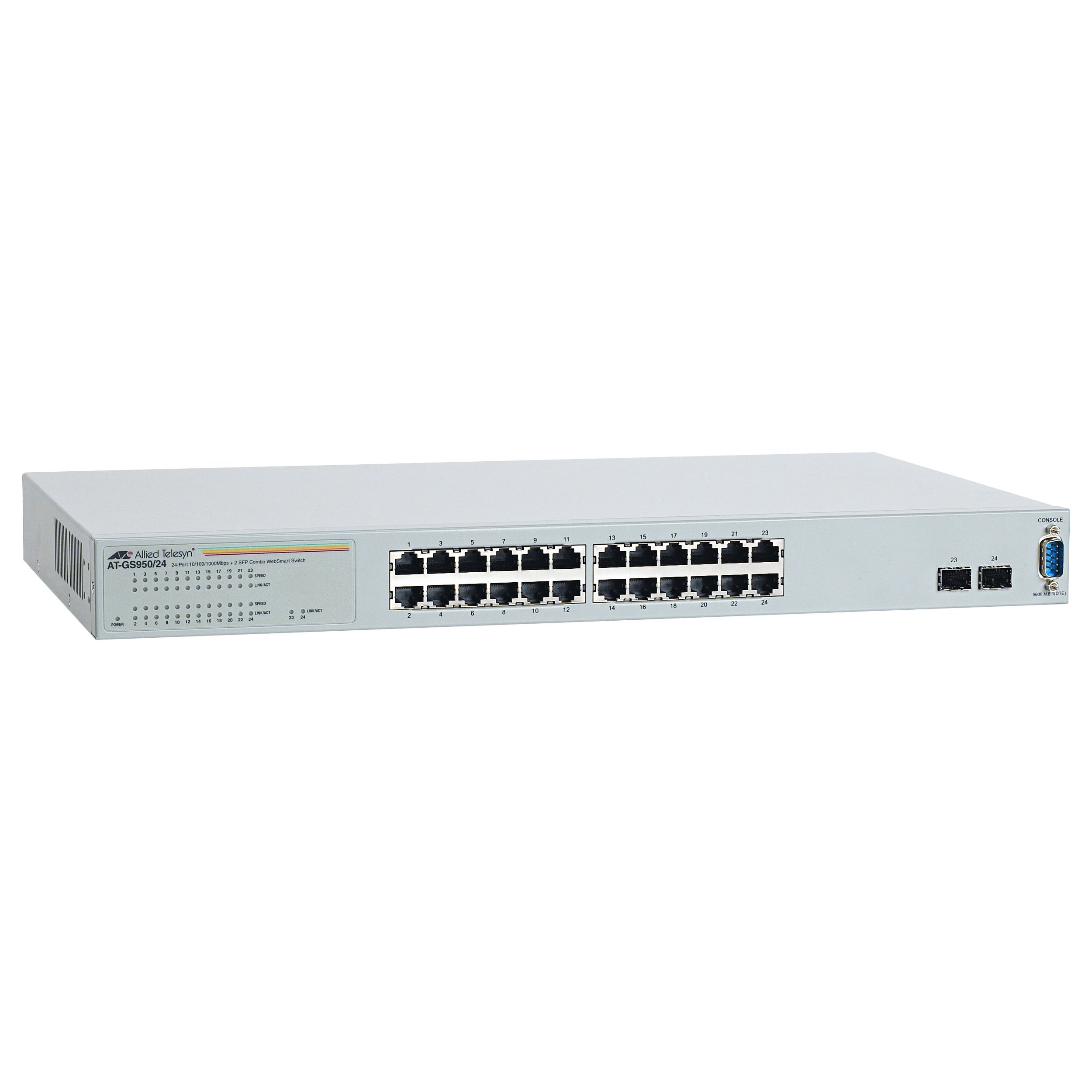
Figi 1: Devan view of the Allied Telesis AT-GS950/24-10 Gigabit Ethernet Smart Switch, showing 24 Ethernet ports and two SFP ports.
2. Enfòmasyon sou Sekirite
Please read all safety instructions carefully before installing or operating this device. Failure to follow these instructions may result in electric shock, fire, or damage to the product.
- Sous pouvwa: Connect the device only to the type of power source indicated on the marking label.
- Vantilasyon: Asire bon vantilasyon. Pa bloke okenn ouvèti vantilasyon.
- Imidite: Pa ekspoze aparèy la ak dlo oswa imidite.
- Tanperati: Operate the device within the specified temperature range (up to 40°C).
- Sèvis: Pa eseye fè sèvis pwodui sa a tèt ou. Refere tout sèvis yo bay pèsonèl sèvis kalifye.
- Câbles: Use only approved and appropriate cables for network connections.
3. Pake kontni
Verifye ke pake ou a gen atik sa yo:
- Allied Telesis AT-GS950/24-10 Gigabit Ethernet Smart Switch (24 x 10/100/1000 + 2 x SFP ports)
- Kòd pouvwa
- Rack-mount kit (if applicable, for desktop enclosure)
- Gid demaraj rapid oswa CD dokimantasyon
Si gen nenpòt atik ki manke oswa ki domaje, tanpri kontakte vandè ou imedyatman.
4. Enstalasyon
4.1 Enstalasyon Fizik
The AT-GS950/24-10 is designed for desktop deployment. Ensure the installation location meets the following criteria:
- A stable, flat surface.
- Adequate ventilation space around the device.
- Away from direct sunlight, heat sources, and excessive moisture.
- Within reach of a grounded power outlet.
4.2 Konekte pouvwa
- Connect one end of the power cord to the power inlet on the rear panel of the switch.
- Konekte lòt bout kòd kouran an nan yon priz elektrik ki gen tè.
- The power LED on the front panel should illuminate, indicating the device is receiving power.
4.3 Konekte Aparèy Rezo yo
- Connect Ethernet cables from your network devices (computers, servers, other switches) to the 24 10/100/1000BASE-T ports on the front panel.
- For fiber optic connections, insert compatible SFP transceivers into the two SFP ports and connect fiber optic cables.
- Observe the link/activity LEDs for each port. A solid green LED indicates a valid link, and a blinking LED indicates data activity.
4.4 Konfigirasyon Inisyal (Web-based Management)
The AT-GS950/24-10 is a web-smart switch, meaning it can be configured via a web browser. Refer to the Quick Start Guide for the default IP address and login credentials to access the web management interface. Through this interface, you can configure advanced features such as VLANs, QoS, and port security.
5. Itilizasyon switch la
Once powered on and connected, the AT-GS950/24-10 switch operates automatically to forward network traffic. As a managed switch, it offers a range of configurable features to optimize network performance and security.
5.1 Operasyon debaz
- Transfè Done: The switch intelligently forwards data frames between connected devices at Gigabit speeds.
- Oto-negosyasyon: Each Ethernet port automatically detects the speed and duplex mode of the connected device.
- MDI/MDIX Otomatik: Elimine nesesite pou kab kwaze.
5.2 Advanced Features (via Web Jesyon)
Aksede a web management interface using a standard web browser to configure the following features:
- VLAN (Rezo Lokal Vityèl): Segmante rezo ou a pou amelyore sekirite ak pèfòmans.
- QoS (Kalite Sèvis): Prioritize critical network traffic (e.g., voice or video) to ensure consistent performance.
- Port Trunking/Link Aggregation: Konbine plizyè lyen fizik nan yon sèl lyen lojik pou ogmante Pleasant ak redondans.
- Port Mirwar: Siveye trafik rezo a lè w voye yon kopi pakè yo soti nan yon pò pou ale nan yon lòt.
- Pwotokòl Spanning Tree (STP): Prevent network loops and ensure network stability.
- 802.1X Security: Implement port-based network access control.
6. Antretyen
Antretyen regilye ede asire lonjevite ak pèfòmans optimal switch ou a.
- Netwayaj: Netwaye deyò switch la detanzantan avèk yon twal mou epi sèk. Pa sèvi ak pwodui netwayaj likid oswa ayewosòl. Asire w ke ouvèti vantilasyon yo pa gen pousyè ak obstak.
- Mizajou mikrolojisyèl: Check the Allied Telesis website for available firmware updates. Keeping the firmware up-to-date can provide new features, performance improvements, and security patches. Follow the instructions provided with the firmware update carefully.
- Kondisyon anviwònman: Ensure the operating environment remains within the specified temperature and humidity ranges to prevent hardware damage.
NAN. Depanaj
This section provides solutions to common issues you might encounter with your AT-GS950/24-10 switch.
| Pwoblèm | Kòz posib | Solisyon |
|---|---|---|
| No power LED indication | Power cord disconnected or faulty power outlet. | Check power cord connections. Try a different power outlet. |
| No link LED for a connected device | Faulty Ethernet cable, incorrect port, or device not powered on. | Verify cable integrity. Ensure the connected device is powered on. Try a different port or cable. |
| Pèfòmans rezo ki ralanti | Cable issues, network congestion, or duplex mismatch. | Check cable quality. Investigate network traffic patterns. Ensure devices are set to auto-negotiate speed and duplex. |
| Pa ka jwenn aksè web koòdone jesyon | Incorrect IP address, network configuration issue, or firewall. | Verify the switch's IP address. Ensure your computer is on the same subnet. Temporarily disable firewalls. |
8. Espesifikasyon
Key technical specifications for the Allied Telesis AT-GS950/24-10 Gigabit Ethernet Smart Switch:
| Karakteristik | Deskripsyon |
|---|---|
| Nimewo Modèl | AT-GS950/24-10 |
| Mak | Alye Telesis |
| Kalite patiraj | Desktop |
| Soutip | Gigabit Ethernet |
| Pò | 24 x 10/100/1000BASE-T + 2 x SFP |
| Pousantaj Transfè Done | 1000 Megabit pa segonn (Gigabit) |
| Kalite entèfas | SFP |
| Pwa atik | 7.2 liv (3.27 kg) |
| Dimansyon pwodwi | 19.7 x 15.2 x 4.9 pous (50.04 x 38.61 x 12.45 cm) |
| Evalyasyon Tanperati Upper | 40 Degre Sèlsiyis |
| Jesyon | Web-based Smart Management |
| MAC Size Tablo Adrès | Jiska 8K antre |
| Gwosè tanpon pake | 512K |
9. Enfòmasyon sou Garanti
Allied Telesis products are designed for reliability and performance. For specific warranty terms and conditions applicable to your AT-GS950/24-10 switch, please refer to the warranty statement included with your product or visit the official Allied Telesis websit. Garanti a anjeneral gen ladan domaj nan materyèl ak nan fabrikasyon anba itilizasyon nòmal.
10. Sipò teknik
If you require technical assistance or have questions not covered in this manual, please contact Allied Telesis technical support. Before contacting support, please have your product model number (AT-GS950/24-10) and serial number ready.
- Resous sou entènèt: Visit the Allied Telesis website for FAQs, documentation, and software downloads.
- Enfòmasyon pou kontakte: Gade nan Telesis alye yo website for regional support contact details (phone numbers, email).


