Entwodiksyon
This manual provides comprehensive instructions for the setup, operation, and maintenance of your Coby CT-P9040 5.8 GHz Analog Cordless Phone. Please read this manual thoroughly before using your phone to ensure proper functionality and to prevent damage.
Pake kontni ak konpozan
Anvan ou kòmanse, asire w ke tout konpozan yo prezan nan pake a:
- Aparèy san fil
- Inite Baz
- AC pouvwa adaptè
- Liy telefòn kòd
- Pak batri rechargeable
- Manyèl Itilizatè (dokiman sa a)
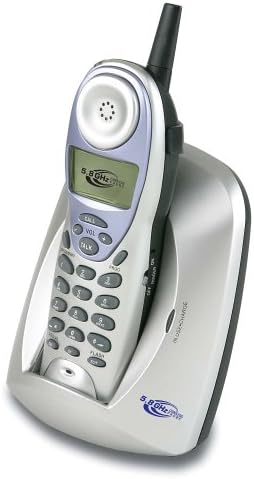
Image: The Coby CT-P9040 cordless phone, showing the handset docked in its silver base unit. The handset features a display screen, numeric keypad, and function buttons. The base unit has a charging cradle for the handset.
Gid Enstalasyon
1. Enstalasyon batri
- Jwenn lòj batri a sou do appareil la.
- Louvri kouvèti lòj batri a.
- Connect the rechargeable battery pack connector to the jack inside the compartment.
- Place the battery pack into the compartment and close the cover securely.
2. Koneksyon Inite Baz la
- Connect one end of the telephone line cord to the "LINE" jack on the back of the base unit.
- Connect the other end of the telephone line cord to a standard telephone wall jack.
- Connect the AC power adapter to the "DC IN" jack on the back of the base unit.
- Plug the AC power adapter into a standard electrical outlet.
3. Premye Chajman
Place the handset in the base unit's charging cradle. Ensure the "IN CHARGE" indicator light on the base unit illuminates, indicating proper charging. For optimal battery performance, charge the handset for at least 12-14 hours before initial use.
Enstriksyon Operasyon
Fè yon apèl
- Pick up the handset from the base unit or press the PALE bouton.
- Koute pou yon ton.
- Konpoze nimewo telefòn ou vle a.
- Pou fini apèl la, peze la PALE button again or place the handset back in the base unit.
Reponn yon apèl
Lè telefòn nan sonnen, ranmase aparèy la oubyen peze bouton an PALE bouton pou reponn apèl la.
Fonksyon Rappel
Pou rekòmanse dènye nimewo yo rele, peze la RAPLIKE bouton sou appareil la.
Ajisteman Volim
Pandan yon apèl, sèvi ak la VOL+ epi VOLIM - buttons on the handset to adjust the earpiece volume.
Flash Fonksyon
Peze a FLASH button to use call waiting or transfer calls if supported by your telephone service provider.
Storing Phone Numbers (Speed Dial)
Your phone can store up to 10 numbers for frequently called contacts. Refer to the detailed instructions in the full manual for programming speed dial entries.
Antretyen ak Swen
- Kenbe telefòn nan lwen sous chalè, limyè solèy dirèk, ak imidite.
- Clean the phone's surfaces with a soft, damp twal. Pa sèvi ak pwodui netwayaj abrazif oswa solvang.
- Ensure the charging contacts on the handset and base unit are clean to maintain proper charging.
- Si ou pa pral itilize telefòn nan pou yon bon bout tan, retire batri a nan aparèy la.
Depanaj
| Pwoblèm | Kòz posib | Solisyon |
|---|---|---|
| Pa gen ton | Fil telefòn nan dekonekte. | Asire w ke kòd telefòn nan byen konekte ak inite baz la ak priz miray la. |
| Telefòn nan pa chaje | Handset not properly seated in cradle or dirty charging contacts. | Reseat the handset in the base unit. Clean the charging contacts on both the handset and base unit with a dry cloth. |
| Move kalite son / Statik | Interference from other electronic devices or out of range. | Move the base unit away from other electronic devices (e.g., microwaves, Wi-Fi routers). Move closer to the base unit. |
| M pa ka fè/resevwa apèl | Power adapter disconnected or battery low. | Check if the AC power adapter is securely plugged in. Ensure the handset battery is fully charged. |
Espesifikasyon
- Modèl: CT-P9040 SVR
- Frekans: 5.8 GHz Analog
- Chanèl: 40 Channel Auto Scan
- memwa: 10-number speed dial storage
- Fonksyon: Flash, Redial, Pause, Tone/Pulse Switch
- Headset Jack: Built-in 2.5mm
- Montaj: Desk and Wall Mountable
- Dimansyon (L x W x H): 5 x 8 x 4 pous
- Pwa: 1.8 liv
- Koulè: Ajan
- ID moun kap rele: Pa sipòte
- Operasyon Multiline: Operasyon yon sèl-liy
Garanti ak sipò
For warranty information and technical support, please refer to the warranty card included with your product or visit the official Coby websit la. Kenbe resi acha ou kòm prèv acha pou reklamasyon garanti.
For further assistance, you may contact Coby customer service. Contact details are typically available on the manufacturer's websit oswa nan anbalaj pwodwi a.


