1. Entwodiksyon
The Brother LS2125 is a versatile sewing machine designed for various sewing projects, from basic mending to creating garments and quilts. It features 25 built-in stitch functions, including straight, zigzag, decorative, heirloom, and quilt stitches. This machine is equipped with an automatic 4-step buttonholer and a free arm for sewing cuffs and sleeves, making it suitable for both beginners and experienced sewers.
2. Pwodwi souview
The Brother LS2125 sewing machine offers a range of features to assist with your sewing tasks. Key components include the stitch selector, tension dial, and a convenient work light.
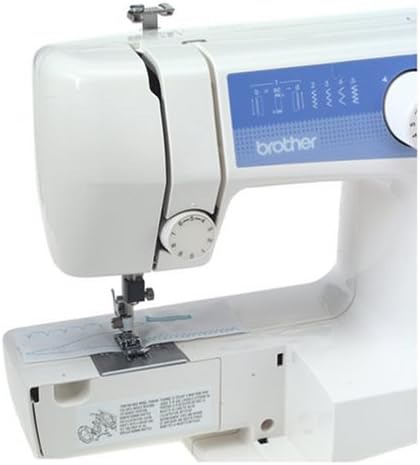
Figi 2.1: Devan view of the Brother LS2125 sewing machine, showing the stitch selection dial and tension control.
Included with your sewing machine is a set of essential accessories to get you started and maintain your machine.
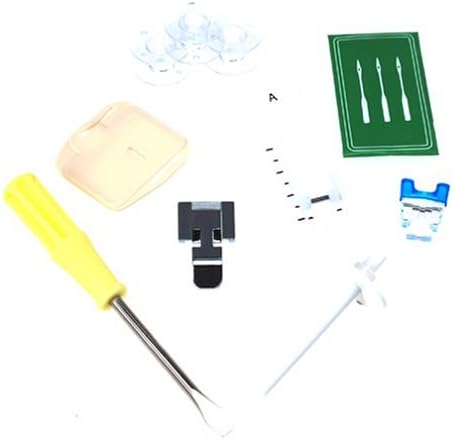
Figi 2.2: Included accessories such as bobbins, needles, screwdriver, and various presser feet.
Karakteristik kle:
- 25 Built-in Stitch Functions: Includes straight, zig-zag, satin, elastic, and blind hem stitches.
- Automatic 4-Step Buttonholer: Senplifye pwosesis pou kreye boutonnyè.
- Auto-Set Stitch Length and Width: For simplified operation.
- Easy Threading and Quick-Set Bobbin Winding: Designed for user convenience.
- Snap-on Presser Feet: Allows for quick and easy changing of feet.
- Free Arm Capability: Converts from flat surface to free arm for sewing cuffs, sleeves, and pant legs.
- Integrated Work Light: Eklere zòn koud la pou pi bon vizibilite.
- Depo akseswar: Built-in compartment for keeping tools and accessories organized.
3. Enstalasyon
3.1 Debalaj ak plasman
- Retire machin nan nan anbalaj li avèk prekosyon.
- Mete machin nan sou yon sifas ki estab, ki plat.
- Ensure the power cord is accessible for connection to a suitable power outlet.
3.2 Koneksyon pouvwa
- Connect the power cord to the machine and then to a wall outlet.
- Turn on the power switch, usually located on the side or back of the machine. The work light should illuminate.
3.3 Bobinaj la
- Mete yon bobin fil sou pin bobin la.
- Follow the threading path for bobbin winding, typically indicated by diagrams on the machine.
- Mete yon bobin vid sou aks bobinè a.
- Push the spindle to the right to engage the bobbin winding mechanism.
- Gently press the foot controller or engage the start/stop button to wind the thread onto the bobbin.
- Once full, cut the thread and remove the bobbin.
3.4 Mete fil anwo a
- Leve levye pye presser la.
- Mete yon bobin fil sou pin bobin la.
- Follow the numbered threading guides on the machine, ensuring the thread passes through all tension discs and guides.
- Fil zegwi a soti devan dèyè.
3.5 Mete bobin nan
- Louvri plak kouvèti bobin lan.
- Mete bobin ki vlope a nan bwat bobin lan, epi asire w ke fil la dewoule nan bon direksyon an (anjeneral nan sans kontrè ak zegwi mont lan).
- Pull the bobbin thread through the tension spring and guide.
- Fèmen kouvèti bobin lan.
- Lower the needle to pick up the bobbin thread, then pull both threads under the presser foot and to the back.
4. Operasyon Enstriksyon
4.1 Chwazi yon modèl pwen
- Turn the pattern selection dial to choose one of the 25 available stitch patterns.
- The machine automatically sets the optimal stitch length and width for most patterns.
4.2 Adjusting Thread Tension
- The upper thread tension dial allows for fine-tuning the stitch balance.
- Adjust the dial as needed to achieve even stitches on both sides of the fabric. A balanced stitch shows threads meeting in the middle of the fabric layers.
4.3 Koud Debaz
- Mete twal la anba pye presser la.
- Bese levye pye presser la.
- Gently press the foot controller to begin sewing.
- To sew in reverse, press and hold the reverse lever/button.
4.4 Creating Buttonholes
- Tache pye bouton an.
- Select the 4-step buttonhole pattern on the dial.
- Follow the machine's markings for each of the four steps to create a perfectly sized buttonhole.
- Use the buttonhole adjusting screw for fine adjustments if necessary.
4.5 Using the Free Arm
- To use the free arm, slide off the accessory storage compartment.
- This exposes the narrow free arm, ideal for sewing cylindrical items like cuffs, sleeves, and pant hems.
4.6 Chanje Pye Pressè
- Ensure the needle is in the highest position and the power is off.
- Press the release button on the back of the presser foot holder to detach the current foot.
- Align the new snap-on presser foot with the holder and lower the presser foot lever until it snaps into place.
5. Antretyen
5.1 Netwaye machin nan
- Toujou debranche machin nan anvan w netwaye.
- Use a soft brush to remove lint and dust from the bobbin area and feed dogs.
- Siye eksteryè a ak yon twal mou, sèk. Evite itilize pwodwi chimik piman bouk yo.
5.2 Changing the Needle
- Turn off the machine and raise the needle to its highest position.
- Lage zegwi a clamp vis epi retire ansyen zegwi a.
- Mete yon nouvo zegwi ak bò plat la ki fè fas dèyè machin nan, pouse l monte osi lwen ke li kapab.
- Sere cl zegwi aamp vis byen.
- Replace needles regularly (every 8-10 hours of sewing) or when they become dull or bent to prevent skipped stitches and fabric damage.
5.3 Depo Akseswa
- Utilize the extension table with its integrated accessory storage to keep your bobbins, needles, and presser feet organized and readily available.
NAN. Depanaj
This section addresses common issues you might encounter during operation. For more complex problems, refer to the full instruction manual or contact customer support.
| Pwoblèm | Kòz posib | Solisyon |
|---|---|---|
| Sote pwen | Incorrectly threaded needle, bent or dull needle, wrong needle type for fabric. | Re-thread the machine, replace the needle, ensure the correct needle is used. |
| Fil Kase (Anwo) | Incorrect upper tension, improperly threaded, burr on needle plate, poor quality thread. | Adjust tension, re-thread, check for burrs, use good quality thread. |
| Thread Breakage (Bobbin) | Incorrectly wound bobbin, bobbin inserted incorrectly, lint in bobbin case. | Re-wind bobbin, re-insert bobbin correctly, clean bobbin case. |
| Uneven Stitches / Looping | Incorrect thread tension (upper or bobbin), improper threading. | Adjust tension dials, re-thread both upper and bobbin threads. |
| Machin pa kòmanse | Power cord not connected, power switch off, foot controller not connected. | Check power connections, ensure switch is on, verify foot controller connection. |
7. Espesifikasyon
Below are the technical specifications for the Brother LS2125 sewing machine.

Figi 7.1: Dimensions of the Brother LS2125 sewing machine.
| Karakteristik | Detay |
|---|---|
| Nimewo Modèl | LS2125 |
| Dimansyon pwodwi | 17.5 x 14.2 x 7.5 pous (44.45 x 36.07 x 19.05 cm) |
| Pwa atik | 15.45 liv (7.01 kg) |
| Mak | Frè |
| Koulè | Blan |
| Materyèl | Plastik |
| Sous pouvwa | Fil elektrik |
| UPC | 012502609773, 012502625360 |
| Manifakti | Brother International Corporation |
| Dat Premye Disponib | 2 me 2006 |
8. Garanti & Sipò
8.1 Garanti limite
The Brother LS2125 sewing machine is covered by a 25-ane garanti limite. This warranty typically covers manufacturing defects and specific components. Please refer to the warranty card included with your product for full terms and conditions, including coverage details and limitations.
8.2 Sipò pou Kliyan
For technical assistance, troubleshooting beyond this manual, or warranty claims, please contact Brother customer support. You can typically find contact information on the official Brother websit la oubyen nan dokimantasyon ki vini ak machin ou an.
- Resous sou entènèt: Vizite sipò ofisyèl Brother la website for FAQs, digital manuals, and driver downloads.
- Sipò nan telefòn: Contact Brother customer service during business hours for direct assistance.
- Sant sèvis otorize: For repairs, locate an authorized Brother service center in your area.


