Entwodiksyon
This manual provides essential information for the safe and efficient operation of your Thomson TM 9850 Radio. Please read it thoroughly before using the device and keep it for future reference.
Enfòmasyon sou Sekirite
- Pa ekspoze aparèy la anba lapli oswa imidite pou evite dife oswa chòk elektrik.
- Pa bloke ouvèti vantilasyon yo. Asire w ke gen ase espas ozalantou aparèy la pou yon bon sikilasyon lè.
- Use only the power supply specified for this device.
- Pa ouvri c laasing. Konfye tout antretyen bay pèsonèl kalifye.
- Kenbe aparèy la lwen limyè solèy dirèk, sous chalè, ak chan mayetik fò.
Pwodwi souview
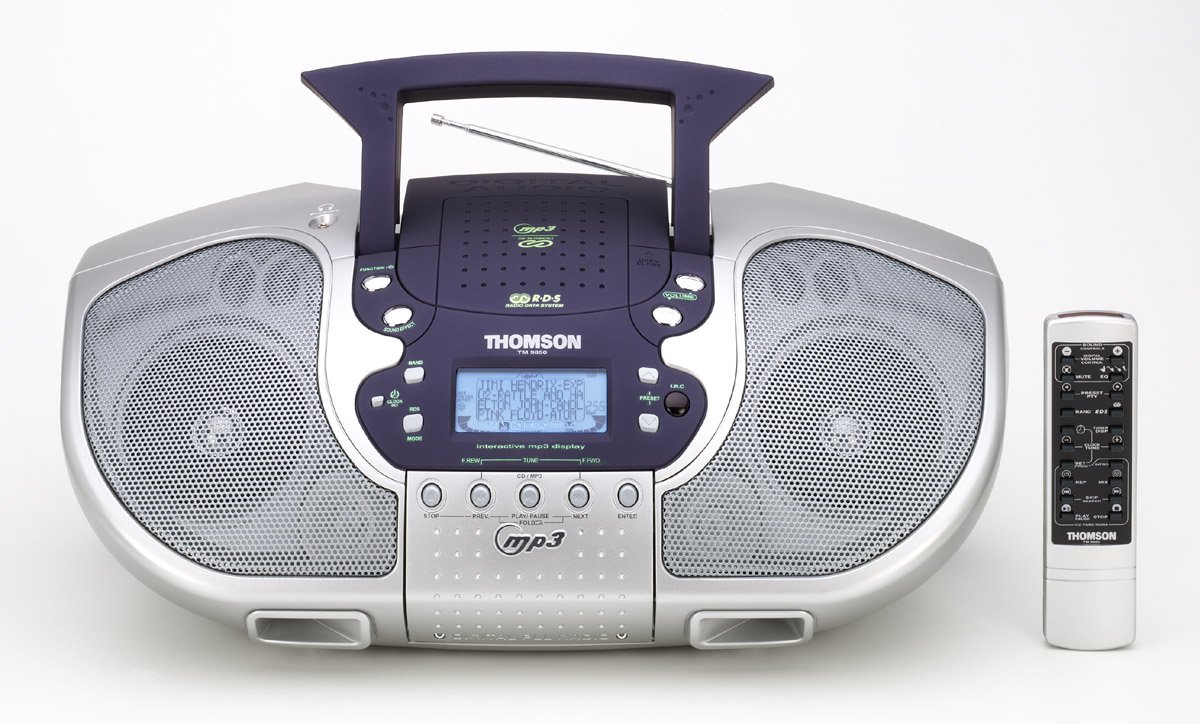
Figi 1: Devan view of the Thomson TM 9850 Radio with its accompanying remote control. The radio features dual speakers, a central control panel with an LCD display, and a top-mounted handle and telescopic antenna. The remote control is slender and white with various function buttons.
The Thomson TM 9850 is a portable radio designed for versatile audio playback. It features an integrated CD/MP3 player, an FM/AM radio tuner, and a clear LCD display for easy navigation. The unit also includes a remote control for convenient operation from a distance.
Enstalasyon
Koneksyon pouvwa
- Ensure the unit is placed on a stable, flat surface.
- Connect the AC power cord to the AC IN jack on the back of the unit.
- Branche lòt bout kòd kouran AC a nan yon priz miray estanda (AC 230V ~ 50Hz).
- Alternatively, for portable use, insert 8 x "C" size batteries (not included) into the battery compartment located on the bottom of the unit, observing correct polarity.
Ajisteman antèn
- For FM reception, extend the telescopic antenna fully. Adjust its position for optimal signal reception.
- Pou resepsyon AM, aparèy la gen yon antèn ferit entegre. Vire aparèy la li menm pou pi bon resepsyon.
Enstriksyon Operasyon
Operasyon debaz
- Limen/Etenyen: Peze a POUVWA bouton pou limen oswa etenn inite a.
- Kontwòl Volim: Vire a VOLIM vire bouton an nan sans zegwi mont lan pou ogmante volim nan, nan sans kontrè ak zegwi mont lan pou diminye.
- Seleksyon Fonksyon: Peze a FONKSYON button to switch between CD/MP3, FM, and AM modes.
Operasyon Radyo (FM/AM)
- Select FM or AM mode using the FONKSYON bouton.
- Peze a BAND button to select the desired frequency band (FM or AM).
- Sèvi ak la TUNE +/- buttons to manually tune to a station. Press and hold for automatic scanning.
- To store a preset station: Tune to the desired station, press PWOGRAM, Lè sa a, sèvi ak PREREGIME +/- pou chwazi yon nimewo predefini, epi peze PWOGRAM ankò pou konfime.
- To recall a preset station: Press PREREGIME +/- to cycle through stored stations.
Lektur CD/MP3
- Louvri kouvèti konpatiman CD a.
- Mete yon CD oswa yon CD MP3 ak bò etikèt la anlè.
- Fèmen kouvèti lòj CD la.
- Select CD/MP3 mode using the FONKSYON button. The display will show "READING" then the total number of tracks/folders.
- Peze JWE/POZ to start playback. Press again to pause.
- Peze PWOCHÈ to skip to the next track/file. Peze PREV to go to the beginning of the current track or the previous track.
- Peze SISPANN pou sispann lecture.
- For MP3 CDs, use DOSYE +/- buttons to navigate between folders.
Antretyen
- Netwayaj: Siye aparèy la avèk yon twal mou epi sèk. Pa sèvi ak pwodui netwayaj abrazif oswa solvan.
- Swen Lantiy CD: If the CD lens gets dirty, use a commercially available CD lens cleaner. Do not touch the lens.
- Depo: If not using the unit for an extended period, remove the batteries and store it in a cool, dry place.
Depanaj
| Pwoblèm | Kòz posib | Solisyon |
|---|---|---|
| Pa gen pouvwa | Kòd kouran an pa konekte; Pil yo fin itilize oswa yo pa byen mete. | Check power cord connection; Replace batteries or ensure correct polarity. |
| Pa gen son | Volume too low; Mute function activated. | Increase volume; Deactivate mute. |
| Resepsyon radyo pòv | Antenna not extended/adjusted; Weak signal. | Extend and adjust telescopic antenna (FM); Rotate unit (AM); Try moving the unit to a different location. |
| CD/MP3 not playing | Disc inserted incorrectly; Disc dirty or scratched; Incorrect function mode. | Insert disc with label side up; Clean or replace disc; Select CD/MP3 function mode. |
Espesifikasyon
- Modèl: TM 9850
- Sous pouvwa: AC 230V ~ 50Hz or 8 x "C" size batteries (UM-2)
- Gamme frekans: FM 87.5 - 108 MHz, AM 522 - 1620 kHz
- Fòma disk sipòte: CD, CD-R/RW, MP3-CD
- Sòti odyo: Stereo
- Dimansyon (W x H x P): (Approximate, based on typical boombox size) 400mm x 200mm x 250mm
- Pwa: (Approximate, based on typical boombox weight) 2.5 kg
Note: Specifications are subject to change without notice for improvement.
Garanti ak sipò
This Thomson TM 9850 Radio comes with a standard manufacturer's warranty. Please refer to the warranty card included in the original packaging for detailed terms and conditions. For technical support, service, or inquiries, please contact Thomson customer service through their official websit oswa enfòmasyon kontak yo bay ak acha w la.
For the latest information and support resources, please visit the official Thomson websit: www.thomsonconsumer.com


