1. Entwodiksyon
The LOFREE TOUCH Mechanical Keyboard is a versatile input device designed for enhanced typing experience and personalization. It features triple-mode connectivity, hot-swappable switches, and compatibility with multiple operating systems. This manual provides essential information for setting up, operating, and maintaining your keyboard.

Figure 1: LOFREE TOUCH 68-key Mechanical Keyboard
2. Pake kontni
Tanpri tcheke kare a pou atik sa yo:
- LOFREE TOUCH Keyboard (68-key or 100-key) x 1
- Manyèl itilizatè x 1
- Kat Garanti x 1
- 2.4G Wireless Receiver x 1
- AAA Battery x 3 (pre-installed or included separately)
- Kalite-C kab x 1
- Accessory Box x 1
- Keycap Puller x 1
- Holder x 1 (for figurines/extra keycaps)

Figure 2: Battery compartment and 2.4G receiver storage
3. Enstalasyon
3.1. Limen epi enstale pil
- Jwenn konpatiman batri a anba klavye a.
- Mete 3 pil AAA, asire polarite kòrèk.
- The keyboard can also be powered via the Type-C cable for wired mode and charging (if rechargeable batteries are used).
3.2. Konekte klavye ou a
The LOFREE TOUCH keyboard supports three connection modes: Bluetooth 5.0, 2.4G Wireless, and Wired (Type-C).

Figi 3: Opsyon Konektivite
3.2.1. 2.4G Wireless Koneksyon
- Locate the 2.4G wireless receiver, usually stored in the battery compartment or a dedicated slot on the keyboard.
- Branche reseptè 2.4G la nan yon pò USB ki disponib sou òdinatè w la.
- Slide the mode switch on the keyboard to the '2.4G' position. The keyboard should connect automatically.
3.2.2. Koneksyon Bluetooth 5.0
- Slide the mode switch on the keyboard to the 'BT' position.
- On your device (computer, tablet, phone), go to Bluetooth settings and enable Bluetooth.
- The keyboard can store up to 3 Bluetooth device pairings. To pair with a new device, press and hold Fn + 1, Fn + 2, or Fn + 3 until the indicator light flashes, indicating pairing mode.
- Select "LOFREE TOUCH" from the list of available Bluetooth devices on your device.
- Once paired, the indicator light will stop flashing. You can switch between paired devices by pressing Fn + 1, Fn + 2, or Fn + 3.
3.2.3. Wired (Type-C) Connection
- Connect one end of the provided Type-C cable to the keyboard's Type-C port.
- Konekte lòt bout kab la nan yon pò USB ki disponib sou òdinatè w la.
- The keyboard will automatically switch to wired mode. This mode also charges the batteries if they are rechargeable.
4. Kijan pou itilize klavye w la
4.1. Multi-System Compatibility
The LOFREE TOUCH keyboard is compatible with Windows, macOS/iOS, and Android operating systems. It features dedicated media keys for both Mac and Windows layouts.
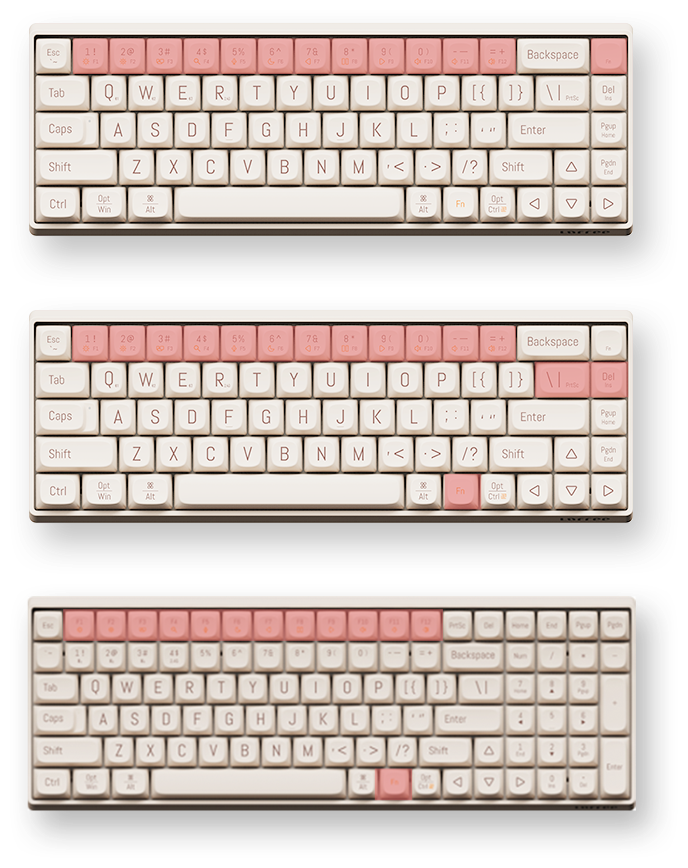
Figure 4: Mac and Windows Layouts
4.1.1. Switching Layouts
To switch between Mac and Windows functional key layouts, press Fn + N (for Mac) or fn+m (for Windows).
4.2. Kle Fonksyon (Konbinezon Fn)
The keyboard utilizes an Fn key for accessing secondary functions printed on the keycaps. Common functions include:
- Fn + F1-F12: Media controls (play/pause, volume, mute, etc.), screen brightness, search, task switch, etc. (functions may vary slightly between 68-key and 100-key models).
- Fn + 1/2/3: Chanje ant aparèy Bluetooth ki asosye yo.
- Fn + Q/W/E: (Specific to some models) Switch between 2.4G and Bluetooth modes or specific Bluetooth channels.
4.3. N-Key Rollover (NKRO)
The LOFREE TOUCH keyboard supports N-Key Rollover (NKRO), ensuring that every key press is registered, even when multiple keys are pressed simultaneously. This is beneficial for fast typists and gamers.
5. Antretyen
5.1. Switch ki ka ranplase a cho
The keyboard features hot-swappable sockets, allowing you to change mechanical switches without soldering. It is compatible with standard 3-pin and 5-pin mechanical switches.
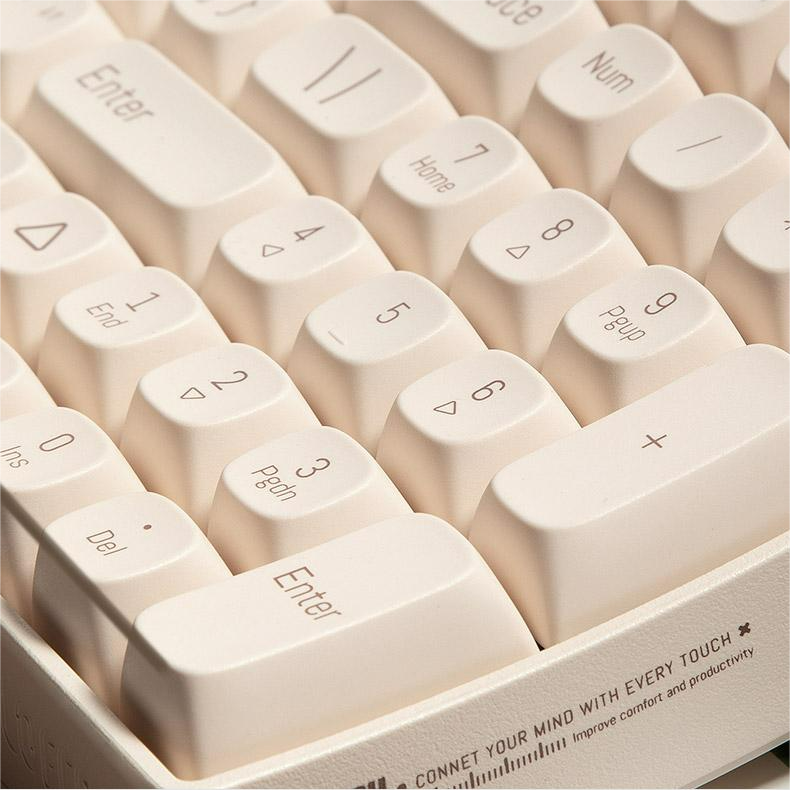
Figure 5: Hot-swappable switches with keycap and switch pullers
5.1.1. Changing Switches
- Sèvi ak zouti pou rale kle a ki vini ak li a, retire kle ou vle a dousman.
- Using a switch puller (often included in the accessory box), carefully grip the switch and pull it straight up to remove it from the PCB.
- Align the pins of the new switch with the holes on the PCB and press it firmly until it clicks into place. Ensure the pins are not bent.
- Ranplase kouvèti kle a.
5.2. Keycaps
The keyboard comes with durable Dye-Sub PBT keycaps, which are resistant to shine and wear over time. You can customize your keyboard with various PBT keycap sets available from LOFREE.
5.3. Netwayaj
- Sèvi ak yon bwòs mou oswa lè konprese pou retire pousyè ak debri ki ant bouchon kle yo.
- For deeper cleaning, remove the keycaps using the keycap puller and clean them with a mild soap solution and a soft cloth. Ensure they are completely dry before reattaching.
- Wipe the keyboard surface with a damp, twal ki pa gen pousyè. Evite pwodui chimik ki agresif.
6. Espesifikasyon
6.1. Espesifikasyon jeneral
- Mak: LOFREE
- Style operasyon: Mekanik
- Chanjman: Gateron G Pro (Red), Linear, Pre-lubed
- Switches Hot Swap: Yes (Standard 3-pin and 5-pin compatible)
- Materyèl Keycap: Dye-Sub PBT
- Kalite entèfas: USB (Tip-C)
- Koneksyon: Bluetooth 5.0, 2.4G Wireless, Kalite-C branche
- Aplikasyon: Odinatè Desktop, Laptop, Tablèt
- Lang: angle
- Pouvwa: 3 x batri AAA
- Lavi batri: Approximately 30 days of typing
- Sistèm operasyon: Windows, macOS/iOS, Android
- N-Key Rollover (NKRO): Wi
- Ergonomi: 9° Curved Shape for reduced finger fatigue
6.2. 68-Key Model (OE902)
- Keyboard Standard: 68 kle
- Dimansyon: 310 x 109 x 51.5 mm
- Pwa klavye: 720g
6.3. 100-Key Model (OE903)
- Keyboard Standard: 100 kle
- Dimansyon: 367 x 129 x 54.5 mm
- Pwa klavye: 1010g

Figure 6: 68-key vs. 100-key models
NAN. Depanaj
| Pwoblèm | Kòz posib | Solisyon |
|---|---|---|
| Klavye pa reponn | Low battery, incorrect connection mode, Bluetooth not paired, 2.4G receiver not plugged in. | Check/replace batteries. Ensure mode switch is set correctly (BT, 2.4G, or Wired). Re-pair Bluetooth or re-insert 2.4G receiver. Try wired connection. |
| Kle yo pa anrejistre | Switch ki gen pwoblèm, gen debri anba bouchon kle a. | Remove keycap and clean. If hot-swappable, try replacing the switch. |
| Bluetooth koneksyon enstab | Interference, distance from device, low keyboard battery. | Move closer to the device. Ensure no other devices are causing interference. Check battery level. Re-pair the Bluetooth connection. |
| Keyboard not recognized by OS | Driver issue, OS compatibility. | Ensure OS is supported. Try a different USB port or cable. Restart computer. |
8. Konsèy itilizatè yo
- Personalize Your Keyboard: Pran avantage of the hot-swappable switches and PBT keycaps to customize the feel and look of your keyboard. Experiment with different switch types for a unique typing experience.
- Maksimize Koneksyon: Utilize the triple-mode connectivity to seamlessly switch between your desktop, laptop, and tablet. Remember to pair your devices to different Bluetooth channels (Fn+1, Fn+2, Fn+3) for quick switching.
- Ergonomik konfò: The 9° curved shape is designed for comfort. Ensure proper wrist posture to further enhance your typing experience and reduce strain.
- Decorative Holder: Use the included holder plate to display your favorite figurines, extra keycaps, or LOFREE's IP mascot, LONELY, adding a personal touch to your workspace.
9. Garanti ak sipò
Your LOFREE TOUCH Mechanical Keyboard comes with a manufacturer's warranty. Please refer to the included Warranty Card for details regarding warranty coverage, terms, and conditions. For technical support, product inquiries, or service requests, please visit the official LOFREE websit oswa kontakte sèvis kliyan yo.
10. Videyo Demonstrasyon Pwodwi
Video: Demonstration of the LOFREE TOUCH keyboard in use, showcasing typing and design elements.


