

UBEE DDW366 KAB MODÈM
Enfòmasyon sou ModemDOCSIS 3.0 Doub Band WiFi modèm Konpatib ak fil mwen an 8 × 4 lyezon chanèl ak vitès ki rive jiska 150 Mbps sou yon koneksyon filaire Cox rekòmande yon modèm DOCSIS 3.1 oswa yon pòtay |
Pi wo nivo sèvisPrefere 150 |
Se pòtay sa a sèlman sètifye pou itilize ak rezo a Cox lè yo bay nan oswa achte nan men Cox.
Devan View
|
Apre modèm kab la anrejistre avèk siksè sou rezo a, la POUVWA, DS / US, ak ONLINE endikatè yo eklere kontinyèlman pou endike ke modèm kab la sou entènèt ak konplètman operasyonèl. | |
Retounen View
|
Ubee DDW366 gen pò sa yo ki disponib sou do modèm WiFi a.
|
|
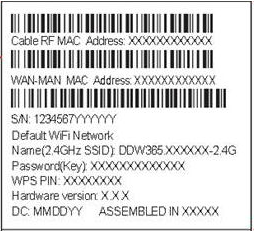
Adrès MAC
|
Adrès MAC yo ekri kòm 12 chif ki genyen tou de lèt ak nimewo (0-9, AF).Yon adrès MAC inik. Premye sis karaktè adrès MAC yo inik pou manifakti aparèy la. |


Depanaj
Limyè modèm yo endike estati aktyèl modèm kab ou an. Gade Limyè Modem Panel Dèyè pou view limyè ki gen rapò ak koneksyon an Ethernet. Pou rézoudr nenpòt pwoblèm koneksyon, sèvi ak tablo ki anba la a.


Limyè Modem Panel Dèyè
Limyè ki anba yo endike estati koneksyon modèm kab WiFi ou a. Pou rezoud nenpòt pwoblèm koneksyon, sèvi ak tablo ki anba a.
| Pò limyè | Estati | Pwoblèm |
|---|---|---|
| ETH1 - ETH4
|
Off | Aparèy la pa konekte ak pò a. Verifye tout koneksyon kab epi eseye reset modèm la. |
| Flache vèt | Okenn. Yon aparèy konekte ak pò a nan vitès 1000 Mbps ak done ap pase ant modèm kab ak aparèy ki konekte. | |
| Flashing Orange | Okenn. Yon aparèy konekte nan vitès 10/100 Mbps ak done ap pase ant modèm kab ak aparèy ki konekte. |


Referans
- Manyèl itilizatèmanual.tools
Published: August 10, 2021
Mizajou: 11 fevriye 2023
This does not tell me how to change the security settings, transferring me to a paid website is not acceptable. Is there a customer service number that I can call?
How do I change the security settings on my Ubee DDW366 and what is the customer service number?
To change the security settings (such as your WiFi password or encryption type) on the Ubee DDW366, you must access the modem's web-based user interface. While the provided manual snippet focuses on hardware and LED indicators, the standard process for Ubee gateways is as follows:
192.168.0.1or192.168.100.1) nan ba adrès la.Regarding customer service, since this modem is specifically certified for the Cox network, you should contact Cox Communications Support for assistance. You can reach Cox customer service at 1-800-234-3993 or visit their official support website. Avoid third-party websites that request payment for technical support, as these are often unaffiliated with the manufacturer or service provider.
Read the full Q&A page