
1. Entwodiksyon
This manual provides essential information for the safe and efficient use of your Kyocera ECOSYS MZ3201ix A3 Laser Multifunction Printer. Please read this manual thoroughly before operating the device and keep it for future reference.
Pwodwi souview
The Kyocera ECOSYS MZ3201ix is a versatile A3 laser multifunction printer designed for both office and home office environments. It offers high-resolution printing, copying, scanning, and faxing capabilities, ensuring efficient document management.
Karakteristik kle:
- Print resolution up to 1200 dpi.
- Print speed up to 32/17 pages A4/A3 per minute in black and white.
- 100-sheet universal feeder and 500-sheet cassette.
- Duplex unit for double-sided printing (DIN A5 - DIN A3).
- Integrated high-level security features.
- Automatic Document Feeder (ADF).
- Network-ready with Ethernet and USB connectivity.
- Scan to email functionality.
- Intuitive touch screen interface.
2. Enfòmasyon sou Sekirite
Toujou obsève prekosyon sekirite sa yo pou evite blesi oswa domaj nan aparèy la.
- Pwovizyon pou pouvwa: Connect the printer only to a grounded power outlet with the correct voltage. Pa twò chaje priz kouran yo.
- Plasman: Place the printer on a stable, level surface. Ensure adequate ventilation around the device. Avoid placing it near water or heat sources.
- Manyen: Do not attempt to disassemble or modify the printer. Refer all servicing to qualified personnel.
- Consommables: Use only genuine Kyocera toner and parts. Keep toner cartridges out of reach of children.
- Deplase aparèy la: The printer is heavy (49 kg). Use appropriate lifting techniques or assistance when moving it to prevent injury.
3. Ki sa ki nan bwat la
Debale bwat la ak anpil atansyon epi asire w tout bagay yo la:
- Kyocera ECOSYS MZ3201ix Multifunction System
- Toner katouch
- Resipyan dechè toner
- Kab pouvwa
- Enstriksyon sekirite
- Gid pou kòmanse rapid
If any items are missing or damaged, please contact your vendor or Kyocera support.
4. Enstalasyon
4.1 Debalaj ak plasman
- Retire tout materyèl anbalaj, tep adezif, ak fim pwoteksyon yo nan enprimant lan.
- Place the printer on a sturdy, level surface capable of supporting its weight (approximately 49 kg). Ensure there is sufficient space around the printer for ventilation and access to trays and covers.
4.2 Konekte kab pouvwa a
- Connect the power cable to the power input on the rear of the printer.
- Branche lòt bout kab kouran an nan yon priz elektrik ki gen tè.
4.3 Installing Toner and Waste Toner Container
- Louvri kouvèti devan aparèy pou enprime a.
- Insert the toner cartridge according to the instructions provided on the cartridge and inside the printer.
- Insert the waste toner container into its designated slot.
- Fèmen kouvèti devan an byen.
4.4 Chaje Papye
- Pull out the paper cassette (standard 500-sheet tray or 100-sheet universal feeder).
- Adjust the paper guides to the size of the paper you are loading (supports A5 to A3).
- Chaje pil papye a, asire w ke li pa depase liy maksimòm ranpli a.
- Gently push the paper cassette back into the printer.
4.5 Koneksyon Rezo ak USB
- Pou Koneksyon Rezo (Etènèt): Connect an Ethernet cable from your network router/switch to the LAN port on the printer.
- For Direct Connection (USB): Connect a USB 2.0 cable from your computer to the USB port on the printer.
4.6 Enstalasyon lojisyèl
- Limen enprimant lan lè l sèvi avèk bouton pouvwa a.
- Follow the on-screen instructions on the printer's touch screen for initial setup, including language and network settings.
- On your computer, insert the driver CD (if provided) or download the latest drivers and utility software from the official Kyocera websit.
- Run the installer and follow the prompts to install the printer drivers and software.
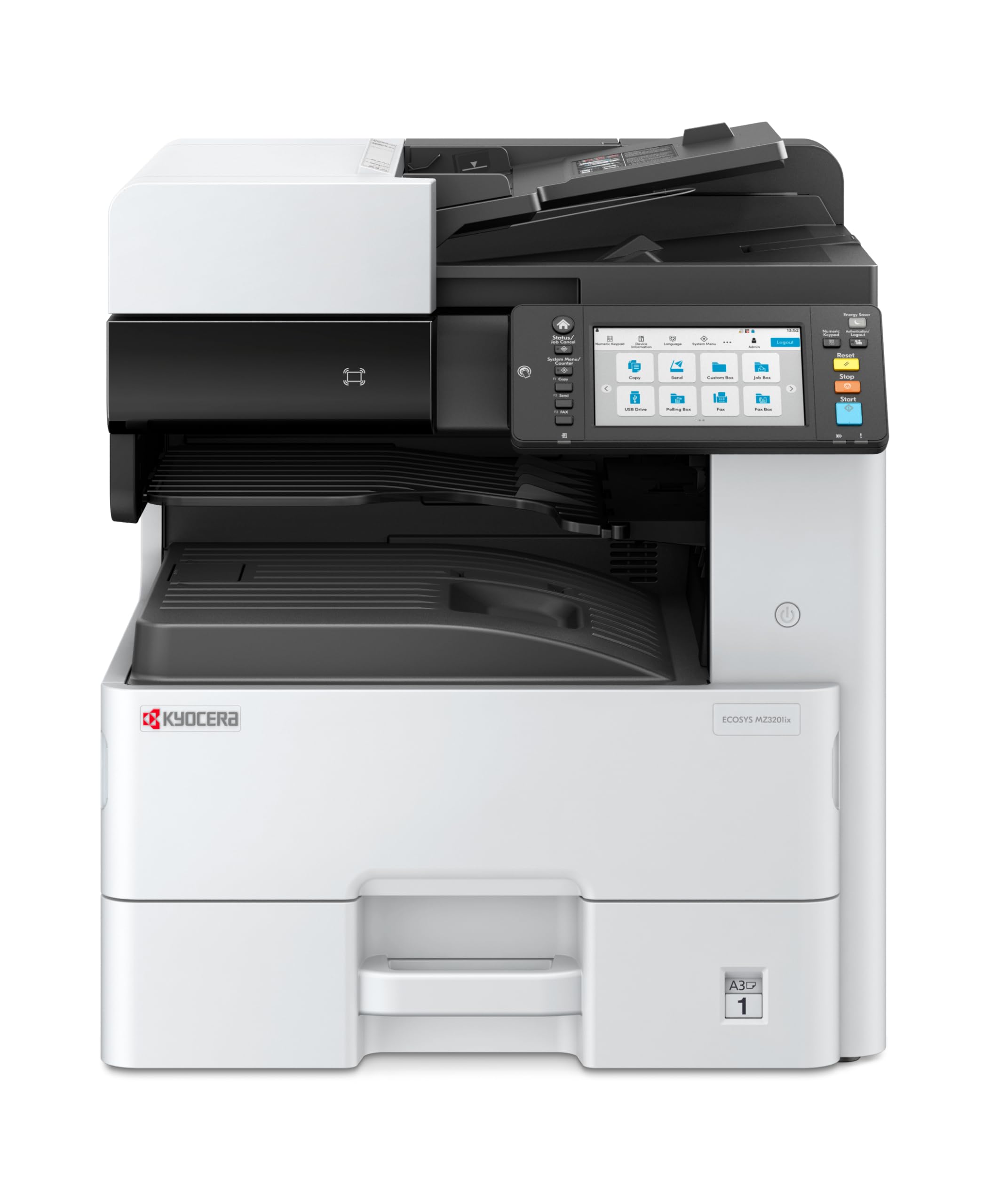
Image 1: Kyocera ECOSYS MZ3201ix A3 Laser Multifunction Printer. This image shows the front view of the printer, highlighting its compact design and the integrated touch screen panel.
5. Operasyon Enstriksyon
5.1 Enpresyon debaz
- Louvri dokiman ou vle enprime a sou òdinatè w la.
- Chwazi File > Enprime.
- Choose the Kyocera ECOSYS MZ3201ix from the list of available printers.
- Ajiste paramèt enprime yo (pa egzanp, kantite kopi, gwosè papye, enprime duplex) jan sa nesesè.
- Klike sou Enprime.
5.2 Kopi Dokiman
- Mete dokiman an fas anba sou vit eskanè a oubyen fas anlè nan manjeur otomatik dokiman an (ADF).
- On the printer's touch screen, select the Kopi fonksyon.
- Adjust settings such as number of copies (up to 999), zoom, and paper type.
- Peze a Kòmanse bouton pou kòmanse kopye.
5.3 Eskane Dokiman
- Mete dokiman an sou vit eskanè a oubyen nan ADF la.
- On the printer's touch screen, select the Eskane fonksyon.
- Choose your desired scan destination (e.g., Scan to PC, Scan to Email, Scan to USB).
- Configure scan settings such as resolution (up to 1200 x 1200 dpi), color mode, and file fòma.
- Peze a Kòmanse bouton pou kòmanse eskane.
5.4 Fakse Dokiman
(Note: Fax functionality requires a telephone line connection, not detailed in this manual.)
- Mete dokiman an sou vit eskanè a oubyen nan ADF la.
- On the printer's touch screen, select the Fakse fonksyon.
- Antre nimewo faks moun k ap resevwa a lè l sèvi avèk klavye a.
- Ajiste tout paramèt faks ki nesesè yo.
- Peze a Kòmanse bouton pou voye faks la.
6. Antretyen
Regular maintenance ensures optimal performance and extends the life of your printer.
6.1 Netwaye aparèy pou enprime a
- Eksteryè: Siye sifas eksteryè yo ak yon mou, damp, twal ki pa gen pousyè. Pa sèvi ak pwodui netwayaj abrazif oswa solvang.
- Scanner Glass: Gently clean the scanner glass with a soft cloth and a non-abrasive glass cleaner.
- Woulo ADF yo: Netwaye woulo ADF yo detanzantan avèk yon twal ki pa gen pousyè.ampened with isopropyl alcohol to prevent paper jams.
6.2 Ranplase Katouch Toner la
- When the printer indicates low toner, order a new Kyocera toner cartridge.
- Louvri kouvèti devan aparèy pou enprime a.
- Retire katouch toner vid la lè w rale l deyò.
- Depake nouvo katouch toner a epi souke l dousman pou distribye toner a.
- Insert the new toner cartridge firmly into its slot until it clicks into place.
- Fèmen kouvèti devan an.
6.3 Replacing Waste Toner Container
- When the printer indicates the waste toner container is full, prepare a new one.
- Open the cover that provides access to the waste toner container.
- Carefully remove the full waste toner container. Seal it in a plastic bag for proper disposal.
- Insert the new waste toner container into its slot.
- Fèmen kouvèti a.
NAN. Depanaj
Seksyon sa a adrese pwoblèm komen ou ka rankontre ak enprimant ou an.
7.1 Konfiti papye
- sentòm: Printer stops, and an error message indicates a paper jam.
- Solisyon: Turn off the printer. Open all covers and trays. Carefully remove any jammed paper, pulling in the direction of the paper path. Ensure no small pieces of paper remain. Close all covers and restart the printer.
7.2 Kalite Enpresyon ki Pòv
- sentòm: Faded prints, streaks, or spots on pages.
- Solisyon: Check toner level and replace if low. Perform a print head cleaning or calibration from the printer's maintenance menu. Ensure you are using appropriate paper for your print job.
7.3 Enprimant lan pa reponn
- sentòm: Printer is online but does not print documents sent from the computer.
- Solisyon: Check all cable connections (USB/Ethernet). Restart both the printer and your computer. Verify that the correct printer driver is installed and selected. Check the printer's network settings if connected via Ethernet.
7.4 Kòd erè
If an error code appears on the touch screen, refer to the comprehensive user manual (available on the Kyocera website) for specific instructions related to that code. Many codes indicate specific issues like open covers, paper jams, or consumable replacement needs.
8. Espesifikasyon
| Karakteristik | Spesifikasyon |
|---|---|
| Mak | Kyocera |
| Non modèl | ECOSYS MZ3201ix |
| Nimewo Modèl | 110C2V3NL0 |
| Koneksyon Teknoloji | Ethernet, USB 2.0 |
| Teknoloji Enpresyon | Lazè |
| Karakteristik espesyal | Automatic Document Feeder, Auto-Duplex, Network Ready, Scan to Email, Touch Screen |
| Sòti enprimant | Monokrom |
| Max Print Speed Black & White | 32 Pages per minute (A4) |
| Pwa atik | 49 Kilogram |
| Dimansyon pwodwi (DxWxH) | 58.5P x 59L x 68.8H cm |
| Max Print Resolution Black & White | 1200 x 1200 dpi |
| Rezolisyon eskanè | 1200 x 1200 dpi |
| Duplex Enpresyon | Otomatik |
| Max Copy Count | 999 |
| Premye paj soti tan | 5.2 segonn |
| Max Supported Paper Size | A3 |
| Max Kapasite Fèy Antre | 1600 |
| Printing Media Type | Papye Plain |
| Fonksyon | Copy, Fax, Scan, Print |
9. Garanti ak sipò
Your Kyocera ECOSYS MZ3201ix printer comes with a standard manufacturer's warranty. For detailed information regarding warranty terms, duration, and coverage, please refer to the warranty card included with your product or visit the official Kyocera websit.
Sipò Kliyan:
If you encounter any issues that cannot be resolved using this manual or require technical assistance, please contact Kyocera customer support. You can find contact information on the Kyocera websit la oubyen nan dokimantasyon ki vini ak enprimant ou an.
When contacting support, please have your printer's model name (ECOSYS MZ3201ix) and serial number ready. The serial number is typically located on a label on the back or bottom of the printer.