
1. Avi enpòtan
Please carefully check the store name and ensure you are purchasing products sold by "LUZHAN." We have received customer feedback stating that products received did not match the description and were of poor quality. Upon investigation, we found that these customers did not purchase the products from us. To prevent such incidents from happening again in the future and to avoid unnecessary misunderstandings, please carefully verify the store name LUZHAN.

Image: Important notice to verify seller name LUZHAN for authentic products.
2. Plis paseview
The XIAOMI POCO X8 Pro Max 5G is a high-performance smartphone designed for advanced users. It features a powerful Mediatek Dimensity 9500s processor, a vibrant 1.5K 120Hz AMOLED display, a large 8500mAh battery with 100W HyperCharge, and a 50 MP Light Fusion 600 camera system with OIS. This manual provides essential information for setting up and operating your device.

Imaj: Devan ak dèyè view of the POCO X8 Pro Max 5G smartphone.
Videyo: Yon finiview of the POCO X8 Pro Series, highlighting key features and design.
3. Enstalasyon
3.1 Sa ki nan bwat la
- XIAOMI POCO X8 Pro Max 5G Smartphone
- Charger
- Pwotektè ekran (pre-aplike oswa enkli)
3.2 Premye Enstalasyon Aparèy la
- Pouvwa sou: Press and hold the power button located on the side of the device until the XIAOMI logo appears.
- Lang ak Rejyon: Swiv enstriksyon yo sou ekran an pou chwazi lang ak rejyon ou prefere a.
- Konekte ak Wi-Fi: Select your Wi-Fi network and enter the password to connect to the internet. This is necessary for initial setup and software updates.
- Kont Google: Konekte avèk kont Google ou a oubyen kreye yon nouvo. Sa a esansyèl pou jwenn aksè nan Google Play Store ak lòt sèvis Google yo.
- Transfè Done: If you are upgrading from another device, you may have the option to transfer your data (apps, photos, contacts) during this stage.
- Enstalasyon sekirite: Set up your preferred security method, such as a PIN, pattern, password, or fingerprint. The device supports an ultrasonic fingerprint sensor.
- Ranpli Enstalasyon: Swiv tout lòt enstriksyon yo pou finalize pwosesis konfigirasyon an.
3.3 Enstalasyon Kat SIM ak eSIM
The POCO X8 Pro Max 5G supports physical SIM cards and eSIM functionality.
- Physical SIM: Use the provided SIM ejector tool to open the SIM tray. Insert your Nano-SIM card(s) into the tray, ensuring proper orientation. Close the tray securely.
- eSIM: Pou aktivasyon eSIM, ale nan Anviwònman > Rezo ak entènèt > Kat SIM and follow the instructions to add an eSIM profile provided by your carrier.
4. Operasyon Enstriksyon
4.1 Ekspozisyon Karakteristik
Your device features a 6.83-inch 1.5K ultra-bright AMOLED display with a 120Hz refresh rate for smooth visuals and a 24x super resolution touch for enhanced responsiveness. It also includes eye protection features and Corning Gorilla Glass 7i for durability.
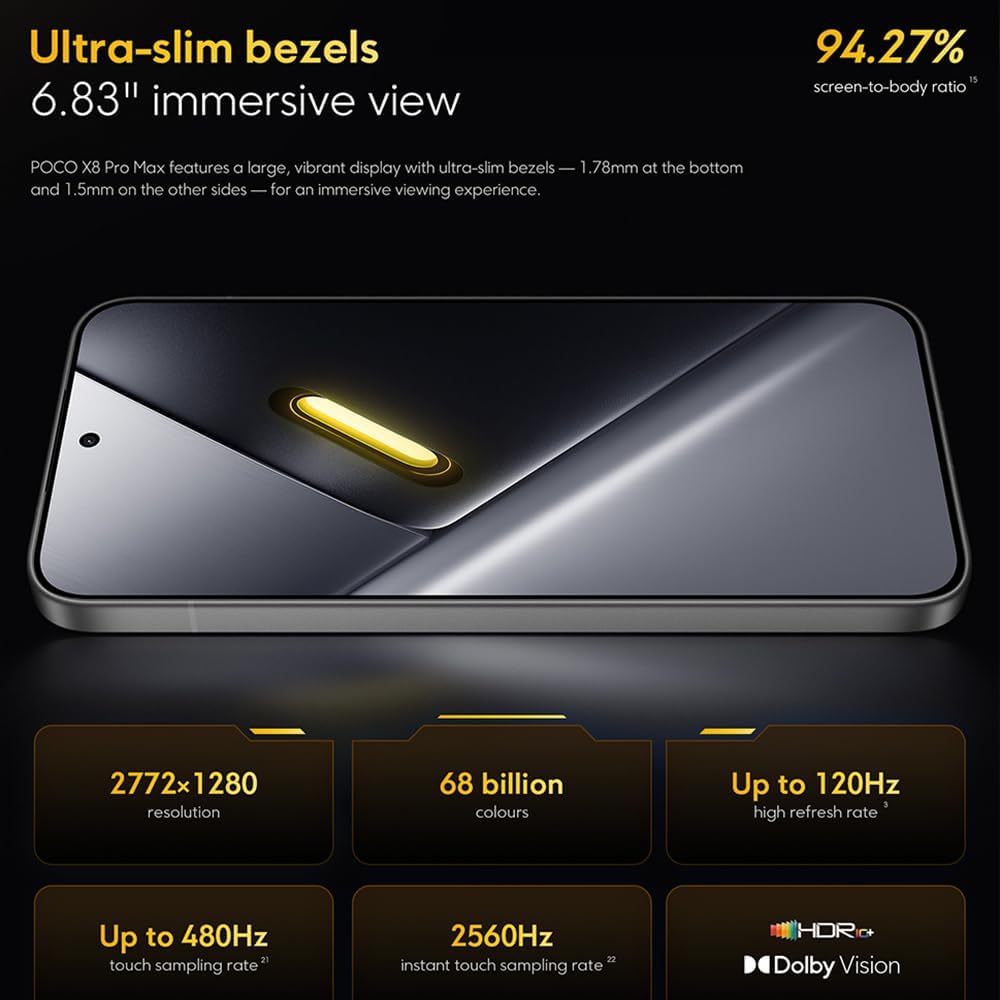
Image: The 6.83-inch 1.5K ultra-bright AMOLED display with minimal bezels.
4.2 Pèfòmans
Powered by the Mediatek Dimensity 9500s chipset (3nm, 4+4 All Big Core architecture, NPU890 AI processor), the POCO X8 Pro Max 5G delivers high performance. The POCO 3D IceLoop cooling system ensures efficient heat dissipation, maintaining optimal performance during intensive tasks like gaming.

Image: Diagram illustrating the Mediatek Dimensity 9500s flagship platform.

Image: Illustration of the 5800mm² ultra-large LHP area for cooling.
4.3 Sistèm Kamera
The device features a 50 MP Light Fusion 600 main camera with OIS (Optical Image Stabilization) and an 8 MP ultra-wide camera. It supports portrait mode with bokeh + HDR and dynamic video-to-still conversion.

Image: Close-up of the 50 MP main camera and 8 MP ultra-wide camera system.
4.4 Batri ak chaje
Equipped with a massive 8500 mAh (typical) battery, the POCO X8 Pro Max 5G offers extended usage. It supports 100W HyperCharge, allowing for rapid recharging. A 16% ultra-high carbon-silicon content contributes to its high energy density.

Image: Illustration highlighting the massive 8500mAh battery capacity.

Image: Visual representation of the 100W HyperCharge technology.
4.5 Odyo
The device features symmetrical dual stereo speakers (1115F) for a balanced and immersive audio experience.
4.6 Software
The POCO X8 Pro Max 5G comes with Xiaomi HyperOS 3 installed, offering an optimized and user-friendly interface based on Android 16.
5. Antretyen
5.1 Netwaye aparèy ou an
- Sèvi ak yon twal mou ki pa gen pousyè pou siye ekran an ak panèl dèyè a.
- Evite itilize pwodui chimik ki agresif, materyèl abrazif, oswa espre ayewosòl.
- Pou tach ki difisil pou retire, yon ti kras dampRense twal la avèk dlo oswa yon pwodui netwayaj ekran ki fèt pou aparèy elektwonik.
5.2 Rezistans kont pousyè ak dlo
The device is certified for IP68 dust and water resistance. This means it can withstand immersion in up to 2 meters of water for 30 minutes under specific laboratory conditions. However, water and dust resistance may deteriorate over time with normal wear and tear. The warranty does not cover liquid damage. Avoid exposing the device to hot water, saltwater, or other liquids.

Image: Visual representation of the IP68 dust and water resistance.
5.3 Mizajou lojisyèl
Tcheke epi enstale mizajou lojisyèl regilyèman pou asire aparèy ou an gen dènye karakteristik yo, patch sekirite yo ak amelyorasyon pèfòmans yo. Anjeneral, ou ka jwenn opsyon sa a nan Anviwònman > Konsènan telefòn > Mizajou sistèm.
NAN. Depanaj
6.1 Pwoblèm komen ak solisyon
- Aparèy pa limen: Asire w batri a chaje. Konekte aparèy la nan plato a epi tann kèk minit anvan ou eseye limen l ankò.
- Ekran an pa reponn: Try restarting the device by holding the power button for an extended period (e.g., 10-15 seconds) until it reboots.
- Aplikasyon k ap kraze: Efase kach aplikasyon ki gen pwoblèm nan (Anviwònman > Aplikasyon > [Non Aplikasyon an] > Depo > Efase kach la) oubyen enstale aplikasyon an ankò. Asire w ke lojisyèl aparèy ou an ajou.
- Pòv lavi batri: Check background app usage, reduce screen brightness, disable unnecessary features like GPS or Bluetooth when not in use, and ensure your software is updated.
- Pwoblèm koneksyon rezo: Restart your device. Check if your SIM card is properly inserted. Toggle Airplane Mode on and off. Reset network settings (Anviwònman > Sistèm > Opsyon Reyajiste > Reyajiste Wi-Fi, mobil ak Bluetooth).
6.2 Reset faktori
If you encounter persistent issues, a factory reset may be necessary. Avètisman: Sa ap efase tout done ki sou aparèy ou an. Fè yon kopi done enpòtan yo anvan ou kontinye. Ale nan Anviwònman> Sistèm> Opsyon Reyajiste> Efase tout done (reset faktori) epi swiv enstriksyon ki sou ekran an.
7. Espesifikasyon
| Karakteristik | Spesifikasyon |
|---|---|
| Mak | XIAOMI |
| Non modèl | POCO X8 Pro Max 5G |
| Sistèm operasyon | Android 16 (with Xiaomi HyperOS 3) |
| Kapasite Depo memwa | 512 GB |
| Gwosè ekran | 6.83 pous |
| Kalite ekspozisyon | AMOLED, 1.5K, 120Hz refresh rate |
| Teknoloji selilè | 5G |
| Koulè | Nwa (Nwa) |
| Kalite Connector | USB Kalite C |
| Sekirite byometrik | Fingerprint Recognition (Ultrasonic) |
| Kapasite batri | 8500 mAh (lityòm-polymère) |
| Chaje | 100W Ipèchaj |
| Kamera prensipal | 50 MP Light Fusion 600 with OIS |
| Kamera ultra-lajè | 8 MP |
| Processeur | Mediatek Dimensity 9500s |
| Pousyè ak rezistans dlo | IP68 |
| Ane nan modèl | 2025 |
| Peyi orijin | Lachin |
8. Garanti ak sipò
For detailed warranty information and customer support, please refer to the warranty card included with your product or visit the official XIAOMI websit la. Kenbe prèv acha ou pou reklamasyon garanti.
Online resources and FAQs may also be available on the XIAOMI support portal.