
SmallRig RF20C
SmallRig RF20C RGB Portable LED Photo Torch User Manual
Model: RF20C (5335)
Mak: SmallRig
1. Entwodiksyon
The SmallRig RF20C RGB Portable LED Photo Torch is a versatile and powerful lighting tool designed for photographers, videographers, and content creators. It features 5-color LED beads, adjustable beam angle, and supports creative lighting effects with included gobos. This manual provides essential information for the safe and effective use of your device.
2. Enfòmasyon sou Sekirite
- Pa ekspoze aparèy la nan dlo oswa imidite twòp.
- Evite ekspozisyon dirèk nan je yo ak limyè LED la.
- Do not disassemble or modify the device. Repairs should only be performed by authorized personnel.
- Kenbe soti nan atenn timoun yo.
- Ensure proper ventilation during extended use, as the device may become warm.
- Sèvi sèlman ak kab chaje ak adaptè kouran ki espesifye a.
3. Pake kontni
Verifye ke tout atik yo prezan nan pakè ou a:
- RF20C Portable Focusable LED Video Light x 1
- Gobos x 20
- Silicone Gobo Holder x 1
- Bag Depo x 1
- Manyèl Itilizatè x 1 (Dokiman sa a)
- Chaje kab x 1
4. Enstalasyon
4.1 Premye chaj
Before first use, fully charge the RF20C. Connect the provided USB-C charging cable to the device's charging port and to a compatible USB power adapter (PD 36W recommended). The device can be used while charging.

Figure 4.1: Internal battery illustration and runtime information.

Figure 4.2: Portable design, mounting options, cooling fan, and charging capability.
4.2 Attaching Gobos
To use the creative pattern gobos, first remove the plano-convex lens from the front of the light. Then, attach the silicone gobo holder and insert the desired gobo. This ensures optimal projection effects.

Figure 4.3: Gobo projection examples and installation tip.
5. Operasyon Enstriksyon
5.1 Pouvwa Limen/Etenn ak Kontwòl Debaz yo
The RF20C features a single multi-function button for control. To prevent accidental activation during transport, the device requires a specific action to turn on.
- Pouvwa sou: Rotate the control button to turn on the device.
- Pouvwa Off: Press and hold the control button for 3 seconds.
- Chanje koulè: Short press the control button to cycle through the available colors (Red, 5600K White, Purple, Orange, Cyan).
- Ajiste klète: Rotate the control button to increase or decrease the light brightness.
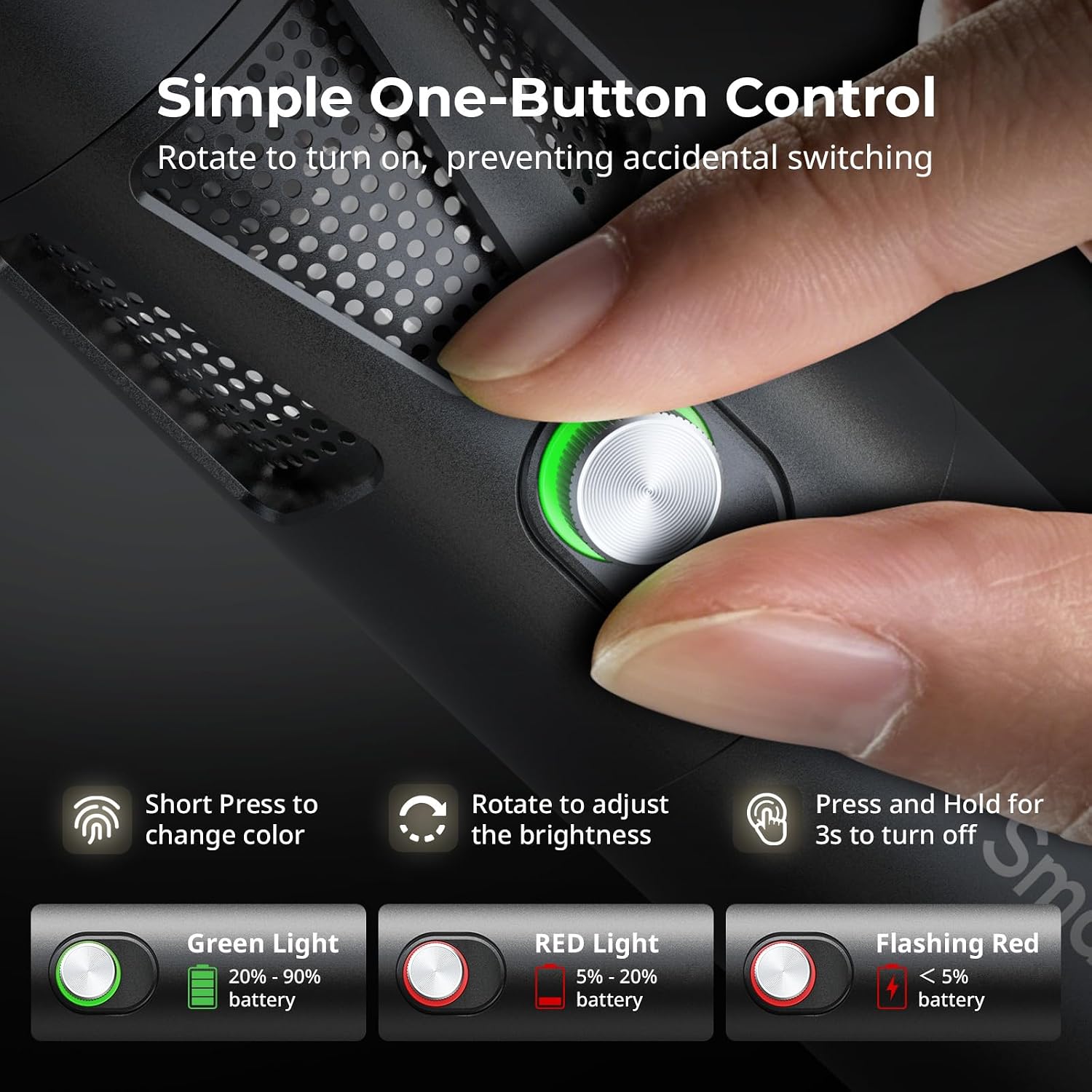
Figure 5.1: One-button control and battery indicator.

Figure 5.2: Available LED colors.
5.2 Adjusting Beam Angle
The front plano-convex lens allows for adjustment of the beam angle. Push or pull the lens to change the focus of the light from a narrow 24° beam to a wider 60° diffusion.
- Extend the lens: Narrows the beam (e.g., 24°).
- Retract the lens: Diffuses the beam (e.g., 60°).

Figure 5.3: Beam angle adjustment mechanism.
5.3 Endikatè batri
The control button's LED indicates the battery status:
- Limyè vèt: 20% - 90% battery remaining.
- Limyè wouj: 5% - 20% battery remaining.
- Limyè wouj kap flache: Mwens pase 5% batri ki rete.

Figure 5.4: Brightness comparison of RF20C.
6. Antretyen
- Clean the device regularly with a soft, dry cloth. Do not use harsh chemicals or abrasive materials.
- Sere aparèy la nan yon kote ki fre epi sèk, lwen limyè solèy dirèk ak tanperati ekstrèm.
- When not in use for extended periods, charge the battery to approximately 50% every three months to prolong battery life.
- Keep the lens and LED surface free from dust and fingerprints for optimal light output.
NAN. Depanaj
| Pwoblèm | Kòz posib | Solisyon |
|---|---|---|
| Aparèy la pa vire. | Pil fèb; pwosedi pou limen l pa kòrèk. | Charge the device. Ensure you rotate the control button to power on. |
| Pwodiksyon limyè se dim. | Low battery; brightness set too low; dirty lens. | Charge the device. Rotate the control button to increase brightness. Clean the lens. |
| Gobo projection is blurry. | Plano-convex lens not removed; gobo not seated correctly. | Remove the plano-convex lens before attaching the silicone gobo holder. Ensure gobo is properly inserted. |
| Device becomes warm during use. | Normal operation, especially at high power; fan obstruction. | This is normal. Ensure the fan vents are not obstructed for proper heat dissipation. If excessively hot, reduce brightness or allow to cool. |
| Bri fanatik la aparan. | Operasyon nòmal pou refwadisman. | The device uses a high-speed fan for efficient heat dissipation. This noise is part of normal operation. Consider distance from audio recording equipment. |
8. Espesifikasyon
| Karakteristik | Detay |
|---|---|
| Modèl | RF20C (5335) |
| Pouvwa | 20 W |
| Antre | 20 V / 1.8 A (max. 36 W) |
| Dirije Koulè | Red, 5600K White, Purple, Orange, Cyan |
| Endèks rann koulè (CRI) | ≥ 97 |
| Endèks konsistans ekleraj televizyon (TLCI) | ≥ 99 (at 5600 K) |
| Luminans | 5400 Lux @ 1m / 5600K |
| Kapasite batri | 10000mAh (2 x 5000mAh / 7.4V / 37Wh) |
| Runtime (Full Power) | Jiska 1.5 èdtan |
| Chaje | USB-C PD 36W Fast Charging, supports charging while operating |
| Ajisteman ang gwo bout bwa | 24° pou 60° |
| Materyèl | Alyaj aliminyòm, ABS |
| Dimansyon pwodwi | φ49.0 x 200.0 mm / φ1.9 x 7.9 inches |
| Pwa pwodwi | 520.0 ± 20.0 g / 18.3 ± 0.7 oz |
| Koneksyon Teknoloji | USB |
| Peyi orijin | Lachin |
9. Garanti ak sipò
SmallRig products are designed and manufactured to the highest quality standards. This product is covered by a limited warranty from the date of purchase. For detailed warranty terms, technical support, or service inquiries, please refer to the official SmallRig websit la oubyen kontakte distribitè lokal ou a.
Tanpri kenbe prèv ou achte pou reklamasyon garanti.
10. Senaryo Itilizasyon
The SmallRig RF20C is suitable for various applications, including:
- Fotografi
- Anrejistreman videyo
- Live Streaming
- Creative Accent Lighting
- Macro Work and Close-ups

Figi 10.1: Egzamples of RF20C usage scenarios.
Ask a question about this manual
Ask about setup, troubleshooting, compatibility, parts, safety, or missing instructions. Manuals+ will review the question and use this page’s manual context to help answer it.