
Entwodiksyon
This manual provides essential information for setting up, operating, maintaining, and troubleshooting your new vivo V70 FE 5G smartphone. Please read this guide thoroughly to ensure optimal performance and longevity of your device. Keep this manual for future reference.
1. Enstalasyon
1.1 Debale ak Premye Enspeksyon
Upon opening the package, verify that all components are present and undamaged. The box contents typically include:
- vivo V70 FE 5G Smartphone
- USB kab
- SIM Plato Ejector
- Ka Telefòn
- Adaptè pouvwa
- Screen Protector (pre-applied or in-box)
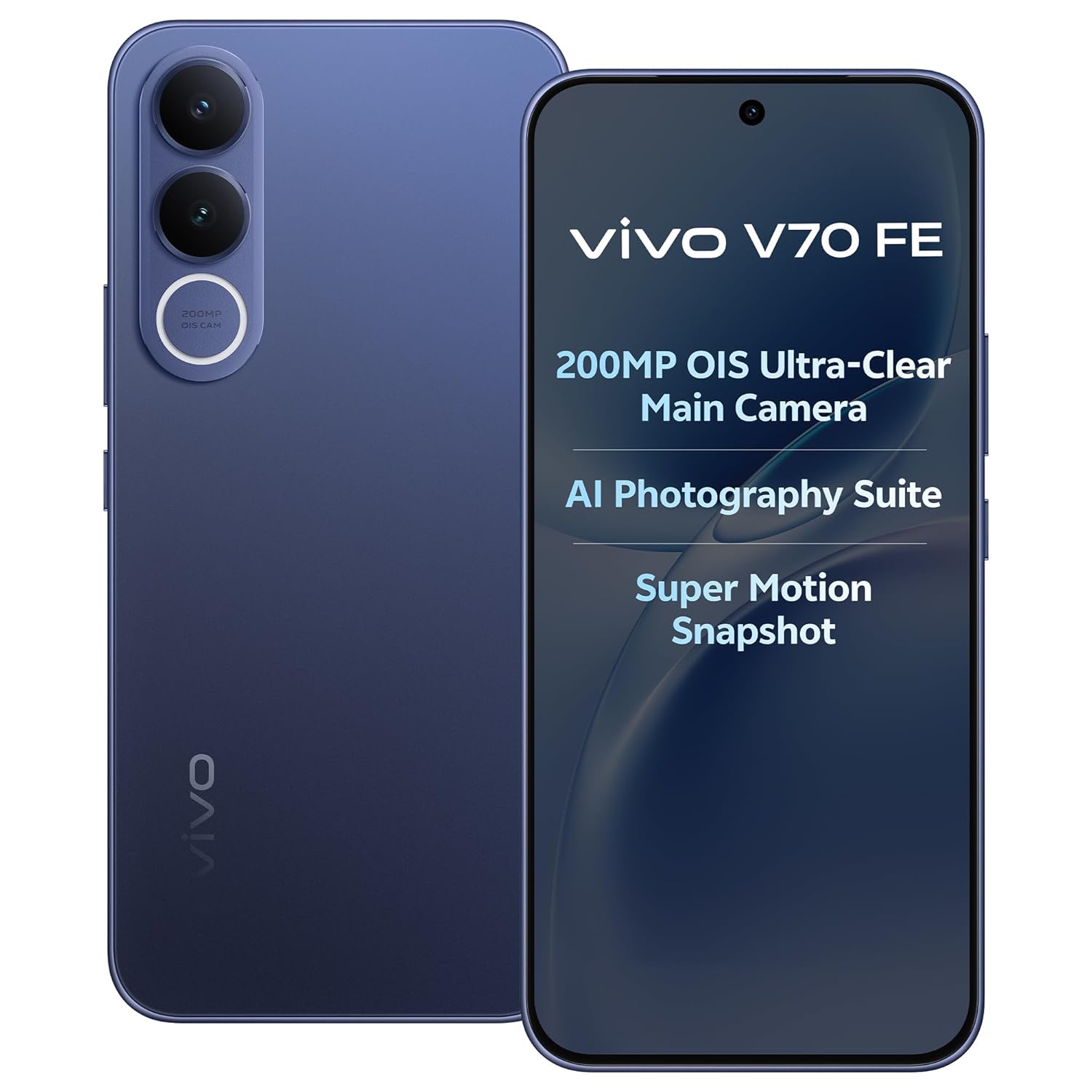
Image: The vivo V70 FE 5G smartphone in Monsoon Blue, showcasing konsepsyon li.
1.2 Enstalasyon kat SIM
- Jwenn plato kat SIM lan sou bò aparèy ou an.
- Mete zouti pou retire plato SIM lan nan ti twou ki akote plato a epi peze dousman jiskaske plato a soti.
- Place your Nano-SIM card(s) into the designated slots on the tray. This device supports Dual SIM functionality.
- Remete plato SIM lan nan telefòn nan avèk anpil atansyon.
1.3 Premye Chaje ak Limen
Before first use, it is recommended to fully charge your device. Connect the provided USB cable to the phone's USB Type-C port and the power adapter, then plug it into a power outlet. The device supports 90W FlashCharge for rapid charging of its 7000mAh battery.
To power on, press and hold the Power button located on the side of the phone until the vivo logo appears. Follow the on-screen instructions to complete the initial setup wizard, including language selection, Wi-Fi connection, and Google account setup.
2. Opere aparèy ou an
2.1 Aparèy souview ak Design
The vivo V70 FE 5G features a minimalist design, crafted for a slim and clean aesthetic.

Image: The minimalist design of the vivo V70 FE 5G, emphasizing its sleek profile.
2.2 Ekspozisyon ak Entèfas Itilizatè
Your device is equipped with a 17.35 cm (6.83-inch) 1.5K Ultra Clear AMOLED Display, offering a resolution of 2800 x 1260 pixels, a 120Hz refresh rate, and HDR10+ support for vibrant visuals and smooth scrolling.

Image: The 1.5K Ultra Clear OLED Display of the vivo V70 FE 5G, highlighting its key display specifications.
The phone runs on OriginOS 6, providing a user-friendly interface with features like Drag & Go for easy file management, One Tap Transfer for quick data migration, and vivo Office Kit for productivity.

Image: OriginOS features including Drag & Go, One Tap Transfer, and vivo Office Kit.
2.3 Fonksyon Kamera
The vivo V70 FE 5G is equipped with an advanced camera system:
- Kamera dèyè: 200MP OIS Ultra-Clear Main Camera + 8MP 120° Wide-Angle Camera
- Kamera Selfie: 50 MP HD Selfie Camera with Eye AF Group Selfie

Imaj: Detaye view of the 200MP OIS Ultra-Clear Main Camera system.
Karakteristik prensipal kamera yo enkli:
- 200MP Ultra-Clear Cropping: Capture a single high-resolution shot and crop it into multiple scenes without losing detail.

Image: Demonstration of 200MP Ultra-Clear Cropping, showing how one shot can yield multiple compositions.
- AI Magic Weather: AI adjusts the sky, light, and automatically removes unwanted objects in your photos.

Imaj: Egzamples of AI Magic Weather effects, transforming backgrounds from morning glow to twilight.
- AI Magic Landscape Mode: Enhance landscapes with AI, transforming scenes like deserts into islands or snow towns.

Image: Before and after comparisons using AI Magic Landscape Mode for various scenic transformations.
- 30X Superzoom with Telephoto Enhancement: Zoom in on distant subjects with clarity.

Image: Visual representation of 30X Superzoom, showing different levels of magnification.
- Super Motion Snapshot: Capture clear images of fast-moving subjects.

Image: Super Motion Snapshot in action, demonstrating its ability to capture clear images of moving subjects.
- 85 mm Close-Up Portrait: Achieve professional-looking portraits with various focal lengths.

Imaj: Egzamples of 85mm Close-Up Portrait mode, illustrating different portrait styles.
2.4 Odyo
Experience immersive sound with the Symmetrical Dual Stereo Speakers.

Image: Visual representation of the Symmetrical Dual Stereo Speaker system.
2.5 Pèfòmans ak Depo
The device is powered by a Mediatek Dimensity 7400 CPU, coupled with 8GB RAM and 128GB internal memory (UFS 3.1) for ultra-fast performance and efficient multitasking.

Image: Illustration of LPDDR5 RAM and UFS 3.1 storage for enhanced speed.
2.6 Batri ak chaje
The vivo V70 FE 5G features a 7000mAh battery with 90W FlashCharge support. A full charge from 1% to 100% can be achieved in approximately 60 minutes. The battery provides up to 43.8 hours of YouTube video playback.

Image: Details on the 7000mAh battery capacity and 90W FlashCharge capabilities.
3. Antretyen
3.1 Netwaye aparèy ou an
To clean your phone, use a soft, lint-free cloth. Avoid using harsh chemicals, abrasive cleaners, or compressed air, as these can damage the screen or finish. For stubborn smudges, slightly dampRense twal la avèk dlo oswa yon pwodui netwayaj ekran ki fèt espesyalman pou aparèy elektwonik.
3.2 Swen Batri
To prolong battery life, avoid exposing your phone to extreme temperatures. While the 90W FlashCharge is efficient, avoid leaving the phone plugged in for extended periods after it's fully charged. For optimal battery health, try to keep the charge level between 20% and 80% when possible.
3.3 Mizajou lojisyèl
Regularly check for and install software updates to ensure your device has the latest features, security patches, and performance improvements. You can usually find this option in your phone's Settings menu under 'System Update' or 'Software Update'.
3.4 Rezistans dlo ak pousyè
The vivo V70 FE 5G features IP68 & IP69 Top-Grade Dust and Water Resistance. This means it can withstand immersion in 1.5 meters of water for up to 120 minutes and offers 48 hours of rain resistance. However, water and dust resistance are not permanent conditions and may decrease over time with normal wear. Do not intentionally submerge the phone in water or expose it to liquids other than fresh water. Damage caused by liquid ingress is not covered under warranty.

Image: The vivo V70 FE 5G demonstrating its IP68 & IP69 dust and water resistance.
NAN. Depanaj
This section addresses common issues you might encounter with your vivo V70 FE 5G.
4.1 Aparèy la pa limen
- Asire w batri a chaje. Konekte telefòn nan nan plato a epi tann kèk minit anvan ou eseye limen l ankò.
- Peze epi kenbe bouton Pouvwa a pou omwen 10-15 segonn pou fòse rekòmanse.
4.2 Pwoblèm chaj
- Check if the USB cable and power adapter are securely connected to both the phone and the power outlet.
- Try using a different power outlet or a different compatible charger and cable to rule out faulty accessories.
- Enspekte pò chaj la pou nenpòt debri oswa domaj.
4.3 Pwoblèm koneksyon rezo
- Asire w kat SIM ou a byen mete epi aktive.
- Check if Airplane Mode is disabled in your phone's Quick Settings or Settings menu.
- Rekòmanse telefòn ou.
- Go to Settings > Network & internet > Mobile network and ensure your preferred network type (e.g., 5G) is selected and data roaming is enabled if necessary.
4.4 App Crashes or Freezing
- Fèmen epi relouvri aplikasyon ki gen pwoblèm nan.
- Efase kach ak done aplikasyon an (Anviwònman > Aplikasyon > [Non aplikasyon an] > Depo > Efase kach/Efase done).
- Asire w aplikasyon an mete ajou nan dènye vèsyon li nan Google Play Store la.
- Si pwoblèm nan pèsiste, konsidere dezinstale epi reenstale aplikasyon an.
4.5 Reset faktori
Si ou gen pwoblèm lojisyèl ki pèsiste, yon réinitializasyon faktori ka rezoud yo. Avètisman: Yon reset faktori ap efase tout done ki sou telefòn ou an. Fè yon kopi done enpòtan yo anvan ou kontinye.
- Ale nan Anviwònman > Sistèm > Opsyon Reyajiste.
- Chwazi 'Efase tout done yo (reyajiste nan paramèt faktori)'.
- Konfime desizyon w lan epi antre PIN/modpas ou si yo mande w.
5. Espesifikasyon
| Karakteristik | Spesifikasyon |
|---|---|
| Mak | vivo |
| Modèl | V70 FE 5G |
| Sistèm operasyon | OriginOS 6 |
| Memwa RAM | 8 GB |
| Depo Entèn | 128 GB (UFS 3.1) |
| Modèl CPU | Mediatek Dimensity 7400 |
| Gwosè ekspozisyon | 17.35 cm (6.83 Pous) |
| Kalite ekspozisyon | AMOLED |
| Rezolisyon ekspozisyon | 2800 x 1260 (Maximum: 1080 x 2400) |
| Kamera dèyè | 200 MP (OIS Ultra-Clear Main) + 8 MP (120° Wide-Angle) |
| Kamera devan | 50 MP (HD Selfie) |
| Kapasite batri | 7000 mAh |
| Chaje | Chaj Flash 90W |
| Fant kat SIM | Doub SIM |
| Koneksyon | 5G, Bluetooth, Built-In GPS, USB Type C |
| Nivo rezistans dlo | IP68 & IP69 (Not Water Resistant - see maintenance section) |
| Dimansyon atik | 16.4 x 7.6 x 0.8 santimèt |
| Pwa atik | 200 gram |
| Ane ki gen konpòtman egzanplè | 2026 |
6. Enfòmasyon sou Garanti
Your vivo V70 FE 5G comes with a 1-year manufacturer warranty for the device epi 6 months for in-box accessories, effective from the date of purchase. This warranty covers manufacturing defects under normal use. Please retain your proof of purchase for warranty claims. The warranty does not cover damage caused by misuse, accidents, unauthorized repairs, or liquid ingress.
7. Sipò
For further assistance, technical support, or service inquiries, please contact vivo customer support. You can find more information and contact details on the official vivo website or through the vivo store.
Manifakti: vivo Mobile India Pvt Ltd Plot No 08, Sector 24, Yamuna Expressway Area, Gautam Buddha Nagar, Uttar Pradesh, 201310
Enpòtatè: Vivo Mobile India Pvt Ltd
Magazen sou entènèt: Visit the vivo Store on Amazon.in


