
1. Entwodiksyon
Thank you for choosing the Trisomy 3.5HP Foldable Under Desk Treadmill. This manual provides essential information for the safe and effective use, setup, operation, and maintenance of your new fitness equipment. Please read this manual thoroughly before use and retain it for future reference.
This innovative 4-in-1 walking pad treadmill is designed to support various fitness levels and activities, including walking, running, climbing, and desk workouts. It features an adjustable handlebar, multiple incline settings, a powerful yet quiet motor, and advanced shock absorption for a comfortable and safe exercise experience.
2. Enfòmasyon sou Sekirite
To ensure your safety and prolong the life of your treadmill, please observe the following precautions:
- Toujou mete tapi kous la sou yon sifas plat epi ki stab.
- Asire w ke gen ase espas vid toutotou tapi kous la (omwen 2 pye sou kote yo ak 6 pye dèyè).
- Kenbe timoun ak bèt kay lwen tapi a pandan operasyon an.
- Mete soulye atletik ki apwopriye.
- Use the safety clip at all times. Attach it to your clothing before starting your workout.
- Pa sèvi ak tapi kous la si li domaje oswa si li pa fonksyone byen.
- Konsilte yon doktè anvan ou kòmanse nenpòt nouvo pwogram egzèsis.
- Maximum user weight capacity is 350 lbs.
3. Pake kontni
Debale bwat la ak anpil atansyon epi asire w tout bagay yo la:
- Inite tapi
- Gid Enstalasyon Rapid
- Òt tablèt
- Safe Lock (Safety Clip)
- Kle ki gen fòm L
- Manyèl itilizatè
- Kontwòl Remote
- Handlebar Fixing Nut (x2)
- Tablet Holder Nut (x2)
- Lubrifyan
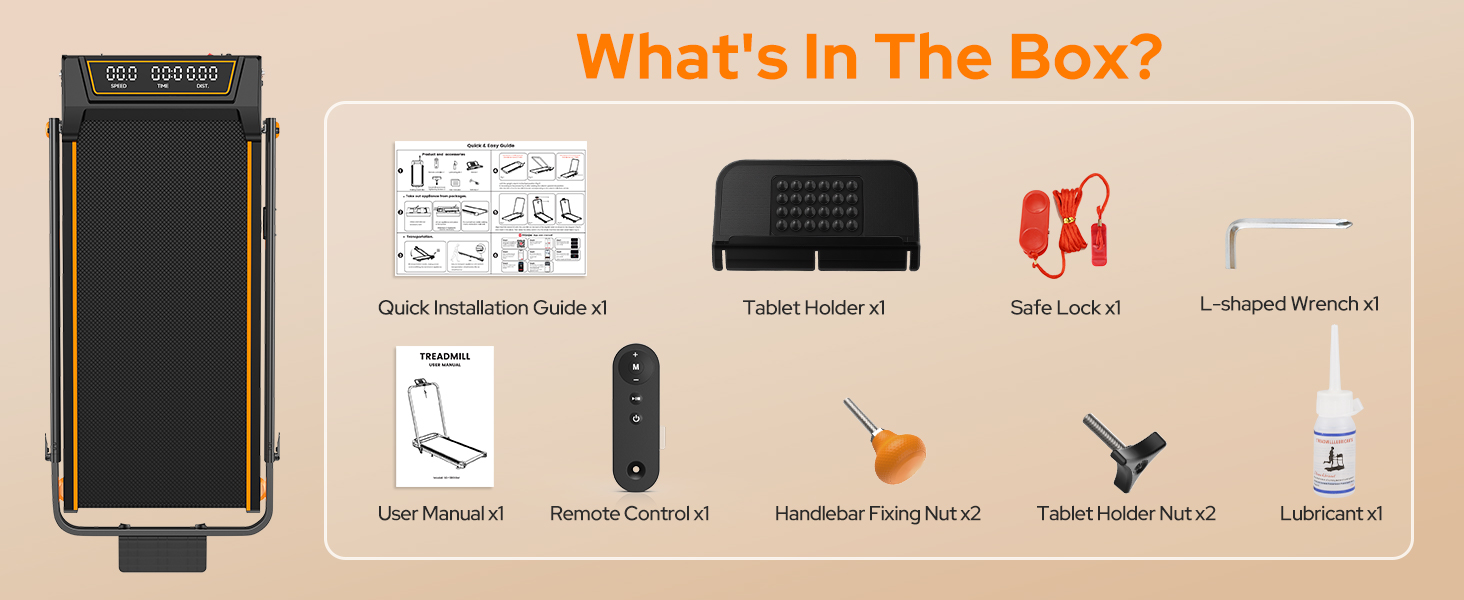
Figi 3.1: Konpozan ki enkli
4. Enstalasyon
The Trisomy treadmill is designed for tool-free assembly, making setup quick and easy.
4.1 Depliye tapi kous la
1. Remove the treadmill from its packaging.

Figure 4.1: Treadmill Unfolded
4.2 Attaching the Handlebar and Tablet Holder
1. Raise the handlebar to the desired height. The handlebar features 6 adjustable levels from 35" to 47".
2. Secure the handlebar in place using the two handlebar fixing nuts. Rotate them by hand until they are firmly tightened.
3. Attach the tablet holder to the top of the handlebar using the two tablet holder nuts, rotating them by hand to secure.

Figure 4.2: Handlebar and Tablet Holder Assembly
4.3 Adjusting Incline
The treadmill offers 3 manual incline settings (0-12%).
1. To adjust the incline, locate the incline adjustment screws at the rear of the treadmill.
2. Manually adjust these screws to select your desired incline level (0%, 6%, or 12%).

Figure 4.3: Manual Incline Adjustment
4.4 Koneksyon pouvwa
1. Plug the power cord into a grounded electrical outlet.
2. Turn on the main power switch, usually located near the power cord connection point.
5. Operasyon Enstriksyon
Your Trisomy treadmill supports various modes and control options.
5.1 Mòd Operasyon
The treadmill offers four distinct modes:
- Mòd travay: Handlebar folded down, ideal for light walking under a desk (0.6-1.5 mph).
- Mòd mache: Handlebar folded down, for general walking (0.6-4.0 mph).
- Kouri Mode: Handlebar raised, for jogging or running (4.0-6.0 mph).
- Mòd Eskalad: Handlebar raised with incline activated, for a more intense workout.

Figure 5.1: Treadmill Operating Modes
5.2 Sèvi ak kontwòl remote la
The included remote control allows you to start/stop the treadmill, adjust speed, and switch display metrics. It also features a mute option for quiet operation.

Figure 5.2: LED Display and Remote Control
5.3 Koneksyon App
Connect your treadmill to the "FITSHOW" app via Bluetooth for enhanced workout tracking and customized exercise journeys. The app allows you to monitor your duration, distance, speed, and calories burned, and can help you set and achieve fitness goals.

Figi 5.3: Entèfas Kontwòl Aplikasyon an
6. Antretyen
Antretyen regilye asire pèfòmans optimal ak lonjevite tapi kous ou a.
6.1 Netwayaj
Siye tapi roulan an ak piblisiteamp Siye twal la apre chak itilizasyon pou retire swe ak pousyè. Evite itilize pwodui netwayaj abrazif oswa solvan.
6.2 Lubrification
The running belt requires periodic lubrication to reduce friction and wear. Use the provided lubricant and follow these steps:
- Etenn epi deploge tapi an.
- Loosen the running belt by turning the rear rollers counter-clockwise (usually 2-3 turns).
- Apply a small amount of lubricant evenly under the center of the running belt.
- Tighten the running belt by turning the rear rollers clockwise until snug.
- Run the treadmill at a low speed (e.g., 1 mph) for 2-3 minutes to distribute the lubricant.

Figure 6.1: Adjusting the Running Belt
6.3 Ajisteman senti
If the running belt is off-center or slipping, adjust it using the L-shaped wrench provided. Refer to the detailed instructions in the Quick Installation Guide for precise adjustments.
NAN. Depanaj
Si ou rankontre nenpòt pwoblèm, tanpri al gade pwoblèm ak solisyon komen sa yo:
- Tapis roulan an pa kòmanse: Asire w kòd kouran an byen branche, switch prensipal la limen, epi klip sekirite a byen tache.
- Senti glise: The running belt may need tensioning or lubrication. Refer to Section 6.2 and 6.3.
- Bri etranj: Check for loose parts or foreign objects under the belt. Lubricate the belt if necessary.
- Ekspozisyon an pa fonksyone: Tcheke koneksyon kouran yo. Si pwoblèm nan pèsiste, kontakte sèvis kliyan.
For more complex issues, please contact Trisomy customer support.
8. Espesifikasyon
| Karakteristik | Spesifikasyon |
|---|---|
| Mak | Trisomy |
| Non modèl | HSM-T12C1 |
| Koulè | Nwa |
| Dimansyon pwodwi | 42.5"D x 22.4"W x 4.4"H |
| Pwa atik | 1 Pounds (Note: This seems to be an error in the source data, actual weight is likely higher) |
| Materyèl | Alloy Steel |
| Maksimòm Puissance | 3.5 Puissance |
| Pousan Incline Maksimòmtage | 12% (3 manual levels) |
| Range vitès | 0.6 - 6.0 mil pa èdtan |
| Wotè gidon reglabl | 35" to 47" (6 levels) |
| Kalite ekspozisyon | dirije |
| Pwa maksimòm itilizatè | 350 LBS |
| Karakteristik espesyal | Adjustable Height, Adjustable Speed, Compact Design, Cushioned Running Belt, Foldable, Bluetooth Speaker, APP Control |
9. Depo
The Trisomy treadmill is designed for easy storage due to its foldable design and built-in wheels.
1. To fold, loosen the handlebar fixing nuts and lower the handlebar completely.
2. The treadmill can then be moved using its built-in wheels and stored under a sofa, desk, or bed, or leaned against a wall.

Figure 9.1: Easy Storage
10. Garanti & Sipò
The Trisomy treadmill comes with a 2-year warranty. We offer 24/7 customer service and lifetime technical support.
If you have any questions, concerns, or require technical assistance, please do not hesitate to contact us. You can find our contact information in the Quick Installation Guide or on the last page of your User Manual.

Figure 10.1: Customer Support Information