
1. Pwodwi souview
The Keenso F4 V3S PLUS Brushless ESC Stack is a high-performance 4-in-1 controller designed for FPV drones and RC airplanes. This integrated unit combines a flight controller and a 45A Electronic Speed Controller (ESC) into a compact design, simplifying installation and wiring.
Karakteristik kle yo enkli:
- High Performance 45A ESC: Integrates four 45A ESCs for efficient power management and simplified setup.
- Anti-Jamming & Fast Response: Supports various throttle modes including Oneshot, Multishot, and Dshot for rapid signal processing and interference resistance.
- Powerful BLHeli_S Firmware: Facilitates easy ESC parameter configuration, firmware updates, and compatibility with Cleanflight and Betaflight firmware.
- Atizanal prim: Constructed with industrial-grade LDO and high-resistance MOS for enhanced durability, strong load capacity, and high-temperature resilience.
- Fonksyonalite amelyore: Equipped with a gyroscope and barometer for superior control and flight stability.
2. Pake kontni
Verifye ke tout atik ki nan lis anba a yo enkli nan pakè ou a:
- 1 x 4-in-1 ESC (Electronic Speed Controller)
- 1 x Kontwolè Vòl
- 1 x Capacitance (Capacitor)
- 3 x Connecting Wires (various types)
- 2 x Accessories (unspecified, typically connectors or small parts)
- 8 x Damping Pads
- 4 x nwa

Imaj 2.1: Plis paseview nan tout konpozan ki enkli yo.

Imaj 2.2: Detaye view of the ESC and Flight Controller boards with accompanying parts.

Image 2.3: Components laid out for inspection.
3. Espesifikasyon teknik
3.1. 4-in-1 ESC Parameters
| Paramèt | Valè |
|---|---|
| ESC Size | Approx. 42x41mm / 1.7x1.6in |
| Distans twou | Approx. 30.5x30.5mm / 1.2x1.2in |
| Kouran kontinyèl | 45A |
| Kouran pete | 50A (10S) |
| Processeur | EFM8BB21F16G |
| Firmware | BLS J H 30 7 |
| Drive Signal Support | DShot300/600, Multshot, Oneshot, PMW |
| Antre Voltage | 7.4 to 22.2V (2 to 6S LiPo) |
| ESC Weight | Apeprè. 12g / 0.4oz |
3.2. Paramèt Kontwolè Vòl la
| Paramèt | Valè |
|---|---|
| Gwosè Kontwolè | Approx. 36x36mm / 1.4x1.4in |
| Mounting Distans Twou | Approx. 30.5x30.5mm / 1.2x1.2in |
| MCU | F405 |
| Fonksyon sipòte | Drag and drop OSD via Betaflight configuration, SBUS, PPM, Spketrum ports, Micro storage card black box |
| Jiroskop | Enkli |
| Baromètr | BMP280 |
| Sòti BEC | 5V/3A, 9V/3A |
| Pwa kontwolè | Apeprè. 7g / 0.2oz |
3.3. Enfòmasyon jeneral sou pwodwi
- Mak: Keenso
- Non modèl: Keensox6h89r54l1
- Materyèl: Eleman elektwonik
- Aplikasyon: FPV UAV, RC Airplanes
4. Enstalasyon ak Enstalasyon
Proper installation is crucial for the performance and safety of your FPV drone or RC airplane. Always refer to the specific wiring diagrams for your frame and components.
4.1. Chèk Pre-Enstalasyon
- Ensure your workspace is clean and static-free.
- Verifye tout eleman yo prezan epi yo pa domaje.
- Gather necessary tools: soldering iron, solder, flux, wire cutters, heat shrink tubing, multimeter.
4.2. Mounting the ESC Stack
- Tache damping pads to the mounting holes on your frame.
- Carefully place the 4-in-1 ESC board onto the damping pads, aligning the mounting holes.
- Place the flight controller board on top of the ESC, ensuring proper orientation and alignment.
- Secure the stack using the provided nuts or standoffs, ensuring not to overtighten.
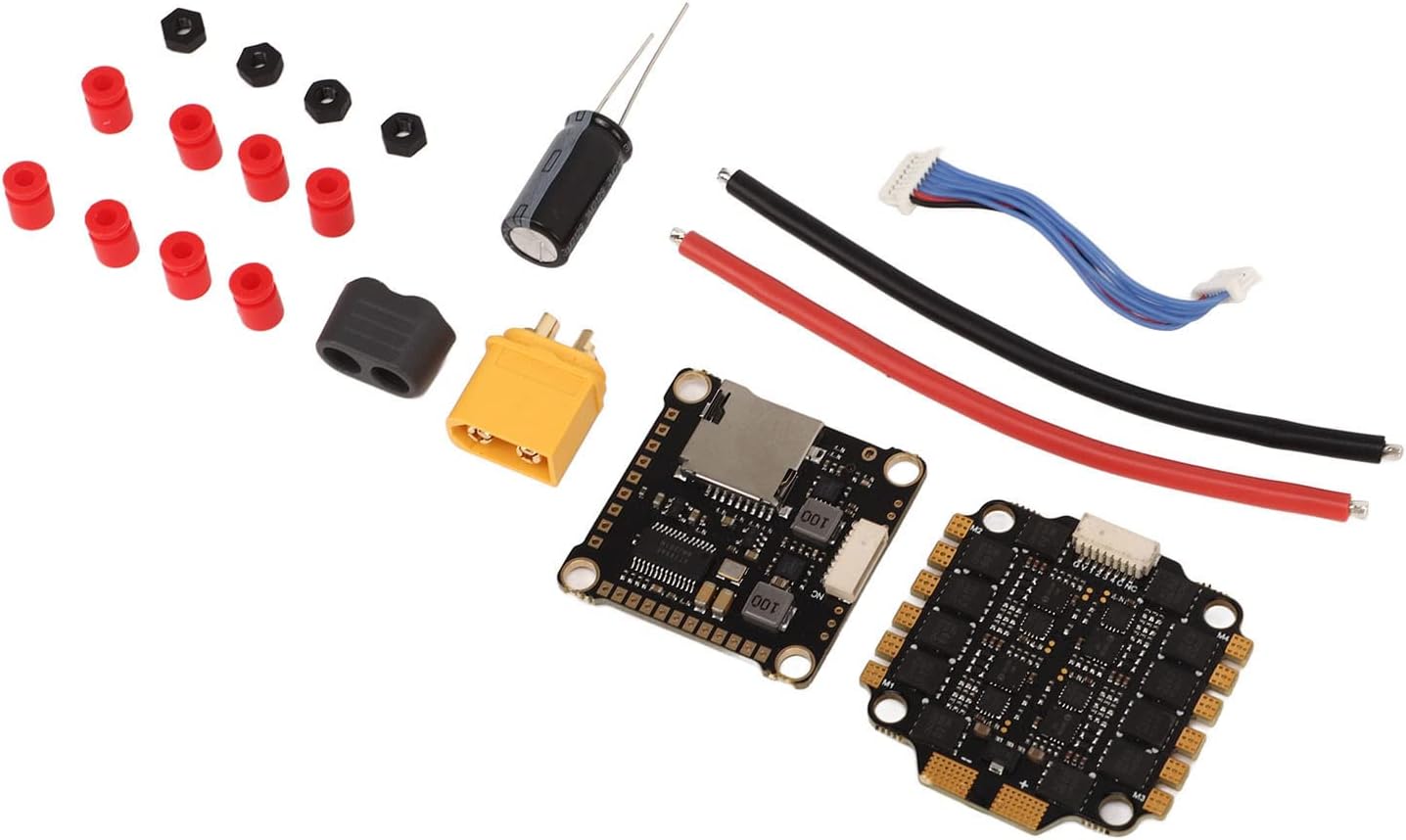
Imaj 4.1: Detaye view of the ESC and Flight Controller boards, highlighting mounting points.
4.3. Koneksyon fil elektrik
Connect the ESC stack to your drone's power distribution board (PDB) or direct battery connection, motors, receiver, and other peripherals. Always double-check polarity before powering on.
- Antre pouvwa: Solder the main battery leads (red for positive, black for negative) to the designated pads on the 4-in-1 ESC. Ensure the capacitor is soldered across the main battery pads for voltage spike suppression.
- Koneksyon motè: Solder the three motor wires from each motor to the corresponding motor pads on the ESC. The order of wires may need adjustment in software for correct motor direction.
- Kontwolè vòl pou ESC: Use the provided connecting wire harness to link the flight controller to the 4-in-1 ESC. This typically carries telemetry, current sensing, and motor control signals.
- Koneksyon reseptè: Connect your receiver (SBUS, PPM, or Spektrum) to the appropriate UART port on the flight controller. Refer to the flight controller's pinout diagram.
- Lòt periferik: Connect FPV camera, video transmitter (VTX), GPS, or other accessories to the designated pads/ports on the flight controller, paying attention to voltage requirements (5V/9V BEC outputs are available).
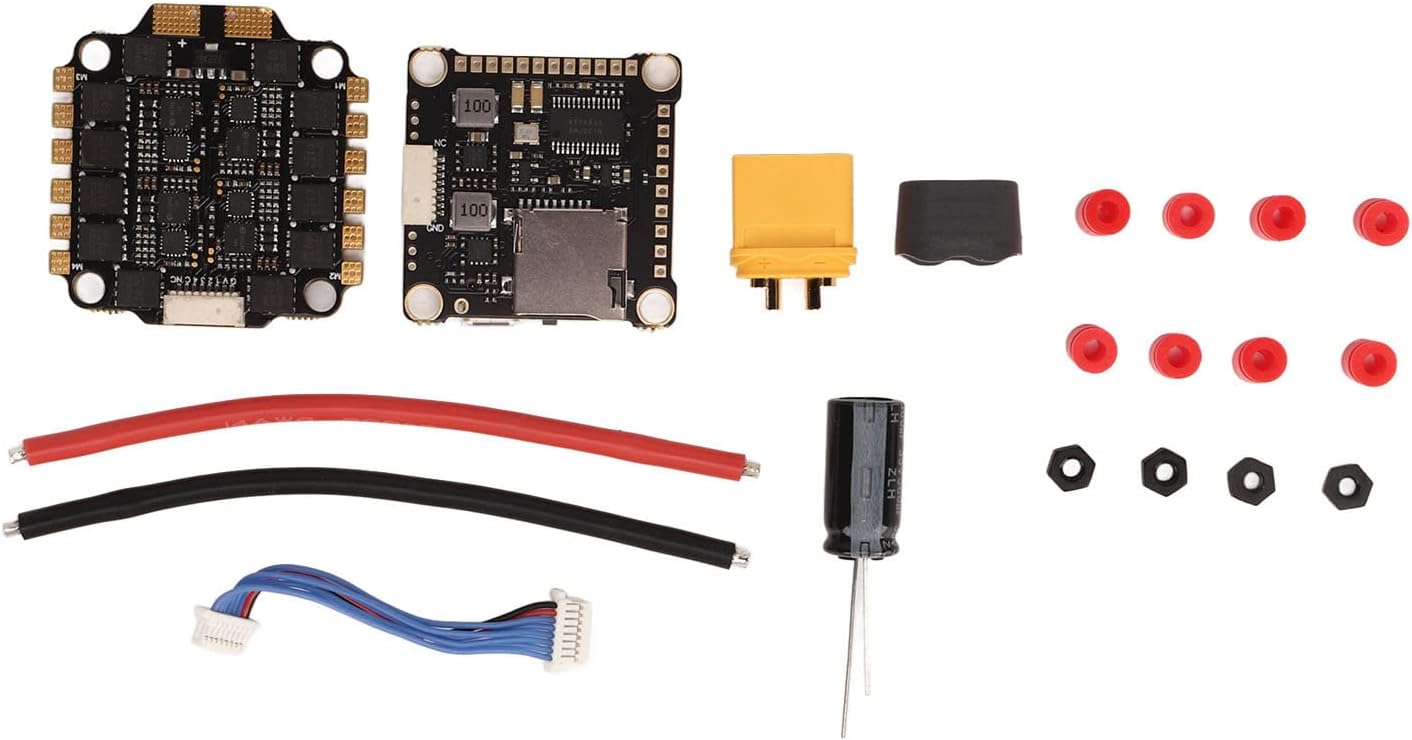
Image 4.2: Connection points on the ESC and Flight Controller.

Image 4.3: Included connecting wires.

Image 4.4: Included capacitor for power filtering.
4.4. Konfigirasyon mikrolojisyèl
The flight controller supports Betaflight and Cleanflight firmware. The ESCs utilize BLHeli_S firmware.
- Kontwolè vòl: Connect the flight controller to your computer via USB. Use the Betaflight Configurator or Cleanflight Configurator software to flash the latest firmware and configure settings such as PID tuning, motor output, receiver protocols, and OSD.
- ESC yo: Use the BLHeliSuite software (accessible through Betaflight/Cleanflight passthrough) to configure ESC settings, calibrate motors, reverse motor direction if needed, and update BLHeli_S firmware.
5. Operasyon Enstriksyon
Once installed and configured, the Keenso F4 V3S PLUS ESC Stack is ready for operation.
5.1. Verifikasyon anvan vòl la
- Asire w ke tout koneksyon an sekirite epi yo pa gen bout pantalon.
- Verify propeller direction and tightness.
- Tcheke batri voltage ak nivo chaj.
- Confirm radio control link and arming switch functionality.
5.2. Powering On and Arming
- Connect the flight battery to the ESC stack. You should hear a series of beeps indicating successful initialization.
- Mete abèy la sou yon sifas ki nivo.
- Arm the motors using your configured arming switch on your radio transmitter. The motors will typically spin slowly or make a distinct sound to indicate they are armed.
5.3. Throttle Modes
The ESC supports various throttle protocols for precise motor control:
- DShot300/600: Digital protocol offering high resolution and noise immunity. Recommended for optimal performance.
- Multishot: Analog protocol, faster than Oneshot.
- Oneshot125: Analog protocol, faster than standard PWM.
- PWM: Standard analog protocol, generally not recommended for FPV drones due to latency.
Select the desired throttle mode in your flight controller software (e.g., Betaflight Configurator).
6. Antretyen
Regular maintenance helps ensure the longevity and reliability of your ESC stack.
- Enspeksyon vizyèl: Periodically check for any signs of physical damage, loose connections, or burnt components.
- Netwayaj: Keep the boards free from dust, dirt, and debris. Use compressed air or a soft brush. Avoid using liquids directly on the electronics.
- Mizajou mikrolojisyèl: Regularly check for and apply the latest firmware updates for both the flight controller (Betaflight/Cleanflight) and ESCs (BLHeli_S) to benefit from performance improvements and bug fixes.
- Jesyon Chalè: Ensure adequate airflow around the ESC stack, especially during intense flight, to prevent overheating.
NAN. Depanaj
Seksyon sa a adrese pwoblèm komen ou ka rankontre.
7.1. No Power / No Initialization Beeps
- Tcheke batri: Asire w ke batri a chaje ak byen konekte.
- Tcheke polarite: Verify that the battery leads are connected with correct polarity to the ESC. Reverse polarity can cause severe damage.
- Inspect Soldering: Look for cold solder joints or bridges on the main power pads.
7.2. Motors Not Spinning / Incorrect Direction
- Ame: Ensure the flight controller is armed.
- Koneksyon motè: Verify all motor wires are securely soldered to the ESC.
- Konfigirasyon BLHeli_S: Use BLHeliSuite to check motor direction and calibrate ESCs. Motor direction can be reversed in the software.
- Throttle Protocol: Confirm the correct DShot/Multishot/Oneshot protocol is selected in Betaflight/Cleanflight.
7.3. Unstable Flight / Jittery Motors
- Ajisteman PID: Adjust PID settings in Betaflight/Cleanflight.
- Damping Pads: Ensure the ESC stack is properly mounted on damping pads to reduce vibrations.
- Propulsè: Tcheke pou elis yo ki domaje oswa ki dezekilib.
- Kondansateur: Verify the capacitor is correctly installed across the main power leads to filter electrical noise.
7.4. USB Connection Issues
- USB kab: Try a different USB cable, ensuring it is a data-capable cable.
- Chofè: Install necessary drivers (e.g., STM32 Virtual COM Port Driver, Zadig for DFU mode) for your flight controller.
- Konfigirasyon: Ensure you are using the correct version of Betaflight/Cleanflight Configurator.
8. Garanti ak sipò
For warranty information and technical support, please refer to the official Keenso websit la oubyen kontakte revandè w la. Kenbe prèv acha w la pou nenpòt reklamasyon sou garanti a.
This product has no known safety hazards to users when installed and operated correctly.