
1. Entwodiksyon
Thank you for choosing the Sharp 40HF2265E Full HD Google TV. This manual provides essential information for setting up, operating, and maintaining your television. Featuring integrated Google TV, HDR10 support, Dolby Digital audio, and Bluetooth connectivity, your new TV offers a rich entertainment experience. Please read this manual thoroughly before use to ensure proper operation and to maximize your viewpran plezi.

Imaj 1.1: Devan view of the Sharp 40HF2265E Full HD Google TV.
2. Ki sa ki nan bwat la
Depake televizyon ou avèk atansyon epi verifye si tout bagay sa yo ladan l:
- Sharp 40HF2265E Television
- Pouvwa kab
- Remote Control (requires 2 AAA batteries, not always included)
- Manyèl Itilizatè (dokiman sa a)
- Kat Garanti
If any items are missing or damaged, please contact your retailer or Sharp customer support immediately.
3. Enstalasyon
3.1 Enstalasyon kanpe
To install the TV stand, place the TV screen-down on a soft, flat surface to prevent scratches. Align the stand feet with the corresponding slots on the bottom of the TV and secure them with the provided screws. Ensure the stand is firmly attached before placing the TV upright.

Imaj 3.1: Devan view of the TV with stand feet attached.
3.2 Montaj mi
If you prefer to wall-mount your TV, you will need a VESA-compatible wall mount (not included). The Sharp 40HF2265E supports a VESA mounting standard of 200 x 200 mm. Refer to the wall mount's instructions for installation. Always ensure the wall can support the weight of the TV and the mount.

Imaj 3.2: Dèyè view of the TV, highlighting VESA mounting points and ports.
3.3 Konekte periferik
Connect your external devices to the appropriate ports on the back and side of the TV. The TV features multiple HDMI, USB, and other connectivity options.
- Pò HDMI: Pou konekte lektè Blu-ray, konsola jwèt, dekodeur, elatriye.
- Pò USB: Pou konekte aparèy depo USB pou li medya oswa pou mizajou lojisyèl.
- Ethernet Port: Pou yon koneksyon entènèt filaire.
- Antre Antèn/Kab: Pou konekte yon antèn oswa yon siyal televizyon kab.
- Sòti odyo: Pou konekte sistèm odyo ekstèn yo.
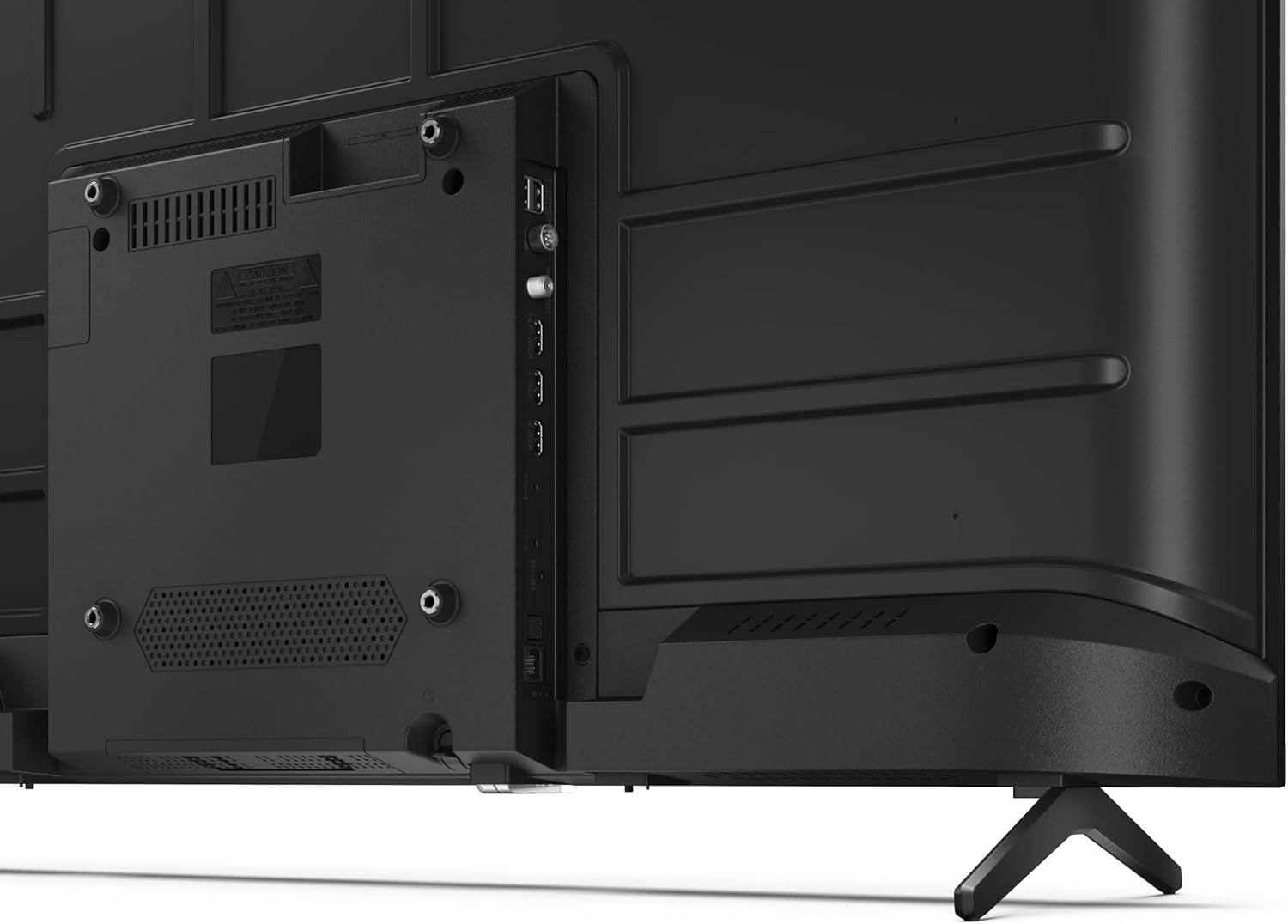
Imaj 3.3: Detaye view nan pò koneksyon televizyon an.
3.4 Premye Limen ak Konfigirasyon Google TV
After connecting all necessary cables, plug the power cable into an electrical outlet. Press the power button on the remote control or on the TV. Follow the on-screen instructions to complete the initial setup, including network connection, Google account login, and channel scanning.
4. Opere
4.1 Fonksyon kontwòl Remote
The remote control allows you to navigate the TV's features. Common buttons include Power, Volume Up/Down, Channel Up/Down, Input Source, Home (Google TV), Navigation (directional arrows, OK), Back, and Google Assistant.
4.2 Entèfas Google TV
Your Sharp TV runs on Google TV, providing a personalized home screen with content recommendations from your subscriptions. Use the remote's navigation buttons to browse movies, shows, apps, and your library.

Image 4.1: The Google TV home screen on the Sharp 40HF2265E.
4.3 Seleksyon Antre
To switch between connected devices (e.g., HDMI 1, HDMI 2, TV tuner), press the 'Input' or 'Source' button on your remote control and select the desired input from the on-screen menu.
4.4 Anviwònman Imaj ak Son
Access the TV's settings menu to adjust picture modes (Standard, Vivid, Cinema, Game), brightness, contrast, color, and sound modes (Standard, Music, Movie, Speech). The TV supports HDR10 for enhanced contrast and color, and Dolby Digital for rich audio.

Image 4.2: Visual representation of HDR (High Dynamic Range) technology.
4.5 Asistan Google ak Chromecast
Use the built-in Google Assistant for voice control. Press the Google Assistant button on your remote and speak your commands, such as searching for content, controlling smart home devices, or getting information. Chromecast allows you to cast content directly from compatible devices like smartphones or tablets to your TV.

Image 4.3: Google Assistant integration for voice commands.
4.6 Koneksyon Bluetooth
Pair Bluetooth-enabled devices such as headphones or soundbars with your TV for a wireless audio experience. Navigate to the TV's settings menu, select 'Remotes & Accessories', and then 'Pair new device' to connect.
5. Antretyen
5.1 Netwaye televizyon an
Always unplug the TV before cleaning. Use a soft, dry cloth to wipe the screen and TV body. For stubborn marks, lightly dampen the cloth with water or a specialized screen cleaner. Never use abrasive cleaners, waxes, or solvents.
5.2 Mizajou lojisyèl
Your Google TV may receive automatic software updates. Ensure your TV is connected to the internet to receive these updates, which can improve performance and add new features. You can also manually check for updates in the settings menu.
NAN. Depanaj
Si w rankontre pwoblèm ak televizyon w lan, gade solisyon komen sa yo:
- Pa gen pouvwa: Tcheke si kab kouran an byen branche nan televizyon an ak nan priz miray la. Asire w ke priz la fonksyone byen.
- Pa gen imaj/son: Verifye ke sous antre ki kòrèk la chwazi. Tcheke tout koneksyon kab yo (HDMI, antèn). Eseye rekòmanse televizyon an.
- Kontwòl Remote pa travay: Ranplase pil yo (2 AAA). Asire w pa gen okenn obstak ant telekòmand lan ak detèktè IR televizyon an.
- Pwoblèm Koneksyon Rezo: For Wi-Fi, check your router and ensure the TV is within range. For wired connections, check the Ethernet cable. Try restarting your router and the TV.
- Pwoblèm Kalite Imaj: Ajiste paramèt imaj yo (klète, kontras, netteté). Asire w sous opinyon an ap bay yon siyal kalite siperyè.
For more complex issues, consult the comprehensive troubleshooting section in the full digital manual or contact Sharp customer support.
7. Espesifikasyon
Below are the technical specifications for the Sharp 40HF2265E Full HD Google TV:

Image 7.1: Dimensions of the Sharp 40HF2265E TV.
| Karakteristik | Spesifikasyon |
|---|---|
| Mak | Sharp |
| Nimewo Modèl | 40HF2265E |
| Non modèl | Seri HF |
| Ane ki gen konpòtman egzanplè | 2025 |
| Gwosè ekran | 40 pous (81 santimèt) |
| Teknoloji ekspozisyon | dirije |
| Rezolisyon | 1080p (Full HD) |
| Rafrechisman pousantaj | 60 Hz |
| Aspè rapò | 16:9 |
| Pwopòsyon kontras | 100000:1 |
| Screen Finish | Mat |
| Tan repons | 8 Milisegond |
| Teknoloji ekleraj | dirije |
| Supported HDR Format | HDR10, HLG |
| Amelyorasyon Kalite Imaj | Dynamic Contrast, HDR10, HLG |
| Motion Enhancement Technology | Entèpolasyon Mouvman |
| Sistèm operasyon | Google TV |
| Internet Applications | Apple TV, Google TV, Hulu, Prime Video, YouTube |
| Karakteristik espesyal | Bluetooth, Chromecast, Dolby Digital, HD Tuner |
| Koneksyon Teknoloji | Ethernet, USB, Wi-Fi |
| Teknoloji san fil | Bluetooth |
| Bluetooth vèsyon | 5.0 |
| Screen Mirroring Technology | Chromecast, Google Cast |
| Total pò HDMI | 3 |
| Total USB 2.0 Ports | 2 |
| Number of Composite Video Inputs | 1 |
| Antre odyo | Mini composite/CVBS + audio input |
| Total Audio Output Ports | 2 |
| Audio Sòti Mode | Stereo |
| Kodaj odyo | DD |
| Integrated Surround Sound Format | Dolby AC-4, Dolby Digital, Dolby Digital Plus |
| Maksimòm puisans sòti oratè | 16 Watts (2x8W) |
| Kantite chanèl odyo | 2.0 |
| Sistèm emisyon | DVB-T2/C/S/S2 |
| Kodaj videyo | MKV |
| Dimansyon pwodwi (DxWxH) | 8.4P x 89.2L x 50.9H cm |
| Pwa atik | 5.4 Kilogram |
| Pwa san kanpe | 5.4 Kilogram |
| Lajè baz | 765 Milimèt |
| VESA Mounting Standard | 200 x 200 mm |
| Konsomasyon pouvwa | 37 Watts |
| Voltage | 230 Volt |
| Remote Control Battery Size | AAA |
| Remote Control Battery Quantity | 2 |
| Parental Control Technology | Kindersicherung Über Google Tv |
| Disponibilite pyès rezèv nan Inyon Ewopeyen an | 7 Ane |
8. Garanti ak sipò
8.1 Pwodwi Garanti
The Sharp 40HF2265E television comes with a 2-year manufacturer's warranty. Please refer to the included Warranty Card for detailed terms and conditions regarding coverage and service. Keep your proof of purchase for warranty claims.
8.2 Sipò pou Kliyan
If you require further assistance, have questions not covered in this manual, or need technical support, please contact Sharp customer service. Contact information can typically be found on the Warranty Card or the official Sharp websit.