
Entwodiksyon
Thank you for choosing the Severin S-Power Olymp HV 7175 Cordless Vacuum Cleaner. This powerful and versatile appliance is designed to provide efficient cleaning for various surfaces in your home. With its 19,000 Pa suction power, 2-in-1 functionality, and convenient features like LED lighting and vertical parking, it offers a comprehensive cleaning solution. Please read this manual carefully before first use to ensure proper operation, maintenance, and safety.

Image: The Severin S-Power Olymp HV 7175 cordless vacuum cleaner, fully assembled with the floor nozzle, shown in its upright position.
Enstriksyon Sekirite Enpòtan
Toujou swiv prekosyon sekirite debaz yo lè w ap itilize aparèy elektrik pou diminye risk dife, chòk elektrik, oswa blesi. Kenbe manyèl sa a pou referans pita.
- Aparèy sa a fèt pou itilizasyon domestik sèlman. Pa sèvi avè l deyò oswa sou sifas mouye.
- Pa kite timoun yo sèvi ak aspiratè a. Li nesesè pou siveye l byen lè w ap itilize l toupre timoun.
- Pa ranmase likid ki ka pran dife oswa ki ka pran dife, tankou gazolin, oswa itilize nan zòn kote yo ka prezan.
- Pa ranmase anyen k ap boule oswa fimen, tankou sigarèt, alimèt, oswa sann cho.
- Pa itilize san gode pousyè tè a ak filtre an plas.
- Turn off the appliance before connecting or disconnecting the battery pack, or before performing any maintenance.
- Sèvi ak sèlman chajè manifakti a te founi pou rechaje.
- Sere aparèy la andedan kay la nan yon kote ki sèk.
Kontni pake
Please check the package contents upon unpacking. If any parts are missing or damaged, contact customer support immediately.
- Severin S-Power Olymp HV 7175 Main Unit (Motor and Dustbin)
- Tib ekstansyon
- Motorized Floor Nozzle with LED Lights
- Wall Mount Docking Station
- Adaptè chaje
- Zouti Crevice
- Bwòs amebleman
- Manyèl itilizatè
Enstalasyon ak Premye Chajman
Asanble
- Insert the extension tube into the main unit until it clicks securely into place.
- Attach the motorized floor nozzle to the other end of the extension tube, ensuring it clicks firmly.
- For handheld use, attach desired accessories (crevice tool, upholstery brush) directly to the main unit.
Chaje batri a
Before first use, fully charge the vacuum cleaner. The battery indicator on the main unit will show the charging status.
- Mount the wall dock in a convenient location near a power outlet.
- Connect the charging adapter to the wall dock and plug it into a power outlet.
- Place the vacuum cleaner onto the wall dock. Ensure the charging contacts align.
- The LED display will indicate charging progress. A full charge takes approximately 4-5 hours.

Image: The Severin S-Power Olymp HV 7175 vacuum cleaner mounted on its wall charging dock, connected to a power outlet.
Enstriksyon Operasyon
Mòd pou limen/etenn ak aspirasyon
- To turn on the vacuum cleaner, press the POUVWA bouton sou panèl kontwòl la.
- The vacuum will start in Eco mode (Min suction).
- To switch to Max suction mode, press the MAX bouton. Peze MIN to return to Eco mode.
- To turn off the vacuum cleaner, press the POUVWA bouton ankò.
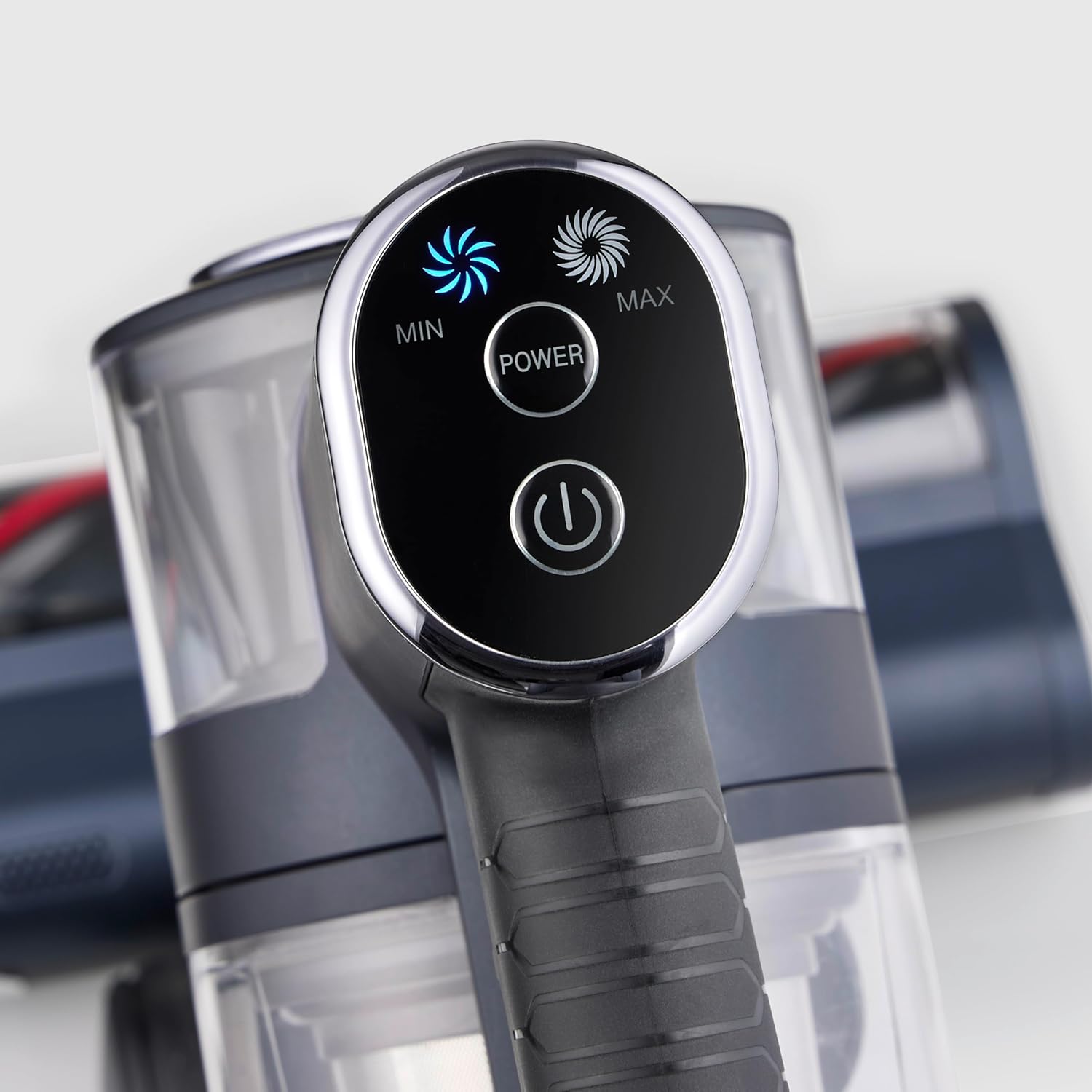
Imaj: Yon gwo plan view of the vacuum cleaner's control panel, featuring illuminated buttons for Min, Max, and Power settings.
2-in-1 Functionality (Handheld Mode)
The S-Power Olymp can be easily converted into a handheld vacuum for versatile cleaning.
- Press the release button on the extension tube to detach it from the main unit.
- Attach the desired accessory (crevice tool or upholstery brush) directly to the main unit's suction opening.
- Use the handheld unit for cleaning car interiors, upholstery, stairs, or hard-to-reach areas.

Image: The Severin S-Power Olymp HV 7175 in handheld configuration, equipped with a crevice tool, being used to clean the interior of a car seat.
Karakteristik ergonomik
- Adjustable Suction Tube: The height of the suction tube can be adjusted for comfortable use by users of different heights.
- Dirije ekleraj: The motorized floor nozzle features integrated LED lights to illuminate dark areas, ensuring no dust or debris is missed.
- Vertical Parking Function: The vacuum cleaner can stand upright independently when the handheld unit is removed, allowing for convenient temporary storage during cleaning breaks.
Antretyen ak netwayaj
Antretyen regilye asire pèfòmans optimal epi pwolonje lavi aspiratè ou a.
Vide poubèl la
Empty the dustbin regularly, ideally after each use, to maintain strong suction.
- Asire w ke aspiratè a etenn.
- Peze bouton lage bwat pousyè a pou detache bwat pousyè a nan inite prensipal la.
- Hold the dustbin over a waste bin and press the bottom release latch to open the dustbin flap and empty its contents.
- Fèmen pòt la epi remete bwat pousyè a nan inite prensipal la jiskaske li fè yon klik.

Imaj: Yon imaj detaye view of the Severin S-Power Olymp HV 7175's transparent dustbin and internal filter components, ready for emptying or cleaning.
Netwaye filtè yo
The HEPA filter and pre-filter should be cleaned periodically to prevent clogging and maintain suction power.
- Retire bwat fatra a jan sa dekri pi wo a.
- Tòde epi rale asanblaj filtè a soti nan bwat fatra a.
- Separate the HEPA filter and the metal mesh pre-filter.
- Tap the filters gently over a waste bin to remove loose dust. For a more thorough clean, rinse them under cold running water.
- Allow all filter components to air dry completely for at least 24 hours before reassembling and placing them back into the vacuum cleaner. Do not use the vacuum with wet filters.
Netwaye woulo bwòs la
Hair and debris can get tangled in the brush roll. Clean it regularly for effective cleaning.
- Turn off the vacuum cleaner and detach the floor nozzle.
- Locate the brush roll access cover on the bottom of the nozzle. Open it using a coin or screwdriver if necessary.
- Retire woulo bwòs la.
- Sèvi ak sizo pou koupe nenpòt cheve oswa fil ki mele.
- Netwaye tout debri ki nan lojman woulo bwòs la.
- Remete woulo bwòs la epi fèmen kouvèti aksè a byen fèm.
Depanaj
| Pwoblèm | Kòz posib | Solisyon |
|---|---|---|
| Vacuum pa limen | Batri egzeyate Bouton pouvwa a pa peze kòrèkteman | Chaje batri a konplètman Press the POWER button firmly |
| Pouvwa pou aspirasyon redwi | Poubèl poubèl plen Filtè yo bouche Bouch la oswa tib la bloke Woulo bwòs la mele | Vide poubèl la Netwaye oswa ranplase filtè yo Tcheke epi netwaye nenpòt blokaj Netwaye woulo bwòs la |
| Batri pa chaje | Charger pa byen konekte Defo plato oswa batri | Ensure charger is securely plugged in Kontakte sipò kliyan |
| Bwòs woulo pa k ap vire | Woulo bwòs la mele Obstruction nan bouch | Netwaye woulo bwòs la Retire nenpòt obstakl |
Espesifikasyon
- Modèl: HV 7175
- Mak: Severin
- Pouvwa pou aspirasyon: 19,000 Pa
- Pouvwa: 200 Watts
- Voltage: 220 Volts
- Kalite batri: Lityòm-ion
- Runtime (Eco Mode): Jiska 35 minit
- Tan pou chaje: 4-5 èdtan
- Kalite filtre: Filtè HEPA
- Nivo bri: 80 Desibèl
- Pwa: 2 Kilogram
- Dimansyon (L x W x H): 105L x 12l x 15H cm
- Sifas Rekòmande: All floor types
- Karakteristik espesyal: Cordless, High Power, Lightweight, Front Light, Spot Cleaning, 2-in-1 Handheld Function, Vertical Parking
Garanti ak sipò
Severin products are manufactured to high-quality standards and come with a manufacturer's warranty. Please refer to the warranty card included in your package for specific terms and conditions, including the warranty period and coverage details.
For technical support, spare parts, or warranty claims, please contact Severin customer service. You can find contact information on the official Severin websit la oubyen sou dokiman garanti ou a.
When contacting support, please have your model number (HV 7175) and proof of purchase readily available.