
1. Pwodwi souview
The Edifier W280NB Pro are neckband wireless headphones designed for immersive audio experiences with advanced features. They offer hybrid active noise cancellation, Hi-Res Audio support with LDAC, and a durable, comfortable design suitable for various activities.

Image: Edifier W280NB Pro headphones with key features highlighted.
Karakteristik kle:
- Deep Hybrid Active Noise Cancellation: Up to -45dB noise reduction with 4 selectable modes (High ANC, Medium ANC, Ambient Aware, Wind Reduction).
- Studio-Quality Hi-Res Audio: 10mm dynamic drivers with titanium-coated composite diaphragms, supporting LDAC codec and Hi-Res Audio Wireless certification (20Hz-40KHz frequency response).
- Long-Lasting Battery & Fast Charging: Up to 23 hours of playback (ANC off), 14 hours (ANC on). 15 minutes of charging provides 5 hours of playtime. Full charge in 1.5 hours.
- Koneksyon Bluetooth 5.4 ki estab: Ensures stable transmission, low power consumption, and multipoint connection for seamless device switching.
- All-Day Comfort & Secure Fit: Lightweight, flexible neckband with skin-friendly material and multiple sizes of ear wings for a secure fit. Magnetic earbuds for tangle-free storage.
- Durable & Clear Calls: IP55 dust and water resistance. Built-in AI noise-canceling microphones for clear communication in noisy environments.
2. Gid Enstalasyon
2.1 Kontni pake a
Before use, please ensure all items are present in the package:
- Edifier W280NB Pro Neckband Wireless Headphones
- USB-C Chaje Kab
- Multiple sizes of ear tips and ear wings
- Manyèl Itilizatè (dokiman sa a)
2.2 Chaje kas ekoutè yo
Charge the headphones fully before first use to ensure optimal battery performance.
- Connect the provided USB-C charging cable to the charging port on the neckband.
- Konekte lòt bout kab la nan yon adaptè kouran USB (pa enkli) oubyen nan yon pò USB òdinatè.
- The indicator light will show charging status (refer to the LED indicator section for details).
- A full charge takes approximately 1.5 hours. A 15-minute quick charge provides approximately 5 hours of playback.

Image: Visual representation of battery life (23 hours ANC off, 14 hours ANC on) and fast charging (15 mins = 5 hours).
2.3 Fitting the Headphones
Proper fit is crucial for comfort, sound quality, and effective noise cancellation.
- Select the ear tips and ear wings that best fit your ears. Experiment with different sizes for the most secure and comfortable seal.
- Place the neckband around your neck.
- Insert the earbuds into your ear canals and adjust the ear wings to sit snugly in your outer ear for stability.

Image: Diagram showing various ear tip and ear wing sizes for a secure and comfortable fit.
2.4 Bluetooth Pairing
Pair your Edifier W280NB Pro headphones with your device via Bluetooth.
- Asire w ke kas ekoutè yo chaje epi etenn.
- Press and hold the multi-function button (usually the power button) until the indicator light flashes rapidly (e.g., blue and red alternately), indicating pairing mode.
- Sou aparèy ou an (telefòn entelijan, tablèt, òdinatè pòtab), aktive Bluetooth epi chèche aparèy ki disponib yo.
- Select "Edifier W280NB Pro" from the list of found devices.
- Yon fwa konekte, limyè endikatè a ap tipikman montre yon limyè ble fiks oswa flache dousman.
Koneksyon miltipwen:
The W280NB Pro supports multipoint connection, allowing you to connect to two Bluetooth devices simultaneously.
- Konekte kas ekoutè yo ak premye aparèy la jan sa dekri pi wo a.
- Dezaktive Bluetooth sou premye aparèy la.
- Remete kas ekoutè yo nan mòd koneksyon epi konekte yo ak dezyèm aparèy la.
- Re-enable Bluetooth on the first device. The headphones should now be connected to both devices, allowing seamless switching.

Image: Illustration of Bluetooth 5.4 technology for stable transmission and multipoint connection.
3. Operasyon Enstriksyon
3.1 Power On/Off
- Pouvwa sou: Press and hold the multi-function button for approximately 3 seconds until the indicator light illuminates.
- Pouvwa Off: Press and hold the multi-function button for approximately 5 seconds until the indicator light turns off.
3.2 Kontwòl bouton
The Edifier W280NB Pro features intuitive button controls on the neckband for easy management of music, calls, and noise cancellation modes.

Image: Diagram illustrating the functions of each button on the neckband for calls, music playback, and mode switching.
| Aksyon | Fonksyon |
|---|---|
| Multi-function Button (Power) | Press and hold 3s: Power On Press and hold 5s: Power Off Press and hold (pairing mode): Enter Bluetooth pairing Single press (during call): Answer/End Call Double press (during call): Reject Call |
| Volim monte (+) | Single press: Increase Volume Press and hold: Next Track |
| Volim Dawonn (-) | Single press: Decrease Volume Press and hold: Previous Track |
| Bouton jwe/poz | Single press: Play/Pause Music |
| Bouton ANC Mode | Single press: Cycle through ANC modes (High ANC, Medium ANC, Ambient Aware, Wind Reduction, ANC Off) |
3.3 Mòd Anilasyon Bri Aktif (ANC)
The W280NB Pro offers four distinct noise cancellation modes to adapt to your environment.

Image: Visual guide to the four ANC modes and their typical use cases.
- ANC ki wo: Provides maximum noise reduction, ideal for very noisy environments like airplanes or subways.
- ANC mwayen: Offers a balanced level of noise cancellation, suitable for offices or cafes.
- Anbyen Konsyan: Allows you to hear your surroundings while still enjoying your audio, useful for urban environments or when needing to be aware of announcements.
- Rediksyon Van: Espesyalman fèt pou minimize bri van pandan aktivite deyò.
3.4 Fè ak Resevwa Apèl
The headphones feature AI noise-canceling microphones for clear call quality.
- Reponn apèl: Peze bouton milti-fonksyon an yon sèl fwa.
- Fini apèl: Peze bouton milti-fonksyon an yon sèl fwa.
- Rejte apèl: Peze bouton milti-fonksyon an de fwa.

Image: A person using the headphones for a call, highlighting the AI-enhanced clear call feature.
3.5 Edifier Connect App
For advanced settings and customization, download the Edifier Connect app from your device's app store. The app allows you to:
- Chanje non aparèy ou an.
- Personalize ANC levels.
- Fine-tune audio with preset EQs or custom EQs.
- Jwenn kas ekoutè ki pèdi yo.
4. Antretyen
4.1 Netwayaj
The W280NB Pro headphones are IP55 rated for dust and water resistance, but proper cleaning helps maintain their condition.
- Wipe the neckband and earbuds with a soft, dry, lint-free cloth.
- For ear tips, gently remove them and clean with a damp twal ak savon dou si sa nesesè. Asire w ke yo byen sèk anvan ou tache yo ankò.
- Avoid using harsh chemicals, abrasive materials, or submerging the headphones in water.
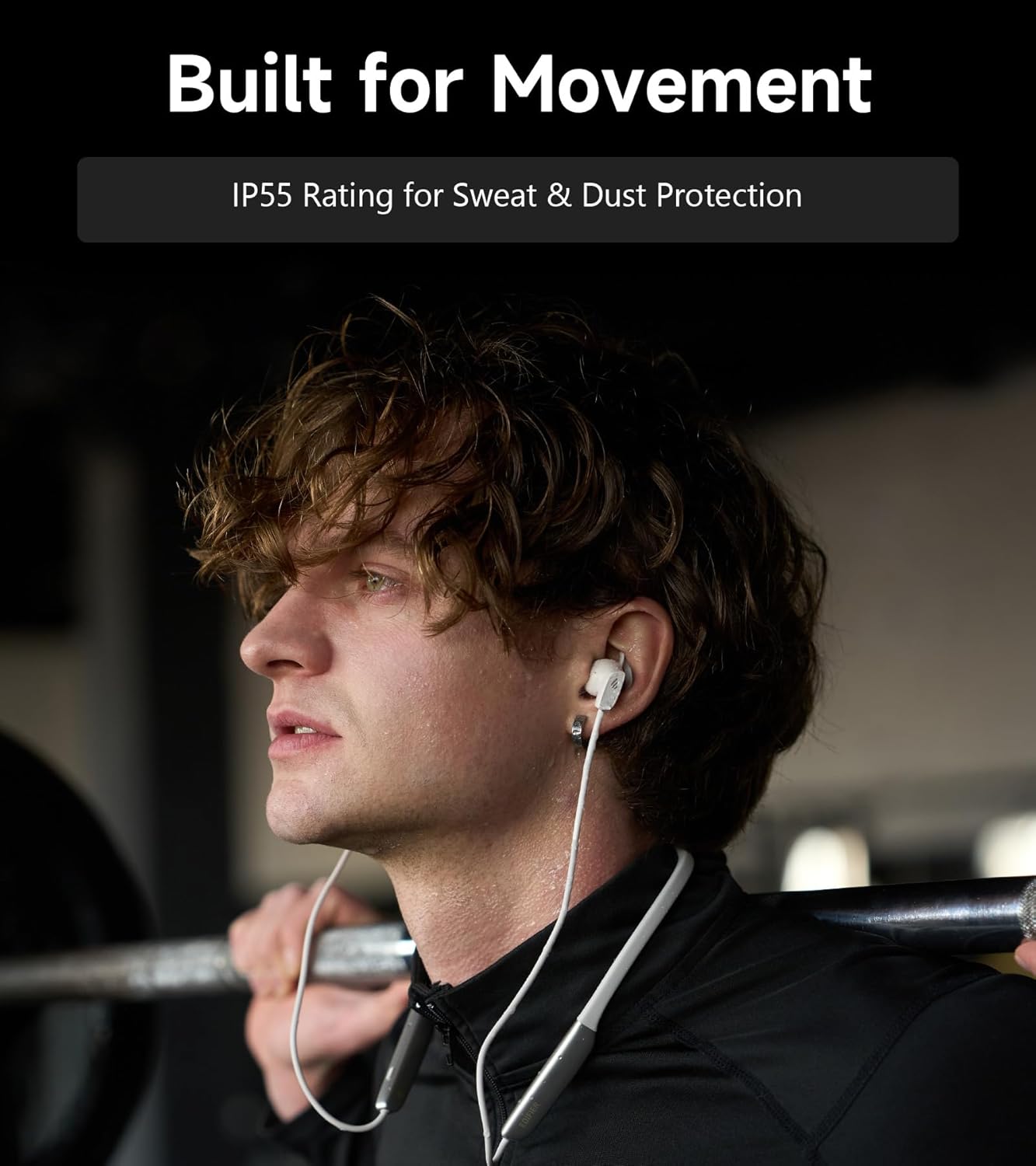
Image: A person wearing the headphones during a workout, illustrating the IP55 sweat and dust protection.
4.2 Depo
When not in use, store your headphones properly to prevent damage.
- The earbuds are magnetic, allowing them to snap together for tangle-free storage around your neck or in a bag.
- Sere nan yon kote ki fre, sèk lwen limyè solèy la dirèk ak tanperati ekstrèm.
4.3 Swen Batri
- Evite dechaje batri a nèt souvan.
- Chaje kas ekoutè yo regilyèman, menm si ou pa itilize yo pou yon bon bout tan, pou batri a rete an bon eta.
NAN. Depanaj
If you encounter issues with your Edifier W280NB Pro headphones, refer to the following common problems and solutions.
| Pwoblèm | Kòz posib | Solisyon |
|---|---|---|
| Kas ekoutè yo pa limen. | Batri ki ba. | Chaje kas ekoutè yo konplètman. |
| Pa ka konekte ak aparèy la. | Kas ekoutè yo pa nan mòd koneksyon. Bluetooth enfim sou aparèy la. Aparèy la twò lwen kas ekoutè yo. | Ensure headphones are in pairing mode (flashing indicator). Pèmèt Bluetooth sou aparèy ou an. Move device closer to headphones (within 10 meters). Try resetting the headphones (refer to manual for specific reset procedure if available, or power cycle). |
| Pa gen son oswa volim nan ba. | Volume too low on headphones or device. Kas ekoutè yo pa konekte. Sòti odyo ki pa kòrèk la chwazi sou aparèy la. | Increase volume on both headphones and device. Ensure headphones are successfully paired and connected. Check your device's audio settings to ensure output is set to Edifier W280NB Pro. |
| Bon kalite son pòv yo. | Pòv koneksyon Bluetooth. Bout zòrèy la pa byen anfòm. Kalite sous odyo a. | Move closer to the connected device. Ensure ear tips provide a secure seal. Eseye yon lòt sous odyo oubyen file. |
| Anilasyon bri aktif la pa efikas. | Bout zòrèy la pa byen anfòm. Incorrect ANC mode selected. Extreme noise conditions. | Ensure ear tips provide a secure seal. Cycle through ANC modes to select the most appropriate one. ANC works best for low-frequency, constant noise. |
| Mikwofòn nan pa fonksyone pandan apèl yo. | Headphones not selected as input device. Mikwofòn nan sou aparèy la. | Check your device's call settings to ensure Edifier W280NB Pro is selected for microphone input. Ensure microphone is not muted on your device. |
6. Espesifikasyon
Detailed technical specifications for the Edifier W280NB Pro Neckband Wireless Headphones.
| Karakteristik | Detay |
|---|---|
| Mak | Edifier |
| Non modèl | W280NB Pwofesyonèl |
| Koulè | Nwa |
| Plasman Zòrèy | Nan Zòrèy |
| Faktè fòm | Neckband |
| Enpedans | 24 Ohms |
| Kontwòl bri | Anile aktif bri |
| Gamme frekans | 20Hz-40KHz |
| Kalite chofè odyo | Dynamic Driver (10mm with Titanium-Coated Diaphragm) |
| Koneksyon Teknoloji | San fil (Bluetooth) |
| Bluetooth vèsyon | 5.4 |
| Gamme Bluetooth | 10 mèt (33 pye) |
| Battery Average Life (Playback) | 23 èdtan (ANC etenn), 14 èdtan (ANC aktive) |
| Tan chaj batri | 1.5 èdtan |
| Nivo rezistans dlo | IP55 (Dust & Waterproof) |
| Aparèy konpatib | Telefòn entelijan, Tablèt, Odinatè pòtab, Oratè entelijan |
| Materyèl | Silicone (Enclosure) |
| UPC | 628430220005 |
7. Enfòmasyon sou Garanti
The Edifier W280NB Pro Neckband Wireless Headphones come with a 1 Ane Manifakti Garanti.
This warranty covers defects in materials and workmanship under normal use. It does not cover damage caused by misuse, accidents, unauthorized modifications, or normal wear and tear. Please retain your proof of purchase for warranty claims.
8. Sipò pou Kliyan
For further assistance, technical support, or warranty inquiries, please contact Edifier customer service.
- Websit: Visit the official Edifier websit pou FAQ, resous sipò, ak enfòmasyon pou kontakte yo.
- Imèl/Telefòn: Refer to the Edifier website or your product packaging for specific contact details in your region.