
Entwodiksyon ak souview
The Tribit StormBox Micro 3 is a compact and powerful portable Bluetooth speaker designed for versatile use. It features advanced audio technology, robust durability, and convenient mounting options, making it ideal for both indoor and outdoor environments.
- 13W XBass Technology: Equipped with a 48mm Neodymium driver and 2 coaxial passive radiators, delivering 13W rich audio with deep, punchy bass and clear highs/mids.
- 24H Non-Stop Music: Enjoy up to 24 hours of continuous music playback at medium volume. A 15-minute quick charge provides 4 hours of playtime.
- IP68 & 1.22m Drop-Proof: SGS-certified IP68 waterproof protection against rain, splashes, and brief submersion. Tested to withstand drops from up to 1.22 meters.
- Strap & Magnetic Mount: Features a 2-in-1 design allowing secure attachment via a non-slip strap to handlebars, backpacks, or tent poles, or magnetic attachment to metal surfaces.
- Bluetooth 6.0 & 45m Range: Utilizes the latest Bluetooth 6.0 chipset with AAC/SBC codec for stable audio up to 45 meters, ensuring faster pairing and stronger anti-interference.
- Versatile Smart Functions: Supports TWS pairing for immersive stereo sound, a dedicated app with 7 presets and 9 EQ bands for audio customization, auto shut-off, OTA updates, and a built-in mic for hands-free calls.
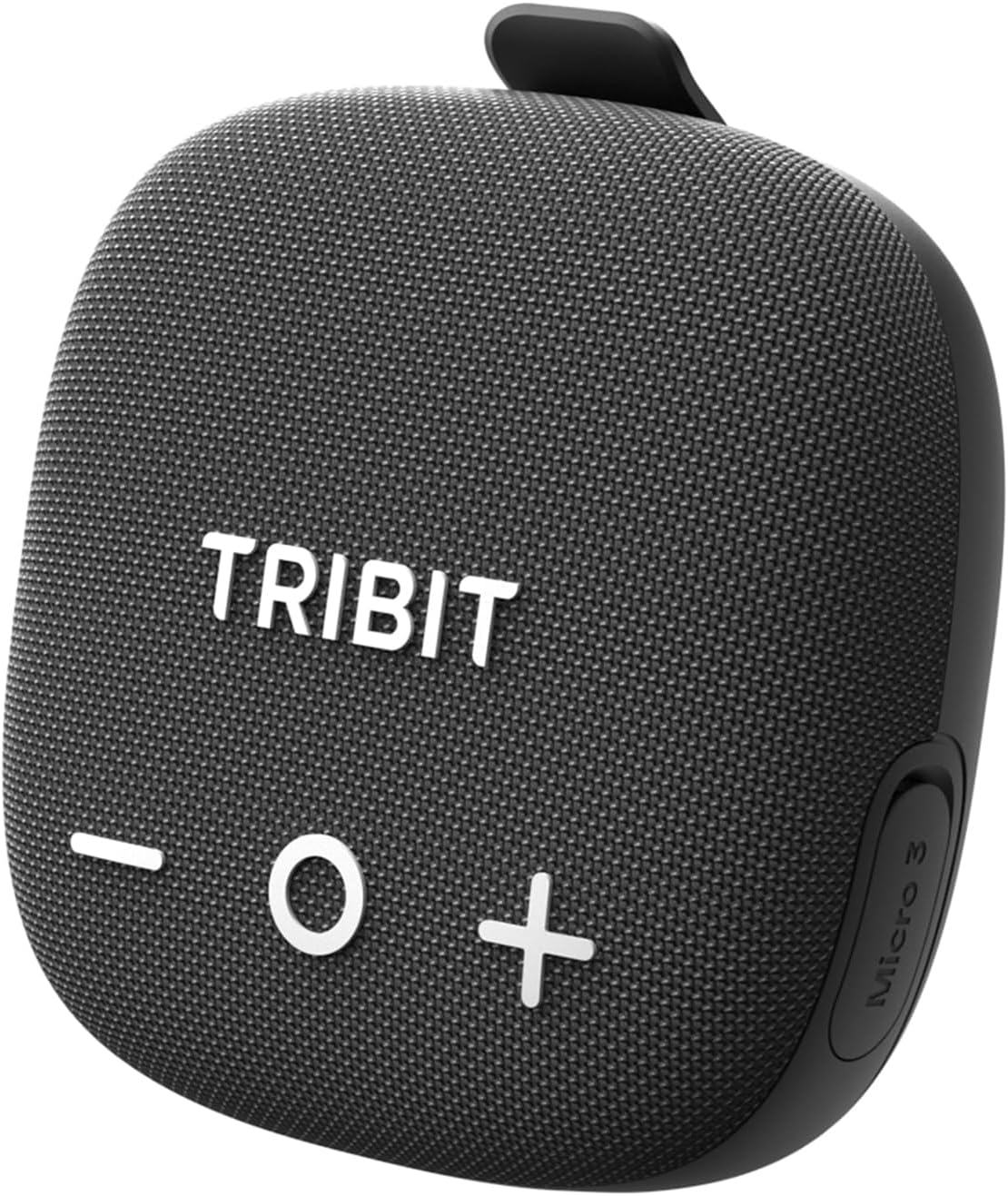
Image: The Tribit StormBox Micro 3 Portable Bluetooth Speaker in black, showcasing konsepsyon kontra enfòmèl ant li yo ak griyaj devan an.
Enstalasyon
1. Premye Chajman
Before first use, fully charge your speaker. Connect the provided USB-C charging cable to the speaker's charging port and a compatible power source. A full charge takes approximately 2 hours. A 15-minute quick charge provides 4 hours of playtime.
2. Power On/Off
- Pouvwa sou: Peze epi kenbe bouton pouvwa a (
 ) pou 2 segonn.
 - Pouvwa Off: Peze epi kenbe bouton Pouvwa a pou 2 segonn.
3. Pè Bluetooth
- Ensure the speaker is powered on and the Bluetooth indicator is blinking, indicating it's in pairing mode.
- On your device (smartphone, tablet, etc.), enable Bluetooth and search for "Tribit StormBox Micro 3" in the list of available devices.
- Select the speaker to connect. Once connected, the Bluetooth indicator will turn solid blue.

Image: The Tribit StormBox Micro 3 speaker held in hand next to a smartphone displaying its Bluetooth settings, showing the speaker as 'Connected'.
4. Tribit App Download
For enhanced control and customization, download the Tribit App from the App Store (iOS) or Google Play Store (Android). The app allows you to adjust EQ settings, manage auto shut-off, and receive firmware updates.
Operasyon Speaker
1. Kontwòl debaz yo
- Volim monte/desann: Peze bouton '+' oswa '-' yo.
- Jwe/Poz: Press the 'O' button.
- Pwochen Track: Double-press the 'O' button.
- Track Previous: Triple-press the 'O' button.

Imaj: Anlè view of the Tribit StormBox Micro 3 speaker, clearly showing the large '+' (volume up), 'O' (play/pause), and '-' (volume down) buttons.
2. XBass Technology
The speaker features XBass technology for enhanced low-end frequencies. Press the 'XBass' button (often indicated by an 'X' icon) to activate or deactivate this feature, boosting bass impact.

Imaj: Yon eksplozyon view diagram of the Tribit StormBox Micro 3, highlighting the 48mm NdFeB driver and two coaxial passive radiators, with 'XBass' logo.
3. Koneksyon Vrè Stereo San Fil (TWS)
Pair two StormBox Micro 3 speakers together for an immersive stereo sound experience. Activate TWS mode on both speakers (usually by pressing a dedicated TWS button or through the app) and follow the pairing instructions.

Image: Two Tribit StormBox Micro 3 speakers are shown attached to backpacks of hikers, illustrating TWS pairing for stereo sound in an outdoor setting.
4. Rele men-gratis
The built-in microphone allows for hands-free calls. When a call comes in, press the 'O' button to answer or end the call. Press and hold the 'O' button to reject a call.

Image: A man cycling with the Tribit StormBox Micro 3 attached to his bike handlebars, making a hands-free call, indicated by a green phone icon.
5. App-Controlled Sound Evolution
Use the Tribit App to customize your audio experience. Choose from 7 preset EQ modes or create your own using the 9-band equalizer. The app also offers features like auto shut-off and firmware updates.

Image: A man in a golf cart using the Tribit App on his smartphone to control the Tribit StormBox Micro 3 speaker, showing the app's equalizer and preset options.
6. Reverse Charging (Power Bank)
The speaker can act as a power bank to charge your devices. Connect your device to the speaker's USB-C port using a compatible cable to initiate reverse charging.
Opsyon Montaj
The StormBox Micro 3 offers flexible mounting solutions to suit various activities:
- Mòn senti: Use the integrated non-slip silicone strap to securely attach the speaker to bicycle handlebars, backpack straps, or tent poles.
- Mòn mayetik: The speaker features strong magnets on its base, allowing it to securely attach to metal surfaces like refrigerators, toolboxes, or metal poles when stationary.

Image: A composite image showing the Tribit StormBox Micro 3 being magnetically attached to a refrigerator and strapped to a bicycle handlebar, illustrating its 2-in-1 mount feature.
Antretyen
To ensure the longevity and optimal performance of your Tribit StormBox Micro 3, follow these maintenance guidelines:
- Netwayaj: Sèvi ak yon mou, damp cloth to wipe the speaker's surface. Avoid using harsh chemicals or abrasive cleaners.
- Depo: Sere oratè a nan yon kote ki fre epi sèk, lwen tanperati ekstrèm ak limyè solèy dirèk lè w pa itilize li pou yon bon bout tan.
- Bouche ki enpèmeyab: Ensure the USB-C port cover is securely closed to maintain IP68 waterproof integrity, especially before exposure to water.
Durability ak Pwoteksyon
The StormBox Micro 3 is built to withstand challenging environments:
- IP68 ki enpèmeyab: The speaker is fully protected against dust and can be submerged in water up to 1.5 meters for 30 minutes.
- 1.22m Drop-Proof: Engineered to survive drops from up to 1.22 meters, making it suitable for rugged outdoor activities.
Image: A Tribit StormBox Micro 3 speaker is shown covered in muddy water on a bike handlebar, with icons indicating IP68 waterproof/dustproof and 1.22m military drop resistance.
Depanaj
If you encounter any issues with your Tribit StormBox Micro 3, please refer to the following general advice:
- Pa gen pouvwa: Ensure the speaker is fully charged. Connect it to a power source and check the charging indicator.
- Pa ka konekte: Make sure the speaker is in pairing mode (blinking Bluetooth indicator). Disable and re-enable Bluetooth on your device, then try pairing again.
- Kalite son pòv: Check the volume levels on both the speaker and your connected device. Ensure there are no obstructions between the speaker and your device. Try adjusting the EQ settings via the Tribit App.
- Koneksyon koupe: Ensure your device is within the 45-meter Bluetooth range. Avoid strong electromagnetic interference.
For more detailed troubleshooting or persistent issues, please contact Tribit customer support.
Espesifikasyon
| Mak | Tribit |
| Non modèl | StormBox Micro 3 |
| Nimewo Modèl | BTS36 |
| Oratè maksimòm pwodiksyon pouvwa | 13 Watts |
| Koneksyon Teknoloji | Bluetooth |
| Gamme Bluetooth | 45 mèt |
| Audio Sòti Mode | Mono |
| Kalite aliye | Magnetic & Strap |
| Materyèl patiraj | ABS+PC/TPE |
| Èske enpèmeyab | Vrè (IP68) |
| Lavi Mwayèn Batri | 24 èdtan |
| Tan chaj batri | 2 èdtan |
| Dimansyon atik (D x W x H) | 3.93"D x 3.93"W x 1.77"H |
| Pwa atik | 0.34 Kilogram |
Ki sa ki nan bwat la
- Portable Bluetooth Speaker (Tribit StormBox Micro 3)
- Manyèl itilizatè
- USB-C Chaje Kab
Garanti ak sipò
The Tribit StormBox Micro 3 comes with a 1-ane garanti. For any product-related inquiries, technical support, or warranty claims, please contact Tribit customer service.
Additionally, Tribit offers Sipò 12 mwa pou ede w ak nenpòt kesyon oswa pwoblèm ou ta ka rankontre.
You can find more information and contact details on the official Tribit website or through the Tribit App.
Videyo pwodwi ofisyèl yo
Bike Speaker, IP68, 24H Playtime, BT6.0, TWS Pairing
Video: This official seller video highlights the key features of the Tribit StormBox Micro 3, including its suitability as a bike speaker, IP68 rating, 24-hour playtime, Bluetooth 6.0 connectivity, and TWS pairing capabilities.