
Entwodiksyon
This user manual provides essential information and instructions for the safe and efficient operation of your FIREBAT AS1 Laptop. Please read this manual thoroughly before using the device and retain it for future reference. This document covers setup, operation, maintenance, and troubleshooting for the FIREBAT AS1 model with AMD Ryzen 7430U processor.
Pwodwi souview
The FIREBAT AS1 is a 15.6-inch Full HD IPS laptop designed for productivity and entertainment. It features an AMD Ryzen 7430U processor, integrated AMD Radeon Graphics, and a versatile port selection.
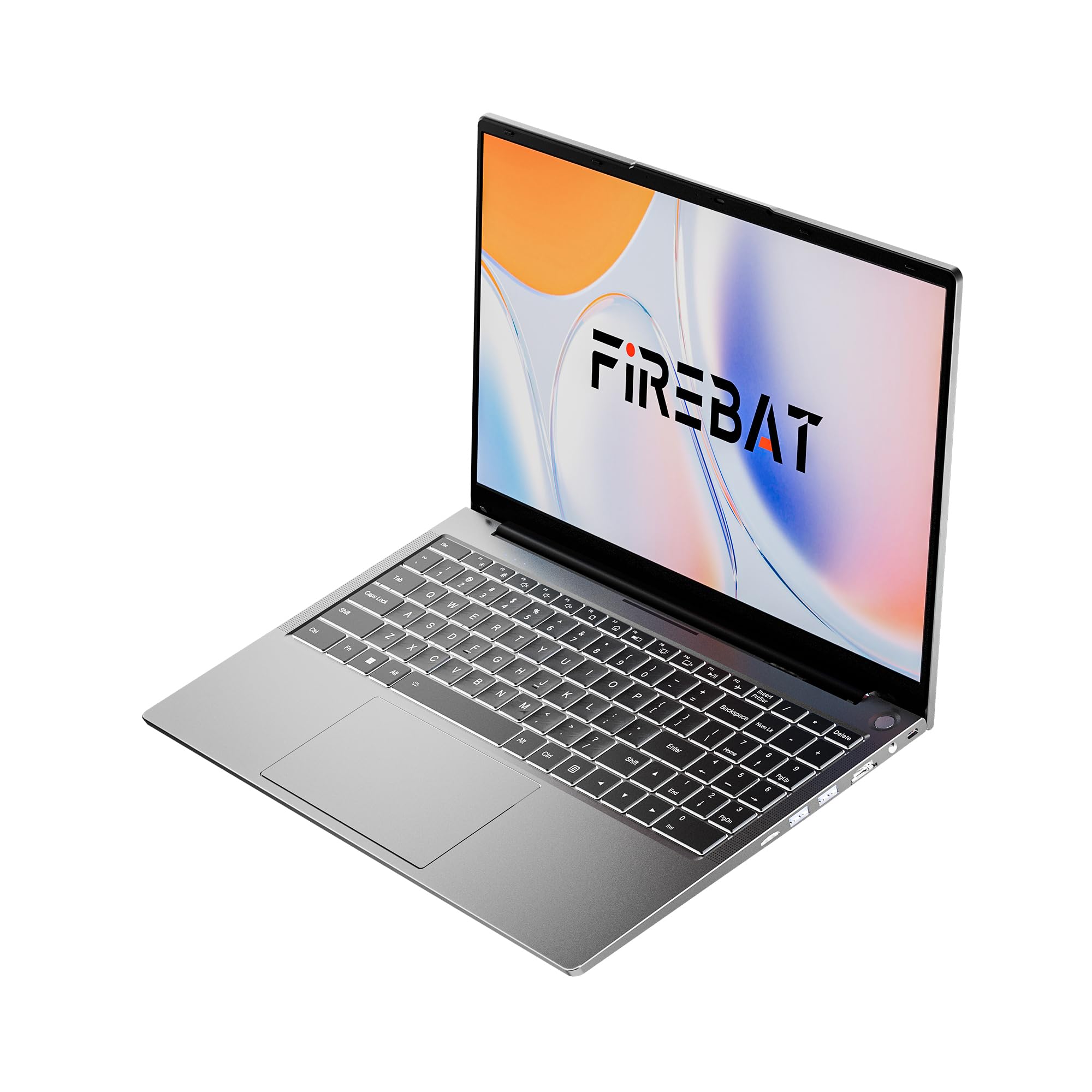
Figure 1: FIREBAT AS1 Laptop (Closed View)
Karakteristik kle
- Processeur: AMD Ryzen 5 7430U (6 Nwayo/12 Fil, jiska 4.3GHz)
- Ekspozisyon: 15.6-inch Full HD (1920x1080) IPS
- memwa: 16GB DDR4 RAM (Expandable up to 64GB)
- Depo: SSD 512GB M.2 (Ekspansib jiska 2TB)
- Grafik: Grafik AMD Radeon entegre
- Klavye: Full-sized backlit keyboard with numeric keypad
- Koneksyon: Wi-Fi 6, Bluetooth 5.2, RJ45 Ethernet
- Pò: USB 3.2 Gen1 Type-A, USB 3.2 Gen1 Type-C (PD 100W, DP1.4), HDMI 1.4, SD Card Reader, 3.5mm Audio Jack
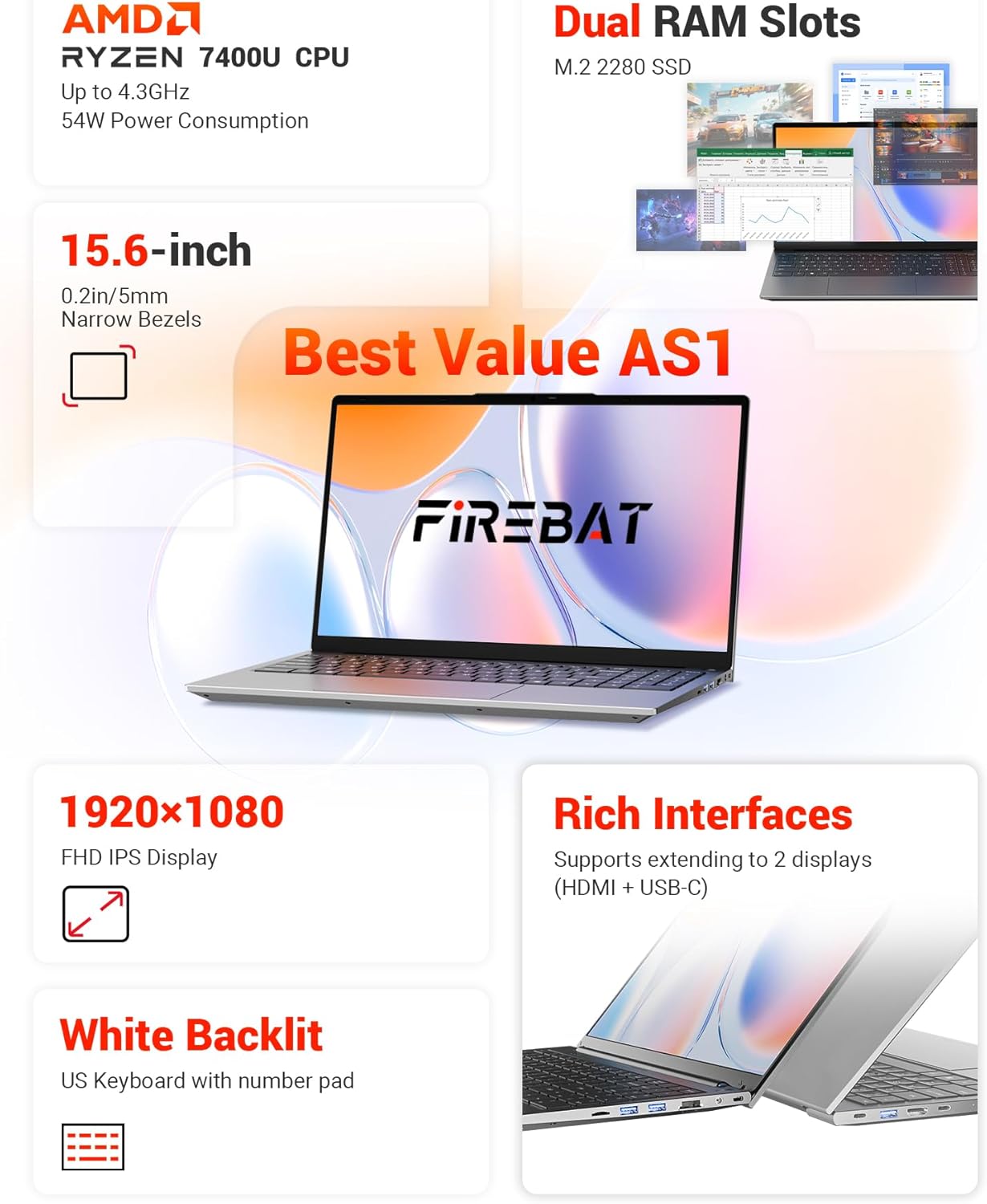
Figi 2: Plis paseview of FIREBAT AS1 Laptop Features
Imaj sa a bay yon vizyon konplèview of the FIREBAT AS1 laptop's core components and features, including the AMD Ryzen 7430U CPU, expandable dual RAM slots, M.2 2280 SSD support, 15.6-inch Full HD IPS display, white backlit keyboard with numeric pad, and various connectivity ports.

Figure 3: Ultra-Portable Design of FIREBAT AS1 Laptop
The image illustrates the laptop's ultra-portable design, emphasizing its compact 15.6-inch form factor, lightweight build at 3.7 lbs (1.69 kg), slim profile of 0.6 inches (15.9 mm), and a versatile 180-degree lay-flat hinge for flexible viewang ing.
Pò ak konektè
The FIREBAT AS1 laptop offers a variety of ports for connecting peripherals and external displays:
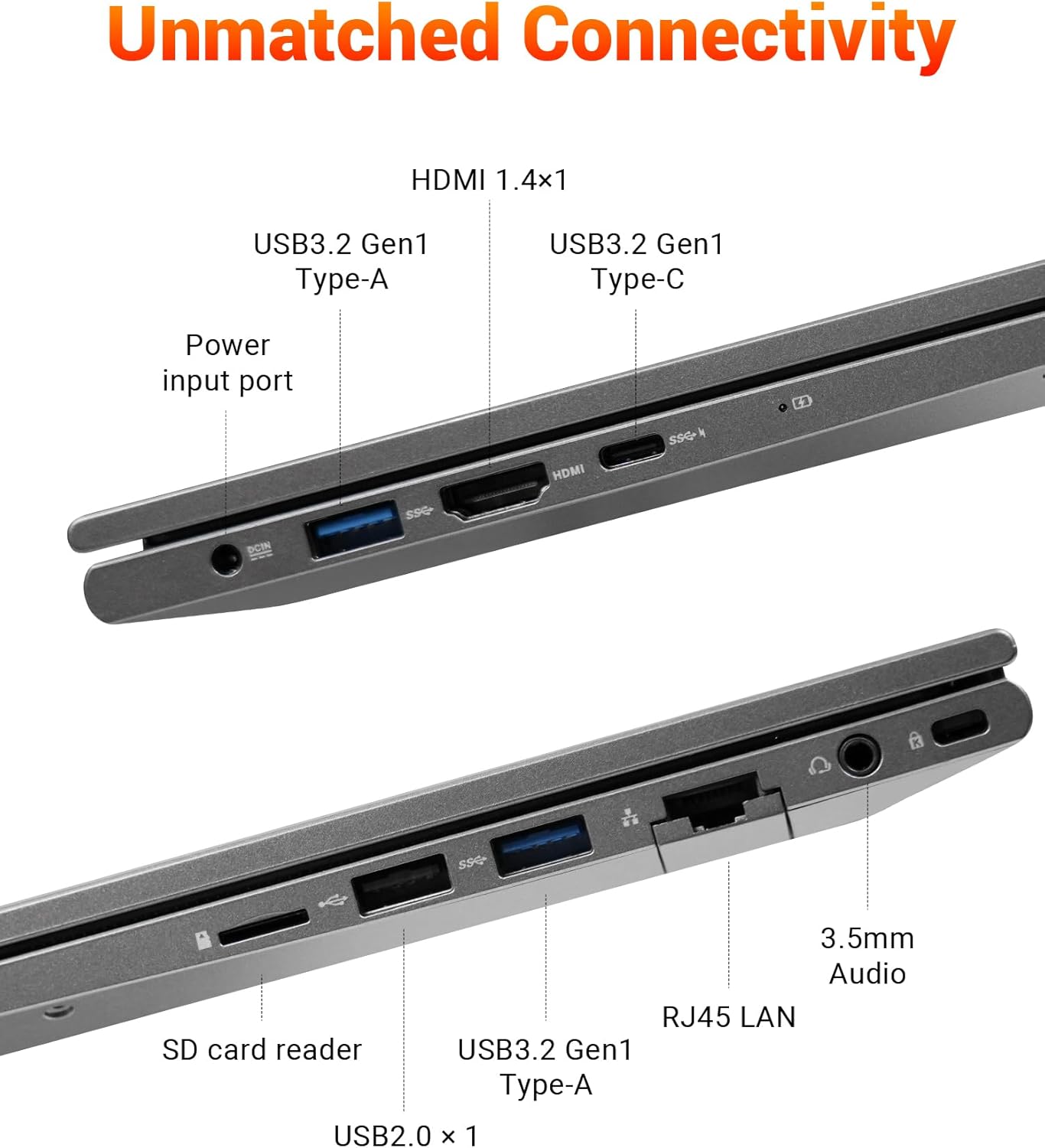
Figure 4: FIREBAT AS1 Laptop Connectivity Ports
This image details the comprehensive connectivity options available on the FIREBAT AS1 laptop. It highlights the various ports on both sides, including USB 3.2 Gen1 Type-A, HDMI 1.4, USB 3.2 Gen1 Type-C (supporting PD 100W and DP1.4), the power input port, an SD card reader, RJ45 LAN port, and a 3.5mm audio jack.
- Bò Goch: Power Input, USB 3.2 Gen1 Type-A, HDMI 1.4, USB 3.2 Gen1 Type-C (Power Delivery & DisplayPort)
- Bò Dwa: USB 2.0 Type-A, SD Card Reader, RJ45 LAN, 3.5mm Audio Jack, USB 3.2 Gen1 Type-A
Enstalasyon
Unboxing and Initial Power On
- Retire laptop la ak tout akseswa yo nan anbalaj la avèk anpil atansyon.
- Konekte adaptè kouran an nan pò antre kouran laptop la epi answit nan yon priz kouran.
- Open the laptop lid. The laptop may power on automatically or you may need to press the power button located on the top right of the keyboard.
- Swiv enstriksyon ki sou ekran an pou konplete premye konfigirasyon Windows la.
Konekte nan yon rezo
- Wi-Fi: Klike sou ikòn Wi-Fi a nan ba travay la, chwazi rezo ou vle a, antre modpas la, epi klike sou Konekte.
- Ethernet: Connect an Ethernet cable from your router or modem to the RJ45 LAN port on the right side of the laptop.
Enstriksyon Operasyon
Power On/Off ak mòd dòmi
- Pouvwa sou: Peze bouton pouvwa a.
- Fèmen: Klike sou bouton Kòmanse a, answit sou Pouvwa > Fèmen.
- Mòd dòmi: Fèmen kouvèti laptop la oubyen klike sou bouton Start la, answit sou Power > Dòmi.
Klavye ak Touchpad
- The laptop features a full-sized keyboard with a dedicated numeric keypad for efficient data entry.
- The keyboard is backlit. Use the function keys (Fn + Fx) to adjust backlight brightness or toggle it on/off.
- The precision touchpad supports multi-touch gestures for navigation. Refer to Windows settings for customization.
Konekte ekspozisyon ekstèn
The FIREBAT AS1 supports connecting up to two external displays simultaneously via HDMI and USB-C (DisplayPort Alt Mode).
- HDMI: Connect an HDMI cable from your monitor to the HDMI port on the left side of the laptop.
- USB-C: Connect a compatible USB-C to DisplayPort or USB-C to HDMI cable/adapter from your monitor to the USB-C port on the left side.
- Yon fwa konekte, peze Kle Windows + P to select your display mode (Duplicate, Extend, Second screen only).
Video 1: FIREBAT AMD 7430U Laptop Computer Overview
Videyo sa a bay yon apèsi jeneral souview of the FIREBAT AS1 laptop, showcasing its design, display quality, and various features in action.
Antretyen
Netwayaj òdinatè pòtab la
- Sèvi ak yon twal mou, ki san pèl dampRense avèk dlo oswa yon pwodui netwayaj ekran pou netwaye ekran an.
- Use a soft brush or compressed air to clean dust from the keyboard and ventilation grilles.
- Evite itilize pwodwi chimik piman bouk oswa materyèl abrazif.
Swen batri
- Pou yon lavi batri optimal, evite dechaje batri a nèt souvan.
- Sere laptop la nan yon kote ki fre epi sèk lè w pa itilize li pou yon bon bout tan.
- If storing for a long time, ensure the battery is charged to about 50-70%.
RAM and SSD Upgrades
The FIREBAT AS1 laptop supports user-upgradable RAM and SSD. It features dual-channel RAM slots (up to 64GB) and an M.2 2280 SSD slot (up to 2TB).

Figi 5: Entèn View with RAM and SSD Slots
Yon entèn view of the FIREBAT AS1 laptop, illustrating the dual-channel DDR4 RAM slots, which can be upgraded to 64GB, and the M.2 2280 SSD slot, supporting NVMe/SATA drives up to 2TB for expanded storage.
Video 2: How to Add RAM to FIREBAT AS1 Laptop
Watch this video for a step-by-step guide on how to safely add or upgrade RAM modules in your FIREBAT AS1 laptop.
Nòt: Opening the laptop for upgrades may require specific tools and care. Refer to the video and consult professional assistance if unsure.
Depanaj
Pwoblèm komen ak solisyon yo
- Laptop la pa limen:
- Asire w adaptè kouran an byen konekte ak laptop la ak yon priz kouran ki fonksyone.
- Tcheke si priz kouran an ap fonksyone lè w branche yon lòt aparèy ladan l.
- Si batri a fin dechaje nèt, kite l chaje pou kèk minit anvan ou eseye limen l.
- Pa gen okenn ekspozisyon sou ekran an:
- Asire w laptop la limen.
- Si yon monitè ekstèn konekte, eseye dekonekte li.
- Adjust display brightness using the function keys.
- Pwoblèm koneksyon Wi-Fi:
- Asire w ke Wi-Fi a aktive nan paramèt Windows yo.
- Rekòmanse routeur ou ak modèm ou.
- Tcheke si lòt aparèy yo ka konekte sou menm rezo Wi-Fi a.
- Klavye a oswa touchpad la pa reponn:
- Rekòmanse laptop la.
- Ensure no external devices are interfering.
Pou plis asistans, tanpri al gade enfòmasyon sipò ki nan seksyon Garanti ak Sipò a.
Espesifikasyon
| Karakteristik | Spesifikasyon |
|---|---|
| Mak | FIREBAT |
| Nimewo Modèl | AS1 7430U |
| Sistèm operasyon | Default (Windows) |
| Modèl CPU | AMD Ryzen 5 7430U |
| CPU vitès | Jiska 4.3 GHz |
| Konte processeur | 6 |
| Memwa RAM enstale | 16 GB DDR4 |
| Gwosè Maksimòm Memwa RAM | 64 GB |
| Deskripsyon Hard Disk | 512 GB SSD (Expandable to 2TB) |
| Gwosè ekran | 15.6 pous |
| Montre Rezolisyon Maksimòm | 1920x1080 piksèl |
| Kalite ekspozisyon | IPS |
| Koprosesè grafik | AMD Radeon |
| Koneksyon Teknoloji | Bluetooth, Ethernet, HDMI, USB, Wi-Fi |
| Konpatibilite Wireless | 802.11ax (Wi-Fi 6) |
| Total pò USB | 4 |
| Total Number of HDMI Ports | 1 |
| Dimansyon atik | 14 x 9 x 0.78 pous |
| Pwa atik | 3.69 liv |
| Koulè | Gri |
Garanti ak sipò
Enfòmasyon sou Garanti
The FIREBAT AS1 Laptop comes with a 1-ane garanti manifaktiGaranti sa a kouvri domaj nan materyèl ak nan fabrikasyon anba itilizasyon nòmal. Tanpri konsève prèv acha ou pou reklamasyon garanti.
Sipò pou Kliyan
For technical support, warranty inquiries, or any questions regarding your FIREBAT AS1 Laptop, please contact FIREBAT customer service:
- Imèl: sipò@firebatpc.com
- Websit: www.firebatpc.com