
1. Entwodiksyon
The Generic CM300 is a versatile 9-function digital multimeter designed for accurate electrical measurements in various environments. It features a 6000-count backlit LCD for clear readings, Non-Contact Voltage (NCV) detection for safety, and a CAT III 600V safety rating. This manual provides instructions for safe and effective use of your CM300 multimeter.
2. Enfòmasyon sou Sekirite
AVÈTISMAN: Always adhere to safety precautions when using electrical testing equipment. Failure to do so may result in injury or damage to the meter.
- The CM300 is rated for CAT III 600V. Do not exceed these voltage limit.
- Always inspect test leads for damage before use. Replace if insulation is compromised.
- Asire w ke switch fonksyon an nan bon pozisyon pou mezi w ap fè a.
- Pa eseye mezire voltage or current on circuits exceeding the meter's maximum ratings.
- Use caution when working with live circuits. Avoid contact with bare wires or terminals.
- Keep fingers behind the finger guards on the test probes.
- Ranplase pil yo byen vit lè endikatè pil fèb la parèt pou asire lekti yo egzak.
3. Pwodwi souview
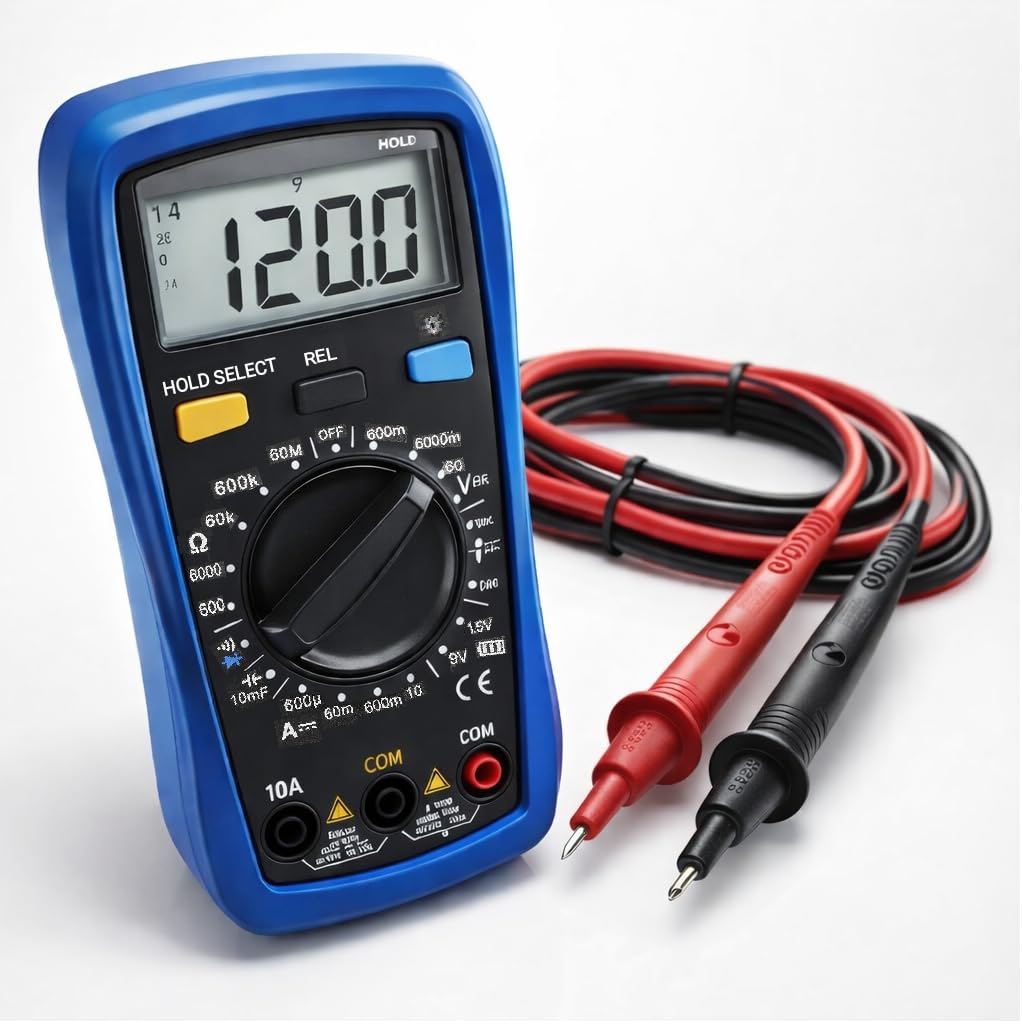
The CM300 Digital Multimeter includes the main unit and two 42-inch test probes (one red, one black).

Figure 3.1: CM300 Multimeter Rotary Dial and Display
Imaj sa a montre yon detay view of the CM300 multimeter's central rotary dial, which is used to select different measurement functions. The backlit LCD display is visible above the dial, and various input jacks are located at the bottom of the device.
3.1 Eleman
- Ekspozisyon LCD: 6000-count backlit display for clear readings.
- Fonksyon switch Rotary: Selects measurement modes.
- Jack Antre: For connecting test probes (COM, VΩmA, 10A).
- Sond Tès: Red (positive) and Black (common/negative).
- Capteur NCV: Located at the top of the meter for non-contact voltage deteksyon.
- Bouton: HOLD/SELECT, REL, BACKLIGHT.
4. Enstalasyon
4.1 Enstalasyon batri
- Asire w ke miltimèt la etenn.
- Jwenn konpatiman pil la sou dèyè mèt la.
- Sèvi ak yon tournevis pou ouvri kouvèti konpatiman batri a.
- Insert two AAA batteries, observing correct polarity (+/-).
- Ranplase kouvèti lòj batri a epi an sekirite li ak vis la.
4.2 Konekte Sond Tès yo
- Mete fil tès nwa a nan priz "COM" (Komen) an.
- Pou pifò mezi (voltage, resistance, continuity, capacitance, diode, battery test), insert the red test lead into the "VΩmA" jack.
- For current measurements (up to 10A), insert the red test lead into the "10A" jack.
5. Operasyon Enstriksyon
Before each measurement, ensure the test leads are correctly connected and the function switch is set to the appropriate range.
Figi 5.1: Mezire Vol ACtage with CM300
This image illustrates the CM300 multimeter in use, displaying a voltage reading. A person is holding the blue multimeter while the red and black test probes are inserted into a standard wall outlet, demonstrating an AC voltage mezi.
5.1 Power On/Off
Rotate the function switch from "OFF" to any desired measurement function to power on the meter. Rotate it back to "OFF" to power off.
5.2 AC/DC Voltage Measurement (V~ / V--)
- Set the function switch to the "V~" (AC Voltage) or "V--" (DC Voltage) pozisyon.
- Connect the test probes in parallel to the circuit or component to be measured.
- Li voltage valè sou ekspozisyon LCD a.
5.3 DC Current Measurement (A--)
- AVÈTISMAN: Ensure the red test lead is in the "10A" jack for current measurements up to 10A, or "VΩmA" for lower current ranges.
- Set the function switch to the "A--" position.
- Open the circuit where current is to be measured and connect the meter in series.
- Li valè aktyèl la sou ekspozisyon LCD a.
5.4 Mezi Rezistans (Ω)
- Set the function switch to the "Ω" position.
- Asire w sikwi a pa gen enèji anvan ou mezire rezistans lan.
- Konekte sond tès yo atravè konpozan ou vle mezire a.
- Li valè rezistans lan sou ekran LCD a.
5.5 Diode Test (->|-)
- Set the function switch to the "->|-" (Diode) position.
- Konekte sond wouj la nan anod la epi Konekte sond nwa a nan katod dyòd la.
- A forward voltage drop will be displayed. Reverse the probes; an open circuit (OL) should be displayed for a good diode.
5.6 Mezi Kapasitans (10mF)
- Set the function switch to the "10mF" (Capacitance) position.
- AVÈTISMAN: Discharge capacitors before testing to prevent electric shock or damage to the meter.
- Konekte sond tès yo atravè tèminal kondansateur yo.
- Li valè kapasite a sou ekspozisyon LCD a.
5.7 Audible Continuity ()))
- Set the function switch to the ")))" (Continuity) position.
- Asire w ke sikwi a pa gen enèji.
- Konekte sond tès yo atravè sikwi a oswa konpozan an.
- If resistance is below approximately 50Ω, the buzzer will sound, indicating continuity.
5.8 Battery Test (1.5V / 9V)
- Set the function switch to the "1.5V" or "9V" battery test position.
- Connect the red probe to the positive terminal and the black probe to the negative terminal of the battery.
- Ekspozisyon an pral montre vol batri atage.
5.9 Voltage (NCV)
- Set the function switch to the "NCV" position.
- Move the top of the meter near a live conductor.
- The meter will beep and the NCV indicator will light up when AC voltage detekte.
5.10 Data Hold (HOLD)
Press the "HOLD" button to freeze the current reading on the display. Press it again to release and resume live readings.
5.11 Relative Mode (REL)
Press the "REL" button to store the current reading as a reference value. Subsequent measurements will be displayed as the difference from this reference. Press again to exit relative mode.
5.12 ekleraj
Press the "BACKLIGHT" button to turn on the display backlight for better visibility in dim conditions. Press again to turn it off.
6. Antretyen
6.1 Netwayaj
Siye kontè a ak piblisiteamp twal ak yon savon dou. Pa sèvi ak pwodui abrazif oswa solvang. Asire w ke mèt la sèk anvan w itilize li.
6.2 Ranplasman batri
Refer to Section 4.1 for battery installation instructions. Replace batteries when the low battery indicator appears on the display.
6.3 Ranplasman Fuse
If the current measurement function stops working, the fuse may need replacement. This procedure should only be performed by qualified personnel. Contact support for assistance.
NAN. Depanaj
| Pwoblèm | Kòz posib | Solisyon |
|---|---|---|
| Kontè a pa limen. | Pil ki mouri oswa ki mal enstale. | Tcheke polarite pil yo; ranplase pil yo. |
| "OL" (Surchaj) parèt. | Input value exceeds selected range or meter's maximum. | Select a higher range or ensure input is within meter's limits. |
| Lekti ki pa kòrèk. | Low battery, incorrect function selected, or damaged test leads. | Replace batteries, verify function switch, inspect and replace test leads if damaged. |
| Pa gen bip kontinwite. | Circuit resistance too high, or open circuit. | Check the circuit for breaks; ensure resistance is below 50Ω. |
8. Espesifikasyon
| Karakteristik | Spesifikasyon |
|---|---|
| Modèl | CM300 |
| Ekspozisyon | 6000-Count Backlit LCD |
| AC / DC Voltage Range | 1mV - 600V |
| DC Kouran Range | Jiska 10A |
| Ranje Rezistans | Jiska 60MΩ |
| Range kapasite | Jiska 10,000 µF |
| Rating sekirite | CAT III 600V, ETL Certified |
| Sous pouvwa | 2 x AAA pil |
| Konpozan ki enkli | CM300 Digital Multimeter, two 42 in. test probes |
| Dimansyon | 8 x 4 x 2.5 pous |
| Pwa | 4 liv |
| Karakteristik espesyal | NCV, Data Hold, Relative Mode, Backlight, Audible Continuity, Diode Test, Battery Test |
9. Garanti ak sipò
The Generic CM300 Digital Multimeter comes with a 30-day return policy. For technical support or warranty inquiries, please contact your retailer or the manufacturer.