
1. Entwodiksyon
This manual provides detailed instructions for the assembly, operation, and maintenance of your VIVO Black TV Cabinet with Motorized Vertical Lift Television Stand (Model: CASE-KIT-EUP1B). This cabinet is designed to discreetly house a motorized TV lift, accommodating televisions from 32 to 55 inches and weighing up to 44 lbs. Please read this manual thoroughly before installation and use to ensure safe and correct operation.
2. Enfòmasyon sou Sekirite
Avètisman Sekirite Enpòtan:
- Do not use the cabinet without the motorized TV lift properly installed.
- Ensure your television does not exceed the maximum weight capacity of 44 lbs (20 kg).
- Always follow all installation instructions carefully to prevent tip-over risks and ensure stability.
- Kenbe timoun ak bèt kay lwen pati k ap deplase asansè televizyon an pandan l ap fonksyone.
- Do not place hands or objects near the lift mechanism when it is in motion.
- Dekonekte kouran an anvan ou fè nenpòt antretyen oswa ajisteman.
3. Sa ki enkli
Verifye ke tout konpozan ki nan lis anba a yo prezan anvan ou kòmanse asanblaj la. Si gen nenpòt pyès ki manke oswa ki domaje, tanpri kontakte sèvis kliyan.

Figi 3.1: Konpozan ki enkli yo. This image displays the main components: the TV cabinet, the motorized TV mount, and the remote control.
- TV Cabinet (Black)
- Mekanis pou leve televizyon motè
- RF Remote Control
- Tout pyès ki nan konpitè nesesè pou asanble
- Step-by-step instruction manual (this document)
4. Enstalasyon ak Asanble
Assembly of the VIVO TV Cabinet and motorized lift requires careful attention to detail. It is recommended to have two people for certain steps due to the weight and size of the components. All hardware is provided. Refer to the included hardware bags and diagrams for specific part identification.
4.1 Asanble Kabinè
Follow the diagrams provided in the separate assembly guide for the cabinet structure. Ensure all panels are securely fastened. The cabinet measures 56.9” x 16.7” x 34.3” (outside) and 55.4" x 13.7" x 32.8" (inside).

Figure 4.1: Cabinet Dimensions. This diagram illustrates the overall maximum height of 75.1 inches when the TV is fully extended, and the cabinet dimensions.
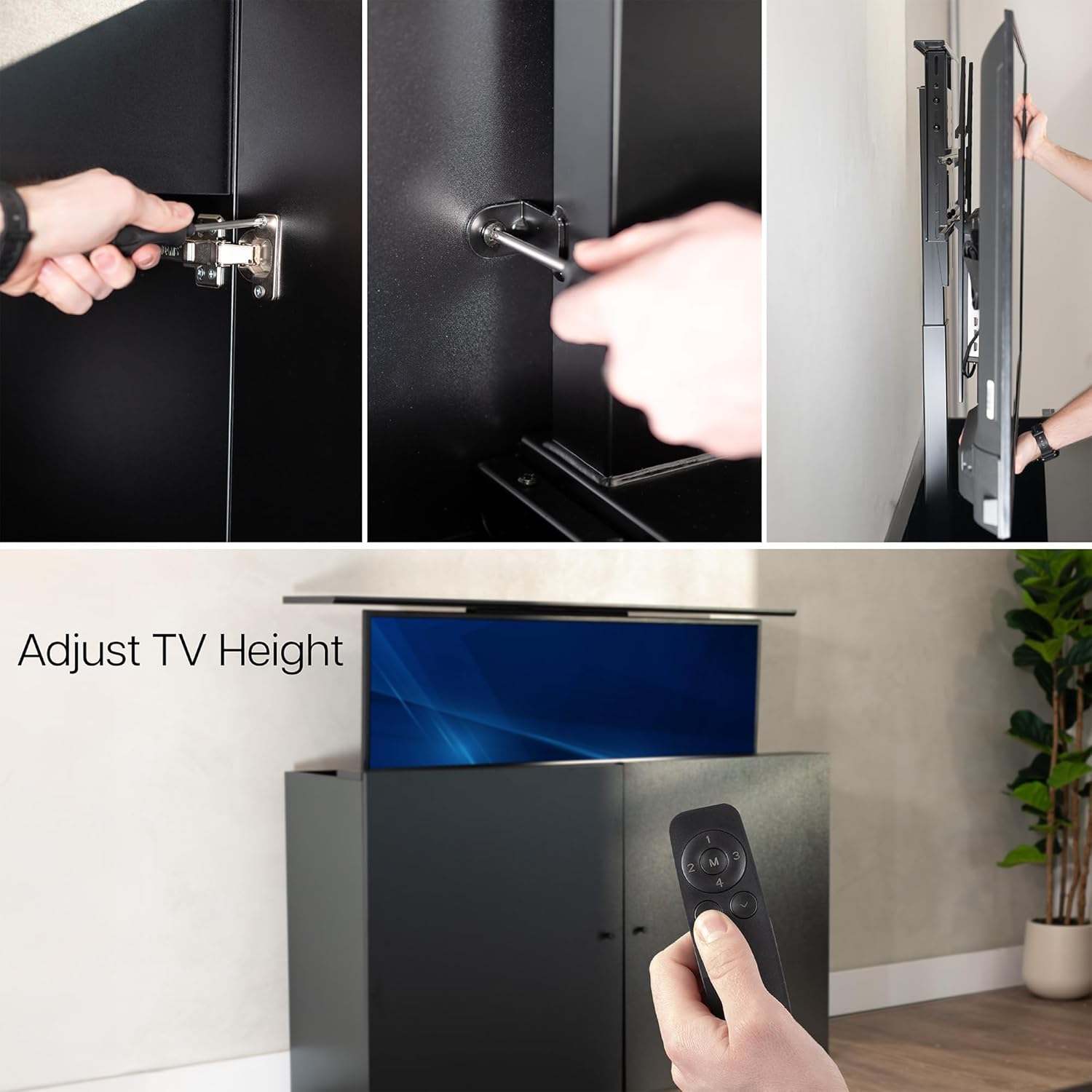
Figi 4.2: Enteryè View with Decorative Doors. The cabinet features decorative doors that conceal the TV and lift mechanism when closed.
4.2 Motorized Lift Installation
The motorized lift must be installed inside the cabinet for maximum stability. It is not designed for freestanding use. Secure the lift mechanism to the designated points within the cabinet using the provided hardware.
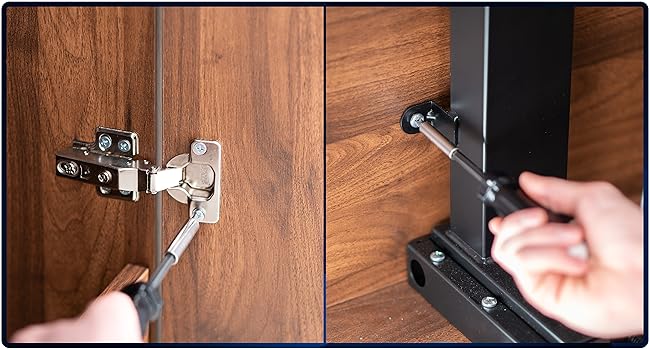
Figure 4.3: Attaching Doors and Securing Mount. This image demonstrates the process of attaching the cabinet doors and securing the TV lift mount within the cabinet.
4.3 TV Mounting
Attach your TV to the VESA mounting plate on the lift mechanism. This mount is compatible with VESA patterns including 75x75, 100x100, 200x200, 300x200, 400x200, 200x300, 300x300, 400x300, 200x400, 300x400, 400x400, 400x600, 600x400, and 600x600. Ensure the TV is centered and securely fastened.
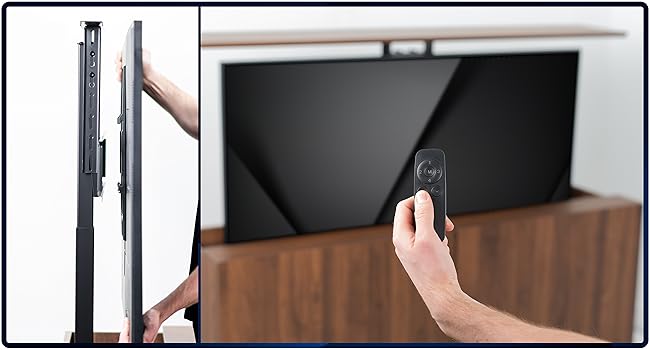
Figure 4.4: Mounting the Television. This image shows the final step of mounting the TV to the lift mechanism.
The cabinet is designed for TVs between 32 to 55 inches and a maximum weight of 44 lbs. The total weight capacity (TV + mount) is 78 lbs.
5. Operasyon Enstriksyon
The motorized TV lift is operated using the included RF remote control. The remote allows for simple up-and-down functions and features 4 memory settings for preferred viewing wotè.
5.1 Fonksyon kontwòl Remote
- Flèch anwo/desann: Press to raise or lower the TV.
- Memory Settings (M1, M2, M3, M4): Press and hold a memory button to save the current TV height. Briefly press a saved memory button to recall that height.
- The RF remote operates up to 30 feet away from the mount.

Figure 5.1: Easy Adjustment with Remote. The remote control allows for convenient adjustment of the TV's height.

Figure 5.2: Adjusting TV Height. This image demonstrates the TV lift in action, raising the television from its concealed position.

Figure 5.3: Hidden TV System in Operation. The TV cabinet allows for a hidden TV system, revealing the screen only when desired.
6. Antretyen
To ensure the longevity and proper function of your TV cabinet and lift:
- Netwayaj: Siye sifas kabinèt yo ak yon twal mou,amp twal. Evite pwodui chimik ki agresif oswa pwodui netwayaj abrazif.
- Mekanis leve: Periodically check the lift mechanism for any obstructions or loose connections. Do not lubricate the mechanism unless specifically instructed by VIVO support.
- Materyèl: Occasionally check all screws and bolts to ensure they remain tight.
NAN. Depanaj
If you encounter issues with your VIVO TV Cabinet and Lift, refer to the following common solutions:
| Pwoblèm | Kòz posib | Solisyon |
|---|---|---|
| TV lift does not respond to remote. | Remote batteries are dead or incorrectly inserted. Power cable is disconnected. | Replace remote batteries. Check power connection to the lift mechanism. Ensure the power outlet is functional. |
| TV lift moves unevenly or makes unusual noises. | Obstruction in the lift path. Loose mounting hardware. | Inspect the lift path for any objects. Tighten all TV and lift mounting hardware. If the issue persists, contact customer support. |
| Top panel is misaligned when lowered. | Cabinet or lift assembly issue. | Recheck the alignment of the top panel and its attachment points. Ensure the lift mechanism is correctly seated within the cabinet. If necessary, contact customer support for guidance. |
8. Espesifikasyon
| Karakteristik | Detay |
|---|---|
| Nimewo Modèl | CASE-KIT-EUP1B |
| Koulè | Nwa |
| Materyèl | Alloy Steel, Engineered Wood |
| Konpatibilite Gwosè televizyon | 32 a 55 pous |
| Kapasite maksimòm pwa televizyon an | 44 liv (20 kg) |
| Total Weight Capacity (TV + Mount) | 78 liv (35.4 kg) |
| VESA Mounting Patterns | 75x75, 100x100, 200x200, 300x200, 400x200, 200x300, 300x300, 400x300, 200x400, 300x400, 400x400, 400x600, 600x400, 600x600 |
| Outside Cabinet Dimensions (L x W x H) | 56.9 "x 16.7" x 34.3 "(144.5 cm x 42.4 cm x 87.1 cm) |
| Inside Cabinet Dimensions (L x W x H) | 55.4 "x 13.7" x 32.8 "(140.7 cm x 34.8 cm x 83.3 cm) |
| Pwa atik | 76.2 liv (34.6 kg) |
| Konpozan ki enkli | Motorized TV Stand, Remote Control |
9. Garanti & Sipò
Garanti: This product comes with a 3-year manufacturer warranty. Please retain your proof of purchase for warranty claims.
Sipò Kliyan: For assembly assistance, technical questions, or to report missing/damaged parts, please contact VIVO customer support. Step-by-step video guides are also available for further clarification on assembly.
VIVO is committed to providing high-quality support and hassle-free returns. Our U.S.-based sales and technical support team is available to assist you.


