
1. Entwodiksyon
Mèsi pou acha aasing the Sharp PS-916 Bluetooth Party Speaker System. This system includes two identical portable Bluetooth speakers designed to deliver powerful audio with versatile connectivity options. Please read this manual carefully before using the product to ensure proper operation and to maximize your listening experience.
Kontni pake:
- 2 x Sharp PS-916 Party Speakers
- 1 x kab chaje
- 1 x kontwòl remote
- 1 x manyèl itilizatè

Image: The Sharp PS-916 system includes two speakers for a complete stereo experience.
2. Enstalasyon
2.1 Chaje Oratè yo
The PS-916 speakers are equipped with rechargeable batteries, providing up to 12 hours of playback. Before initial use, fully charge both speakers.
- Connect the charging cable to the DC IN port on the rear of each speaker.
- Plug the other end of the charging cable into a suitable power adapter (not included) or USB power source.
- The charging indicator light will illuminate. It will change color or turn off once charging is complete.
2.2 Limen/Etenyen
To power on or off each speaker, press and hold the ON/STAND BY INPUT bouton ki sitiye sou panèl la kontwòl.
2.3 Koneksyon Bluetooth (Yon sèl Oratè)
- Ensure the speaker is powered on and in Bluetooth mode. The Bluetooth indicator will flash, indicating it is ready for pairing.
- Sou aparèy mobil ou, aktive Bluetooth epi chèche aparèy ki disponib.
- Select "Sharp PS-916" from the list of devices.
- Once connected, the Bluetooth indicator will stop flashing and remain solid.
2.4 Koneksyon Vrè Stereo San Fil (TWS) (De Oratè)
TWS allows you to connect two PS-916 speakers wirelessly for a stereo sound experience.
- Power on both PS-916 speakers.
- Ensure neither speaker is currently connected to a Bluetooth device.
- Sou youn nan oratè yo (sa a pral oratè prensipal la), peze bouton an TWS button. The speaker will enter TWS pairing mode.
- The primary speaker will automatically search for the secondary speaker. Once connected, you will hear an audible confirmation, and the TWS indicator lights on both speakers will illuminate.
- Kounye a, konekte aparèy mobil ou a ak oratè prensipal la atravè Bluetooth jan sa dekri nan seksyon 2.3 la. Odyo a ap jwe nan tou de oratè yo an stereo.
3. Opere
3.1 Kontwòl Panel Overview

Image: Main control panel for the Sharp PS-916 speaker.
- ON/STAND BY INPUT: Power on/off, switch input modes (Bluetooth, USB, TF, AUX, FM).
- PLAY/PAUSE (►/∕∕): Jwe oswa mete yon poz nan lekti odyo a.
- PREVIOUS (◀◀): Ale nan tras anvan an.
- NEXT (▶▶): Ale nan pwochen track la.
- BOUTON VOLIM: Rotate to adjust the master volume.
- TWS: Initiate or disconnect True Wireless Stereo pairing.
- Ekivalan: Cycle through preset equalizer modes.
- BASS: Activate or deactivate bass boost.
- LIMYÈ: Change or turn off the LED light effects.
- MIC CONTROL: Adjust microphone volume or echo (if applicable).
3.2 Pò Antre
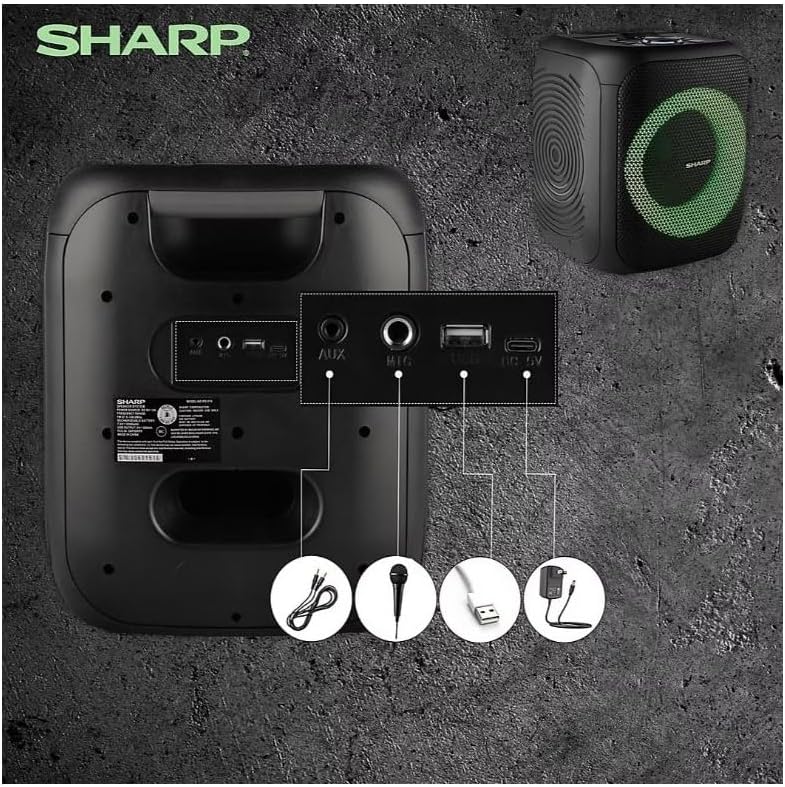
Image: Rear panel with various input and charging ports.
- AUX NAN: Konekte aparèy odyo ekstèn yo lè l sèvi avèk yon kab odyo 3.5mm.
- MIC IN: Connect a microphone (sold separately) for karaoke or announcements.
- USB: Mete yon kle USB pou li ka koute odyo.
- KAT TF: Insert a TF (microSD) card for audio playback.
- DC IN: Connect the charging cable to power and charge the speaker.
3.3 Playing Audio from USB/TF Card
- Insert a USB flash drive or TF card into the corresponding port.
- Peze a ON/STAND BY INPUT button repeatedly until the display shows the USB or TF mode.
- Lekti a ap kòmanse otomatikman. Sèvi ak JWE/POZ, ANVAN, ak PWOCHÈ bouton pou kontwole lèktur.
3.4 Itilizasyon Antre AUX
- Connect one end of a 3.5mm audio cable to the AUX IN port on the speaker.
- Konekte lòt bout la nan priz kas ekoutè a oswa nan pwodiksyon odyo aparèy ekstèn ou an.
- Peze a ON/STAND BY INPUT button repeatedly until the display shows AUX mode.
- Kontwole lekti ak volim nan soti nan aparèy ekstèn ou an.
3.5 Operasyon Radyo FM

Image: The PS-916 features an integrated FM Tuner.
- Peze a ON/STAND BY INPUT button repeatedly until the display shows FM mode.
- Peze epi kenbe la JWE/POZ bouton an pou eskane epi sove estasyon FM ki disponib yo otomatikman.
- Sèvi ak la ANVAN epi PWOCHÈ bouton navige nan estasyon sove.
3.6 Efè Limyè LED
Peze a LIMYÈ button to cycle through different LED light modes or to turn the lights off.
4. Antretyen
4.1 Netwayaj
- Toujou etenn oratè a epi dekonekte li nan sous kouran an anvan ou netwaye li.
- Sèvi ak yon twal mou epi sèk pou siye sifas ekstèn yo.
- Pa sèvi ak pwodui netwayaj likid, ayewosòl, oswa solvan, paske sa yo ka domaje fini an oswa konpozan entèn yo.
4.2 Depo
- Store the speakers in a cool, dry place away from direct sunlight and extreme temperatures.
- Si w ap sere l pou yon peryòd pwolonje, chaje batri a apeprè 50% chak kèk mwa pou kenbe l an bon eta.
NAN. Depanaj
If you encounter issues with your Sharp PS-916 speakers, please refer to the following common problems and solutions:
| Pwoblèm | Solisyon posib |
|---|---|
| Oratè a pa limen. | Asire w batri a chaje. Konekte kab chaje a epi eseye ankò. |
| Pa gen son soti nan oratè la. | Tcheke nivo volim nan tou de sou oratè a ak aparèy ki konekte a. Asire w ke ou chwazi mòd antre ki kòrèk la. |
| Aparèy Bluetooth la pa ka konekte. | Ensure the speaker is in Bluetooth pairing mode (indicator flashing). Move your device closer to the speaker. Disconnect from other Bluetooth devices. |
| Koneksyon TWS la echwe. | Ensure both speakers are powered on and not connected to any other Bluetooth devices. Try initiating TWS pairing again. |
| Son defòme. | Reduce the volume on both the speaker and your connected device. Ensure the audio source is not distorted. |
6. Espesifikasyon
| Karakteristik | Detay |
|---|---|
| Mak | Sharp |
| Non modèl | PS-916 |
| Konfigirasyon Oratè | 8" Woofer, 1" Tweeter (per speaker) |
| Pik pwodiksyon pouvwa | 400 Watt (pa oratè) |
| RMS Sòti Pouvwa | 40 Watt (pa oratè) |
| Koneksyon Teknoloji | Bluetooth |
| Antre adisyonèl | USB, TF Card, 3.5mm AUX, Microphone Input |
| Lavi batri | Jiska 12 èdtan |
| Karakteristik espesyal | True Wireless Stereo (TWS) Pairing, Bass Boost, LED Light Effects, FM Tuner |
| Koulè | Nwa |
| Pwa atik | 6.5 liv (pa oratè) |
| UPC | 728434122111 |
| GTIN | 728434122111 |
7. Garanti & Sipò
7.1 Enfòmasyon sou Garanti
This Sharp PS-916 product comes with a 90-day limited warranty. This warranty covers manufacturing defects under normal use. It does not cover damage caused by misuse, accidents, unauthorized modifications, or normal wear and tear.
7.2 Sipò pou Kliyan
For technical assistance, warranty claims, or further inquiries, please refer to the contact information provided with your purchase documentation or visit the official Sharp support websit.