
Entwodiksyon
Thank you for choosing the KAMRUI Hyper H2 Mini PC. This compact and powerful desktop computer is designed for a wide range of applications, from demanding office tasks and creative projects to home entertainment and light gaming. Equipped with an Intel Core i5-14450HX processor, 16GB DDR4 RAM, and a 512GB NVMe SSD, it offers robust performance and seamless multitasking capabilities. Its versatile connectivity options and triple 4K display support ensure a flexible and immersive user experience.
This manual provides essential information on setting up, operating, maintaining, and troubleshooting your KAMRUI Hyper H2 Mini PC. Please read it thoroughly to ensure optimal performance and longevity of your device.
Ki sa ki nan bwat la
Upon opening your KAMRUI Hyper H2 Mini PC package, please verify that all the following items are included:
- 1 x KAMRUI Hyper H2 Mini PC
- 1 x HDMI kab
- 1 x VESA Mount ak Vis
- 1 x pouvwa adaptè
- 1 x manyèl itilizatè

Pwodwi souview
The KAMRUI Hyper H2 Mini PC is engineered for efficiency and connectivity. Its compact chassis houses a powerful Intel Core i5-14450HX processor, supported by a robust cooling system to ensure stable performance even under heavy workloads.
Pò panèl devan
- 1 x USB 3.2 Gen2 Type-C port (10Gbps data transfer, DisplayPort Alt Mode, 15W power delivery)
- 2 x USB 3.2 Gen2 Type-A ports (10Gbps)
- 1 x Audio Jack (3.5mm for headphones/microphone)
- 1 x bouton pouvwa
Pò panèl dèyè
- 1 x HDMI 2.0 pò
- 1 x DisplayPort 1.4b
- 1 x RJ45 Gigabit Ethernet Port
- 4 x USB 3.2 Gen1 Type-A ports (5Gbps)
- 1 x DC Power Input

Gid Enstalasyon
Follow these steps for initial setup of your KAMRUI Hyper H2 Mini PC:
- Konekte Ekspozisyon: Connect your monitor(s) to the Mini PC using the HDMI, DisplayPort, or USB-C port. For triple display setup, utilize all three available video outputs.
- Konekte periferik: Branche klavye ou, sourit ou, ak nenpòt lòt aparèy USB nan pò USB ki disponib yo.
- Konekte sou rezo a: For wired internet, connect an Ethernet cable to the RJ45 Gigabit Ethernet port. For wireless, ensure your Wi-Fi 6 network is available after initial boot.
- Konekte pouvwa: Branche adaptè kouran an nan pò antre DC a sou Mini PC a, answit konekte adaptè a nan yon priz kouran.
- Pouvwa sou: Press the power button on the front panel to turn on your Mini PC.
- Premye konfigirasyon: Follow the on-screen instructions to complete the Windows 11 Pro setup, including language, network, and user account settings.
VESA Mount Enstalasyon
The included VESA mount allows you to attach the Mini PC to the back of a compatible monitor or TV, saving desk space and creating a clean setup.
- Atache sipò VESA a nan dèyè monitè a avèk vis yo bay la.
- Slide the KAMRUI Hyper H2 Mini PC onto the mounted bracket until it clicks securely into place.
Enstriksyon Operasyon
Operasyon debaz
- Limen/Etenyen: Press the power button once to turn the device on or off. For a forced shutdown, press and hold the power button for 5-7 seconds.
- Rekòmanse: Use the operating system's restart option for proper system reboots.
- Mòd dòmi: The system will enter sleep mode after a period of inactivity or by selecting the sleep option in the OS.
Konfigirasyon Plizyè Ekran
The KAMRUI Hyper H2 supports up to three 4K@60Hz displays simultaneously, enhancing productivity and entertainment. Connect your displays to the HDMI, DisplayPort, and full-featured USB-C ports. Once connected, configure your display settings within the operating system (e.g., Extend, Duplicate, or Second screen only).

Antretyen ak Amelyorasyon
Sistèm refwadisman
The KAMRUI Hyper H2 features a premium thermal design with a dual-fan cooling system, full copper heat pipes, and a dedicated aluminum SSD heatsink. This ensures the CPU and storage remain cool, even under sustained heavy workloads. To maintain optimal cooling performance:
- Ensure proper airflow by keeping the vents clear of obstructions.
- Regularly clean dust from the vents using compressed air.

RAM and SSD Upgrades
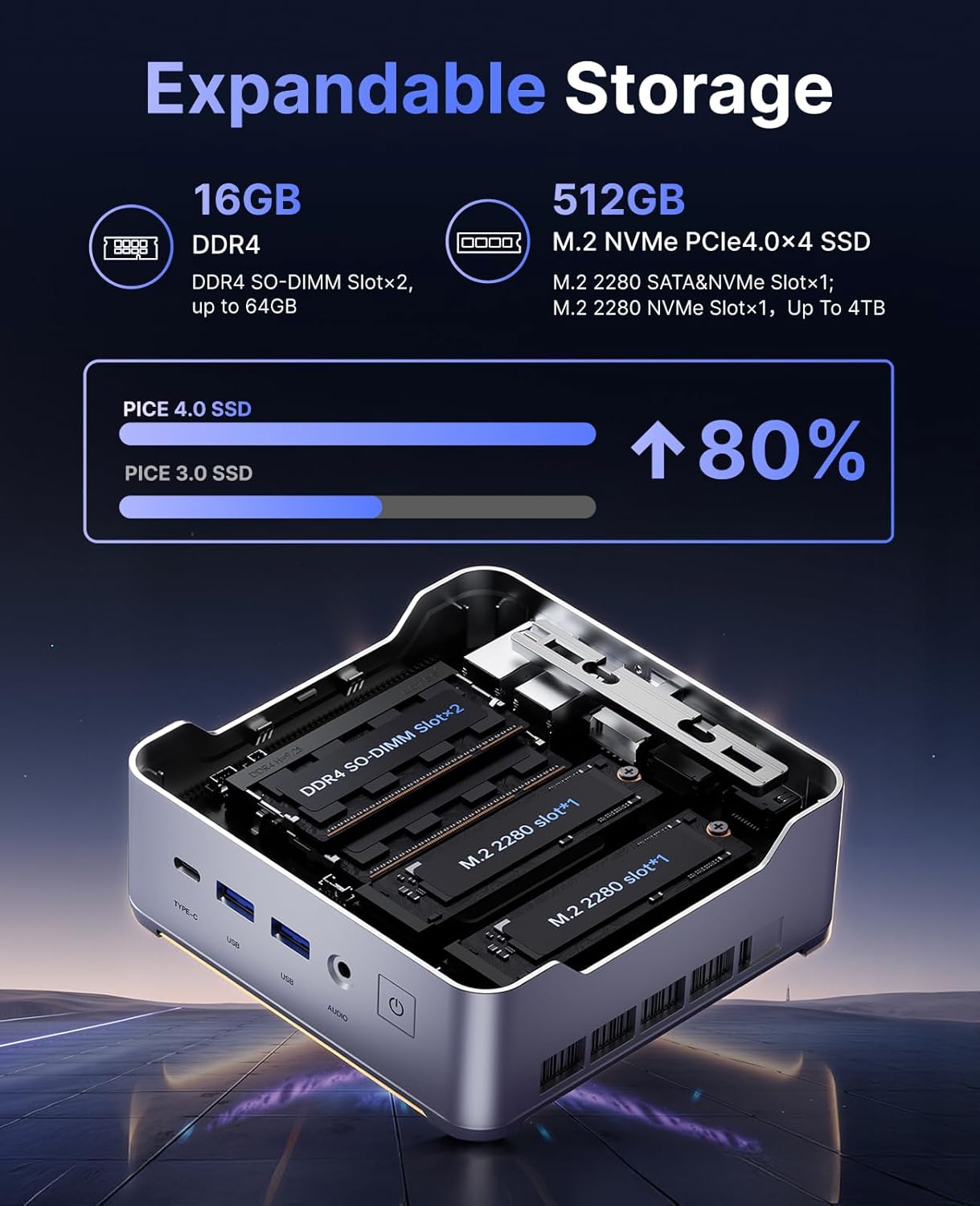
The KAMRUI Hyper H2 is designed for easy upgrades, allowing you to expand its memory and storage capacity. The Mini PC supports:
- RAM: Up to 2x 32GB DDR4 3200MHz/s SO-DIMM (total 64GB).
- SSD: Up to 2x 2TB NVMe SSD (M.2 2280 PCIe Gen4x4).
To access the RAM and SSD slots:
- Ensure the Mini PC is powered off and disconnected from all cables.
- Locate the small Phillips screw on the rear panel next to the lock/unlock switch. Remove this screw.
- Slide the lock switch to the unlock position. The top cover will lift slightly.
- Ak anpil atansyon retire kouvèti anwo a.
- Unscrew the four Phillips screws holding the metal plate/cover.
- Gently lift the metal plate to reveal the RAM and NVMe SSD slots.
- Install or replace your RAM modules or NVMe SSDs as needed.
- Reassemble the Mini PC by reversing these steps, ensuring all screws are tightened and the cover is securely locked.
Depanaj
If you encounter any issues with your KAMRUI Hyper H2 Mini PC, please refer to the following common solutions:
- Pa gen pouvwa:
- Asire w ke adaptè kouran an byen konekte ak Mini PC a ak yon priz kouran ki fonksyone.
- Verifye si priz kouran an fonksyone byen lè w branche yon lòt aparèy.
- Pa gen ekspozisyon:
- Check all video cable connections (HDMI, DP, USB-C) between the Mini PC and your monitor(s).
- Ensure your monitor is powered on and set to the correct input source.
- Try connecting to a different display or using a different video cable.
- Pa gen koneksyon entènèt:
- For wired connection, ensure the Ethernet cable is properly connected and your router/modem is working.
- For Wi-Fi, check if Wi-Fi is enabled in Windows settings and ensure you are connected to the correct network with the right password.
- Restart your router/modem and the Mini PC.
- Pèfòmans Ralanti:
- Fèmen aplikasyon ki pa nesesè k ap fonksyone nan background nan.
- Asire w ke sistèm operasyon ou an ak chofè yo ajou.
- Tcheke pou malveyan oswa viris lè l sèvi avèk yon lojisyèl antivirus ki gen bon repitasyon.
- Consider upgrading RAM or SSD if performance issues persist, especially with demanding tasks.
Espesifikasyon
| Karakteristik | Spesifikasyon |
|---|---|
| Processeur | Intel Core i5-14450HX (10 Nwayo/16 Fil, jiska 4.8GHz) |
| Grafik | Integrated UHD Graphics for 14th Gen Processors (max frequency 1.5GHz) |
| RAM | 16GB DDR4 (Expandable up to 64GB, 2x SO-DIMM slots) |
| Depo | 512GB NVMe PCIe 4.0 SSD (Expandable up to 2x 2TB NVMe SSD) |
| Sòti videyo | Triple 4K@60Hz (HDMI 2.0, DP 1.4b, USB-C with DisplayPort Alt Mode) |
| Koneksyon san fil | Wi-Fi 6 (802.11ax), Bluetooth 5.2 |
| Koneksyon filaire | 1 x RJ45 Gigabit Ethernet Port |
| Pò USB | 1 x USB 3.2 Gen2 Type-C (10Gbps, DP Alt Mode, 15W PD) 2 x USB 3.2 Gen2 Type-A (10Gbps) 4 x USB 3.2 Gen1 Type-A (5Gbps) |
| Odyo | 1 x 3.5mm Audio Jack |
| Sistèm operasyon | OS PRO |
| Dimansyon | 6.46 x 6.42 x 4.53 pous (Pakè) |
| Pwa atik | 2.99 liv |
Garanti ak sipò
Your KAMRUI Hyper H2 Mini PC comes with a 12-mwa garanti from the date of purchase, covering manufacturing defects and hardware malfunctions under normal use. For any technical assistance, troubleshooting, or warranty claims, please contact KAMRUI customer support.
KAMRUI offers Sipò kliyan 24 sou XNUMX to assist you with any queries or issues you may encounter. Please refer to the contact information provided in your product packaging or visit the official KAMRUI websit pou detay sipò.
Pou plis resous ak enfòmasyon sou pwodwi yo, vizite KAMRUI Store on Amazon.