
1. Entwodiksyon
Mèsi pou acha aasing the ULTIMEA Aura A60 U2621 7.1ch Dolby Atmos Soundbar System. This manual provides essential information for setting up, operating, and maintaining your new sound system. Please read this manual thoroughly before use to ensure proper functionality and to maximize your audio experience.

Figure 1.1: Immersive audio experience with the ULTIMEA Aura A60 system.
2. Enfòmasyon sou Sekirite
To reduce the risk of electric shock, fire, or damage to your device, please observe the following safety precautions:
- Pa ekspoze aparèy sa a lapli oswa imidite.
- Pa mete objè ki ranpli ak likid, tankou vaz, sou aparèy la.
- Asire bon vantilasyon. Pa bloke okenn ouvèti vantilasyon.
- Pa enstale tou pre okenn sous chalè tankou radyatè, rejis chalè, recho, oswa lòt aparèy (tankou amplifiers) ki pwodui chalè.
- Pwoteje kòd elektrik la pou yo pa mache oswa kwense, sitou nan priz, resipyan konvenyans, ak pwen kote yo sòti nan aparèy la.
- Itilize sèlman atachman/akseswa manifakti a espesifye.
- Deploge aparèy sa a pandan tanpèt zèklè oswa lè li pa itilize pou yon peryòd tan ki long.
- Refere tout sèvis yo bay pèsonèl sèvis kalifye.
3. Pake kontni
Tanpri verifye ke tout atik yo prezan epi yo an bon kondisyon:
- ULTIMEA Aura A60 Soundbar
- Wireless Subwoofer (4-inch, BassMX Technology)
- 4 x Surround Speakers (2 front, 2 rear)
- Kontwòl Remote
- HDMI kab
- Power Adapter/Cables
- Manyèl Itilizatè (dokiman sa a)
4. Pwodwi souview
The ULTIMEA Aura A60 U2621 is a 7.1ch Dolby Atmos soundbar system designed to deliver an immersive home theater audio experience. It features a main soundbar unit, a powerful wireless subwoofer with BassMX technology, and four surround speakers.
4.1 Main Soundbar Unit
The main soundbar unit houses 3 main channels for clear dialogue and primary audio. It serves as the central hub for all audio connections.

Figure 4.1: Main soundbar unit with front surround speakers.
4.2 Wireless subwoofer
The dedicated 4-inch wireless subwoofer incorporates BassMX technology to enhance low frequencies, providing deep and resonant bass for a more impactful audio experience.

Figure 4.2: Wireless subwoofer with BassMX technology.
4.3 Oratè Surround
The system includes four surround speakers: two front and two rear. The rear speakers connect wirelessly to the soundbar, minimizing cable clutter and allowing flexible placement to create an expansive acoustic space.

Figure 4.3: Diagram of 7.1ch sound distribution.
4.4 Pò Antre / Sòti
The soundbar features multiple input options for versatile connectivity:
- HDMI eARC: For high-quality audio transmission and seamless TV integration.
- Optik: Antre odyo dijital.
- AUX: Antre odyo analòg.
- USB: Pou lekti medya.
- Bluetooth: Difizyon odyo san fil.

Figure 4.4: Rear panel connections, including HDMI eARC.
5. Enstalasyon
5.1 Plasman fizik
Optimal placement of your sound system components is crucial for the best audio experience.
- Ba son: Mete ba son an nan mitan anba televizyon ou an. Asire w ke li pa bloke.
- Subwoofers: Position the wireless subwoofer on the floor near the soundbar. Experiment with placement to find the best bass response for your room.
- Front Surround Speakers: Place the two wired front surround speakers to the left and right of your TV, ideally at ear level when seated.
- Oratè antoure dèyè: Position the two wireless rear surround speakers behind your primary listening position, to the left and right. These speakers will automatically connect wirelessly to the soundbar once powered on.

Figure 5.1: Recommended speaker placement for Dolby Atmos.
5.2 Koneksyon
Swiv etap sa yo pou konekte sistèm soundbar ou a:
- Koneksyon pouvwa: Connect the power cables to the soundbar, subwoofer, and surround speakers, then plug them into a power outlet.
- HDMI eARC (Rekòmande): Connect one end of the provided HDMI cable to the HDMI eARC port on your soundbar and the other end to the HDMI eARC/ARC port on your TV. This connection supports Dolby Atmos and allows for TV remote control of the soundbar.
- Koneksyon Optik (Altènatif): If your TV does not have an HDMI eARC/ARC port, connect an optical cable (not included) from your TV's optical output to the OPTICAL input on the soundbar.
- AUX Connection (Alternative): For analog audio sources, connect a 3.5mm AUX cable (not included) from your device's audio output to the AUX input on the soundbar.
- Koneksyon USB: Insert a USB drive into the USB port on the soundbar for direct media playback.
- Bluetooth mak: To connect a Bluetooth device, select the Bluetooth input on the soundbar. On your device, search for 'ULTIMEA Aura A60' and pair.
6. Operasyon Enstriksyon
6.1 Power On/Off
Peze bouton Power ki sou ba son an oswa sou kontwòl remote la pou limen oswa etenn sistèm nan.
6.2 Seleksyon Antre
Use the 'Input' button on the remote control or the soundbar to cycle through available input sources: HDMI eARC, Optical, AUX, USB, and Bluetooth.

Figure 6.1: Remote control for easy operation.
6.3 Kontwòl Volim
Adjust the master volume using the 'Volume Up' and 'Volume Down' buttons on the remote control or the soundbar. You can also adjust subwoofer and surround speaker levels independently.
6.4 Sound Modes and EQ Presets
The Aura A60 offers various sound modes and EQ presets to optimize audio for different content and preferences.
- Dedicated Modes: Select from 6 specialized modes: Movie, Music, Voice, Sports, Game, and Night.
- Prereglaj EQ: Access 121 professional EQ presets for genres like Bass, Pop, Classical, and Rock via the ULTIMEA app.

Figure 6.2: 121 preset EQ matrix for customized audio.
6.5 Kontwòl App
Download the ULTIMEA app to your smartphone for advanced control and customization options, including a 10-band EQ and access to all EQ presets.
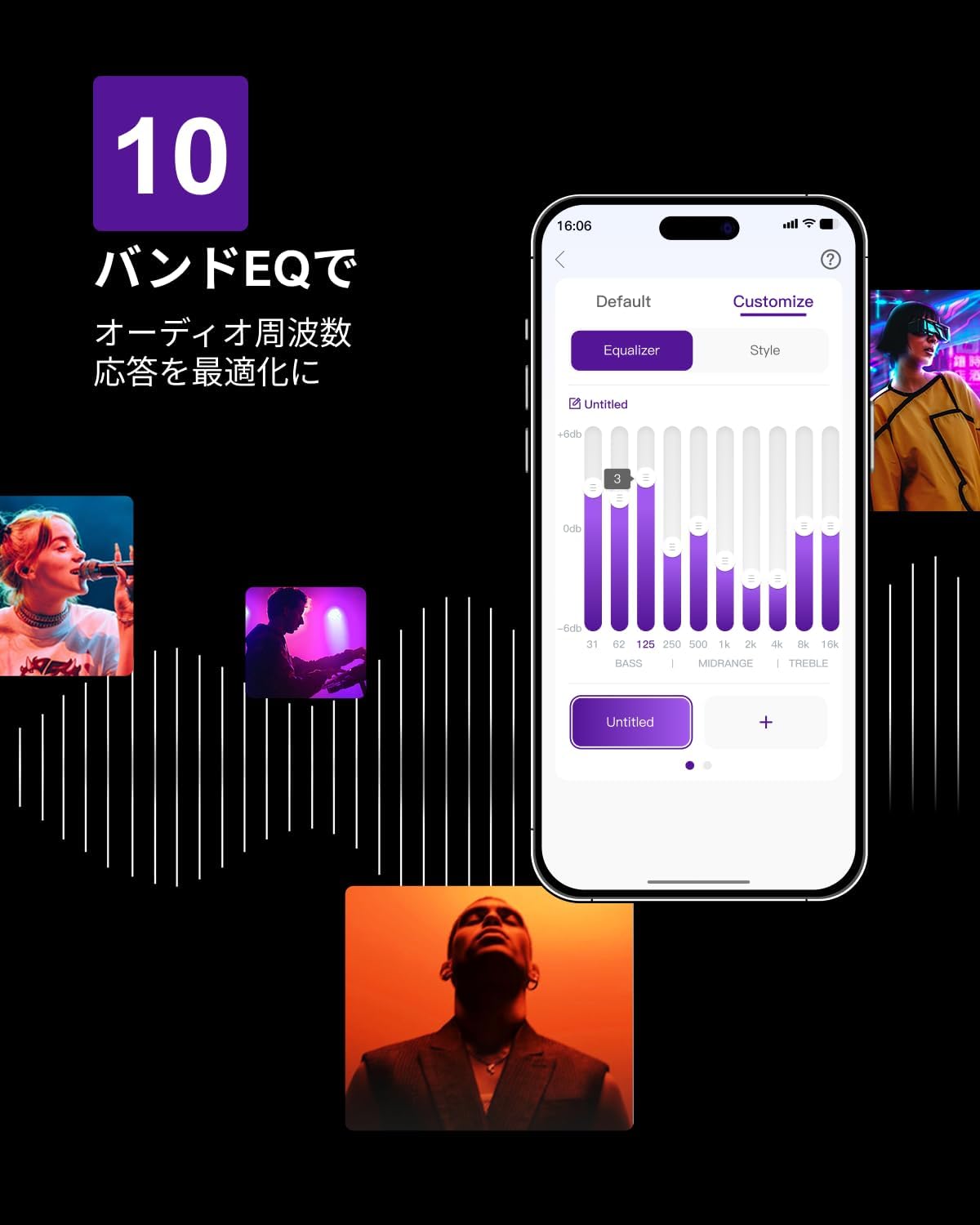
Figure 6.3: ULTIMEA mobile application interface.
7. Antretyen
To ensure the longevity and optimal performance of your ULTIMEA Aura A60 soundbar system, follow these simple maintenance guidelines:
- Netwayaj: Use a soft, dry cloth to wipe the surfaces of the soundbar, subwoofer, and speakers. Do not use liquid cleaners or abrasive materials, as they may damage the finish.
- Vantilasyon: Ensure that all ventilation openings remain clear and unobstructed to prevent overheating.
- Depo: Si w ap sere sistèm nan pou yon peryòd tan pwolonje, dekonekte l nan kouran an epi sere l nan yon kote ki fre epi sèk, lwen limyè solèy dirèk ak tanperati ekstrèm.
NAN. Depanaj
Si ou rankontre pwoblèm ak sistèm soundbar ou a, gade pwoblèm ak solisyon komen sa yo:
| Pwoblèm | Kòz posib | Solisyon |
|---|---|---|
| Pa gen son nan ba son an. | Incorrect input selected, volume too low, cables not connected properly. | Verify the correct input source. Increase volume. Check all cable connections (HDMI, Optical, AUX). Ensure the soundbar is powered on. |
| No sound from subwoofer/surround speakers. | Subwoofer/speakers not paired or powered on, volume too low. | Ensure subwoofer and surround speakers are powered on. They should automatically pair. If not, refer to the pairing instructions in the full manual (if available) or contact support. Increase their individual volume levels. |
| Son defòme oswa move kalite. | Incorrect audio settings, poor source quality, interference. | Adjust EQ settings or try different sound modes. Ensure the audio source is high quality. Check for nearby electronic devices causing interference. |
| Pwoblèm koneksyon Bluetooth. | Device out of range, not in pairing mode, interference. | Ensure the soundbar is in Bluetooth pairing mode. Move your device closer to the soundbar. Disconnect and re-pair the device. |
If the problem persists after trying these solutions, please contact ULTIMEA customer support.
9. Espesifikasyon
| Karakteristik | Detay |
|---|---|
| Mak | ULTIMEA |
| Non modèl | Aura A60 |
| Nimewo Modèl | U2621 |
| Kalite Oratè | Soundbar with 7.1ch Surround Sound |
| Teknoloji Audio | Dolby Atmos, BassMX Technology |
| Koneksyon | HDMI eARC, Bluetooth, Optical, AUX, USB |
| Subwoofer | 4-inch Wired Subwoofer (integrated BassMX) |
| Antouraj Oratè | 4 (2 wired front, 2 wireless rear) |
| Kontwòl | Remote Control, ULTIMEA App |
| Koulè | Nwa |
| Dimansyon (D x W x H) | 9 cm x 40 cm x 7 cm (Soundbar, approximate) |
| Peyi orijin | Lachin |
10. Garanti ak sipò
ULTIMEA is committed to providing high-quality products and customer satisfaction. Your Aura A60 U2621 soundbar system comes with comprehensive support.
10.1 Enfòmasyon sou Garanti
Specific warranty details may vary by region. Please refer to the warranty card included with your product or visit the official ULTIMEA websit la pou jwenn dènye kondisyon garanti yo.
10.2 Sipò pou Kliyan
For any questions, technical assistance, or troubleshooting not covered in this manual, please contact our dedicated support team:
- 365-Day Support: Our expert staff is available year-round to assist you.
- Live Chat: Instant responses are available via live chat on our websit.
- Retounen: We offer a 30-day return policy with free shipping for your peace of mind.

365-Day Expert Support

Instant Live Chat

Retounen gratis 30 jou
Pou plis asistans, tanpri vizite ULTIMEA Brand Store.