
Entwodiksyon
Thank you for choosing the MACAP MI40 Luxe On-Demand Espresso Grinder. This manual provides essential information for the safe and efficient operation, maintenance, and care of your new grinder. Please read all instructions carefully before use and retain this manual for future reference.

The MACAP MI40 Luxe On-Demand Espresso Grinder, featuring a sleek black finish and integrated touchscreen display.
Enfòmasyon sou Sekirite
Toujou swiv prekosyon sekirite debaz yo lè w ap itilize aparèy elektrik pou diminye risk dife, chòk elektrik, ak blesi.
- Read all instructions before operating the grinder.
- Do not immerse the grinder, cord, or plug in water or other liquids.
- Debranche aparèy la nan priz la lè w pa ap itilize l, anvan w monte oswa demonte pyès, epi anvan w netwaye l.
- Evite kontak ak pati k ap deplase.
- Pa opere nenpòt aparèy ki gen yon kòd oswa ploge ki domaje, oswa apre aparèy la fonksyone mal oswa li te domaje nan nenpòt fason. Kontakte sipò kliyan pou asistans.
- Itilizasyon atachman manifakti a pa rekòmande oswa vann yo ka lakòz dife, chòk elektrik, oswa blesi.
- Pa sèvi ak deyò.
- Pa kite kòd la pandye sou kwen yon tab oswa kontwa, oswa manyen sifas cho.
- Ensure the hopper lid is securely in place before operating.
- Only grind whole roasted coffee beans. Do not grind other substances such as nuts, spices, or instant coffee.
Enstalasyon
1. Debake
- Ak anpil atansyon retire tout eleman nan anbalaj la.
- Inspect the grinder for any signs of damage. If damaged, do not operate and contact your retailer.
- Retire tout fim pwoteksyon ak materyèl anbalaj yo.
2. Idantifikasyon konpozan
Familiarize yourself with the main parts of your MI40 Luxe grinder:
- Hopper: Kenbe grenn kafe antye.
- Kouvèti Hopper: Covers the hopper.
- Kadran Ajisteman Moulen: Located below the hopper, used to set grind fineness.
- Ekspozisyon Touchscreen: For programming and selecting dosing options.
- Dosing Spout: Where ground coffee is dispensed.
- Sipò Pòtafiltè: Supports the portafilter during grinding.
- Pouvwa switch: Located on the side of the grinder.
3. Premye Asanble
- Install the Hopper: Place the hopper onto the grinder body, ensuring it seats correctly. Rotate it slightly until it locks into position.
- Install the Hopper Lid: Place the lid securely on top of the hopper.
4. Plasman
Mete moulen an sou yon sifas ki estab, plat, epi sèk. Asire w ke gen ase vantilasyon toutotou aparèy la.
5. Koneksyon pouvwa
Branche kòd kouran an nan yon priz elektrik ki gen tè. Asire w vòltaj latage matches the specifications listed on the grinder's rating label.
Enstriksyon Operasyon
1. Filling the Hopper
Lift the hopper lid and pour whole roasted coffee beans into the hopper. Do not overfill. Replace the lid securely.
2. Grind Adjustment (Nice Grind Control Dial)
The MI40 Luxe features a stepless grind adjustment dial for precise control. To adjust the grind fineness:
- Turn the grinder ON using the power switch.
- Rotate the grind adjustment dial. Turning it clockwise results in a finer grind, and counter-clockwise results in a coarser grind.
- For espresso, start with a fine setting and adjust incrementally based on extraction time and taste. It is recommended to adjust the grind while the burrs are running to prevent jamming.

Detaye view of the Nice Grind Control Dial for precise grind fineness adjustment.
3. Touchscreen Dosing
The touchscreen allows for programmable dosing for single and double shots.
- Pouvwa sou: Ensure the grinder is powered on. The touchscreen will illuminate.
- Select Dose: On the main screen, you will see icons for single and double shot doses. Tap the desired dose icon.
- Adjust Dose Time (if needed): To program the dose time, press and hold the desired dose icon until it enters programming mode. Use the '+' and '-' buttons on the screen to adjust the grinding time in seconds. Tap the icon again to save.
- Place Portafilter: Position your portafilter securely in the portafilter holder beneath the dosing spout.
- Kòmanse Manje: Tap the selected dose icon once to start grinding. The grinder will automatically stop after the programmed time.
- Manual Grinding: Some models may offer a manual grind option, typically by pressing a dedicated button or holding a dose icon briefly. Refer to the on-screen prompts.
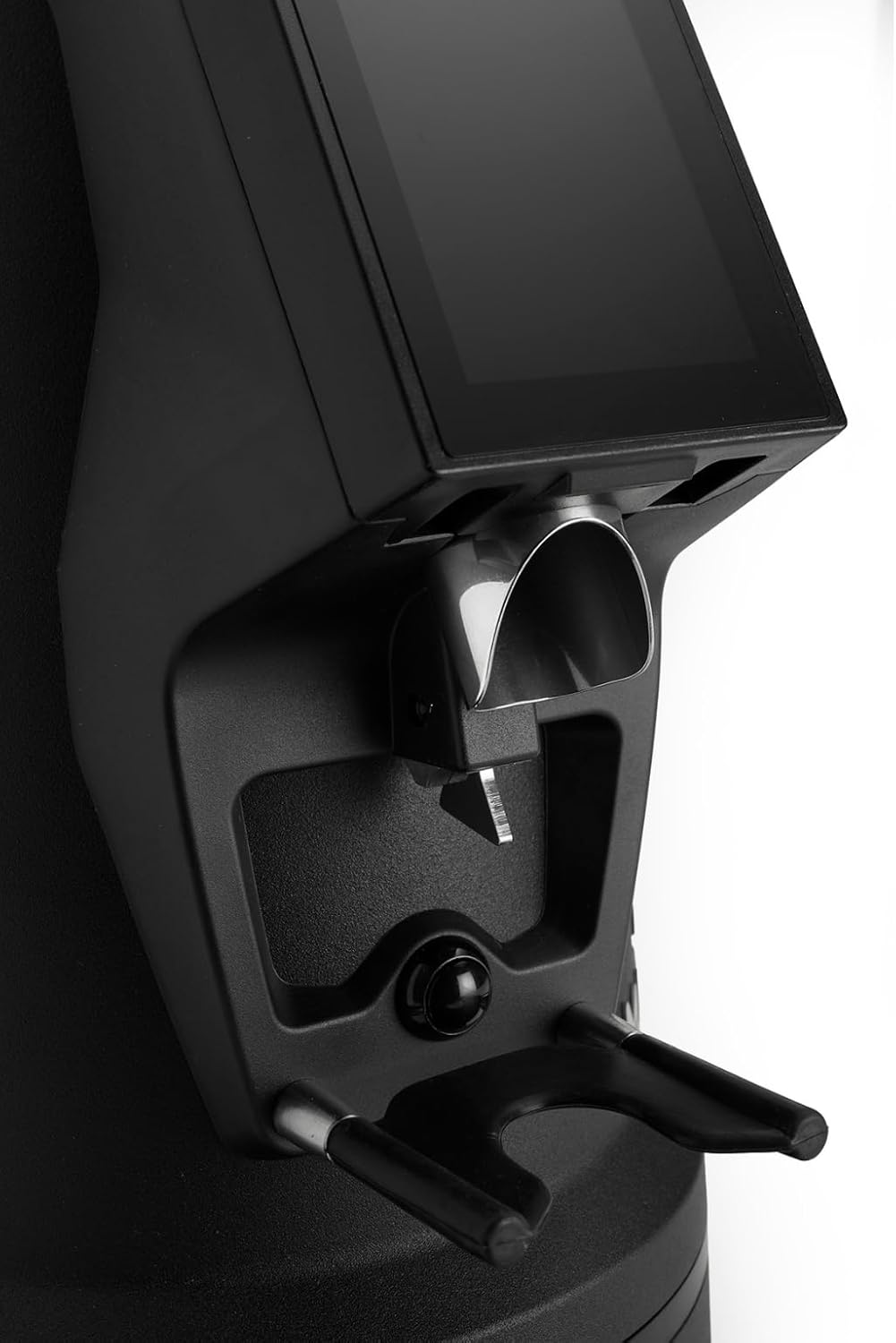
The dosing spout and portafilter holder, designed for efficient and clean coffee dispensing.
Antretyen
Regular cleaning and maintenance ensure optimal performance and longevity of your grinder.
1. Netwayaj chak jou
- Hopper: Empty any remaining beans and wipe the inside of the hopper with a dry cloth.
- Dosing Spout: Use a brush or vacuum cleaner to remove any residual coffee grounds from the dosing spout and portafilter holder area.
- Eksteryè: Siye eksteryè moulen an ak anonsamp twal. Pa sèvi ak pwodui netwayaj abrazif oswa plonje aparèy la nan dlo.
2. Burrs Cleaning (Weekly/Bi-weekly)
To maintain grind consistency, the burrs should be cleaned regularly.
- Dekonekte moulen an: Always disconnect the power before cleaning the burrs.
- Remove Hopper: Empty the hopper and remove it from the grinder body.
- Access Burrs: Depending on the model, you may need to unscrew the top burr carrier. Refer to the specific instructions for your MI40 Luxe model.
- Netwaye bav yo: Use a stiff brush or a vacuum cleaner to remove all coffee grounds from both the stationary and rotating burrs. Do not use water.
- Remonte: Carefully reassemble the burr carrier and hopper, ensuring all parts are securely in place.
3. Swen Jeneral
- Sere moulen an nan yon kote ki fre, sèk.
- Avoid exposing the grinder to direct sunlight or extreme temperatures.
Depanaj
Si ou rankontre pwoblèm ak moulen ou an, gade pwoblèm ak solisyon komen sa yo:
| Pwoblèm | Kòz posib | Solisyon |
|---|---|---|
| Moulen pa limen | No power, power switch off, or safety interlock not engaged. | Check power cord connection, ensure power switch is ON, verify hopper is correctly seated. |
| No coffee grinding / Grinder jams | Beans not feeding, burrs clogged, or grind setting too fine. | Ensure hopper has beans. Unplug, remove hopper, clean burrs. Adjust to a coarser setting. |
| Inconsistent grind | Bav yo sal oswa ize. | Clean burrs thoroughly. If problem persists, burrs may need replacement. |
| Moulin se fè bwi | Foreign object in burrs or loose components. | Unplug and inspect burrs for foreign objects. Ensure all parts are securely fastened. |
If the problem persists after attempting these solutions, please contact MACAP customer support or your retailer.
Espesifikasyon
| Karakteristik | Detay |
|---|---|
| Modèl | MI40 Luxe |
| Mak | Macap |
| Kalite Burr | Flat Burrs |
| Gwosè Burr | 65 mm |
| Moulen Ajisteman | Stepless (Nice Grind Control Dial) |
| Dòz | Touchscreen Programmable On-Demand |
| Kapasite Hopper | 2.6 liv (apeprè 1.2 kg) |
| Materyèl | Nerjaveèi asye |
| Pwa atik | 19.6 liv (apeprè 8.9 kg) |
| Dimansyon (L x W x H) | 12" x 7.6" x 22" (apeprè 30.5cm x 19.3cm x 55.9cm) |
| Motè | High-Torque |
Garanti ak sipò
Your MACAP MI40 Luxe Grinder is covered by a manufacturer's warranty. For specific warranty terms and conditions, please refer to the warranty card included with your product or visit the official Macap website. For technical support, spare parts, or service inquiries, please contact your authorized Macap dealer or the customer support team.
Enfòmasyon pou kontakte:
- Gade dokiman acha ou a pou jwenn enfòmasyon pou kontakte machann nan.
- Visit the official Macap website for global support information.