
1. Entwodiksyon
Welcome to the user manual for your LOKLNEYK H610 S4 Motherboard. This guide provides detailed instructions for installation, operation, maintenance, and troubleshooting to ensure optimal performance and longevity of your system. Please read this manual thoroughly before beginning installation.
2. Enstalasyon
2.1. Pake kontni
Verifye ke tout konpozan yo prezan nan pake kat manman ou an:
- LOKLNEYK H610 S4 Motherboard
- I / O Shield
- Kab Done SATA (kantite a ka varye)
- Manyèl Itilizatè (dokiman sa a)
- CD/USB chofè (oswa enstriksyon pou telechaje)
2.2. Mèr Layout
Familiarize yourself with the various components and connectors on the motherboard. Refer to the diagram below for a detailed overview of the H610 S4 motherboard's key areas.

Figure 1: Labeled diagram of the LOKLNEYK H610 S4 Motherboard, highlighting CPU socket, RAM slots, PCIe slots, M.2 slots, SATA ports, and various headers.
2.3. Etap enstalasyon yo
Swiv etap sa yo pou byen enstale kat manman w lan ak konpozan yo:
- Prepare chasi a: Enstale pwoteksyon E/S la nan ouvèti dèyè bwat òdinatè w la.
- Enstale kat manman an: Carefully place the motherboard into the chassis, aligning it with the standoffs. Secure it with screws.
- CPU Installation (LGA 1700):
- Open the CPU socket lever and protective cover.
- Align the CPU's triangular mark with the mark on the socket.
- Mete CPU a dousman nan priz la. Pa fòse li.
- Fèmen levye a pou byen sere CPU a.
- Enstalasyon Refwadisè CPU a: Install your CPU cooler according to its manufacturer's instructions, ensuring proper thermal paste application.
- RAM Installation (DDR4):
- Louvri klip yo nan tou de bout fant memwa DDR4 yo.
- Align the memory module's notch with the slot's key.
- Press down firmly on both ends of the module until the clips snap into place.
- Storage Installation (NVMe M.2 / SATA):
- For M.2 SSDs, insert the drive into the M.2 slot and secure it with the provided screw.
- For SATA drives, connect SATA data cables to the motherboard's SATA ports and to your drives. Connect power cables from your power supply to the drives.
- Enstalasyon Kat PCIe: Insert your graphics card or other PCIe expansion cards into the appropriate PCIe slots and secure them.
- Koneksyon ekipman pou pouvwa: Konekte konektè pouvwa ATX 24-pin lan ak konektè pouvwa CPU 8-pin lan ki soti nan ekipman pouvwa ou a ak kat manman an.
- Koneksyon panèl devan: Connect the front panel headers (power button, reset button, USB ports, audio jacks, LED indicators) to the corresponding pins on the motherboard. Refer to the motherboard layout diagram (Figure 1) for pin locations.
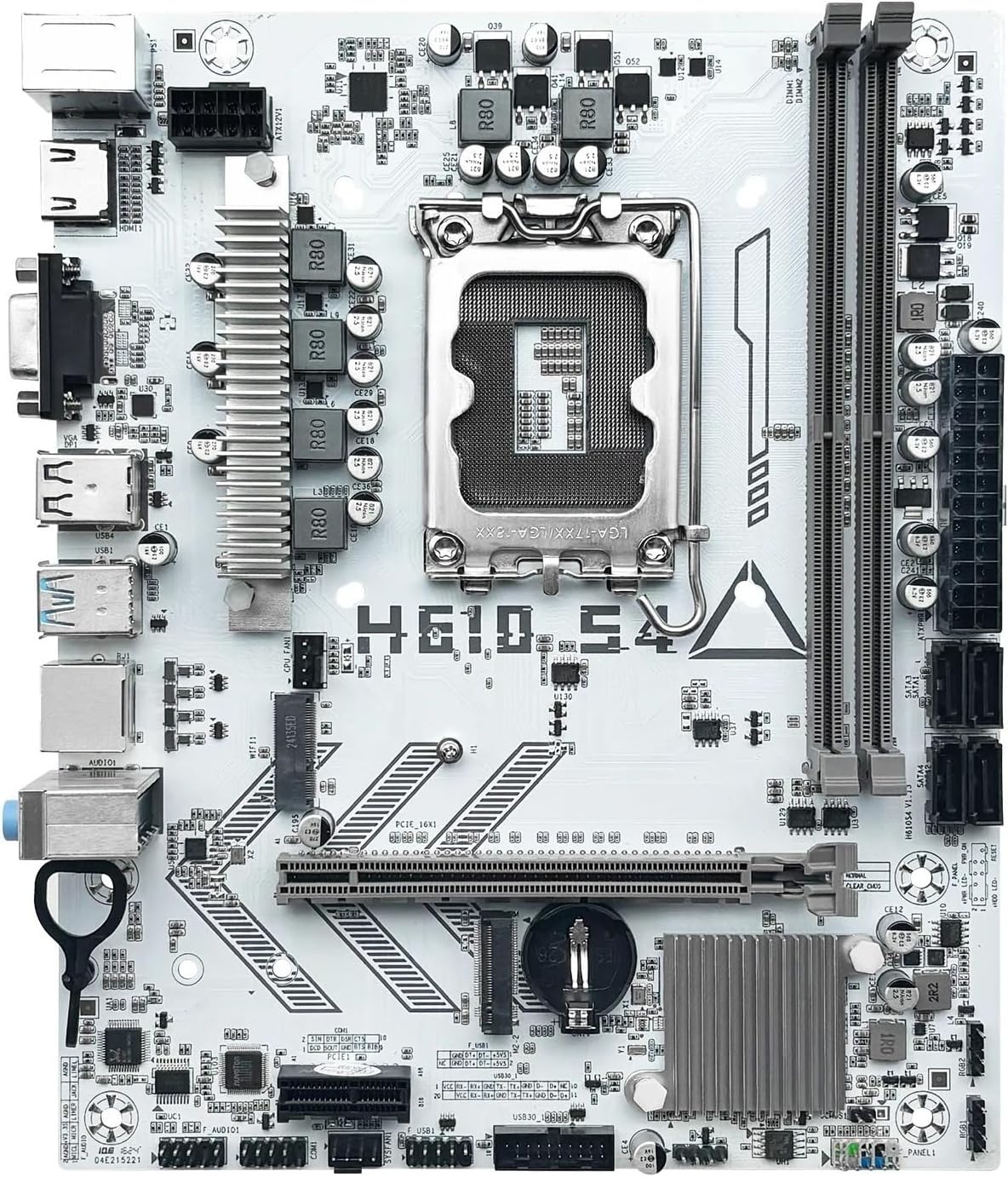
Figi 2: Plis paseview of the LOKLNEYK H610 S4 Motherboard, showing the general layout of components.
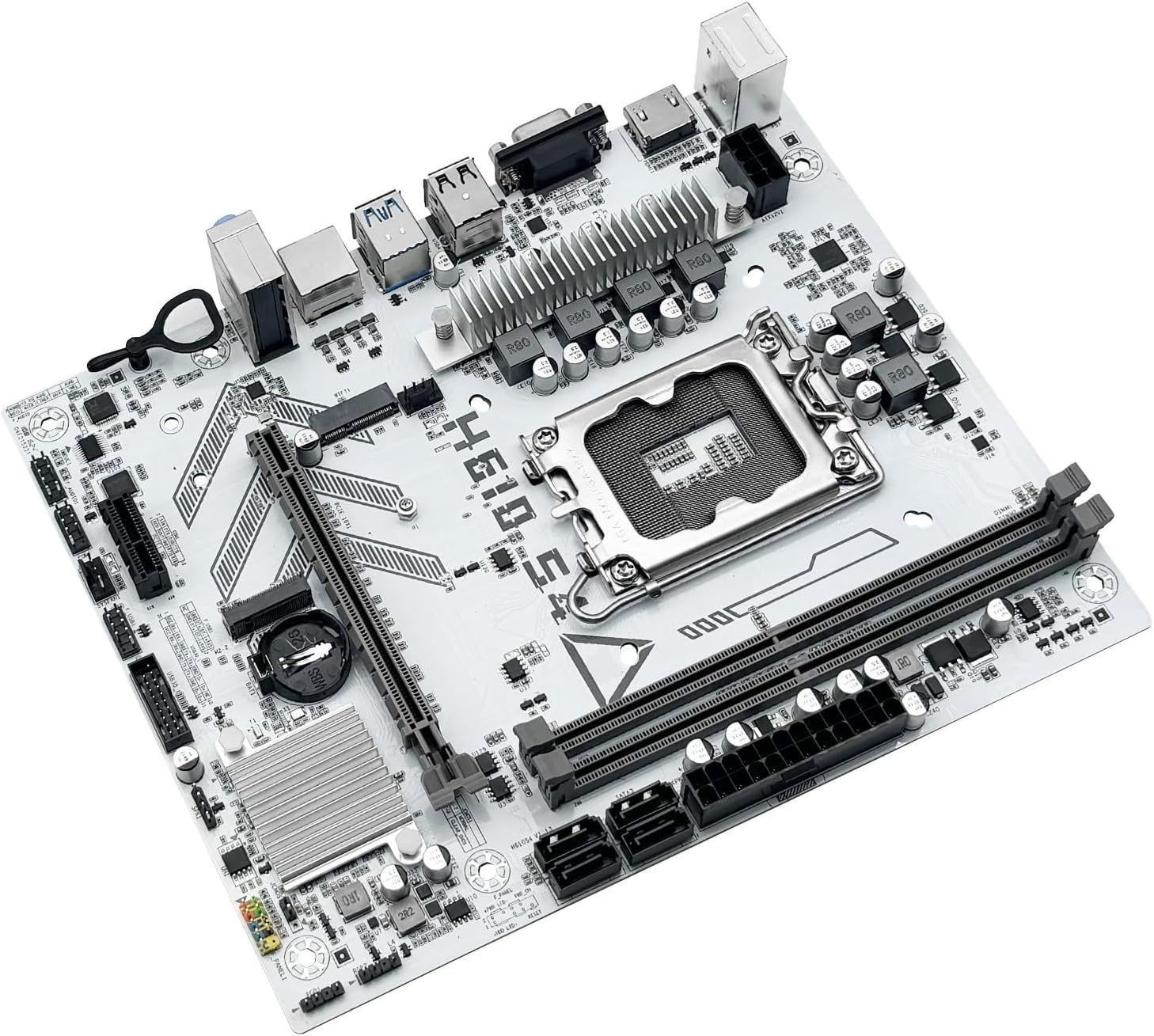
Figure 3: Rear I/O panel connectors and typical accessories like the I/O shield and SATA cables.
3. Operasyon Enstriksyon
3.1. Premye bòt
After completing all hardware installations, connect your monitor, keyboard, and mouse. Power on your system. The system should display the BIOS/UEFI splash screen. If not, check all power connections and component seating.
3.2. Konfigirasyon BIOS/UEFI
Pou antre nan zouti konfigirasyon BIOS/UEFI a, peze bouton an. DEL or F2 key during the initial boot sequence. Here you can configure:
- Boot order for your operating system drive.
- Paramèt dat ak lè.
- Memory profiles (e.g., XMP for DDR4).
- Fan speed controls.
- SATA mode (AHCI/RAID).
3.3. Enstalasyon chofè
After installing your operating system, it is crucial to install the latest drivers for your motherboard components. These include:
- Chofè Chipset yo
- Chofè LAN (Etènèt)
- Chofè odyo
- Graphics drivers (for integrated graphics or discrete GPU)
Drivers can typically be found on the LOKLNEYK official website or on the provided driver media.
4. Antretyen
4.1. Netwayaj
Regular cleaning helps maintain optimal performance and extends the lifespan of your motherboard. Use compressed air to remove dust from heatsinks, fans, and other components. Ensure the system is powered off and unplugged before cleaning.
4.2. Mizajou BIOS/UEFI
Periodically check the LOKLNEYK website for updated BIOS/UEFI versions. Updates can provide improved compatibility, stability, and new features. Follow the specific instructions provided by LOKLNEYK for updating the BIOS/UEFI to avoid system damage.
NAN. Depanaj
Seksyon sa a bay solisyon pou pwoblèm komen ou ka rankontre.
5.1. Pwoblèm komen ak solisyon yo
- Pa gen pouvwa:
- Check if the power supply is connected correctly to the motherboard (24-pin ATX and 8-pin CPU).
- Ensure the power supply switch is in the 'ON' position.
- Verifye koneksyon bouton pouvwa a sou panèl devan an.
- Pa gen ekspozisyon:
- Asire w kab monitè a byen konekte ak kat grafik la oswa kat manman an (si w ap itilize yon kat grafik entegre).
- Remete kat grafik la ak modil RAM yo.
- Eseye demarre ak yon sèl kle RAM.
- Enstabilite/Pwoblèm Sistèm:
- Tcheke tanperati CPU ak GPU yo.
- Asire w ke tout chofè yo ajou.
- Test RAM modules for errors.
- Aparèy demaraj pa jwenn:
- Verify that your storage drive (SSD/HDD) is properly connected.
- Check BIOS/UEFI settings for correct boot order and SATA mode.
- Ensure the operating system is correctly installed on the drive.
For more complex issues, consult the LOKLNEYK support website or a qualified technician.
6. Espesifikasyon
Below are the technical specifications for the LOKLNEYK H610 S4 Motherboard:
| Karakteristik | Spesifikasyon |
|---|---|
| CPU Socket | LGA 1700 |
| CPU konpatib yo | Intel Core 12th, 13th, 14th Generation i3, i5 Processors |
| Chipset | Intel H610 |
| Memwa fant | 2 x DDR4 DIMM |
| Kapasite Memwa Maksimòm | 64 GB |
| Entèfas Depo | 2 x M.2 (NVMe 2280), 4 x SATA 3.0 |
| PCIe fant | 1 x PCIe 4.0 x16, 1 x PCIe x1 |
| LAN | 1 x RJ45 Gigabit Ethernet |
| Pò USB | USB 3.0, USB 3.1 Gen1, USB 2.0 (Front & Rear) |
| Sorti Videyo | Dmi, VGA |
| Odyo | Abò Audio |
| Faktè fòm | Konpak (180mm x 220mm) |

Figure 4: LOKLNEYK H610 S4 Motherboard showing its physical dimensions.
7. Garanti ak sipò
7.1. Enfòmasyon sou Garanti
Please refer to the warranty card included with your product or visit the official LOKLNEYK websit la pou plis detay sou tèm ak kondisyon garanti a. Kenbe prèv acha ou pou reklamasyon garanti.
7.2. Sipò teknik
If you encounter any issues that cannot be resolved using this manual, please visit the LOKLNEYK support websit pou FAQ, telechajman chofè, ak enfòmasyon pou kontakte pou asistans teknik.