
1. Entwodiksyon
Mèsi pou acha aasing the ELEPHAS BL128MINI Mini Projector. This manual provides essential information for setting up, operating, and maintaining your projector. Please read it thoroughly before use to ensure optimal performance and longevity of the device.
2. Pake kontni
Verifye ke tout atik ki nan lis anba a yo enkli nan pakè ou a:
- 1 x ELEPHAS BL128MINI Projector
- 1 x kontwòl remote
- 1 x Manyèl Itilizatè (dokiman sa a)
- 1 x HDMI kab
- 1 x Detachable Tripod
3. Pwodwi souview
3.1 Karakteristik kle
- 1080P Full HD Rezolisyon: Supports 1920 x 1080 resolution for clear images.
- 24-bit True Color: Bay koulè vivan ak egzak.
- Gwo pwojeksyon ekran: Capable of projecting up to a 200-inch screen.
- Detachable Tripod: Provides stable placement and flexible positioning.
- Built-in HIFI Speaker: Offers integrated audio output.
- Opsyon Koneksyon miltip: Includes USB, HDMI, AV, and Audio ports.

Image 3.1: The ELEPHAS BL128MINI Projector offers 1080P Full HD resolution with 24-bit true color, an 8000:1 contrast ratio, and enhanced brightness for a vivid vieweksperyans nan.
3.2 Projector Ports and Controls
Familiarize yourself with the various ports and controls on your projector for proper connection and operation.

Image 3.2: Rear panel of the ELEPHAS BL128MINI Projector, highlighting DC power input, USB ports, HDMI port, AV port, and audio output. Compatible devices include Xbox, TV Stick, PC, Smartphone, USB drives, speakers, and headphones.
4. Enstalasyon
4.1 Koneksyon pouvwa
- Konekte adaptè kouran an nan pò DC IN ki sou pwojektè a.
- Ploge adaptè pouvwa a nan yon priz miray.
4.2 Tripod Installation
The included detachable tripod allows for stable placement on various surfaces.
- Locate the tripod mounting screw hole on the bottom of the projector.
- Screw the tripod securely into the mounting hole.
- Adjust the tripod legs to achieve the desired height and angle for projection.

Image 4.2: The detachable tripod provides stability for the projector, whether placed on a desktop or uneven outdoor surfaces.
4.3 Plasman ak Distans Pwojeksyon
Position the projector on a flat, stable surface. The optimal projection distance ranges from 3.3 to 9.8 feet for screen sizes between 50 and 200 inches.

Image 4.3: Recommended projection distances for achieving various screen sizes, from 50 to 200 inches.
5. Operasyon Enstriksyon
5.1 Power On/Off
- Pouvwa sou: Peze bouton pouvwa a sou pwojektè a oswa kontwòl remote la.
- Pouvwa Off: Peze bouton pouvwa a ankò. Pwojektè a ap antre nan mòd veille.
5.2 Ajisteman Konsantre
Rotate the focus ring on the projector lens until the projected image is clear and sharp.
5.3 Seleksyon Sous Antre
Use the 'Source' button on the remote control or the projector to select the desired input source (HDMI, USB, AV).
5.4 Konekte Aparèy Ekstèn yo
The projector supports various external devices:
- HDMI: Connect laptops, PCs, TV boxes, TV sticks, gaming consoles (e.g., Xbox), or other HDMI-enabled devices using the provided HDMI cable.
- USB: Mete yon kle USB nan pò USB a pou li medya yo files dirèkteman.
- DE: Use the AV port for older devices with composite video output.
- Smartphones/Tablet: For iOS and Android devices, an additional HDMI adapter (not included) is required for connection.
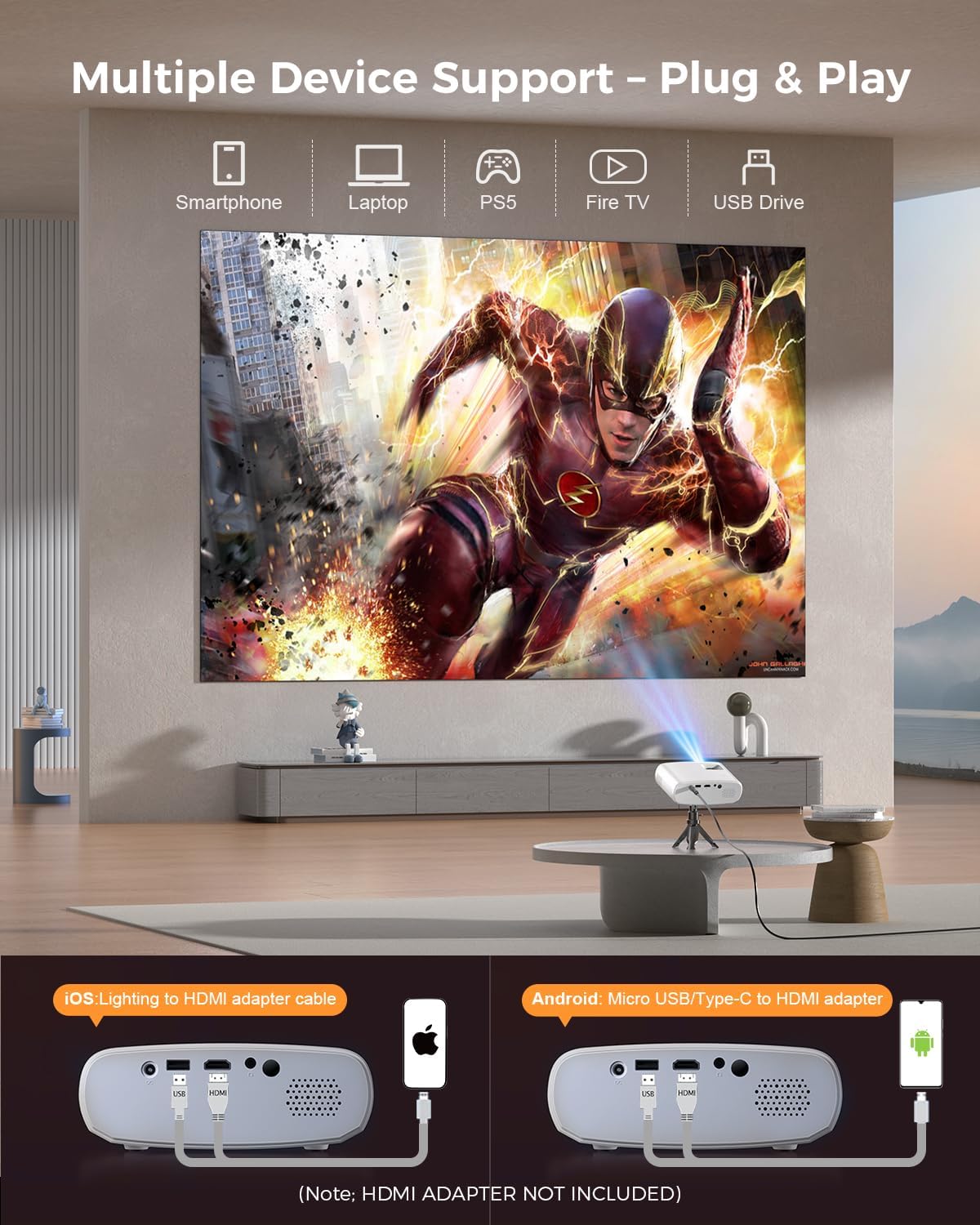
Image 5.4: The projector supports multiple devices via HDMI and USB. Note that an HDMI adapter is required for direct smartphone connection (not included).
5.5 Sòti odyo
The projector has a built-in HIFI speaker. For external audio, connect headphones or external speakers to the Audio Out port.
6. Antretyen
6.1 Netwayaj
- Lantiy: Use a soft, lint-free cloth or lens cleaning paper. Avoid abrasive materials.
- Casing: Siye pwojektè a casing with a soft, dry cloth. Do not use liquid cleaners or solvents.
- Vantilasyon: Asire w ouvèti vantilasyon yo pa gen pousyè ak obstak pou anpeche yo chofe twòp.
6.2 Depo
When not in use, store the projector in a cool, dry place, away from direct sunlight and extreme temperatures. Use the original packaging or a protective bag to prevent dust accumulation.
NAN. Depanaj
| Pwoblèm | Kòz posib | Solisyon |
|---|---|---|
| Pa gen imaj projeté | Power cable loose; Incorrect input source; Device not connected properly. | Check power connection; Select correct input source; Reconnect HDMI/USB cable. |
| Imaj floue | Fokus la pa ajiste; Pwojektè a twò pre/lwen ekran an. | Ajiste bag konsantrasyon an; Ajiste distans pwojeksyon an. |
| Pa gen son | Volim twò ba; Mizik sou silans; Aparèy odyo ekstèn pa konekte. | Ogmante volim nan; Aktive son an; Tcheke koneksyon odyo ekstèn yo. |
| Remote kontwòl pa travay | Pil yo fèb/mouri; Gen yon obstak ant telekòmand lan ak pwojektè a. | Ranplase pil yo; Asire w ke liy vizyon an klè ak reseptè IR la. |
| Cannot play Netflix/Hulu/Prime Video | HDCP copyright protection. | Use an external streaming device like Amazon Fire Stick or Roku Stick (not included). |
8. Espesifikasyon
| Karakteristik | Detay |
|---|---|
| Modèl | BL128MINI |
| Mak | ELEPHAS |
| Rezolisyon ekspozisyon | 1920 x 1080 (1080P Full HD) |
| Koneksyon Teknoloji | HDMI, USB, AV, Audio Out |
| Karakteristik espesyal | HDMI Connectivity, Portable, Built-in Speakers, Detachable Tripod |
| Itilizasyon Rekòmande | Andedan kay la / Deyò |
| Pwa atik | 1.96 liv (apeprè 0.89 kg) |
| Dimansyon pwodwi | 6 x 4.4 x 2.4 pous (apeprè 15.2 x 11.2 x 6.1 cm) |
9. Garanti ak sipò
ELEPHAS projectors are certified with CE, FCC, and RoHS standards.
- Factory Support: We provide 3-years factory support for this product.
- Sipò teknik: Sipò teknik pou tout lavi disponib.
- Sèvis Kliyan: 24/7 professional service is provided.
- Retounen: A 30-day return or exchange policy is in place.
For further assistance, please refer to the contact information provided on the product packaging or the official ELEPHAS websit.

Image 9.1: ELEPHAS offers comprehensive customer support, including 24/7 professional service, a 30-day return policy, and lifetime technical support.