
1. Entwodiksyon
The ORICO CB05 Dual USB Flash Drive is a versatile storage solution designed for universal compatibility across various devices. Featuring both USB-C and USB-A connectors, this flash drive allows for seamless data transfer between smartphones, tablets, laptops, and other compatible devices without requiring additional drivers or software. Its robust metal housing and swivel design ensure durability and ease of use.
Karakteristik kle:
- Doub Koneksyon: Equipped with both USB-C and USB-A 3.0 connectors for broad device compatibility.
- Konsepsyon pivotan 360°: Allows for easy switching between connectors and protects the unused port.
- Transfè Done gwo vitès: Achieves read speeds up to 150MB/s and write speeds up to 70MB/s, significantly faster than USB 2.0.
- Lojman metal dirab: Constructed from zinc alloy with silver electroplating for resistance against scratches, drops, and daily wear.
- Fonksyonalite Plug-and-Play: No drivers or software installation required for most operating systems.
- Lajè konpatibilite: Supports iPhone 15, Android smartphones, iPads, MacBooks, Windows laptops, gaming consoles, and car audio systems.
2. Pwodwi souview
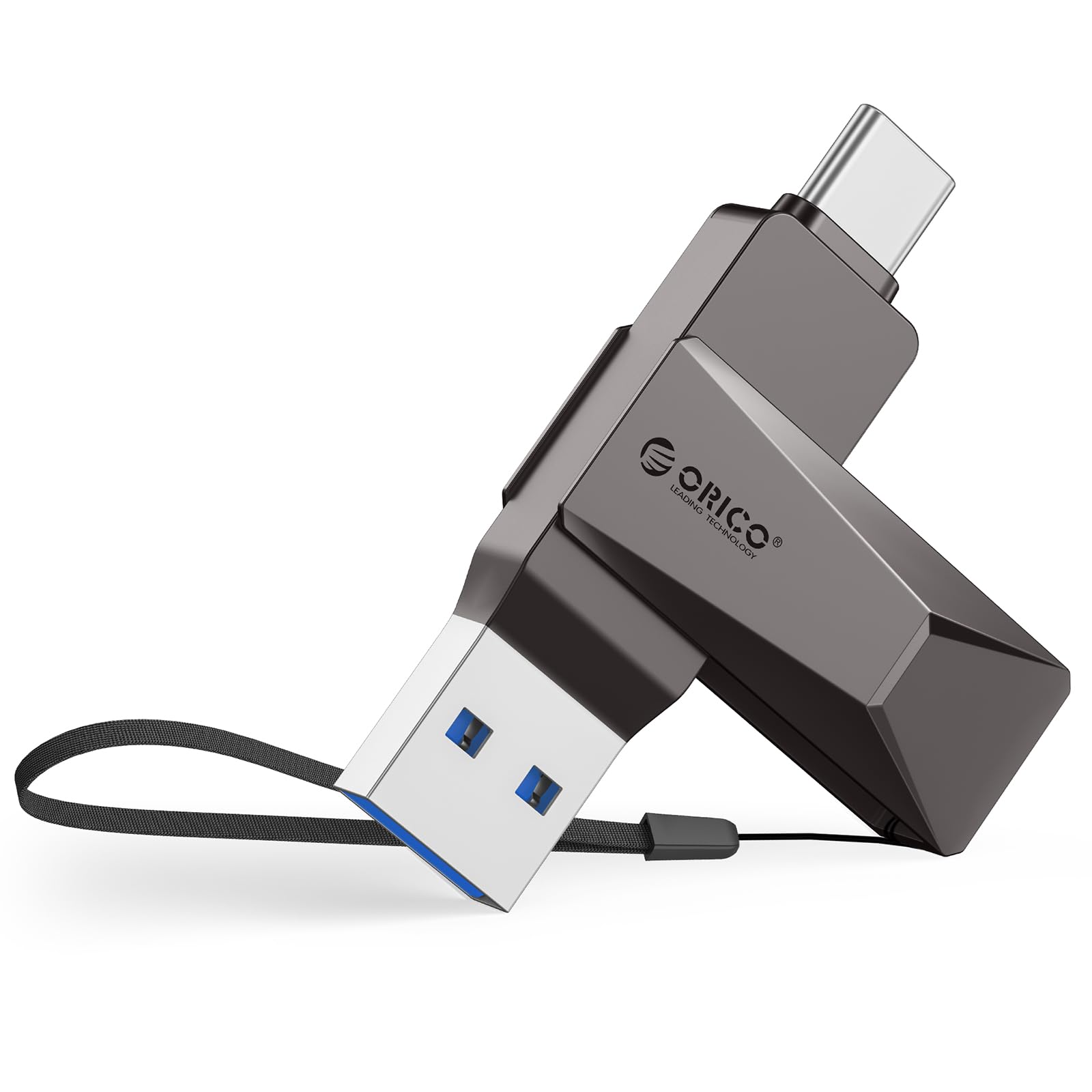
Figure 2.1: The ORICO CB05 128GB Dual USB Flash Drive in Grey, showcasing konsepsyon kontra enfòmèl ant li an.

Figure 2.2: Detail of the dual USB-A and USB-C connectors, highlighting the swivel mechanism.

Figi 2.3: Yon anlèview of the ORICO CB05 Dual USB Flash Drive, emphasizing its dual USB-A and USB-C functionality.
3. Enstalasyon
Konekte ak aparèy:
The ORICO CB05 is designed for plug-and-play operation. No special drivers or software are typically required for basic functionality on most compatible devices.
- Identify the correct connector: The flash drive features both a standard USB-A connector and a reversible USB-C connector. Rotate the metal housing to expose the desired connector.
- Insert into device: Plug the appropriate connector firmly into the corresponding port on your smartphone, tablet, laptop, or other compatible device.
- Rekonesans aparèy: Your device should automatically detect the flash drive. On computers, it will appear as a removable drive. On smartphones/tablets, you may need to access a file aplikasyon manadjè.

Figure 3.1: The ORICO CB05 supports a wide range of devices including PCs, laptops, printers, USB hubs, smartphones, tablets, MacBooks, Nintendo Switch, Smart TVs, and car audio systems.
4. Operasyon Enstriksyon
File Transfer on Mobile Devices (iOS/Android):
For iOS devices (iPhone 15 series, iPads with USB-C) and Android devices, file management is typically handled through the device's native file manager app.
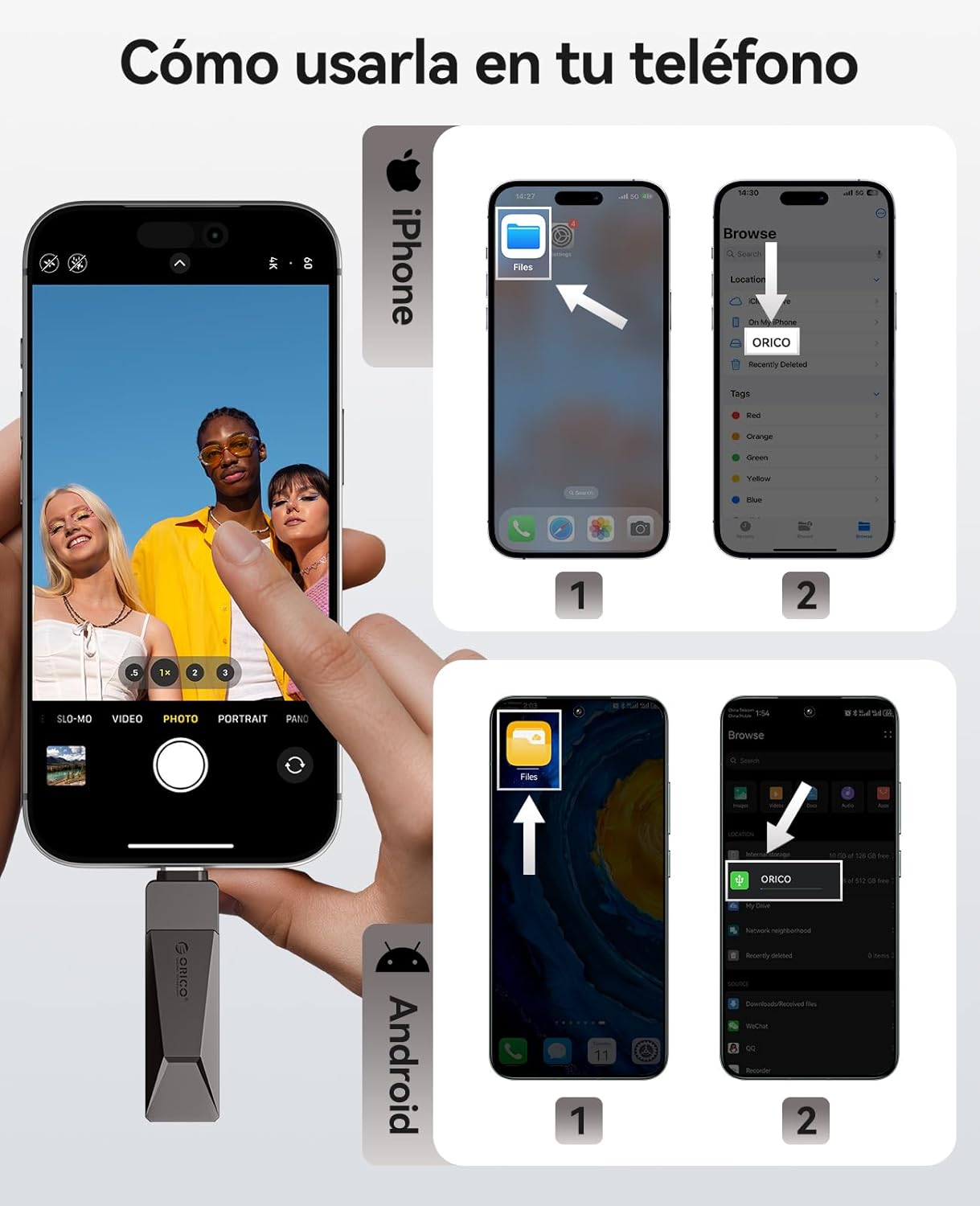
Figure 4.1: Visual guide for connecting and accessing the flash drive on both iPhone and Android devices using their respective file aplikasyon jesyon yo.
iOS Devices (iPhone 15 Series, USB-C iPads):
- Connect the flash drive to your iPhone 15/iPad via the USB-C port.
- Open the 'Files' app on your device.
- Navigate to 'Browse' and select 'ORICO' under Locations.
- Ou kapab kounye a view, copy, or move files ale ak soti nan kondwi a flash.
Aparèy Android:
- Connect the flash drive to your Android phone via the USB-C port.
- Open the 'Files' app (or equivalent file manager) on your device.
- The ORICO drive should appear as an external storage device.
- You can now manage files jan sa nesesè.
File Transfer on Computers (Windows/Mac):
For Windows and Mac computers, the process is straightforward:
- Connect the flash drive to your computer using either the USB-A or USB-C connector.
- The computer will recognize the drive automatically.
- Louvri 'File Explorer' (Windows) or 'Finder' (Mac) and locate the 'ORICO' drive.
- Trennen epi gout files to transfer them to or from the flash drive.
Video 4.1: Demonstration of the ORICO CB05's multi-device compatibility and plug-and-play functionality across various platforms without needing app installations.
Video 4.2: A short video illustrating the convenience of using a single ORICO CB05 drive for both USB-A and USB-C storage needs.
5. Pèfòmans
The ORICO CB05 utilizes USB 3.0 technology to deliver fast data transfer speeds, optimizing your workflow for large files, 4K videos, and high-resolution photos.

Figure 5.1: The ORICO CB05 offers speeds up to 150MB/s, making it significantly faster than older USB 2.0 drives.

Figure 5.2: Illustrates the high-speed capability, allowing for quick transfer of large files.
Internal Technology:
The drive incorporates TLC NAND Flash technology, which contributes to faster read/write speeds, stable performance, and an extended lifespan compared to traditional QLC flash.

Figure 5.3: The internal TLC NAND Flash ensures superior performance and reliability.
6. Antretyen
The ORICO CB05 is designed for durability with its zinc alloy casing. To ensure longevity and optimal performance:
- Kenbe pwòp: Periodically wipe the exterior with a soft, dry cloth to remove dust and debris. Avoid using harsh chemicals or abrasive materials.
- Pwoteje konektè yo: Utilize the 360° swivel design to protect the unused connector from dust and physical damage when not in use.
- Evite kondisyon ekstrèm: Do not expose the drive to extreme temperatures, humidity, or strong magnetic fields.
- Retire san danje: Always safely eject the flash drive from your device before physically removing it to prevent data corruption.

Figure 6.1: The zinc alloy casing provides shockproof, compression-resistant, X-ray shielding, and dustproof protection.
NAN. Depanaj
If you encounter issues with your ORICO CB05 flash drive, try the following troubleshooting steps:
- Kondwi pa rekonèt:
- Asire w ke kondwi a byen antre nan pò USB a.
- Eseye yon lòt pò USB sou aparèy ou an.
- Rekòmanse òdinatè w la oswa aparèy mobil ou a.
- For mobile devices, ensure you are using the correct file manager app and that your device supports OTG (On-The-Go) functionality.
- Vitès transfè ki ba:
- Ensure you are connected to a USB 3.0/3.2 Gen 1 port for optimal performance. Connecting to a USB 2.0 port will result in slower speeds.
- Verifye ke chofè aparèy ou an yo ajou.
- Yon gwo kantite ti files ka transfere pi dousman pase yon sèl gwo file nan menm gwosè total la.
- Performance may vary depending on the host device, file atribi, ak lòt faktè.
- Koripsyon Done:
- Always safely eject the drive before removing it from your device.
- Avoid disconnecting the drive during a file transfè.
- Divèjans Kapasite:
- Labeled capacity uses the decimal system (1GB = 1,000,000,000 bytes). Operating systems like Windows/Mac may show slightly less due to using a binary system (1GB = 1024MB). This is normal and not a defect.
8. Espesifikasyon
| Karakteristik | Detay |
|---|---|
| Mak | ORICO |
| Non modèl | CB05-128GB |
| Kapasite Depo memwa | 128 GB |
| Entèfas Materyèl | USB, USB 3.2 Gen 1 |
| Teknoloji Konektivite Materyèl | USB Kalite A, USB Kalite C |
| Li vitès | 150 Megabytes pou chak segonn |
| Vitès ekri | 70 Megabytes pou chak segonn |
| Karakteristik espesyal | Dual USB Connector, Lightweight |
| Aparèy konpatib | iPhone 15, Android smartphones, iPads, MacBooks, Windows laptops, gaming consoles, car audio systems |
| Koulè | Gri |
| Manifakti | SHENZHEN ORICO TEKNOLOJI CO., LTD |
9. Garanti ak sipò
Enfòmasyon sou garanti:
The ORICO CB05 Dual USB Flash Drive is backed by a Garanti manifakti 36 mwaGaranti sa a kouvri domaj nan materyèl ak nan fabrikasyon anba itilizasyon nòmal. Tanpri konsève prèv acha ou pou reklamasyon garanti.
Sipò Kliyan:
For technical assistance, warranty claims, or general inquiries, please contact ORICO customer support through their official website or the retailer where the product was purchased. You can visit the Magazen ORICO sou Amazon pou plis enfòmasyon ak resous sipò.