
Entwodiksyon
This manual provides essential information for the safe and efficient operation, installation, and maintenance of your LiftMaster 2420L 3/4 HP Chain Drive Garage Door Opener. This model is designed as a replacement for the 81602 and features a built-in camera, battery backup, and myQ connectivity for enhanced control and monitoring.
Please read all instructions carefully before beginning installation or operation. Keep this manual for future reference.
Enfòmasyon sou Sekirite
AVÈTISMAN: Pou diminye risk pou blesi grav oswa lanmò:
- Li epi swiv tout enstriksyon yo ak anpil atansyon.
- Never permit children to operate or play with the garage door opener. Keep remote controls away from children.
- Always keep the moving garage door in sight and away from people and objects until it is completely closed.
- Test the safety reversal system monthly.
- If the opener fails to reverse when obstructed, adjust or repair it.
- Disconnect power to the garage door opener before performing any repairs or removing covers.
- Ensure the garage door is properly balanced before installing the opener.
Kontni pake
Verifye ke tout konpozan yo prezan anvan ou kòmanse enstalasyon an:
- LiftMaster 2420L Chain Garage Door Opener Head Unit
- L955W Multi-Function Garage Door Panel (Wall Control)
- L993S LiftMaster 3-Button Remote Control
- Mounting Hardware and Fasteners
Nòt: The rail assembly for the chain drive is pa enkli epi yo dwe achte separeman.
Enstalasyon ak Enstalasyon
The LiftMaster 2420L is designed for straightforward installation, particularly as a replacement unit. Professional installation is recommended to ensure proper function and safety.
Chèk Pre-Enstalasyon
- Ensure your garage door is in good working condition and properly balanced.
- Verify that you have the correct rail assembly for your garage door height.
- Confirm that a power outlet is available near the ceiling where the opener will be mounted.
Monte Opener la
Attach the opener head unit to the rail assembly according to the rail's instructions. Securely mount the entire assembly to the garage ceiling and header bracket, ensuring it is level and stable.

Image: The LiftMaster 2420L opener head unit installed on a garage ceiling, connected to the chain drive rail.
Connecting the Chain Drive
Assemble the chain drive mechanism onto the rail. Ensure the chain is properly tensioned and lubricated as per the rail manufacturer's instructions. The DC motor and chain drive system are designed for smooth and reliable performance.

Imaj: Yon imaj detaye view of the chain drive mechanism on the LiftMaster 2420L.
Fil elektrik ak pouvwa
Connect the safety sensors, wall control panel, and power cord. Plug the unit into a grounded electrical outlet. The unit features a battery backup for continued operation during power outages.
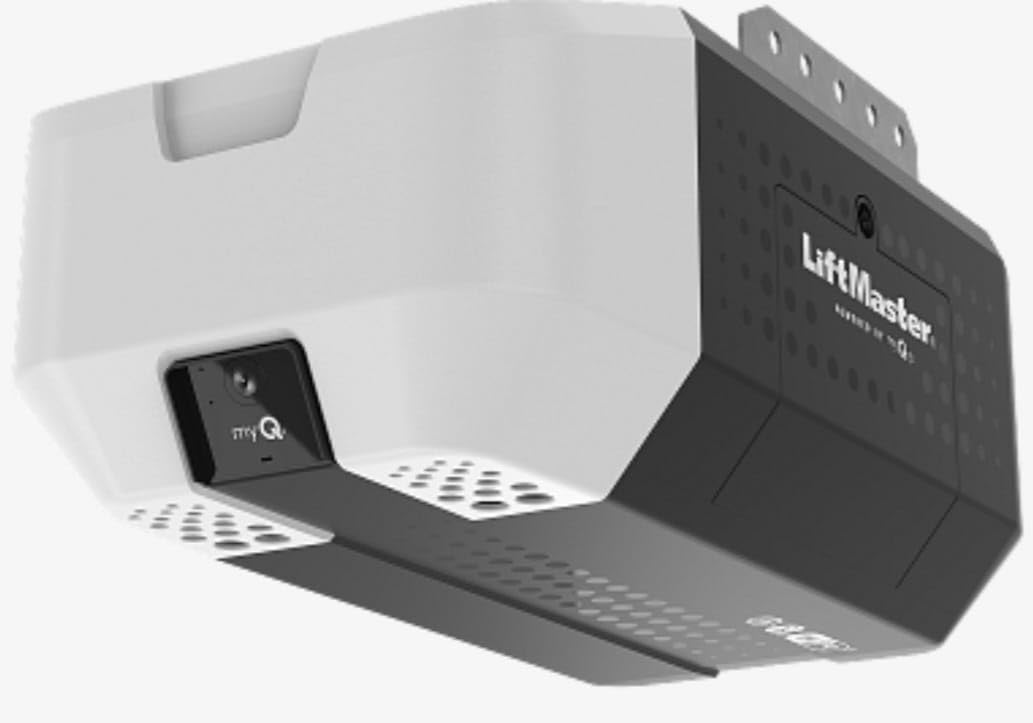
Image: The LiftMaster 2420L opener head unit, showing its internal structure and connections.
myQ Connectivity Setup
Download the myQ app from your smartphone's app store. Follow the in-app instructions to connect your LiftMaster 2420L to your home Wi-Fi network. This enables remote control and monitoring features.
Enstriksyon Operasyon
Using the Remote Control and Wall Panel
The included 3-button remote control and multi-function wall panel allow you to open, close, and stop the garage door. The wall panel also features a light control button.

Image: The LiftMaster 3-button remote control and the multi-function wall panel.
myQ App Features
With the myQ app, you can:
- Louvri/Fèmen: Operate your garage door from anywhere using your smartphone.
- Siveye: Check the status of your garage door (open or closed) in real-time.
- Live Garage View: Utilize the built-in wide-angle camera to view your garage remotely.
- Avètisman: Receive notifications when the garage door opens or closes, or if motion is detected by the camera.

Image: Smartphone screens showing the myQ app's interface for monitoring and controlling the garage door, including live camera feed.
Bati-an Kamera
The integrated wide-angle camera provides a live feed of your garage, accessible through the myQ app. This feature allows for visual monitoring of your garage space.

Imaj: Yon gwo plan view of the built-in camera on the LiftMaster 2420L unit.
Limyè entegre
The opener includes a built-in light for illumination in your garage. This light can be activated via the wall control panel or through the myQ app, providing safer entry and exit.

Image: The LiftMaster 2420L opener viewed from below, with its integrated light turned on.
Antretyen
Antretyen regilye asire lonjevite ak operasyon an sekirite ouvè pòt garaj ou a.
- Chak mwa: Test the safety reversal system. Inspect the chain for proper tension and lubricate if necessary.
- Chak ane: Check all mounting hardware for tightness. Inspect the garage door springs and cables for wear.
- Batri Backup: Periodically test the battery backup by unplugging the unit and operating the door. Replace the battery as needed (typically every 1-2 years).
Depanaj
If you encounter issues with your LiftMaster 2420L, refer to the following common problems and solutions:
| Pwoblèm | Kòz posib | Solisyon |
|---|---|---|
| Ouvè pòt la pa reponn a kontwòl remote/miray la. | No power, remote battery dead, safety sensors obstructed. | Check power connection. Replace remote battery. Clear sensor path. |
| Garage door reverses unexpectedly. | Detèktè sekirite yo mal aliyen oswa bouche, paramèt fòs yo twò wo/ba. | Align safety sensors. Adjust force settings (refer to full manual). |
| myQ app not connecting or camera not working. | Wi-Fi signal issue, app error, camera privacy mode. | Check Wi-Fi connection. Restart app/phone. Ensure camera privacy is off. |
| Opener is noisy. | Lack of lubrication on chain, worn rollers. | Lubricate chain. Inspect and replace worn rollers if necessary. |
For more detailed troubleshooting, please consult the complete LiftMaster 2420L user manual or contact customer support.
Espesifikasyon
| Nimewo Modèl | 2420L |
| Kondwi Kalite | Kondwi chèn |
| Puissance ekivalan | 3/4 HP (DC Motor) |
| Koneksyon | myQ, Wi-Fi |
| Karakteristik espesyal | Built-in Camera, Battery Backup, Built-in Light |
| Manifakti | Chamberlain (LiftMaster) |
| Pwa atik | 17.51 liv |
| Dimansyon pwodwi | 10 x 12 x 18 pous |
| Koulè | Nwa |
| Batri enkli | No (for remote, main unit has battery backup) |
| Dat Premye Disponib | 8 novanm 2025 |
Enfòmasyon sou Garanti
The LiftMaster 2420L garage door opener comes with the following warranty:
- Motè: 5-ane garanti
- chèn: 1-ane garanti
Please retain your proof of purchase for warranty claims. Warranty terms and conditions may apply.
Sipò
For technical assistance, replacement parts, or further inquiries, please visit the official LiftMaster website or contact their customer support department. You can also refer to the comprehensive digital manual available online for detailed diagrams and step-by-step instructions.