
1. Entwodiksyon
This manual provides comprehensive instructions for the HIGOLE PC RK3399-4+64 Fanless All-in-One Touchscreen Computer. It covers essential information regarding product features, setup procedures, operational guidelines, maintenance tips, and troubleshooting steps to ensure optimal performance and longevity of your device. Please read this manual thoroughly before using the product.
2. Pwodwi souview
The HIGOLE PC RK3399-4+64 is a robust 10.1-inch industrial touchscreen computer designed for demanding applications. It features a powerful RK3399 hexa-core processor, 4GB RAM, 64GB ROM, and runs on Android 12. Its fanless design ensures silent operation and enhanced durability in various environments.
Karakteristik kle:
- Hexa-Core RK3399 Processor: Provides reliable and responsive performance for industrial control systems, digital signage, and interactive kiosks.
- Ekran taktil IPS 10.1 pous: Features a 1280x800 resolution with wide viewing angles and G+G multi-touch for intuitive control.
- Koneksyon konplè: Includes Gigabit LAN, USB 3.0, HDMI 2.0 (4K@60Hz output), DB9 RS-232 serial port, and optional 4G LTE module.
- Konsepsyon san fanatik: Ensures silent operation and stable performance in temperatures from -10°C to 50°C.
- Android 12 OS: Pre-installed for a stable and versatile platform.
- Montaj fleksib: Standard VESA mount support for versatile deployment.
Internal Components and Performance:
The device is powered by an ARM RK3399 processor with a Mali-T860 MP4 GPU, 4GB LPDDR4 RAM, and 64GB eMMC storage, expandable via TF card slot.
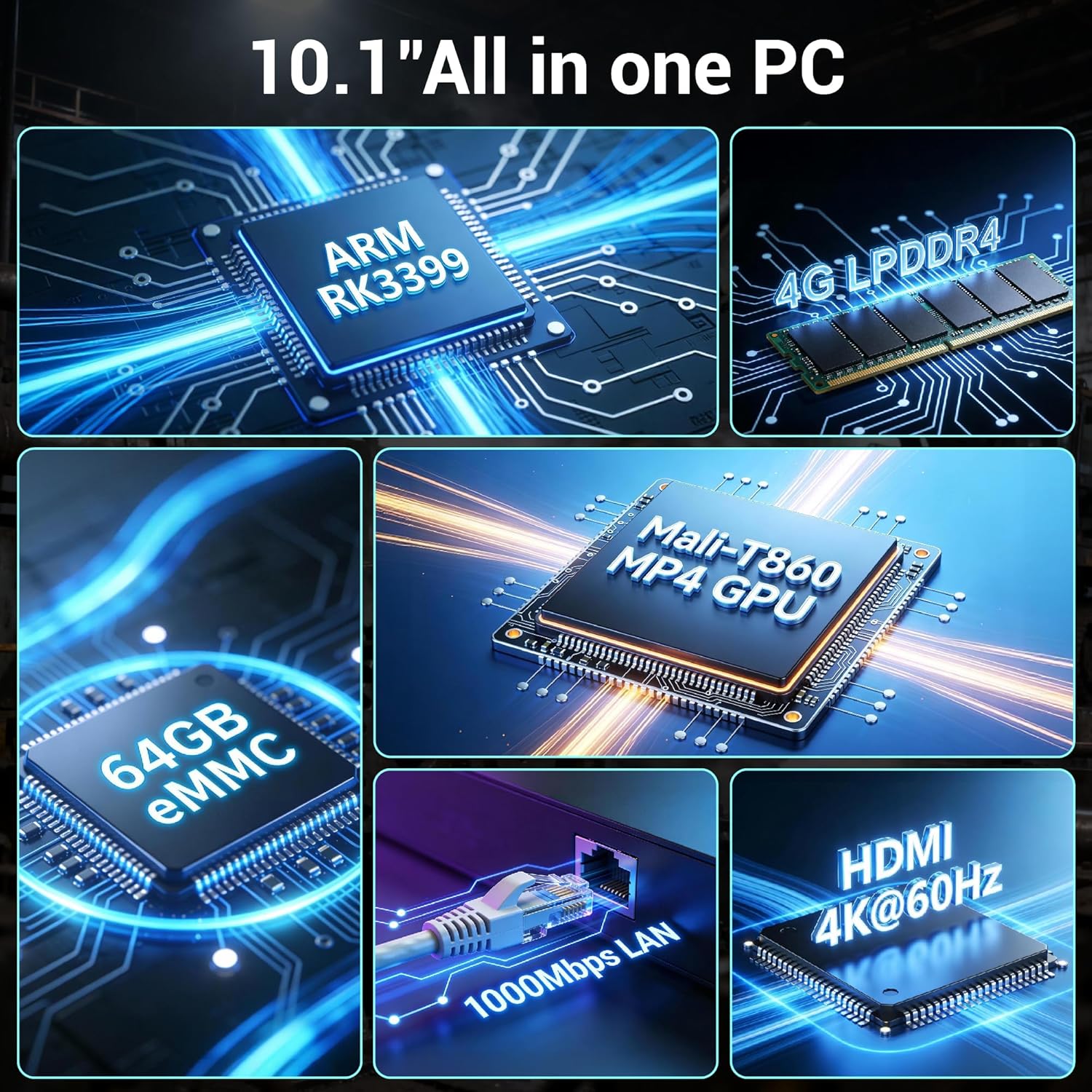
Imaj: Plis paseview of the internal components and key specifications, including the RK3399 processor, RAM, storage, GPU, and connectivity features.
Entèfas ki disponib:
The device offers a variety of ports for wide compatibility with peripherals and external displays.

Imaj: Detaye view of the device's rear interfaces, including power input, USB 3.0, Gigabit LAN, USB 2.0, TF Card Slot, HDMI 2.0, Headphone jack, and Type-C port, along with examples aparèy konpatib yo.
3. Enstriksyon Enstalasyon
3.1 Debale ak Enspeksyon
- Retire òdinatè a ak tout akseswa yo nan anbalaj la avèk prekosyon.
- Verifye ke tout konpozan ki nan lis anbalaj la prezan.
- Enspekte aparèy la pou wè si li gen nenpòt siy domaj fizik. Si ou jwenn domaj, kontakte vandè ou imedyatman.
3.2 Konekte pouvwa
- Connect the provided power adapter to the DC 12V input port on the device.
- Ploge adaptè pouvwa a nan yon priz elektrik apwopriye.
- The device is designed for auto-start functionality; it may power on automatically upon receiving power.
3.3 Konekte periferik
The device supports various peripherals via its USB and HDMI ports.

Image: The all-in-one computer connected to an external monitor and printer, highlighting its touchscreen operation and convenience without requiring a mouse or keyboard for basic tasks.
- Aparèy USB: Connect USB cameras, external hard drives, printers, keyboards, or mice to the available USB 2.0 or USB 3.0 ports.
- Sòti HDMI: Use an HDMI cable to connect the device to an external monitor, TV, or projector for dual-screen display. The HDMI 2.0 port supports up to 4K resolution at 60Hz.
- Rezo Koneksyon: For a wired connection, plug an Ethernet cable into the Gigabit LAN (RJ45) port. For wireless, ensure Wi-Fi is enabled in the settings.
- Seri Port: The DB9 RS-232 serial port can be used for industrial control applications.
4. Operasyon Enstriksyon
4.1 Initial Boot-up and Android 12
Upon first power-on, the device will boot into the Android 12 operating system. Follow the on-screen prompts for initial setup, including language selection, Wi-Fi connection, and Google account setup (optional).
4.2 Operasyon ekran taktil
The 10.1-inch G+G multi-touch screen allows for intuitive interaction. Use standard Android gestures:
- Tape: Chwazi yon atik oubyen louvri yon aplikasyon.
- Glise: Navige nan meni yo oubyen defile kontni an.
- Zoom-pou-Zoom: Enlarge or reduce content size.
- Long Press: Jwenn aksè nan meni kontèks yo oubyen deplase ikòn yo.

Image: User interacting with the 10.1-inch touchscreen, highlighting its 10-point multi-touch functionality and responsive design.
4.3 Koneksyon Rezo
- Wi-Fi: Ale nan Anviwònman > Rezo ak entènèt > Wi-Fi to connect to available wireless networks. The device supports enhanced Wi-Fi 5.
- Ethernet: If an Ethernet cable is connected, the device will automatically establish a wired network connection.
- Bluetooth: Enable Bluetooth 4.0 in Anviwònman> Aparèy Konekte> Preferans Koneksyon> Bluetooth to pair with Bluetooth peripherals.
4.4 Sòti HDMI
The HDMI 2.0 port allows for high-definition video output up to 4K at 60Hz, enabling dual-screen setups for presentations, digital signage, or extended workspaces.

Image: The device connected to an external 4K display, showcasing its HDMI 2.0 capabilities for ultra-high definition picture quality.
4.5 Itilizasyon Aplikasyon an
The device is capable of running various Android applications, suitable for office work, industrial control, and multimedia. It can handle applications like Excel, Word, PowerPoint, Photoshop, and more.

Image: The device running Adobe Photoshop, illustrating its capability for efficient office and creative work with 4GB RAM and 64GB ROM.
5. Antretyen
5.1 Netwaye Aparèy la
- Sèvi ak yon twal mou ki pa gen pousyè pou netwaye ekran an ak sifas ekstèn yo.
- Pou mak ki difisil pou retire, yon ti kras dampSiye twal la avèk dlo oswa yon pwodui netwayaj ki san danje pou ekran.
- Evite sèvi ak pwodui chimik ki fò, pwodui netwayaj abrazif, oswa espre ayewosòl dirèkteman sou aparèy la.
5.2 Konsiderasyon Anviwònman
The fanless design of this industrial PC allows for reliable operation in challenging environments.

Image: The device operating reliably in temperatures ranging from -10°C to 50°C, demonstrating its suitability for tough industrial conditions.
- Tanperati operasyon: -10 ° C a 50 ° C.
- Tanperati Depo: -20 ° C a 60 ° C.
- Ensure adequate ventilation around the device, even with its fanless design, to prevent heat buildup in enclosed spaces.
- Avoid exposing the device to direct sunlight, excessive humidity, or dusty environments.
5.3 Fanless Design Benefits
The fanless design eliminates moving parts, reducing noise, power consumption, and the risk of dust ingress, making it ideal for industrial settings where reliability and quiet operation are crucial.

Image: Close-up of the device's robust construction, including its aluminum alloy casing and heat dissipation features, which contribute to its fanless and durable design.
NAN. Depanaj
If you encounter issues with your HIGOLE PC RK3399-4+64, refer to the following common troubleshooting steps:
6.1 Aparèy la pa limen
- Asire w adaptè kouran an byen konekte ak aparèy la ak yon priz elektrik ki fonksyone.
- Verifye ke priz kouran an fonksyone lè w teste li ak yon lòt aparèy.
- If the device has an on/off switch, ensure it is in the 'on' position.
6.2 Pwoblèm ekspozisyon
- Pa gen ekspozisyon: If using an external monitor, ensure the HDMI cable is properly connected and the monitor is powered on and set to the correct input source.
- Flickering/Distorted Display: Check cable connections. Try a different HDMI cable or monitor if possible.
- Ekran taktil la pa reponn: Ensure the screen is clean and free of obstructions. Restart the device.
6.3 Pwoblèm koneksyon rezo
- Wi-Fi: Check if Wi-Fi is enabled in settings. Ensure you are connecting to the correct network and entering the password accurately. Restart your Wi-Fi router.
- Ethernet: Verify the Ethernet cable is securely plugged into both the device and the router/switch. Check router status.
- Bluetooth: Ensure Bluetooth is enabled and the peripheral is in pairing mode. Try unpairing and re-pairing the device.
6.4 Peripheral Recognition Issues
- Eseye konekte periferik la nan yon lòt pò USB.
- Test the peripheral on another computer to ensure it is functional.
- Restart the HIGOLE PC.
7. Espesifikasyon
Detailed technical specifications for the HIGOLE PC RK3399-4+64 Fanless All-in-One Touchscreen Computer:
| Karakteristik | Spesifikasyon |
|---|---|
| Mak | HIGOLE PC |
| Non modèl | RK3399-4+64 |
| Sistèm operasyon | Android 12 |
| Kanpe Screen Display Size | 10.1 pous |
| Rezolisyon ekran | 1280x800 IPS |
| Rezolisyon ekran maksimòm | 1280x800 |
| Mak processeur | Rockchip |
| Kantite processeurs | 6 (Hexa-Core RK3399) |
| Koprosesè grafik | Integrated (Mali-T860 MP4 GPU) |
| Gwosè memwa RAM enstale | 4 GB (DDR4 SDRAM) |
| Kapasite Depo memwa | 64 GB (eMMC) |
| Depo dilatabl | TF Card Slot (up to 256GB) |
| Koneksyon | Gigabit LAN, USB 3.0, USB 2.0, HDMI 2.0 (4K@60Hz), DB9 RS-232, Type-C 3.0 (OTG), Wi-Fi 5, Bluetooth 4.0, Optional 4G LTE |
| Pwa atik | 1 liv |
| Dimansyon pwodwi | 9.5 x 2.8 x 6 pous |
| Tanperati Fonksyònman | -10 ° C a 50 ° C |
| Konpozan ki enkli | PC |
8. Garanti ak sipò
For warranty information and technical support, please refer to the documentation provided with your purchase or visit the official HIGOLE PC website. You may also contact customer service through the retailer where the product was purchased.