
Cillso H97
Cillso H97 Wireless Earbuds User Manual
Modèl: H97
Brand: Cillso
Entwodiksyon
Thank you for choosing the Cillso H97 Wireless Earbuds. These earbuds feature advanced Bluetooth 5.4 technology, HiFi stereo sound with deep bass, Environmental Noise Cancelling (ENC) for clear calls, and an IPX7 waterproof rating. Designed for comfort and extended use, they offer up to 40 hours of total playtime with the charging case. This manual provides essential information for setup, operation, maintenance, and troubleshooting to ensure optimal performance.
Ki sa ki nan bwat la
- Cillso H97 Wireless Earbuds (Left and Right)
- Ka chaje
- USB-C Chaje Kab
- Manyèl itilizatè
Pwodwi souview
Familiarize yourself with the components and features of your Cillso H97 Wireless Earbuds.
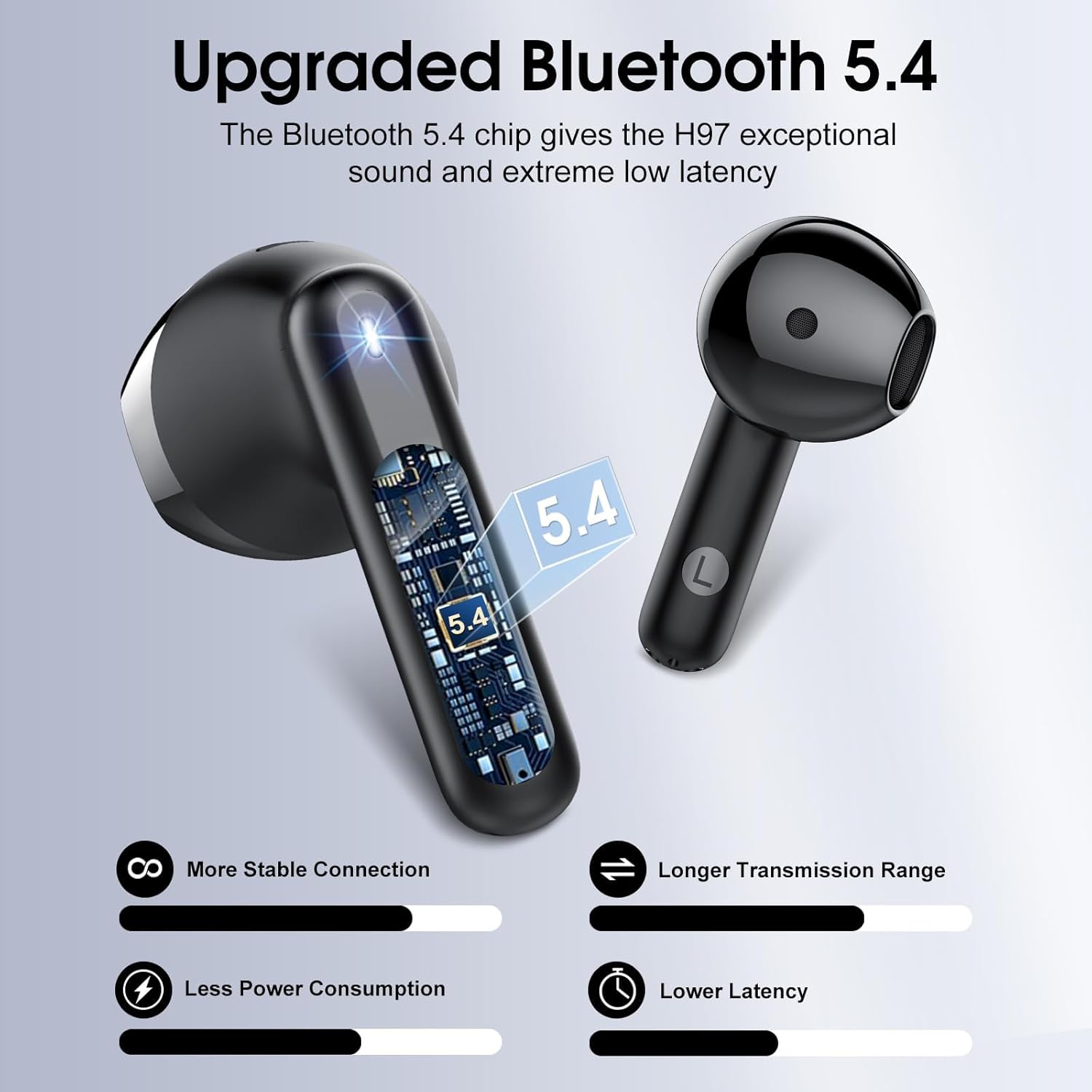
Figi 1: Entèn view nan yon ekoutè, montreasing the advanced Bluetooth 5.4 chip for stable connection and low latency.
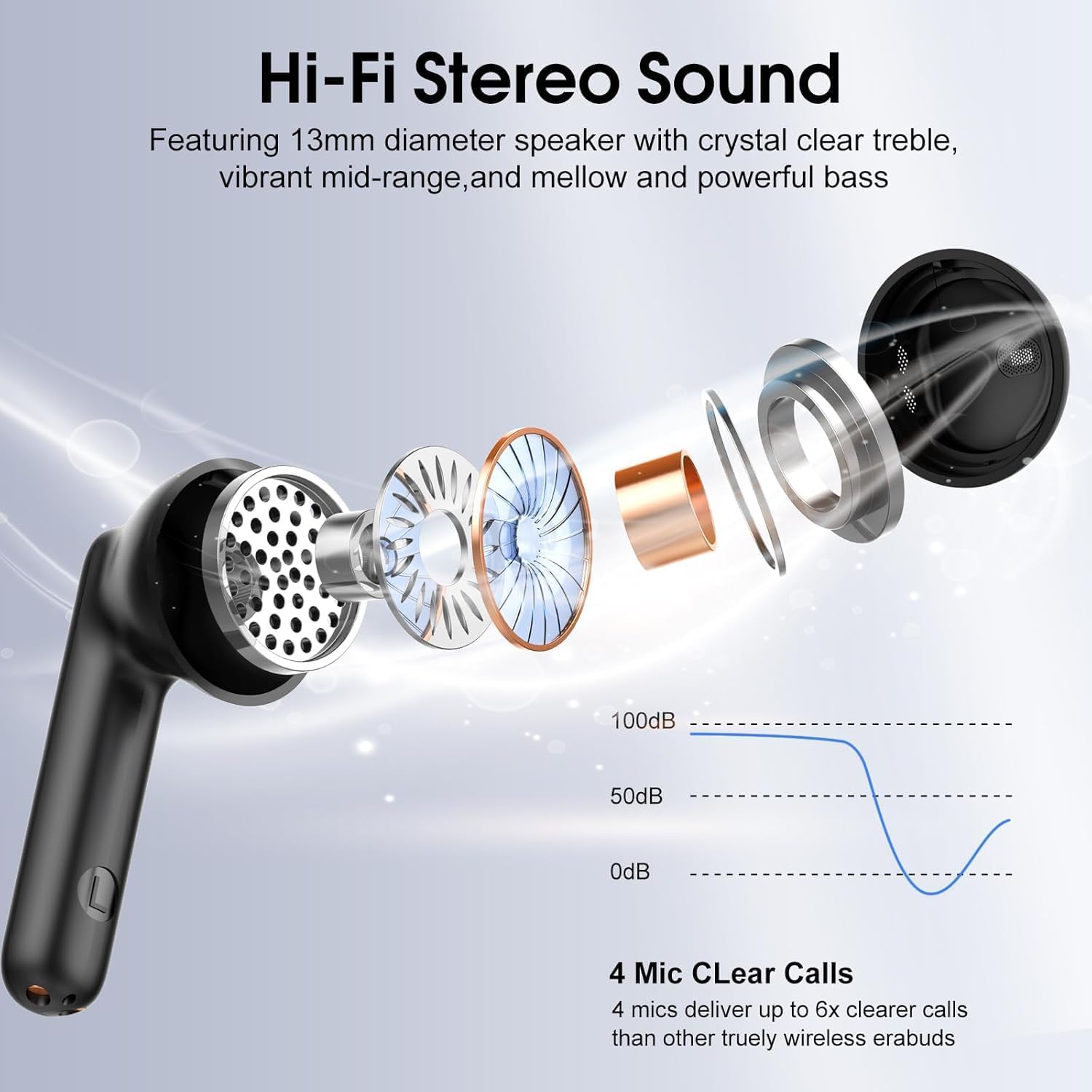
Figi 2: Eksploze view illustrating the 13mm diaphragm drivers responsible for Hi-Fi stereo sound with deep bass and clear highs.

Figi 3: The charging case features an independent LED display to show real-time battery levels for both earbuds and the case.

Figi 4: Dimensions of the earbuds and charging case, emphasizing their lightweight and portable design. Each earbud weighs 3.5 grams, and the case weighs 32 grams.

Figi 5: Plis paseview of the sensitive touch controls on the earbuds for various functions.

Figi 6: The earbuds feature an IPX7 waterproof rating, providing protection against sweat, rain, and splashes.
Enstalasyon
1. Premye Chajman
- Anvan premye itilizasyon an, mete tou de ekoutè yo nan bwat chaje a.
- Konekte kab chaje USB-C a nan pò chaje ki sou bwat la ak yon sous kouran.
- The LED display on the case will indicate the charging status. A full charge for the case takes approximately 1.5 hours.
- Ensure the earbuds are fully charged before initial use for optimal battery performance.
2. Pairing ak yon Aparèy
- Louvri bwat chaje a. Ekoutè yo ap limen otomatikman epi antre nan mòd koneksyon.
- Sou aparèy ou an (telefòn entelijan, tablèt, òdinatè pòtab), aktive Bluetooth.
- Chèche pou available Bluetooth devices and select "H97" from the list.
- Once connected, your device will confirm successful pairing. The earbuds will automatically reconnect to the last paired device when removed from the case and within range (up to 15 meters).
Enstriksyon Operasyon
The Cillso H97 earbuds feature sensitive touch controls for easy management of audio playback and calls.
| Aksyon | Fonksyon |
|---|---|
| Double tap Left/Right earbud | Jwe/Poz mizik |
| One tap Left/Right earbud | Reponn/Fen apèl |
| Long press Right earbud (2s) | Pwochen tras |
| Long press Left earbud (2s) | Track Previous |
| One tap Left/Right earbud (during call) | Volume control (specific tap pattern may vary, refer to device settings if needed) |
| Triple tap Left/Right earbud (typically) | Aktive Asistan Vwa |
Antretyen
Netwayaj
- Netwaye ekoutè yo ak bwat chaje a regilyèman avèk yon twal mou, sèk, epi ki pa gen pousyè.
- Pa sèvi ak pwodui netwayaj abrazif, alkòl, oswa solvan chimik.
- Asire w ke kontak chaje yo sou tou de ekoutè yo ak sou bwat la pwòp epi sèk pou yon chajman kòrèk.
Depo
- Lè w pa ap itilize ekoutè yo, sere yo nan bwat chaje yo pou pwoteje yo epi kenbe yo chaje.
- Sere nan yon kote ki fre epi sèk, lwen tanperati ekstrèm ak limyè solèy dirèk.
Rezistans dlo
- The earbuds are IPX7 waterproof, meaning they are protected against temporary immersion in water up to 1 meter for 30 minutes.
- This rating protects against sweat, rain, and splashes. However, it is not recommended to swim or shower with the earbuds.
- Asire w ke ekoutè yo sèch anvan ou mete yo tounen nan bwat chaje a pou evite yo domaje.
Depanaj
Ekoutè yo pa konekte oswa konekte
- Ensure both earbuds are charged and removed from the charging case.
- Etenn epi aktive Bluetooth sou aparèy ou an.
- Delete "H97" from your device's Bluetooth list and attempt to pair again.
- Try resetting the earbuds (refer to specific reset instructions if available in a separate quick start guide, or place them back in the case and close for 10 seconds, then reopen).
Se yon sèl ekoutè k ap travay
- Asire ke tou de ekoutè yo chaje.
- Place both earbuds back into the charging case, close the lid, wait a few seconds, then open the lid and remove them simultaneously.
- If the issue persists, try resetting the earbuds and re-pairing.
Pwoblèm chaje
- Check that the USB-C cable is securely connected to both the charging case and the power source.
- Asire w ke kontak chaje yo sou ekoutè yo ak anndan bwat la pwòp epi san debri.
- Eseye itilize yon diferan USB-C kab oswa adaptè pouvwa.
Move son kalite
- Asire w ke ekoutè yo byen chita nan zòrèy ou yo.
- Check the audio source and volume levels on your connected device.
- Move closer to your connected device to reduce potential interference.
- Clean any earwax or debris from the earbud speaker grilles.
Espesifikasyon
| Karakteristik | Detay |
|---|---|
| Non modèl | H97 |
| Bluetooth vèsyon | 5.4 |
| Gamme Bluetooth | Jiska 15 mèt (49 pye) |
| Gwosè Chofè Audio | 13mm chofè dinamik |
| Repons Frekans | 20Hz - 20kHz |
| Kontwòl bri | Anilasyon bri anviwònman an (ENC) |
| Dire batri (ekoutè) | Jiska 8 èdtan sou yon sèl chaj |
| Tan total pou jwe (ak bwat chaje a) | Jiska 40 èdtan |
| Tan chaje (Ka) | Apeprè 1.5 èdtan (USB-C) |
| Nivo rezistans dlo | IPX7 |
| Earbud Pwa | 3.5 gram (chak) |
| Chaje Ka Pwa | 32 gram |
| Kalite kontwòl | Kontwòl manyen |
| Aparèy konpatib | iOS 9.0+/Android 5.0+ and Bluetooth 4.0+ devices |
Garanti ak sipò
Cillso products are designed for reliability and performance. For warranty information, technical support, or any questions regarding your H97 Wireless Earbuds, please refer to the warranty card included in your packaging or contact Cillso customer service through the retailer where you purchased the product.
Tanpri konsève prèv acha ou a pou nenpòt reklamasyon garanti.
Ask a question about this manual
Ask about setup, troubleshooting, compatibility, parts, safety, or missing instructions. Manuals+ will review the question and use this page’s manual context to help answer it.