1. Entwodiksyon
Thank you for choosing the RockSeed S2-50M Digital Laser Distance Meter. This device is designed for precise and efficient distance measurements, offering various functions for professional and DIY applications. Please read this manual carefully before using the device to ensure safe and correct operation.
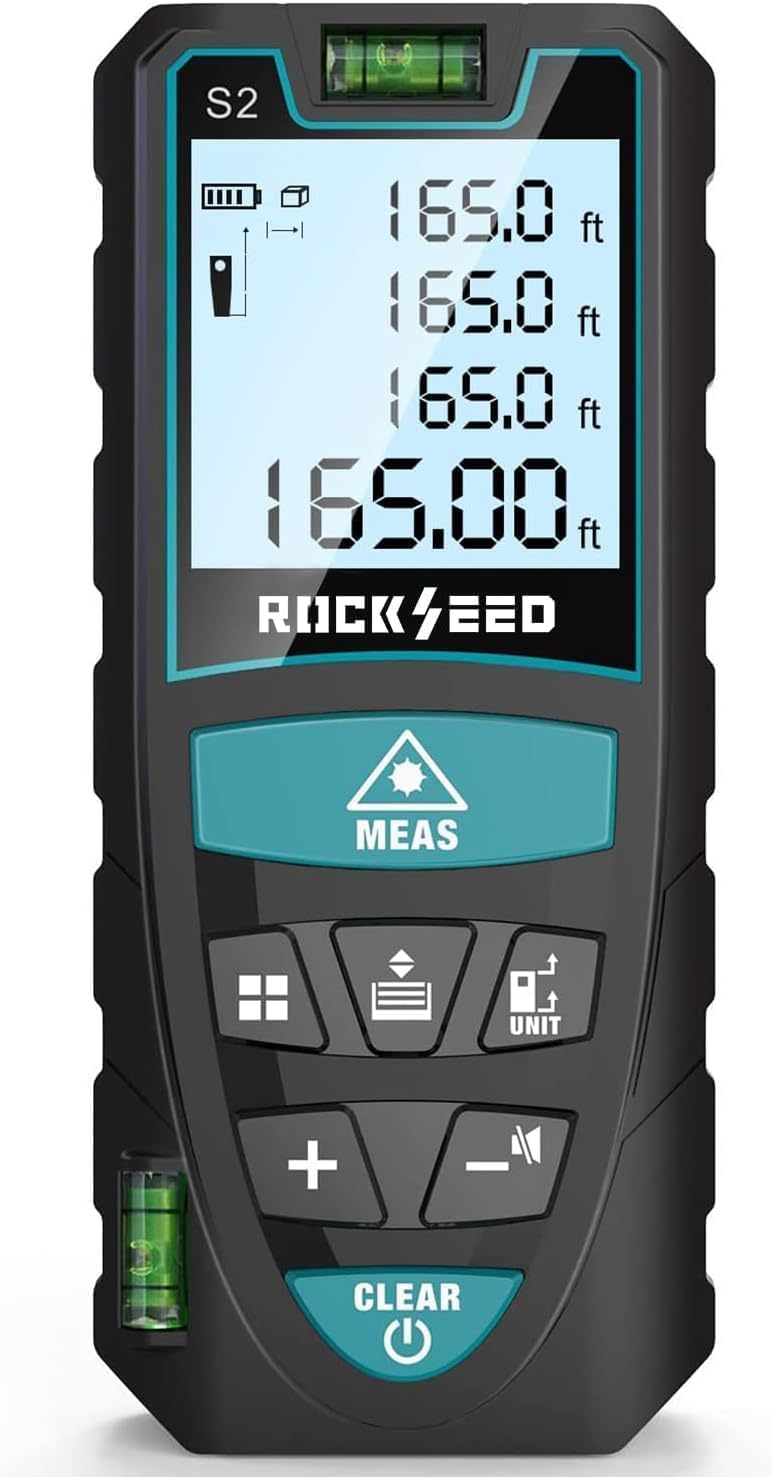
Image 1.1: RockSeed S2-50M Laser Measure displaying its accuracy of ±2mm/±0.08inch and a measurement range of 50m/165ft.
2. Enfòmasyon sou Sekirite
This device is a Class 2 laser product. Observe the following safety precautions:
- Pa gade nan reyon lazè a. Direct exposure to the laser beam can cause eye injury.
- Pa vize reyon lazè a sou moun oswa bèt.
- Pa modifye aparèy la. Unauthorized modifications can lead to hazardous radiation exposure.
- Kenbe aparèy la pa rive nan men timoun yo.
- Itilize sèlman jan sa dekri nan manyèl sa a.
- Evite itilize aparèy la nan anviwònman ki ka eksploze oswa toupre materyèl ki ka pran dife.
3. Pake kontni
Verifye ke tout atik yo prezan nan pakè ou a:
- RockSeed S2 Red Laser Distance Meter
- Manyèl Enstriksyon
- Bwat anbalaj
- Sak twal
- AAA 1.5V Batteries (2 included)
- Lanyard

Image 3.1: Visual representation of the items included in the RockSeed S2-50M package.
4. Pwodwi Features
- Segondè Presizyon: Provides measurements with an accuracy of ±1/16 inch (±2mm).
- Extended Measurement Range: Measures distances up to 165 feet (50 meters).
- Chanje inite: Easily switch between Meters (M), Inches (In), and Feet (Ft).
- Dual Bubble Levels: Equipped with two bubble levels for more precise horizontal and vertical alignment compared to single-bubble designs.
- Retroeklere LCD: Large display with backlight for clear visibility in low-light conditions.
- Anviwònman bèbè: Option to turn measurement beep sounds on or off, suitable for quiet environments.
- Mòd mezi miltip: Includes single distance, continuous measurement, area, volume, and Pythagorean (three points) calculations.
- Done memwa: Stores up to 20 groups of measurement data.
- Auto Fèmen: Li etenn otomatikman apre 150 segonn inaktivite pou konsève lavi batri a.
- Konsepsyon dirab: IP54 rated for water and dust resistance, featuring a hard rubber body for a secure grip and enhanced durability.
- Pòtab: Compact size and included wrist strap for easy carrying.

Image 4.1: The RockSeed S2-50M device fits easily into a pocket, highlighting its portability.
5. Aparèy la ak bouton yo

Imaj 5.1: Plis paseview of the RockSeed S2-50M Laser Measure's buttons and their corresponding functions.
Fonksyon bouton:
- MEAS (Laser/Measure): Activates the laser, initiates single or continuous measurement.
- INITE: Long press to switch measurement units (M/In/Ft).
- Function (Area/Volume/Pythagorean): Chanje nan diferan mòd mezi.
- Switch (Measurement References): Changes the measurement reference point (front or back of the device).
- +: Addition function for measurements.
- -: Subtraction function for measurements.
- Silence ON/OFF: Active oswa etenn son an.
- CLEAR (Power Off/Data Record Clear): Short press to clear current data or exit a mode. Long press to power off the device.
6. Enstalasyon
6.1 Enstalasyon batri
- Jwenn kouvèti konpatiman batri a sou dèyè aparèy la.
- Glise kouvèti a louvri.
- Mete de (2) pil AAA 1.5V, asire w polarite a kòrèk (+/-).
- Fèmen kouvèti lòj batri a byen.
7. Operasyon Enstriksyon
7.1 Power On/Off
- Pouvwa sou: Peze a KLE bouton an. Ekran an ap limen.
- Pouvwa Off: Long peze la KLE button for approximately 3 seconds. The device will also automatically shut down after 150 seconds of inactivity.
7.2 Chanjman Inite
- Long peze la INITE button to cycle through the available measurement units: Meters (M), Inches (In), and Feet (Ft).

Image 7.1: The device display illustrating the four available unit conversions: feet+inches, inches, meters, and feet.
7.3 Reference Point Setting
- Peze a SWITCH button to toggle between the front and back reference points.
- The display will show an icon indicating whether the measurement is taken from the front edge or the back edge of the device.

Image 7.2: Illustration of how the two reference points (front and back) affect the measurement origin.
8. Mòd Mezi

Image 8.1: Visual representation of the different measurement functions available on the device.
8.1 Mezi Distans Single
- Dirije lazè a sou sib la.
- Peze a MEAS button once. The measured distance will appear on the display.
8.2 Mezi kontinyèl
- From single measurement mode, press the MEAS button repeatedly. The device will continuously measure and display the current distance (MAX/MIN values will also be shown).
- Peze MEAS again to stop continuous measurement.
8.3 Mezi Zòn
- Peze a Fonksyon Peze bouton an yon fwa. Ikòn zòn nan ap parèt sou ekran an.
- Mezire premye bò a (longè) lè w peze MEAS.
- Mezire dezyèm bò a (lajè) lè w peze MEAS.
- Aparèy la ap kalkile epi montre sifas la otomatikman.
8.4 Mezi Volim
- Peze a Fonksyon bouton an de fwa. Ikòn volim nan ap parèt sou ekran an.
- Mezire longè a lè w peze MEAS.
- Mezire lajè a lè w peze MEAS.
- Mezire wotè a lè w peze MEAS.
- Aparèy la ap kalkile epi montre volim nan otomatikman.
8.5 Mezi Pitagò (Mezi Endirèk)
This mode is used to calculate inaccessible heights or distances using the Pythagorean theorem.
Pythagorean Mode 1 (Two Points)
- Peze a Fonksyon button three times. The Pythagorean mode 1 icon will appear.
- Mezire ipoteniz la (distans dyagonal la) lè w peze MEAS.
- Measure the horizontal or vertical leg by pressing MEAS.
- The device will calculate and display the unknown leg.
Pythagorean Mode 2 (Three Points)
- Peze a Fonksyon button four times. The Pythagorean mode 2 icon will appear.
- Measure the first hypotenuse by pressing MEAS.
- Measure the second hypotenuse by pressing MEAS.
- Measure the base by pressing MEAS.
- Aparèy la ap kalkile epi montre wotè a.
9. Antretyen
- Netwaye aparèy la ak yon mou, damp twal. Pa sèvi ak pwodui netwayaj abrazif oswa solvang.
- Pa plonje aparèy la nan dlo oswa ekspoze li nan twòp imidite.
- Sere aparèy la nan yon anviwònman sèk, san pousyè lè w pa ap itilize li.
- Retire pil yo si ou pa pral itilize aparèy la pou yon peryòd tan pwolonje pou anpeche flit.
- Protect the laser lens from scratches and dirt.
NAN. Depanaj
| Pwoblèm | Kòz posib | Solisyon |
|---|---|---|
| Aparèy pa limen | Pil ki fèb oswa ki mouri; Enstalasyon pil ki pa kòrèk | Ranplase pil yo; Tcheke polarite pil yo. |
| Lekti kòrèk | Unstable device; Target surface too reflective/non-reflective; Incorrect reference point | Ensure device is stable; Use a target plate for difficult surfaces; Verify reference point setting. |
| Laser beam not visible outdoors | Limyè anbyen klere | Use the device in shaded areas or at dusk/dawn; Use a target plate. |
| Mesaj erè nan ekspozisyon | Measurement out of range; Obstruction of laser path; Internal error | Ensure target is within range; Clear laser path; Restart device. If error persists, contact support. |
11. Espesifikasyon
| Karakteristik | Spesifikasyon |
|---|---|
| Mezire Range | 0.05m - 50m (0.16ft - 165ft) |
| Presizyon Mezi | ±2mm (±0.08 inch) |
| Inite Mezi | m/nan/ft |
| Klas Lazè | Klas 2, <1mW |
| Kalite lazè | 635nm |
| Automatic Shutdown (Laser) | 20 segonn |
| Automatic Shutdown (Device) | 150 segonn |
| Kalite batri | 2 x AAA 1.5V Alkaline |
| Lavi batri | Jiska 5000 mezi |
| Tanperati Fonksyònman | 0°C a 40°C (32°F a 104°F) |
| Tanperati Depo | -20 ° C a 60 ° C (-4 ° F a 140 ° F) |
| Dimansyon | Apeprè. 112 x 50 x 25 mm |
| Pwa | Apeprè. 120g |
| Evalyasyon IP | IP54 (Rezistan a pousyè ak dlo) |
12. Garanti ak sipò
12.1 Enfòmasyon sou Garanti
All RockSeed products in the United States come with a two-year free repair service. This warranty covers defects in materials and workmanship under normal use.
12.2 Sipò pou Kliyan
For technical support or after-sales service, please contact our support team:
- Telefòn: 904-900-2136 (Monday to Friday, 9:00 a.m. to 6:00 p.m. Eastern Time)
- Imèl: Expect a reply within 24 hours on weekdays.
We are committed to continuously improving our products and ensuring user satisfaction.